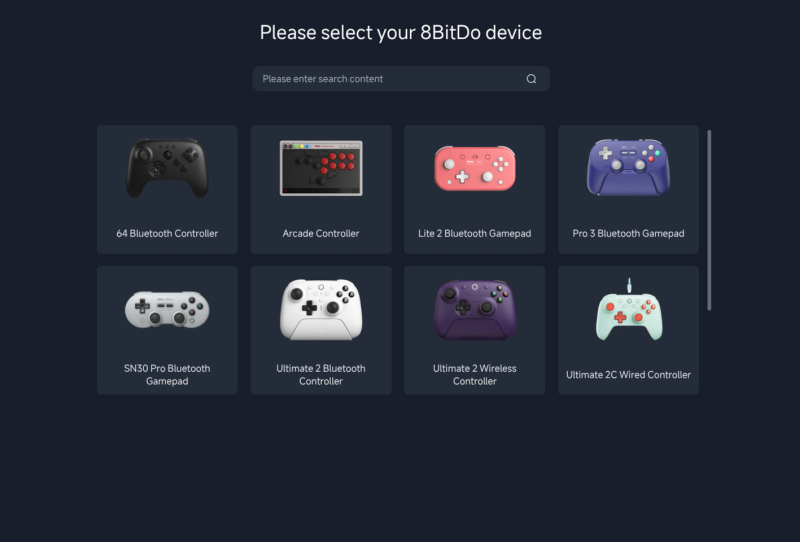
8BitDo Ultimate Software Online has arrived as a browser-based configuration tool built specifically to give Linux owners a way to remap and customise the brand’s controllers, something that has long been missing from its lineup. Rather than requiring a separate installable app, the new tool runs directly in a web browser, following a wider shift among peripheral makers toward cloud and browser-hosted configuration software.
The move puts 8BitDo alongside companies like Wooting and Keychron, whose Launcher software already lets keyboard owners remap keys and adjust lighting straight from a browser tab. Open-source projects such as QMK/VIA and ZMK Studio have pushed the same idea even further, letting enthusiasts flash and configure custom keyboards without installing anything locally. 8BitDo’s new tool brings that same philosophy to game controllers, and Linux users are the clear priority.
Table of Contents
What 8BitDo Ultimate Software Online Actually Does
8BitDo Ultimate Software Online lets owners of supported controllers remap buttons, adjust stick and trigger behaviour, and tweak other settings without downloading a desktop client. That matters because 8BitDo has never officially supported Linux with its standard configuration software, leaving Linux users to rely on community workarounds or simply accept default button layouts.
The catch, at least for now, is scope. The tool is still in beta and 8BitDo has confirmed it currently supports only nine devices, a modest slice of the company’s broader controller catalogue. Anyone hoping to remap a device outside that initial list will need to wait for future updates, since 8BitDo has stated plainly that more devices and features are still being added.
Windows and macOS users are not being pushed toward the new browser tool just yet. 8BitDo itself recommends that owners on those platforms stick with the existing installable software, noting it remains the more feature-complete option. In other words, this launch is squarely aimed at plugging a Linux-shaped gap rather than replacing what already works elsewhere.
Why Linux Support Has Been Missing Until Now
Peripheral makers have historically treated Linux as an afterthought, largely because it represents a smaller slice of the desktop market compared with Windows. Building and maintaining a native Linux app is extra engineering overhead for a user base that, until recently, was seen as niche. A browser-based tool sidesteps a lot of that friction, since it only needs to run inside a standards-compliant browser rather than being packaged and maintained as a separate Linux binary.
That calculation looks different today. Linux gaming has gained serious momentum thanks to tools like Proton and the popularity of Steam Deck, and hardware brands that ignore Linux owners risk leaving a genuinely engaged slice of gamers without proper support. 8BitDo’s controllers are popular with retro emulation fans and PC gamers alike, many of whom already run Linux distributions, so filling this gap makes sense from a purely practical standpoint.
How It Stacks Up Against Other Configuration Tools
The browser-first approach isn’t new territory in the peripherals space. Wooting’s web configurator and Keychron’s Launcher have proven that remapping and firmware updates can work reliably through a browser using WebHID or similar APIs, without sacrificing much functionality compared with a native app. QMK/VIA has done something similar for years in the custom keyboard community, and ZMK Studio extended that same idea to wireless split keyboards.
8BitDo’s version follows the same logic but starts from a narrower base. Nine supported devices is a modest beginning next to the dozens of controllers, keyboards, and accessories 8BitDo sells worldwide. It also arrives without the years of refinement that Wooting and Keychron have already put into their respective tools, so early adopters should expect some rough edges typical of a beta release.
| Tool | Platform focus | Delivery method | Status |
|---|---|---|---|
| 8BitDo Ultimate Software Online | Linux | Browser-based | Beta, 9 devices |
| 8BitDo Ultimate Software (installable) | Windows, macOS | Desktop app | Full feature set |
| Wooting Web Configurator | Cross-platform | Browser-based | Mature, widely used |
| Keychron Launcher | Cross-platform | Browser-based | Mature, widely used |
What This Means for Linux Gamers and Controller Buyers
For anyone who already owns an 8BitDo Ultimate 2C Bluetooth controller or the 8BitDo Ultimate 2.4G wireless controller and runs Linux day to day, this launch is a genuinely useful development, provided the device falls within the initial nine supported by the beta. It signals that 8BitDo sees Linux as worth investing engineering time into, rather than a platform to quietly ignore.
Software support has occasionally been a sore point for peripheral owners more broadly. Even on Windows, peripheral software has caused headaches on Windows before, so a lightweight browser tool that avoids installing extra background services has its own appeal beyond just Linux compatibility.
The practical takeaway for shoppers is to check compatibility before assuming full remapping support exists on Linux for any given 8BitDo controller. 8BitDo has committed to expanding both device coverage and feature depth over time, which suggests the current beta is a foundation rather than the finished product. Anyone buying primarily for Linux use should keep an eye on future updates from the brand before assuming a specific model is fully supported.