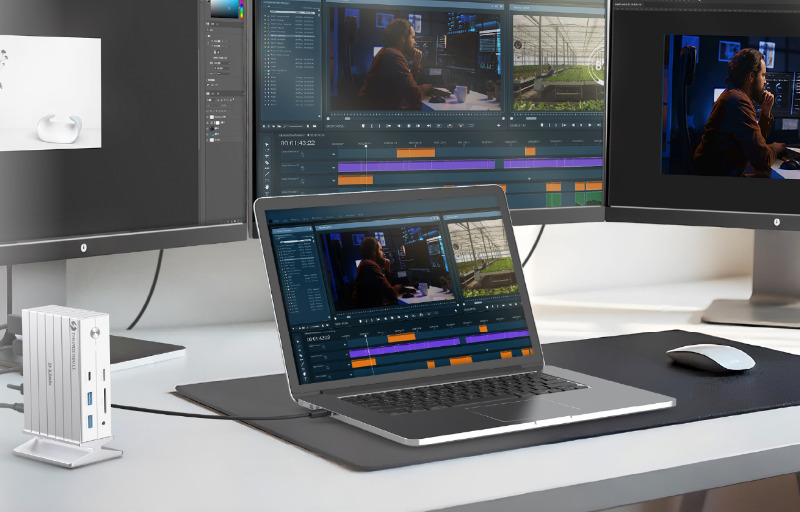
The D-Link DUF-E01 is designed for anyone who wants to turn a laptop into a full desktop workstation without constantly juggling cables, adapters, and separate chargers. It brings together Thunderbolt 4, display outputs, USB connectivity, wired networking, card readers, audio support, and power delivery in a single docking station, making it a practical centrepiece for a cleaner and more capable desk setup.
For users who regularly move between portable work and a fixed desk environment, the appeal is immediate. Instead of reconnecting monitors, storage drives, keyboards, mice, network cables, and power every time you return to your workspace, the DUF-E01 allows everything to run through one Thunderbolt 4 connection to your laptop.
What makes it especially useful is the breadth of its connection options, with support for high-resolution displays, fast external storage, SD and microSD card transfers, and reliable Gigabit Ethernet. It is the kind of dock that suits productivity-focused users, content creators, and home office setups where a laptop needs to feel more like a complete desktop system without sacrificing convenience.
Table of Contents
Design and Functionality
The D-Link DUF-E01 has been built around a vertical tower-style design that keeps the desk footprint fairly compact while still offering a large number of connection options. Rather than spreading every port across a wide, flat enclosure, the upright format helps it sit neatly beside a monitor, laptop stand, or external drive without taking over the workspace.
The white and silver finish gives the dock a clean, modern appearance that suits a wide range of desk setups. It has a professional look without feeling overly technical, which makes it easy to place in a home office, studio, or shared workspace without drawing too much attention to itself.
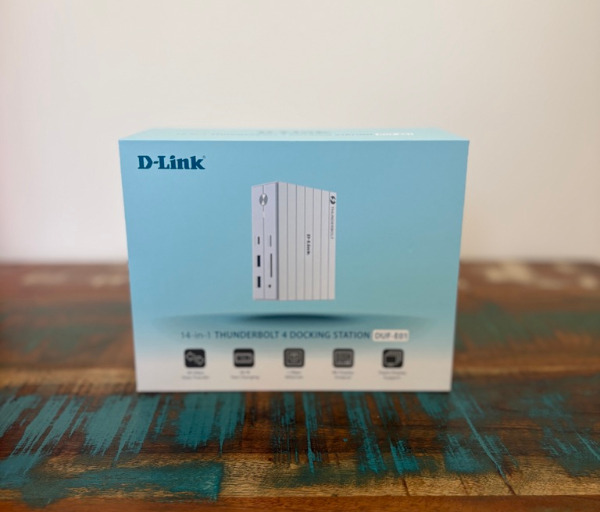

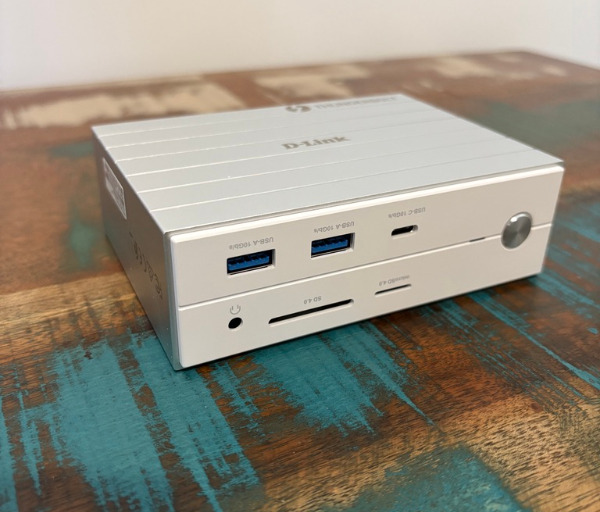
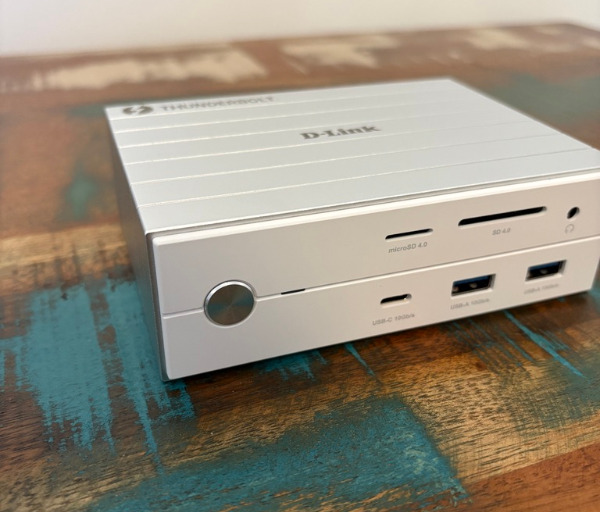
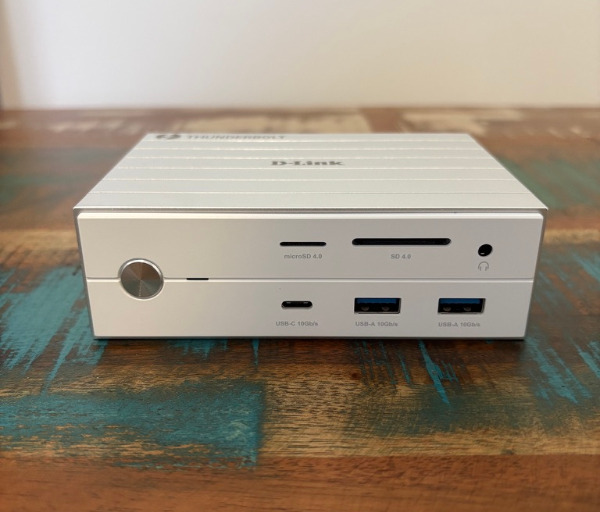
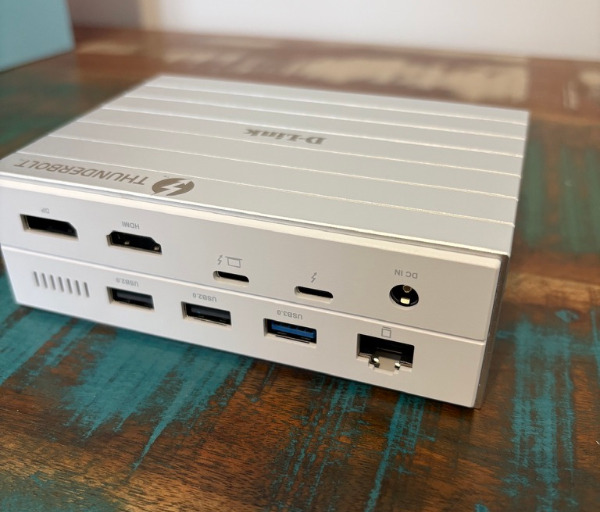
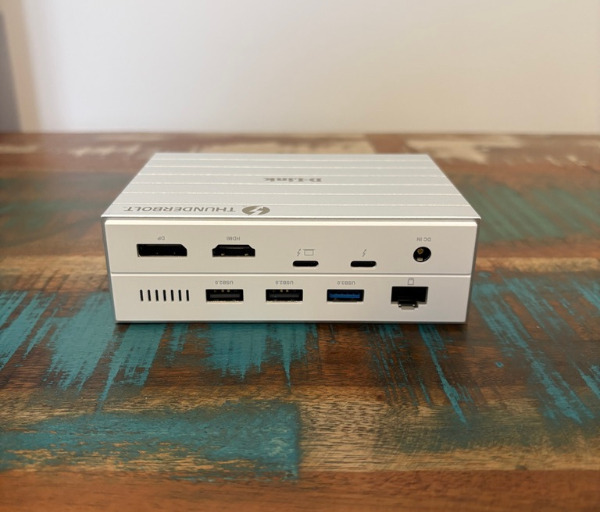
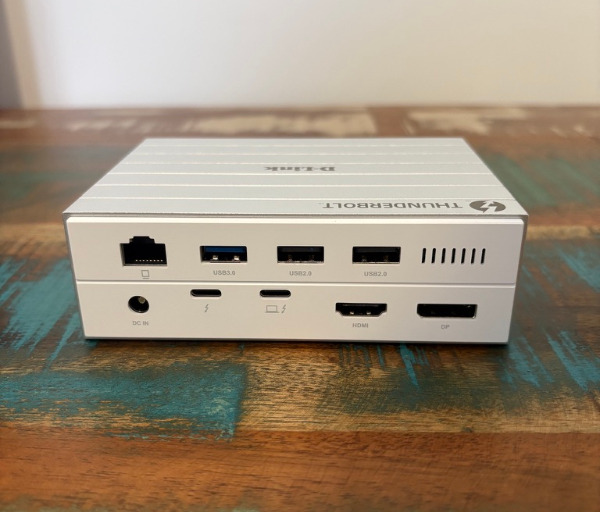
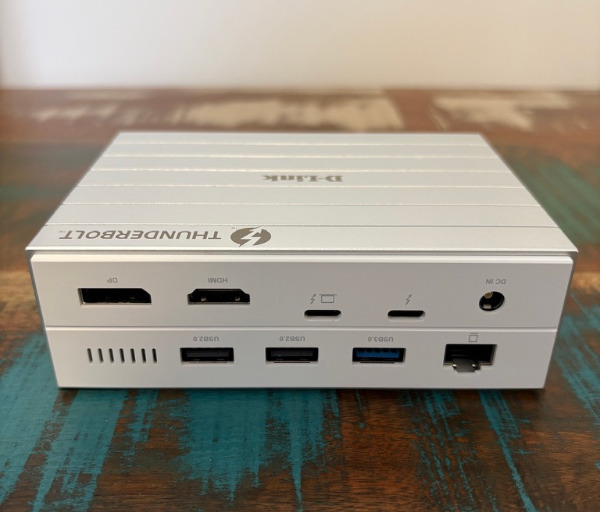
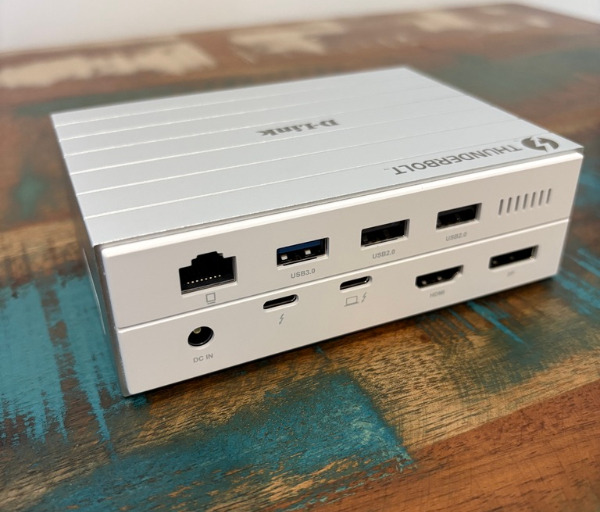
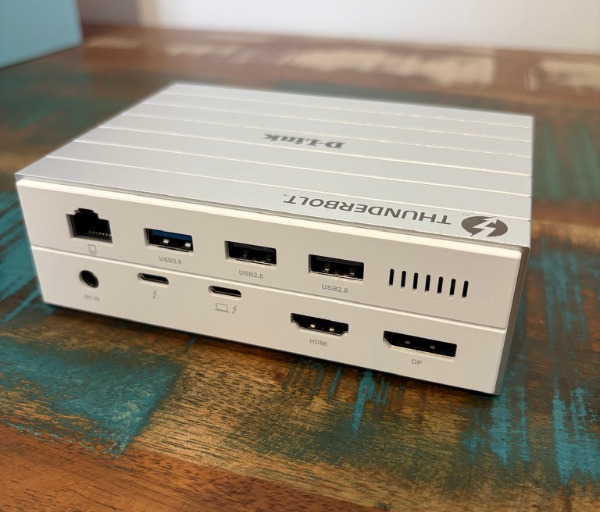
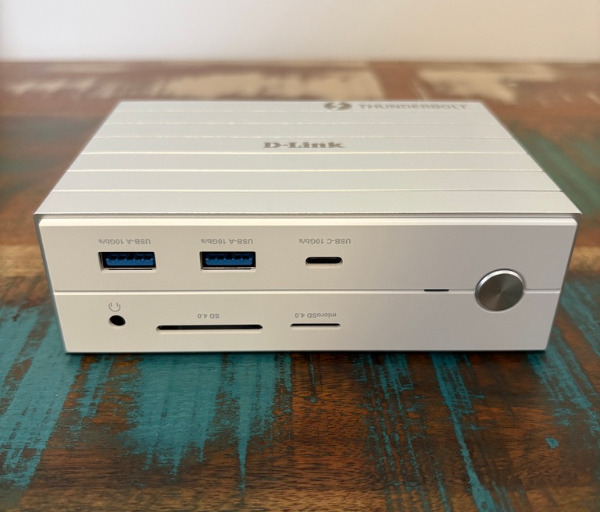
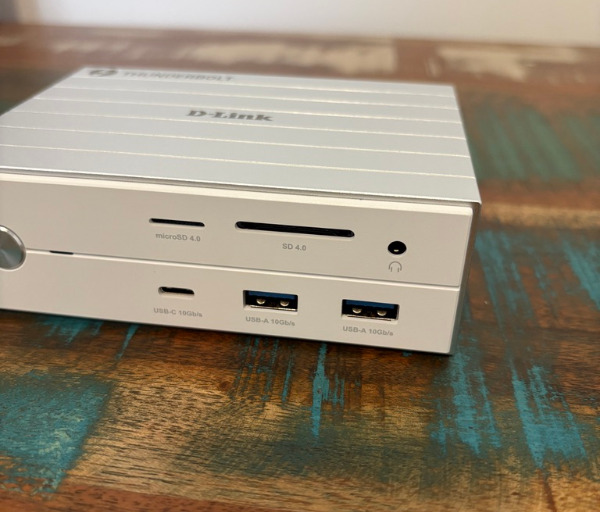
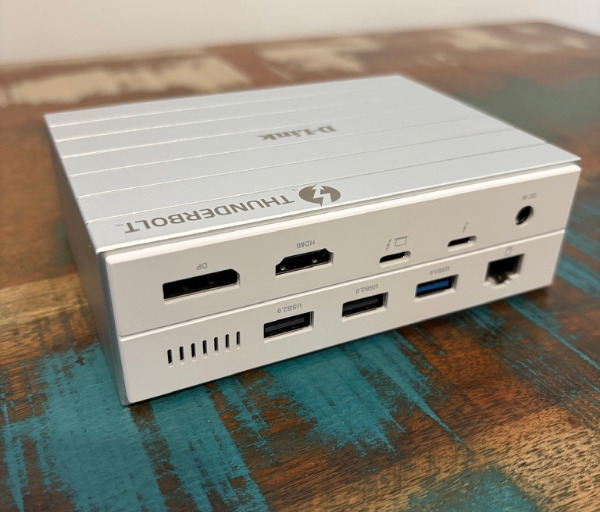
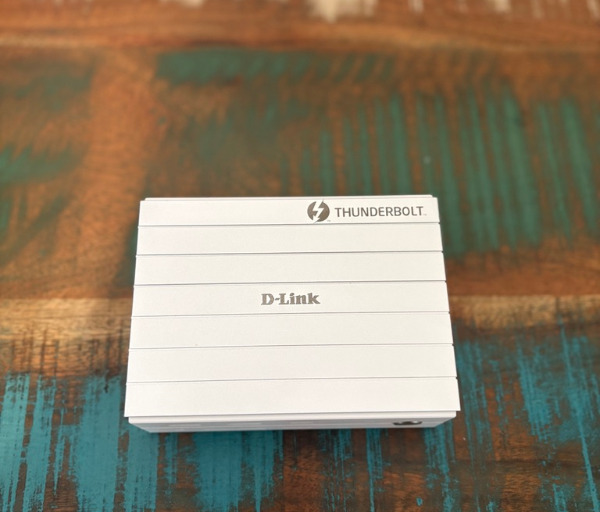
D-Link has used a mix of aluminium and plastic across the body, giving the DUF-E01 a balanced feel that is both lightweight enough to reposition and solid enough for daily desk use. The aluminium section also assists with heat management, which is important for a dock handling Thunderbolt 4 data, display output, charging, networking, and multiple connected peripherals at once.
The included magnetic stand is one of the more practical parts of the design, as it gives the dock a stable upright base and helps keep it positioned correctly during use. The rubberised base adds grip, so the unit is less likely to move around when plugging in USB drives, memory cards, or headphones from the front.
The layout of the ports has clearly been considered with a permanent desk setup in mind. Most of the connections you are likely to leave attached, including monitors, power, Ethernet, and regular peripherals, are positioned at the rear so cables can be routed away from the main working area.
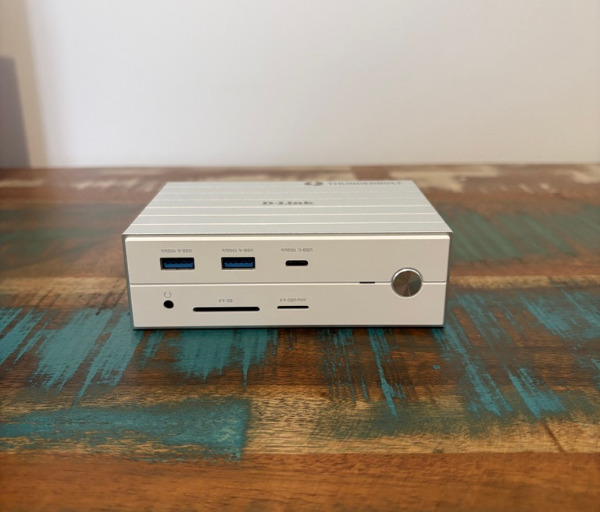
The front-facing ports are reserved for the types of devices you are more likely to connect and remove throughout the day. Having USB-A, USB-C, SD, microSD, and a 3.5mm audio jack on the front makes the dock much easier to use when working with portable storage, camera cards, headphones, or quick accessory connections.
The Thunderbolt 4 upstream connection is the core of the DUF-E01’s functionality, as it allows the laptop to communicate with the dock through one high-speed cable. Through that single connection, the dock can handle display output, data transfer, charging, and peripheral access, which makes a laptop feel far more capable when used at a desk.
Display connectivity is another major strength of the design, with HDMI, DisplayPort, and Thunderbolt 4 available for external monitors. This gives users a flexible foundation for single-screen, dual-screen, or triple-screen workflows, depending on the laptop being used and the display configuration required.
The inclusion of both full-sized SD and microSD card slots makes the DUF-E01 particularly appealing for creators, photographers, videographers, and anyone regularly moving files from cameras or portable devices. Since the card readers are located on the front, they are easy to access without reaching behind the dock or disturbing the rest of the cable setup.
Wired networking is also integrated through a Gigabit Ethernet port, which is useful for anyone who wants a more stable connection than Wi-Fi can provide. For large downloads, cloud backups, video calls, file transfers, and general workstation use, having Ethernet built into the dock adds another layer of reliability.
The DUF-E01 also functions as a charging hub, supplying up to 60W of power delivery to a connected laptop while also offering power from the downstream Thunderbolt 4 port for compatible accessories. This helps reduce the number of separate chargers needed on the desk and keeps the workstation looking more organised.
As a complete docking solution, the design is focused on reducing clutter while expanding what a laptop can do. It is not just about adding more ports, but about creating a smoother transition between working on the go and settling into a more powerful, multi-display desktop environment.
Key Features
The D-Link DUF-E01 is a 14-in-1 Thunderbolt 4 docking station, giving users a broad selection of ports from one central hub. This makes it ideal for laptop users who want a more complete desktop experience without relying on several separate adapters.
Thunderbolt 4 is the main feature holding the dock together, offering up to 40Gbps data transfer through a single high-speed connection. This gives the DUF-E01 the bandwidth needed for demanding workstation tasks, including external storage, display output, and connected accessories.
The dock supports up to 60W power delivery to a connected laptop, helping keep the battery charged while it is being used at a desk. This is especially useful for users who want to arrive at their workstation, plug in one cable, and immediately start working without connecting a separate charger.
For display output, the DUF-E01 includes HDMI 2.1, DisplayPort 1.4, and Thunderbolt 4 downstream connectivity. This allows it to support flexible monitor setups, including triple 4K displays or a single 8K display at 30Hz, depending on the laptop and screen configuration.
The USB selection is generous, with both USB-C and USB-A options available for accessories and external storage. The faster 10Gbps USB ports are particularly useful for moving large files, while the additional USB-A ports provide convenient connectivity for everyday peripherals such as keyboards, mice, webcams, and other desk accessories.
The front-mounted SD and microSD card slots support UHS-II speeds and cards up to 2TB, making the dock a strong choice for creators who regularly work with camera media. Being able to transfer photos, video clips, and project files directly through the dock helps simplify a content creation workflow.
Gigabit Ethernet is built in, giving users a dependable wired networking option for work, streaming, uploads, downloads, and video conferencing. This is a valuable inclusion for anyone who wants consistent network performance at a desk, especially in environments where wireless signal strength can vary.
The 3.5mm combo audio jack adds simple headset and microphone support without needing a separate USB sound adapter. It is a small but practical feature for meetings, calls, online collaboration, or anyone who prefers a wired headset at their workstation.
The DUF-E01 also includes a centralised power button that can switch the connected dock ports on or off for added convenience. This makes it easier to manage the workstation as a single connected system rather than switching off individual devices one by one.
The aluminium alloy casing and detachable base also contribute to the overall feature set by helping with stability and heat dissipation. For a docking station handling charging, displays, storage, and multiple accessories at once, that focus on thermal performance supports more reliable everyday use.
Experience Using the Product and Performance
Using the D-Link DUF-E01 as the centre of a laptop-based workstation quickly shows why a good docking station can make such a difference to day-to-day productivity. Once everything is connected, the desk feels far more organised, with the laptop needing only a single Thunderbolt 4 cable to become part of a much larger setup.
That one-cable workflow is the biggest practical advantage. It removes the usual routine of connecting power, monitors, keyboard, mouse, storage, network, and audio separately, which is especially helpful if you regularly move your laptop between rooms, meetings, travel, or a couch-based workflow.
The transition from portable use to desk use feels smooth and immediate. After returning to the desk, plugging in the Thunderbolt 4 cable brings the laptop back into a proper workstation environment, complete with external displays, peripherals, and charging.
For writing, editing, research, and content management, the DUF-E01 makes a laptop feel much closer to a desktop computer. Multiple screens provide the space to keep documents, browsers, image folders, messaging apps, and notes visible at the same time, which can make a meaningful difference during longer work sessions.
The display support is one of the dock’s strongest productivity features. With HDMI, DisplayPort, and Thunderbolt 4 available for video output, the DUF-E01 gives users the flexibility to build a workspace around different monitor types rather than being limited to one specific connection standard.
Running a multi-monitor setup through the dock helps keep the desk cleaner and more consistent. Instead of having display cables spread directly from the laptop, they can stay connected to the dock permanently, which makes the laptop easier to remove when it is time to work elsewhere.
The Thunderbolt 4 performance also gives the dock plenty of bandwidth for demanding accessories. External drives, display output, and other connected devices can operate through the dock without making the setup feel compromised or awkward.
File transfers through the faster USB ports feel well suited to modern workflows, particularly when moving larger project folders, video files, image libraries, or backups. The 10Gbps USB-C and USB-A ports are useful for fast external storage, while the extra USB-A ports are ideal for lower-bandwidth accessories that do not need the fastest connection.
The SD and microSD card slots are especially convenient if you work with camera footage, photography, drones, action cameras, or other portable media. Having both card formats built into the front of the dock reduces the need for a separate reader and keeps media transfers simple.
The placement of the front ports makes a real difference during regular use. Quick-access connections such as USB drives, memory cards, and headphones are easy to reach, while the less frequently changed cables remain tucked away at the back.
The rear port layout helps the desk feel more intentional and less cluttered. Monitors, Ethernet, power, and permanent peripherals can all stay connected out of sight, allowing the dock to act as the fixed connection point for the whole workstation.
The Gigabit Ethernet port is another feature that improves the overall experience. For video calls, cloud storage, website management, downloads, and large file transfers, a wired connection can provide a more stable experience than relying entirely on Wi-Fi.
Charging performance is also a key part of the dock’s usefulness. The 60W power delivery is enough to keep many laptops topped up during everyday productivity work, reducing the need to keep the original charger permanently attached to the desk.
The additional 15W output from the downstream Thunderbolt 4 port also adds flexibility for accessories. It gives the dock extra usefulness when connecting compatible devices that benefit from both data and power over a single port.
Daily reliability is one of the most important parts of any docking station, and the DUF-E01 is designed to make the desk routine feel predictable. Once the workspace is set up correctly, the experience becomes simple: connect the laptop, wake the displays, and start working.
The dock is also useful for keeping a workstation consistent between different tasks. Whether you are writing, editing images, managing files, taking calls, or working across several browser windows, the DUF-E01 keeps the accessories and display environment ready to go.
For creators, the combination of display outputs, card readers, fast USB, and Ethernet creates a strong foundation. It means photos and videos can be imported, backed up, reviewed, and edited from the same central hub without constantly swapping adapters.
For office users, the appeal is just as strong. A keyboard, mouse, monitor setup, wired headset, Ethernet connection, and charger can all remain attached to the dock, making it easy to use a laptop as the main computer without giving up the comfort of a proper desk setup.
The DUF-E01 also helps reduce wear on the laptop’s own ports. Rather than plugging and unplugging several cables from the laptop every day, most devices remain connected to the dock, leaving the laptop to rely mainly on one Thunderbolt 4 connection.
Thermal handling is also important for a dock with this much capability. The aluminium alloy casing helps the unit manage heat during longer work sessions, which is reassuring when multiple displays, USB devices, Ethernet, and charging are all active.
The upright design proves useful in real-world use because it keeps the dock visible and accessible without occupying too much desk space. It sits neatly beside a laptop stand or monitor and gives the workspace a cleaner, more permanent feel.
As a daily workstation upgrade, the D-Link DUF-E01 delivers the kind of convenience that quickly becomes hard to give up. It simplifies the desk, expands laptop connectivity, supports more ambitious display setups, and makes returning to a full workspace feel effortless.
Conclusion
The D-Link DUF-E01 is a highly practical Thunderbolt 4 docking station for anyone who wants a cleaner, more capable, and more efficient laptop workstation. Its 14-in-1 design brings together display output, fast data transfer, charging, networking, card readers, USB expansion, and audio support in one compact desk-friendly device.
Its biggest strength is the simplicity it brings to daily work. Being able to connect a laptop to monitors, peripherals, storage, Ethernet, and power through a single cable makes the whole desk setup feel smoother and more organised.
It is also a strong option for users who rely on multiple screens, fast external storage, camera media, and dependable wired networking. The mix of Thunderbolt 4, HDMI, DisplayPort, UHS-II card readers, and Gigabit Ethernet gives it the flexibility needed for both productivity and creative workflows.
For laptop users who want their portable machine to double as a proper desktop setup, the DUF-E01 makes a lot of sense. It removes cable clutter, expands connectivity, and turns a modern laptop into the centre of a more powerful and comfortable workspace.