The Turtle Beach Command Series KB5 keyboard is designed for users who want more than a conventional mechanical keyboard. It combines a full-size layout, low-profile switches and a built-in touch display to create a highly customisable setup for gaming, streaming and everyday computer use.
Its appearance immediately gives it a distinctive identity, with a brushed metal finish, exposed design details and a retro-inspired industrial look. The result is a keyboard that feels noticeably different from the cleaner, more minimal designs that have become common across modern desktops.
Beyond its styling, the KB5 places a strong emphasis on convenience and control. The programmable display, dedicated macro keys, clickable volume barrel and per-key RGB lighting all contribute to an experience that can be tailored to suit different games, applications and workflows.
Table of Contents
Design and Functionality
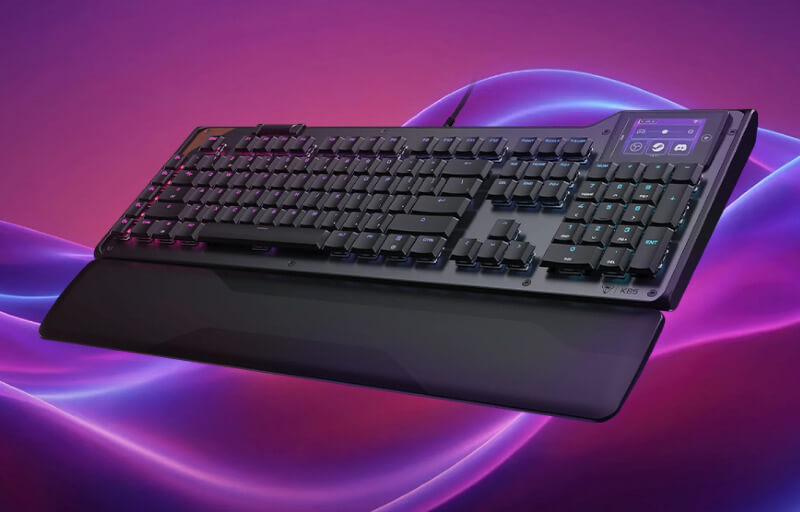
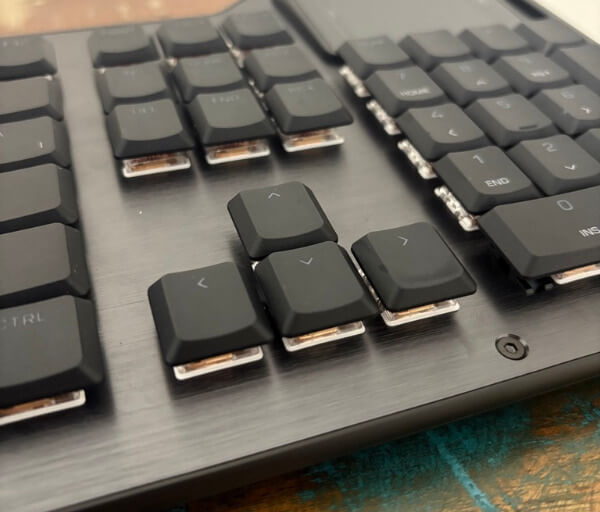
The Turtle Beach Command Series KB5 has a striking design that immediately separates it from more conventional gaming keyboards. Its grey brushed metal chassis, exposed screws and copper-toned detailing give it a distinctive retro-industrial appearance without making the layout feel impractical.
Despite being a full-size keyboard, the KB5 maintains a relatively slim profile at 27 mm tall. The low-profile construction helps it sit neatly on the desk while still providing a complete key layout with a dedicated number pad.
The aluminium-reinforced top plate gives the keyboard a sturdy and reassuring feel during use. At 887 g without the palm rest, it has enough weight to remain stable during fast typing and energetic gaming sessions.


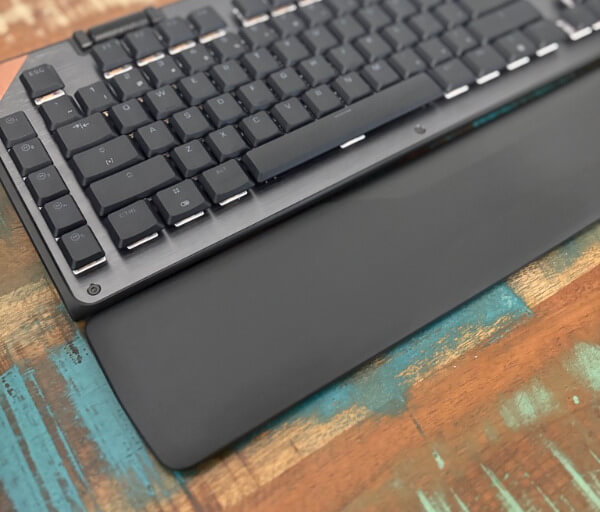




Its full dimensions measure 47.7 x 17.5 x 2.7 cm, expanding to 47.7 x 25.7 x 2.7 cm when the palm rest is attached. It does require a reasonable amount of desk space, although the additional room is well used by the number pad, macro controls and touch display.
Two-stage kickstands on the underside allow the typing angle to be adjusted to suit personal preference. This makes it easier to find a comfortable hand position, whether the keyboard is being used for a short gaming session or several hours of work.
A detachable palm rest is included and clips securely onto the front edge of the chassis. Its broad surface provides useful support for the wrists and helps create a more relaxed position when using the low-profile keys.
The KB5 uses Titan low-profile linear mechanical switches with an actuation point of 1.2 mm and a total travel distance of 3.1 mm. Their short movement gives each press a quick and smooth character, while the 42 gf actuation force keeps the keys light and easy to operate.
The switches and stabilisers are pre-lubricated to improve consistency across the board. Larger keys such as the space bar and shift keys feel controlled and stable, contributing to a polished typing experience.
Double-shot PBT keycaps provide a durable matte surface with a slightly textured finish. They feel substantial under the fingertips and are designed to resist the shine and oily appearance that can develop on frequently used keys over time.
Turtle Beach also includes four replacement WASD keycaps with a more heavily textured surface. These can be installed using the supplied keycap puller and make the main movement keys easier to locate by touch during gameplay.
Five dedicated macro keys are positioned along the left edge of the keyboard. They remain easy to reach without interfering with the main key layout and can be assigned to in-game actions, software commands or frequently used productivity shortcuts.
The detachable 1.8 m USB-A cable provides a secure wired connection while making the keyboard easier to transport or store. Full-key rollover and anti-ghosting support ensure that simultaneous inputs are recognised accurately, making the KB5 well suited to complex commands and fast-paced play.
Key Features
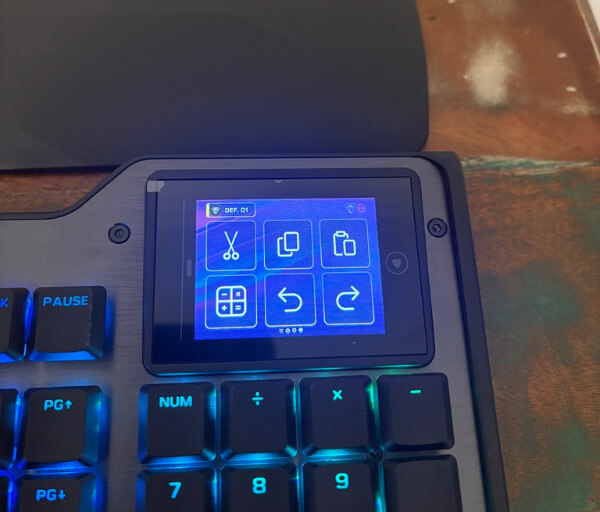
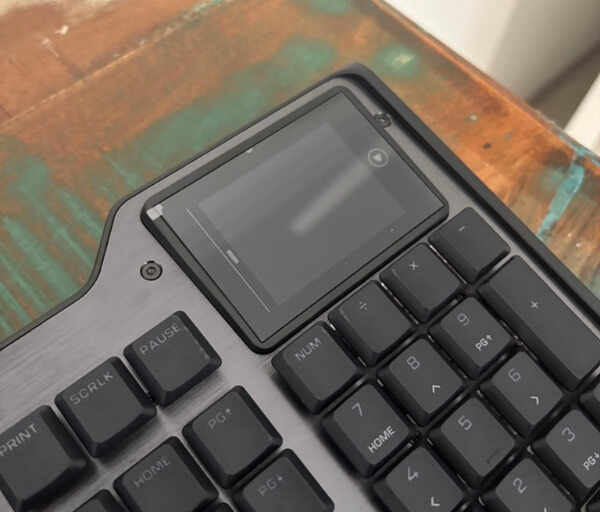
The centrepiece of the Turtle Beach Command Series KB5 is its 2.4-inch full-colour Command Touch Display. Positioned above the number pad, it provides direct access to shortcuts, macros, system information, media controls and other frequently used functions without requiring users to leave their current application.
The display supports multiple custom profiles, making it possible to create separate control layouts for gaming, streaming, work and general desktop use. Each profile can contain three pages with up to six virtual buttons per page, providing as many as 18 customisable controls within a single setup.
This flexibility makes the screen useful for far more than launching programs. It can be configured to manage audio, activate macros, display system statistics, control compatible streaming functions or open regularly visited websites and applications.
The five dedicated macro keys on the left side of the keyboard add another layer of customisation. These physical buttons can be programmed for game commands, productivity actions or software shortcuts, helping reduce the number of steps required for repetitive tasks.
A clickable volume barrel is mounted along the top edge of the keyboard for convenient audio control. Rolling it in either direction adjusts the volume, while pressing it instantly mutes the sound, allowing quick changes without interrupting gameplay or work.
The Titan low-profile mechanical switches are built to deliver fast and consistent input. Their 1.2 mm actuation point allows commands to register with minimal movement, while the 3.1 mm total travel provides enough depth to maintain a satisfying mechanical feel.
ReacTap technology supports rapid switch resets and smooth repeated keystrokes. This is particularly useful during games that demand quick directional changes, repeated abilities or closely timed inputs, as each press feels precise and ready for the next command.
The KB5 also features a true 8,000 Hz polling rate with latency rated at 0.125 ms. This allows the keyboard to report inputs to the computer more frequently, helping deliver immediate and accurate responses during competitive play.
Per-key RGB lighting allows every key to be individually illuminated and adjusted through the Swarm II software. Users can create personalised colour layouts, highlight important controls or match the keyboard with the rest of their desktop lighting.
Swarm II acts as the main control centre for the keyboard’s advanced functions. It provides access to display layouts, profiles, lighting, macros, firmware updates and other performance settings, bringing the KB5’s wide range of customisation options together in one interface.
Experience Using the Product and Performance
The Turtle Beach Command Series KB5 makes a strong first impression because it feels different from a typical full-size mechanical keyboard. Its combination of a low-profile layout, dedicated controls and built-in touch display gives it a practical identity that becomes more apparent with regular use.
The full-size arrangement is especially useful for anyone who relies on a number pad for work, data entry or game controls. Every major key group remains easy to access, so there is no need to depend on layered shortcuts for common functions.
Moving to the KB5 can require a brief adjustment period due to the spacing and shape of its low-profile keycaps. Once familiar, however, the layout feels comfortable and provides plenty of room for the fingers to settle naturally across the board.
The Titan mechanical switches deliver a light and responsive typing experience. Their linear movement feels smooth from the beginning of each press to the bottom of the keystroke, making them suitable for both rapid gaming inputs and extended periods of writing.
A 1.2 mm actuation point allows commands to register quickly without requiring a deep press. This makes the keyboard feel immediate during fast gameplay, particularly when changing direction, activating abilities or entering several commands in quick succession.
The 3.1 mm total travel still provides enough movement to make each keystroke feel deliberate. It strikes a useful balance between the speed of a low-profile switch and the satisfying feedback expected from a mechanical keyboard.
The relatively light 42 gf actuation force also reduces the effort required to hold or repeatedly press keys. This is valuable during longer sessions where movement controls, shortcuts or frequently used commands may remain active for extended periods.
Pre-lubricated switches contribute to the smooth character of the keyboard. Key movement feels consistent across the main typing area, while the tuned stabilisers help larger keys remain controlled and even when pressed from different positions.
The double-shot PBT keycaps feel sturdy and well suited to everyday use. Their matte texture provides a secure surface under the fingertips and helps the keyboard maintain a clean appearance through regular gaming and work.
Replacing the standard WASD caps with the included textured alternatives gives the movement keys a more pronounced feel. The added surface detail makes them easier to identify without looking down, which can be helpful when returning a hand to the keyboard during play.
The 8,000 Hz polling rate supports the fast switch response by allowing the KB5 to communicate inputs with the computer at a very high frequency. In practical use, key presses feel immediate and consistent, with no distracting sense of delay.
This responsiveness is particularly noticeable in games that rely on accurate timing or rapid combinations. Movement, menu navigation and repeated commands all feel dependable, allowing attention to remain focused on the action rather than the keyboard.
Full-key rollover and anti-ghosting support provide further confidence when several inputs are pressed together. Complex combinations register accurately, which is useful for gaming as well as productivity shortcuts that involve multiple modifier keys.
The Command Touch Display quickly becomes one of the most frequently used parts of the KB5. Although it initially attracts attention because of its appearance, its programmable controls give it genuine value beyond being a decorative feature.
Creating shortcuts for commonly used applications can reduce the time spent searching through menus or desktop icons. Game launchers, communication tools, recording software and work programs can all be opened directly from the keyboard.
The ability to create several profiles makes the display useful across different activities. A gaming profile can hold macros and launcher shortcuts, while a work profile can provide access to websites, media controls or frequently used applications.
Three pages within each profile provide enough space to organise commands into logical groups. Moving between these pages feels straightforward, and the virtual buttons are large enough to select without interrupting the current task.
The screen can also display useful system information, allowing important statistics to remain visible while another application occupies the main monitor. This can be convenient during gaming, recording or demanding workloads where system performance may need to be monitored.
The five physical macro keys complement the touch display by providing controls that can be activated without looking away from the screen. They are particularly effective for frequently repeated functions that benefit from a consistent physical button.
Audio adjustments are equally convenient through the top-mounted volume barrel. Its rolling action makes it easy to make small or large changes, while the clickable mute function provides an immediate way to silence sound when required.
Per-key RGB lighting adds visual customisation without affecting the practical layout. Important gaming controls can be highlighted, individual colours can be assigned to different groups, and lighting effects can be coordinated with the rest of a desktop setup.
Swarm II brings the keyboard’s customisation options together in a single application. Once profiles, display pages, macros and lighting are configured, the KB5 becomes a highly personalised control centre that supports gaming, streaming and everyday productivity with equal confidence.
Conclusion
The Turtle Beach Command Series KB5 is a distinctive full-size mechanical keyboard that combines responsive performance with an unusually broad range of controls. Its low-profile Titan switches, 8,000 Hz polling rate and durable construction give it the speed and consistency needed for gaming, while the complete layout remains practical for everyday work.
Its 2.4-inch Command Touch Display is more than a visual centrepiece. Once customised, it becomes a convenient way to launch applications, activate macros, monitor system information and manage frequently used functions without leaving the current task.
Dedicated macro keys, per-key RGB lighting and the clickable volume barrel add further flexibility to the experience. Swarm II allows these elements to be adapted around individual games, streaming tools and productivity workflows, helping the keyboard feel genuinely personal.
For users who value a number pad, fast mechanical switches and extensive customisation, the KB5 delivers a compelling blend of function and character. Its retro-industrial styling and integrated touch controls make it an appealing choice for anyone seeking a keyboard that can serve as both an input device and a central desktop command hub.