The Logitech G502 X Plus is a wireless gaming mouse designed for players who value precision, comfort and extensive customisation. It combines a familiar ergonomic shape with modern internal hardware, responsive controls and a refined exterior that feels suited to both competitive gaming and everyday desktop use.
Its long list of programmable buttons makes it particularly appealing for users who like to keep important commands within easy reach. The combination of LIGHTFORCE hybrid switches, the HERO 25K sensor and LIGHTSPEED wireless connectivity gives the mouse a fast and dependable feel across a wide range of games.
The G502 X Plus also adds visual character through its multi-zone RGB lighting while retaining practical features such as onboard profiles, USB-C charging and compatibility with the POWERPLAY wireless charging system. These elements come together in a polished gaming mouse that offers strong performance without sacrificing convenience or versatility.
Table of Contents
Design and Functionality
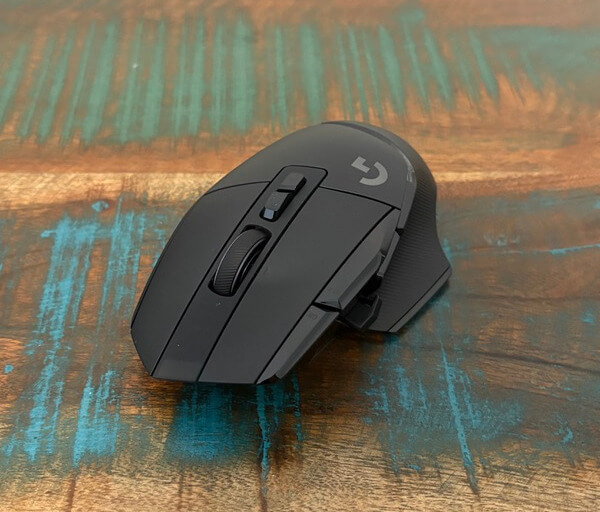
The Logitech G502 X Plus has a sculpted right-handed shape that is designed to support the palm, thumb and fingers during longer sessions. Its body follows an ergonomic profile that feels substantial without becoming overly bulky, making it suitable for players who prefer a secure and controlled grip.
The upper shell has been refined with cleaner joins and fewer narrow gaps than earlier versions of the design. This gives the mouse a more streamlined appearance while also reducing the number of small spaces where dust and debris can collect over time.
At the front, the left and right mouse buttons flow neatly towards the central section surrounding the scroll wheel. This creates a more unified edge and helps the mouse look modern and carefully finished from almost every angle.

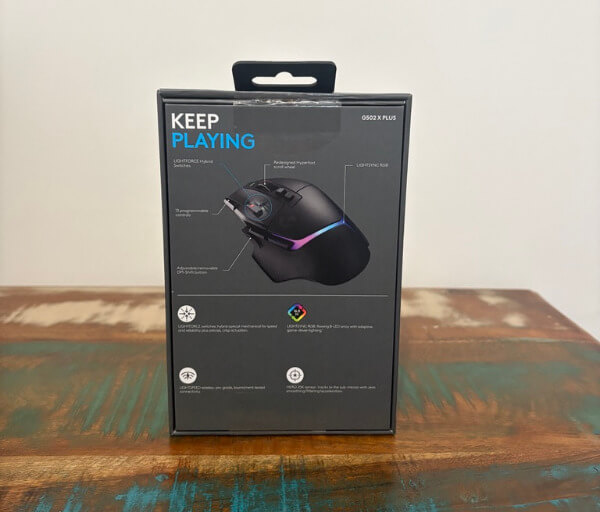




Both primary buttons have a crisp and energetic response when pressed. The spring-assisted construction gives each click a defined feel, which helps actions register with a satisfying level of physical feedback during gaming and regular computer use.
The mouse uses LIGHTFORCE hybrid optical-mechanical switches beneath the main buttons. This design combines the tactile sensation associated with a mechanical click and the fast actuation of optical technology, giving the controls a responsive and dependable character.
A dual-mode scroll wheel sits between the primary buttons and provides two distinct scrolling experiences. Users can choose a stepped movement for precise navigation or release the wheel into a free-spinning mode for quickly moving through long pages and documents.
The textured surface of the wheel gives the fingertip plenty of grip without feeling harsh. It can also tilt to the left and right, adding two more programmable inputs that can be assigned to horizontal scrolling, shortcuts or in-game commands.
Two slim buttons are positioned directly beneath the scroll wheel. One switches between the wheel modes, while the other can be used to cycle through stored profiles or reassigned through Logitech’s software to suit a different function.
The DPI adjustment controls are located beside the left mouse button where they can be reached with the index finger. Their narrow shape keeps them out of the way during normal clicking while still making quick sensitivity changes easy when required.
Forward and back buttons are placed along the left side of the shell above the thumb rest. Their raised profiles make them simple to locate by touch, allowing them to be used without shifting the hand away from its natural position.
A removable DPI shift control sits towards the front of the thumb area. It is attached magnetically and can be reversed to change its reach, giving users more freedom to position it according to their hand size and preferred grip.
Logitech also includes a replacement cover for users who do not want the DPI shift button installed. Swapping it out creates a smoother thumb area and prevents accidental presses, which is useful for players who prefer a simpler control layout.
Textured rubber sections run along the sides of the mouse to strengthen grip and improve stability. The broad thumb rest extends out from the left side, providing a comfortable platform that helps keep the thumb from dragging across the mouse pad.
The underside is fitted with low-friction PTFE feet that help the G502 X Plus glide smoothly across compatible surfaces. A magnetic circular cover also provides storage for the wireless receiver and can be replaced with a POWERPLAY charging module for users with a compatible charging mat.
Key Features
The HERO 25K sensor is one of the most important features of the Logitech G502 X Plus. It supports sensitivity settings from 100 to 25,600 DPI, allowing users to choose everything from slow, deliberate movement to extremely fast cursor response.
Sensitivity can be adjusted in increments of 50 DPI through Logitech G HUB. This level of control makes it easier to create precise settings for different games, monitor resolutions and personal preferences.
LIGHTSPEED wireless technology provides the mouse with a fast and stable connection. It delivers a responsive experience that feels well suited to competitive gaming, while also avoiding the movement restrictions of a permanently attached cable.
The included wireless receiver can support two compatible LIGHTSPEED devices. Pairing a mouse and keyboard through the same receiver can help free up a USB port and simplify the number of accessories connected to a gaming system.
LIGHTFORCE hybrid switches combine optical actuation with a mechanical-style response. This gives the primary buttons a fast trigger while preserving the crisp tactile feedback that many players expect from a gaming mouse.
The G502 X Plus includes 13 programmable controls when the scroll wheel tilt functions are counted. These inputs can be assigned to keyboard commands, media actions, macros, sensitivity adjustments or frequently used functions within games and applications.
Its reversible DPI shift button adds another layer of physical customisation. Users can position the control closer to the thumb, rotate it for a different reach or replace it with the supplied cover when the function is not required.
Five onboard memory profiles can be stored directly on the mouse. This allows button assignments and sensitivity settings to travel with the device, reducing the need to reconfigure it when moving between compatible computers.
The eight-zone LIGHTSYNC RGB strip provides a distinctive lighting effect around the rear of the shell. Colours and animations can be customised through G HUB, while synchronisation allows the mouse to coordinate with other compatible Logitech G products.
Battery life can reach up to approximately 120 hours when the lighting is switched off. This extended runtime makes the mouse practical for long gaming sessions and regular work use without requiring frequent charging.
USB-C charging provides a convenient wired option whenever the battery needs replenishing. The reversible connector is easy to insert, and the mouse can continue operating while it is connected to the supplied cable.
POWERPLAY compatibility gives users another way to keep the mouse charged. Replacing the magnetic storage disc with the appropriate POWERCORE module allows a compatible POWERPLAY mat to provide continuous wireless charging during use.
Experience Using the Product and Performance
The Logitech G502 X Plus delivers a confident and responsive feel from the moment it is connected. Its combination of a stable wireless link, accurate tracking and clearly defined button feedback makes it easy to trust during both fast-paced games and everyday computer use.
The sculpted right-handed shape encourages the hand to settle naturally across the shell. The raised palm area provides steady support, while the thumb rest helps maintain a relaxed grip during longer sessions.
At approximately 106 grams, the mouse has enough weight to feel controlled without becoming difficult to move. It feels particularly well suited to players who prefer a planted and deliberate style rather than an extremely lightweight competitive mouse.
The textured side grips make a noticeable difference when performing quick directional movements. They provide enough traction to keep the mouse secure without creating an overly rough or abrasive surface against the fingers.
Gliding performance is smooth across a suitable mouse pad thanks to the PTFE feet underneath. The mouse moves predictably during both broad arm movements and smaller wrist adjustments, helping maintain consistency when aiming or navigating detailed interfaces.
The HERO 25K sensor tracks movement with excellent accuracy across a wide sensitivity range. Cursor placement remains precise, with no noticeable unwanted acceleration interfering with deliberate movements.
At lower DPI settings, the mouse performs well for careful aiming and detailed control. Slow movements remain clean and steady, which is useful when lining up precise shots or working with small elements in creative and productivity applications.
Higher sensitivity settings also feel responsive and controlled once adjusted to the user’s preference. Rapid turns and sweeping movements register immediately, making the mouse capable of keeping up with games that demand quick reactions.
LIGHTSPEED wireless performance feels dependable throughout extended use. Inputs register without distracting delays or connection interruptions, allowing the mouse to provide a wired-like sense of responsiveness while retaining the freedom of wireless movement.
The primary buttons are particularly enjoyable to use because of their crisp actuation. Each press produces a clear response that makes repeated clicking feel controlled, whether firing rapidly in a game or working through menus and documents.
The LIGHTFORCE switches also help the mouse feel consistent across the main left and right controls. They respond quickly without requiring excessive force, reducing strain during games that involve frequent clicking.
The scroll wheel provides useful flexibility depending on the task. Its ratcheted mode gives each step a distinct and controlled feel, making it suitable for weapon selection, menu navigation and precise movement through webpages.
Switching to the free-spinning mode is valuable when moving through lengthy documents or large webpages. The wheel carries momentum smoothly, allowing users to travel through content much faster than with conventional stepped scrolling.
Tilting the wheel left and right adds another practical layer to the control layout. These inputs work well for horizontal navigation, media commands or extra game functions that would otherwise require reaching for the keyboard.
The side buttons are positioned so they can be found quickly with the thumb. Their shapes are distinct enough to identify by touch, helping prevent confusion when assigning separate actions to the forward, back and DPI shift controls.
The reversible DPI shift button is especially useful for players who alternate between regular movement and temporary low-sensitivity aiming. Holding it can provide finer control for precision actions, while releasing it returns the sensor to the normal sensitivity level.
Users who do not rely on a DPI shift function can replace the button with the included cover. This creates a cleaner thumb area and allows the mouse to adapt to a simpler playing style without leaving an unused control in the way.
The dedicated DPI adjustment buttons make sensitivity changes quick and convenient. They can be used to move between preset levels during a game or reassigned to other commands when on-the-fly DPI control is not required.
The large number of programmable inputs makes the G502 X Plus useful across several game genres. Shooters benefit from quick access to sensitivity and utility functions, while strategy, simulation and role-playing games can use the extra buttons for shortcuts and frequently used commands.
It is equally capable outside gaming. Assigning actions such as copy, paste, media control, application switching or browser navigation can make routine tasks faster and reduce dependence on keyboard combinations.
G HUB provides a straightforward way to configure the mouse for different activities. Sensitivity stages, button assignments, macros, lighting and onboard profiles can all be adjusted from one interface.
Creating separate profiles allows the controls to change automatically or manually depending on the software being used. A gaming profile can prioritise combat commands, while a productivity profile can focus on navigation and editing shortcuts.
Onboard memory is helpful when using the mouse with more than one computer. Once preferred settings have been saved, the G502 X Plus can retain key sensitivity and button configurations without requiring the full software installation on every system.
The LIGHTSYNC lighting adds a polished visual effect around the rear portion of the mouse. Colours appear bright and evenly diffused, and the available effects provide enough variety to match a gaming setup or create a more restrained appearance.
Battery life is strong when the lighting is disabled or used selectively. The extended runtime means the mouse can handle many long sessions between charges, while G HUB provides a convenient indication of the remaining battery level.
Conclusion
The Logitech G502 X Plus is a polished wireless gaming mouse that combines precise tracking, responsive controls and a comfortable right-handed shape. Its design supports extended use while keeping a wide selection of programmable buttons close at hand.
The HERO 25K sensor and LIGHTSPEED wireless connection deliver smooth, dependable performance across fast-paced games, strategy titles and everyday desktop tasks. LIGHTFORCE switches add crisp feedback to the main buttons, while the dual-mode scroll wheel improves versatility.
Features such as onboard memory, USB-C charging, adjustable DPI controls and POWERPLAY compatibility make the mouse practical as well as highly customisable. The eight-zone RGB lighting also gives it a distinctive appearance that can be tailored through Logitech G HUB.
For users who want a feature-rich mouse that can handle gaming and productivity with equal confidence, the G502 X Plus is an excellent choice. Its refined ergonomics, reliable wireless performance and flexible control layout make it a strong addition to a modern PC setup.