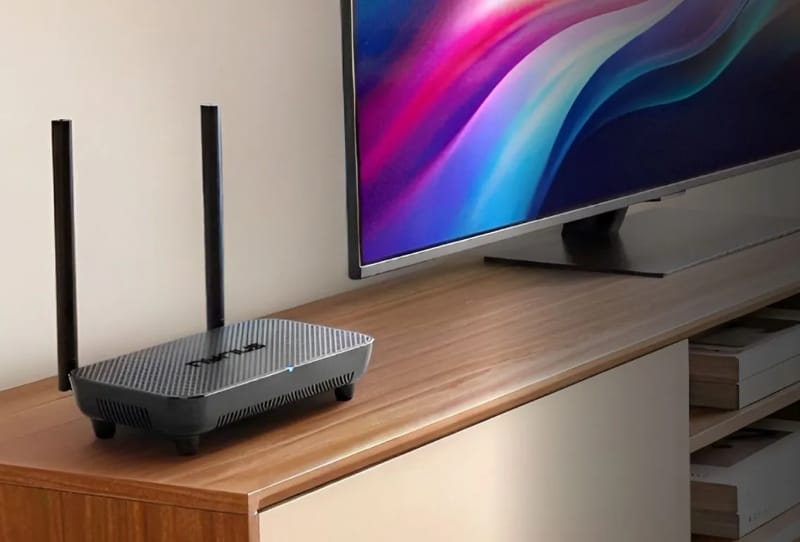
The Nyrius Phoenix Home has arrived to solve a problem anyone who has tried to mount a TV above a fireplace already knows well: getting a clean HDMI signal from a games console, streaming box or Blu-ray player to a screen without snaking a cable through the wall. Instead of drilling, the Phoenix Home sends true 4K video wirelessly, and it claims a range of up to 500 feet in open air or 75 feet through walls and floors.
That is a serious spec for a device built around simplicity. The kit consists of one transmitter with a single HDMI input and one receiver with a single HDMI output, so there is no app to configure and no drivers to install. Plug a source into the transmitter, connect the receiver to a display, and the video should appear on the other end.
Table of Contents
What the Nyrius Phoenix Home actually does
At its core, the Phoenix Home is a point-to-point wireless HDMI bridge. It accepts a single HDMI source, which could be a games console, an Apple TV 4K, a Blu-ray player, or even an AV receiver carrying several devices at once, and it beams that signal to a receiver connected to a TV, projector or desktop monitor.
The transmitter supports resolutions up to 4K at 60 frames per second, along with DTS, Dolby Atmos and 7.1-channel surround sound. That is a meaningful jump over many budget wireless HDMI kits, which often cap out at 1080p or struggle to pass through full surround audio formats.
There is also a USB-C port on the transmitter, letting someone connect a computer and control it remotely using a keyboard and mouse plugged into the receiver end. An IR extender is included too, so a remote control can still reach a source device that has been moved out of sight into another room or a cabinet.
Specifications at a glance
| Feature | Detail |
|---|---|
| Video resolution | Up to 4K at 60Hz |
| Wireless range (line of sight) | Up to 500 feet |
| Wireless range (through walls/floors) | Up to 75 feet |
| Audio support | DTS, Dolby Atmos, 7.1 surround |
| Ports | HDMI in (transmitter), HDMI out (receiver), USB-C for remote PC control |
| Extras | IR extender for remote controls |
Those numbers put the Phoenix Home ahead of most rivals in its category on paper, particularly given how it is priced. Many competing 4K wireless HDMI extenders either charge considerably more for similar range and resolution, or cut corners on audio formats to hit a lower price point.
Where it fits into a home theatre setup
The obvious use case is exactly the fireplace-mounted TV scenario that manufacturers like Samsung and LG have tried to solve with proprietary boxes such as the Wireless One Connect and Zero Connect systems, both of which are tied to specific flagship television ranges. The Phoenix Home offers a similar idea, minus the requirement to buy a particular brand of screen.
It also suits renters and share-house living, where drilling holes for cutting cables from a home network setup or running an HDMI line through a wall simply is not an option. A student bedroom, a rental apartment, or an oddly laid out living room with a console and TV on opposite walls could all benefit from a wireless link like this.
Outdoor movie nights and backyard sporting events are another realistic scenario, thanks to that 500-foot open-air range. A source device could stay indoors near a router and power outlet while the receiver drives a portable projector or outdoor screen well away from the house. For those looking to strengthen the wireless backbone that a setup like this depends on, pairing it with a fast wireless mesh router built for demanding home setups can help keep other network traffic from causing interference.
What buyers should keep in mind
One open question is gaming latency. Wireless HDMI extenders generally add at least some processing delay compared with a direct cable connection, and how noticeable that lag feels will depend heavily on the game and the player. Anyone planning to use the Phoenix Home for competitive or fast-paced titles should weigh that possibility before relying on it as a permanent setup.
It is also worth remembering the transmitter only accepts HDMI input, so older devices without that port will need an adapter first. And because the kit is a single transmitter paired with a single receiver, anyone wanting to send the same signal to multiple screens around the house would need additional units or a separate distribution solution.
For home theatre fans wanting to hide their console or media player out of sight, the same instinct that makes the Phoenix Home appealing also applies to computing gear. Some people go a step further and end up tucking a mini PC away as a home server alongside their entertainment setup, using wireless links like this one to keep cabling to an absolute minimum throughout the house.
Availability is already confirmed, and the Phoenix Home lands as one of the more capable options in its price bracket for genuinely cable-free 4K streaming around the home. For anyone tired of fishing HDMI cable through skirting boards and ceiling cavities, it offers a straightforward, driver-free alternative worth considering before reaching for the drill.