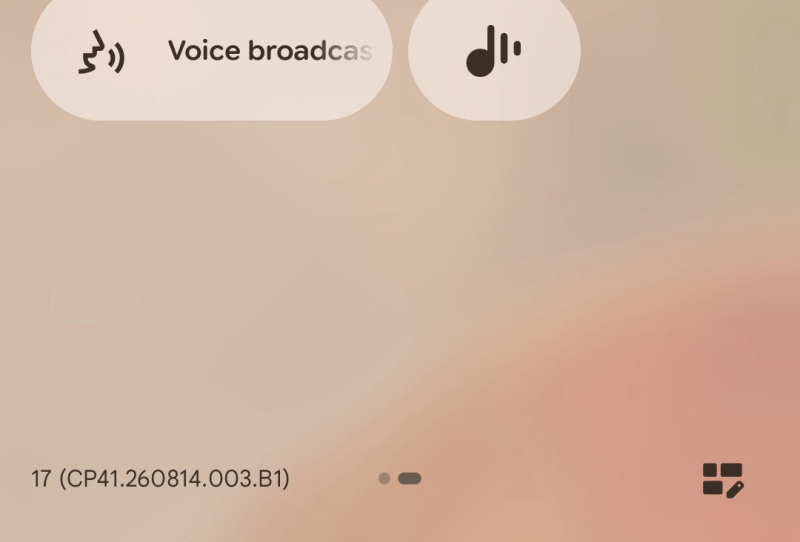
Pixel Voice Broadcast is about to graduate from a hidden developer setting to a proper Quick Settings tile, giving Android users a genuinely useful way to turn a phone into a portable PA system. The feature has appeared in Android 17 QPR2 Beta 4, and it lets a Pixel stream live microphone audio straight to any nearby Auracast broadcast audio receiver, no cables, no single-device pairing limit, and no digging through obscure menus required.
The idea sounds simple, but the technology behind it is a genuine shift in how Bluetooth audio works. Instead of connecting to one pair of earbuds at a time, a phone running Voice Broadcast can send its audio to dozens of compatible headphones, hearing aids, or speakers simultaneously, all tuning into the same broadcast the way a group might tune a car radio to the same station.
Table of Contents
What the Pixel Voice Broadcast feature actually does
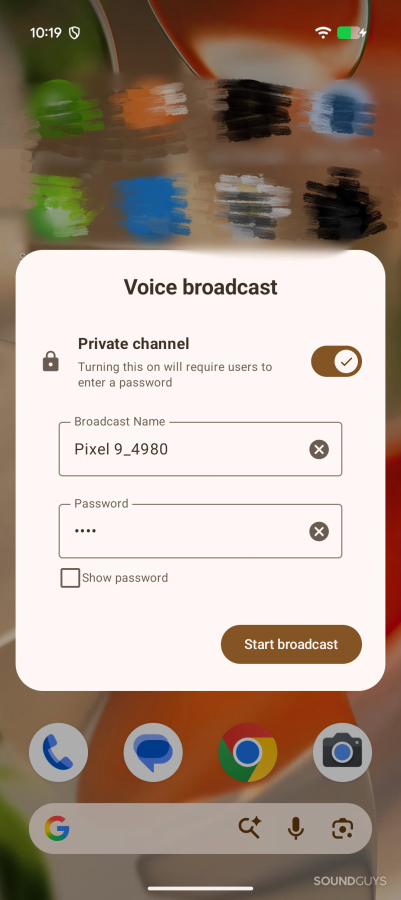
Tapping the new tile activates the phone’s built-in microphone as a live transmitter. Anyone nearby with an Auracast-compatible device can then pick up that audio stream on their own headphones or speaker, provided they have the right receiver hardware. Google has also included a privacy option: users can lock a broadcast behind a password so only invited listeners can join, or leave it open for anyone in range to tune in.
That flexibility opens up some genuinely practical scenarios. A teacher could broadcast a lesson to a room full of students wearing their own earbuds. A tour guide could narrate to a group without shouting over traffic. Someone with hearing loss could pair a compatible hearing aid directly to a friend’s phone during a noisy dinner conversation. None of these require special equipment beyond an Auracast receiver, which is becoming increasingly common in newer headphones and hearing aids.
From a buried toggle to a Quick Settings tile
This isn’t the first sighting of the feature. It first surfaced a few weeks earlier in Android 17 QPR2 Beta 2 under the working name “Voicecast,” and it was first spotted by the tech outlet Android Authority, which found that the toggle only worked after manually enabling it through Developer Options. That was clearly an early, unfinished implementation aimed at testers rather than everyday users.
With Beta 4, Google has renamed the feature “Voice Broadcast” and surfaced it directly in Quick Settings, the panel most Android users pull down dozens of times a day. Moving a feature out of developer options and into a standard toggle is usually a strong signal that a wider rollout isn’t far off, even though Google hasn’t confirmed a stable release date. Given the pattern of QPR beta releases feeding into the next quarterly Pixel feature drop, a public debut in the near future looks likely, though nothing is locked in yet.
How Auracast changes the Bluetooth audio equation
Traditional Bluetooth audio has always been a one-to-one relationship: a phone pairs with a single set of headphones or a single speaker, and that’s the end of the connection. Auracast, built on the Bluetooth Low Energy Audio standard, breaks that limit by allowing an unlimited number of receivers to join the same audio stream at once.
| Feature | Traditional Bluetooth | Auracast broadcast audio |
|---|---|---|
| Connection type | Point-to-point, one device at a time | One-to-many broadcast |
| Listener limit | Typically one or two paired devices | Unlimited compatible receivers in range |
| Public use cases | Personal listening only | Venues, transit hubs, classrooms, hearing aids |
| Privacy control | Not applicable | Optional password-protected broadcasts |
Auracast has already started appearing in airports, gyms, and some public venues as a way to send audio to visitors’ own earbuds instead of relying on shared headphone jacks or ambient speakers. Google folding a broadcasting toggle straight into Pixel’s Quick Settings effectively turns every compatible Pixel owner into a potential Auracast source, not just a listener, which is a meaningful step for adoption of the standard.
What it means for Pixel owners and the wider ecosystem
For everyday users, the appeal of Pixel Voice Broadcast is less about flashy new hardware and more about removing friction from something people already want to do: share audio with more than one listener at a time. Anyone who has tried splitting a single audio jack between two sets of headphones, or awkwardly holding a phone speaker up during a group video call, will understand the gap this fills.
It also fits into a broader pattern of phone makers building broadcast-style audio sharing directly into their platforms, and wireless standards keep evolving on the networking side too, mirroring how mesh Wi-Fi and next-generation connectivity keep pushing toward simpler, more flexible sharing. As more headphones, earbuds, and hearing aids ship with native Auracast support, features like Voice Broadcast become more useful by default rather than requiring extra accessories.
Google hasn’t detailed exactly which Pixel models will get the feature at launch, nor which Android version will carry it to the stable channel. What’s clear is that promoting Voice Broadcast out of a hidden developer menu and into the main Quick Settings panel is a deliberate move toward mainstream use, not just an experimental flag left for testers to stumble across.