A good microphone can make a noticeable difference to the quality of a stream, podcast or recorded video, but not everyone wants to spend time dealing with complicated audio gear. The Elgato Wave:3 MK.2 is designed around that idea, combining a straightforward USB connection with built-in processing that helps produce clean, polished vocals with minimal setup. It is aimed at creators who want professional-sounding audio without turning their desk into a small recording studio.
Elgato has kept the core concept familiar while refining the areas that matter most during everyday use. The Wave:3 MK.2 adds onboard DSP processing, improved protection against clipping and smarter gain control, while still keeping the compact form factor and simple controls that make USB microphones so convenient. These additions are intended to make the microphone easier to manage while also giving users more control over how their voice sounds.
During use, the Wave:3 MK.2 stands out for how quickly it can deliver clear and natural vocal audio without requiring extensive tweaking. Its combination of a condenser capsule, onboard effects and Elgato’s Wave Link software creates a flexible setup for streaming, podcasting, voice chat and general content creation. For anyone looking for a capable desktop microphone that balances ease of use with deeper audio control, it presents a very appealing package.
Table of Contents
Design and Functionality
The Elgato Wave:3 MK.2 keeps a compact desktop-friendly design that feels well suited to modern streaming and content creation setups. Its upright body has a clean, understated appearance, making it easy to place beside a monitor, keyboard or camera without dominating the desk.
The microphone uses a black finish that gives it a professional look and helps it blend easily with most gaming and creator equipment. The styling is simple rather than flashy, which works particularly well for users who prefer a tidy workspace or need their microphone to look presentable on camera.
Its main body measures approximately 4.6 x 8.5 x 16.7 cm without the stand, so it remains relatively compact despite housing its processing hardware and controls internally. With the supplied desktop stand fitted, the complete setup reaches around 21.3 cm high and occupies a footprint of approximately 10 cm in diameter.
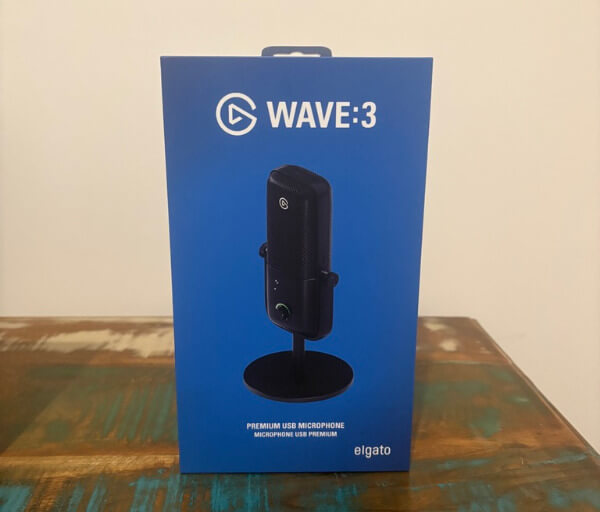


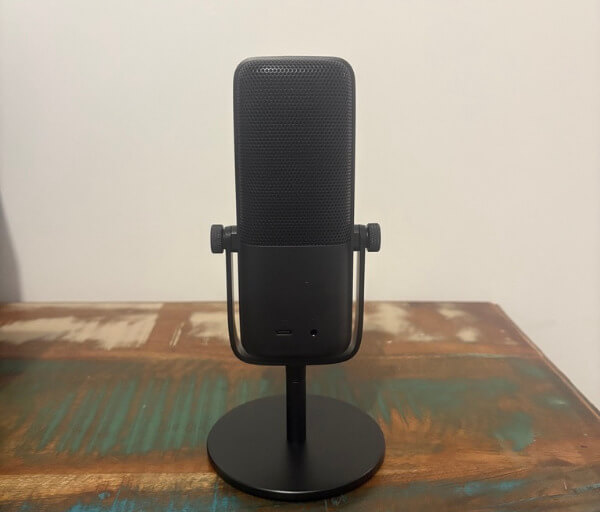
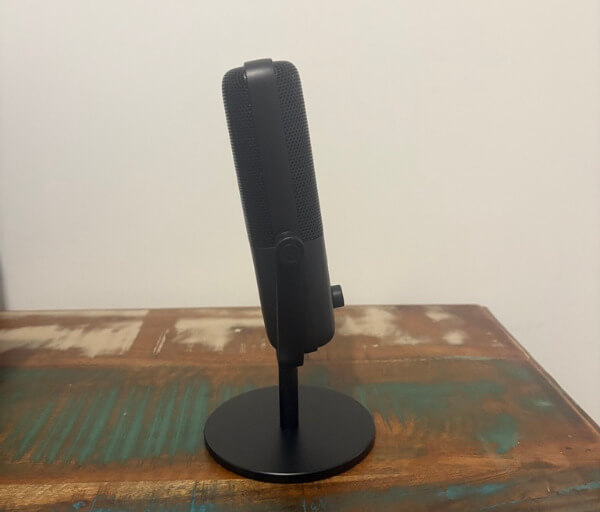


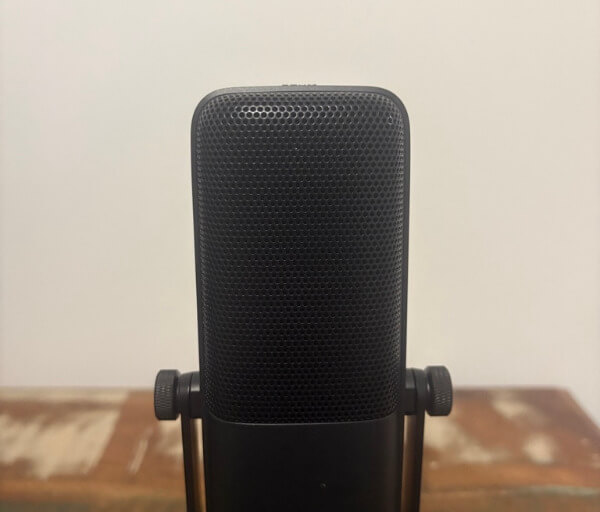
The included stand gives the microphone a stable base for straightforward desk use. At around 570 g with the stand attached, it has enough weight to remain planted during normal operation, while the microphone itself weighs approximately 250 g if it is removed for use with another mounting solution.
A U-shaped mounting bracket supports the microphone body and allows the angle to be adjusted to suit different seating positions. This makes it simple to point the capsule towards your mouth whether the Wave:3 MK.2 is sitting directly on the desk or positioned slightly off to one side.
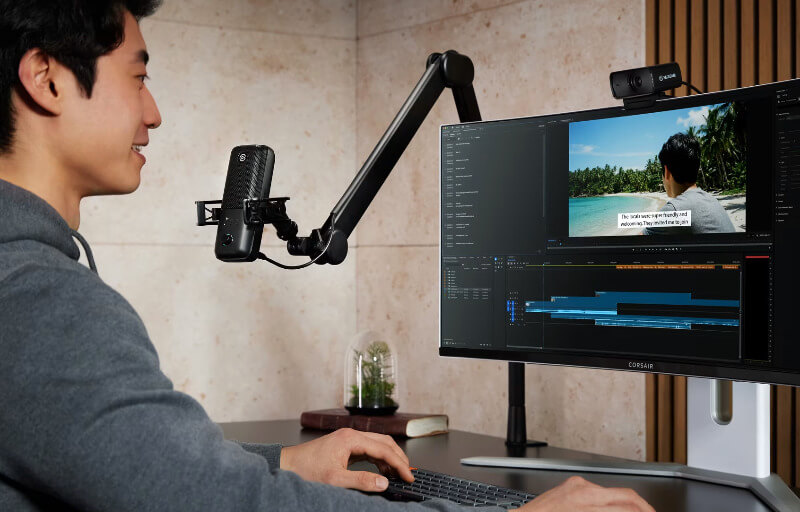
The same mounting arrangement also makes the microphone practical for use with a boom arm. Moving it away from the desktop can help free up workspace and allows users to bring the microphone closer without placing it directly in front of the keyboard or other controls.
One of the most useful design elements is the large multifunction dial positioned on the front. Rather than relying on several separate physical controls, Elgato has consolidated important adjustments into a single interface that keeps the front of the microphone neat and easy to understand.
Indicator icons above the dial show which function is currently being adjusted. This allows users to move between settings quickly without needing to open software every time they want to make a minor change during a stream, recording session or voice chat.
An LED ring surrounding the control dial provides immediate visual feedback. It can show gain information and incoming audio levels, making it considerably easier to see what the microphone is doing without constantly checking meters on a computer screen.
The same lighting system also clearly indicates when the microphone has been muted. This is especially useful during live broadcasts or meetings because a quick glance at the Wave:3 MK.2 can confirm whether audio is active before speaking.
A touch-sensitive mute control is positioned on the top of the microphone, keeping one of the most frequently used functions within easy reach. Muting does not require pressing a mechanical button into the microphone body, so it can be performed quickly without creating unnecessary handling noise.
Connectivity is positioned around the rear, helping cables remain out of sight from the user’s normal viewing position. The USB-C connection handles both power and audio transmission, which keeps installation simple and avoids the need for a separate power adaptor.
Alongside USB-C is a 3.5 mm headphone connection for direct monitoring. This is particularly useful when recording because it allows users to hear their microphone feed with extremely little delay and make adjustments before problems become part of the finished recording.
The Wave:3 MK.2 manages to combine a compact physical design with controls that remain genuinely useful during day-to-day operation. Everything from the integrated monitoring connection to the multifunction dial contributes to a microphone that feels designed around reducing unnecessary complexity while still providing creators with meaningful control over their audio.
Key Features
At the heart of the Elgato Wave:3 MK.2 is a 16 mm condenser capsule designed to capture speech with clarity and detail. Its vocal presentation suits streaming, podcasting, voice-over work and online communication, giving users a versatile microphone that can move easily between different types of content creation.
The microphone records at 24-bit and 48 kHz, providing more than enough resolution for spoken-word content and live broadcasting. This combination gives recordings a clean digital signal while keeping the workflow simple for users who do not need to work with unnecessarily large audio files.
Its frequency response spans from 70 Hz through to 20 kHz, covering the important range of the human voice while maintaining useful detail through the upper frequencies. This helps speech remain intelligible and lively without requiring significant correction before it is ready to publish or stream.
The Wave:3 MK.2 is also capable of handling sound pressure levels up to 130 dBSPL. That added headroom is useful for users with louder voices, animated delivery styles or recording situations where sudden volume changes could otherwise create unwanted distortion.
A dynamic range of 110 dB gives the microphone plenty of room to capture quieter and louder moments without making the recording feel compressed or restricted. This becomes particularly useful during natural conversations where vocal levels can change quickly from one sentence to the next.
One of the most important additions is the onboard Wave FX Processor. Instead of placing all audio processing demands on the connected computer, the microphone can run several useful effects internally, helping simplify the signal chain and keeping important vocal processing close to the source.
These onboard effects include a low-cut filter, expander, compressor and four-band equaliser. Together, they provide a useful foundation for shaping the microphone’s output, controlling unwanted low-frequency noise, managing dynamics and adjusting the tonal balance of a voice.
Voice Tune adds another layer of vocal adjustment and is designed to help users refine how their voice is presented. Rather than requiring advanced audio knowledge, it provides an accessible way to improve vocal character and make speech sound more polished.
Clipguard 2.0 is another valuable part of the Wave:3 MK.2’s feature set. It is designed to protect recordings from sudden peaks that could otherwise push the signal into clipping, which is particularly helpful during enthusiastic streams, podcasts or live commentary.
Auto Gain further reduces the amount of manual setup required. The microphone can analyse the user’s voice and help establish an appropriate gain level, making it much easier for less experienced users to begin with sensible settings instead of relying on trial and error.
Wave Link software expands the microphone beyond its physical controls by giving users access to routing, effects and more detailed configuration from the computer. This creates a flexible environment for combining microphone audio with game sound, music, browser audio and other sources used during content creation.
The ability to store settings on the microphone itself is particularly useful for users who move between systems. Rather than rebuilding a preferred setup every time the Wave:3 MK.2 is connected elsewhere, important configuration choices can remain with the microphone and make the transition between machines much more convenient.
Experience Using the Product and Performance
Using the Elgato Wave:3 MK.2 is refreshingly straightforward from the moment it is connected. The USB-C setup keeps the process simple, and the microphone is quickly ready for streaming, recording, voice chat or podcast work without needing additional audio hardware.
One of its strongest qualities is how natural voices sound through the microphone. Speech comes through with a good balance of warmth, clarity and detail, giving recordings a polished character without making the speaker sound artificially processed.
The 16 mm condenser capsule does a particularly good job of preserving the finer elements of speech. Consonants remain clear, quieter details are easy to hear and vocal texture comes through without the result becoming excessively sharp or clinical.
That balance makes the Wave:3 MK.2 particularly well suited to longer-form content. Podcast conversations, commentary and recorded narration remain comfortable to listen to because the microphone retains enough detail to sound engaging without pushing the upper frequencies too aggressively.
Placement is also relatively forgiving when the microphone is positioned sensibly. Keeping it roughly 10 to 20 cm from the mouth provides a strong, direct signal, while slightly greater distances can still work well when the microphone remains properly aligned with the speaker.
This flexibility is useful for streamers who do not necessarily want a microphone taking up a large part of the camera frame. The Wave:3 MK.2 can be positioned a little further away and still maintain convincing vocal quality, provided the capsule remains aimed towards the user.
As expected with a directional condenser microphone, moving too far away from the front of the capsule changes the sound more noticeably. Correct positioning therefore remains important, but the microphone gives users enough freedom to find a practical arrangement around monitors, cameras and other desktop equipment.
The improved maximum sound pressure handling is valuable during more animated sessions. Raising your voice during a game, reacting enthusiastically on stream or suddenly laughing does not immediately push the microphone into harsh distortion, which makes it easier to speak naturally.
Clipguard 2.0 adds another layer of reassurance during these louder moments. Instead of forcing users to constantly watch their levels, the system helps manage sudden peaks before they become a problem in the finished audio.
This is especially useful for live content where there is no opportunity to repair a clipped section later. Knowing that the microphone has additional protection against unexpected volume spikes makes it easier to focus on the stream or conversation rather than constantly monitoring meters.
Auto Gain is similarly helpful for getting started quickly. Rather than spending time repeatedly speaking, adjusting gain and checking levels, users can allow the system to analyse their voice and establish a practical starting point.
The result is a microphone that feels approachable even for users who are not particularly experienced with audio equipment. More advanced creators can still fine-tune settings manually, but newcomers are not forced to understand gain structure before they can achieve a useful recording.
The onboard processing is another major strength in everyday use. Having core effects handled directly by the microphone reduces reliance on a complicated chain of desktop plug-ins and gives the Wave:3 MK.2 a more self-contained feel.
The low-cut filter is useful for cleaning up unwanted low-frequency energy that can creep into recordings. Desk vibrations, distant rumbles and other low-end noise can be reduced before they become distracting parts of the vocal track.
The expander can also help keep quieter background sounds under better control. When configured appropriately, it makes pauses between sentences cleaner without making speech sound unnaturally chopped or heavily gated.
Compression is particularly useful for maintaining a more consistent vocal level. Softer phrases remain easier to hear while louder sections are controlled more effectively, helping streams and recordings feel more professionally balanced.
The four-band equaliser gives users additional flexibility to shape the microphone around their own voice. Small adjustments can be used to add body, reduce unwanted resonance or improve intelligibility without needing external audio software.
Voice Tune is one of the more interesting processing tools because it provides another way to refine vocal character without requiring deep technical knowledge. Used in moderation, it can enhance the presentation of a voice while still preserving a natural quality.
This ability to maintain the speaker’s individual character is one of the Wave:3 MK.2’s more appealing traits. Instead of forcing every user towards the same heavily processed sound, it provides tools that can support and refine the voice that is already there.
Direct headphone monitoring also works well in practice. Connecting headphones to the 3.5 mm output makes it possible to hear the microphone while speaking, which is useful for checking positioning, volume and processing before starting a recording.
Being able to monitor processed audio is particularly helpful because it gives users a better representation of what an audience will actually hear. This makes adjusting EQ, compression and other effects far easier than relying solely on raw microphone monitoring.
Wave Link adds considerably more flexibility once multiple audio sources become involved. Streamers can manage microphone audio alongside games, music, browser content and communication applications from a single environment, making complex creator setups easier to control.
The software also makes experimenting with different processing settings much more accessible. Users can gradually build a vocal profile that suits their voice and room rather than being locked into a single factory sound.
During general desktop use, the physical controls remain useful enough that Wave Link does not need to stay open constantly. Gain changes, monitoring adjustments and muting can all be handled directly from the microphone when only a quick change is needed.
The LED feedback helps enormously here because it provides immediate confirmation of what is happening. Being able to see input activity, gain information and mute status directly on the front of the microphone reduces the need to keep checking software windows.
After extended use, the Wave:3 MK.2 feels particularly well suited to creators who want strong vocal performance without turning microphone setup into a separate hobby. Its combination of natural sound, useful onboard processing, straightforward controls and flexible software makes it easy to achieve polished results while still leaving plenty of room for personal adjustment.
Conclusion
The Elgato Wave:3 MK.2 is a polished USB microphone that combines strong vocal quality with an impressively simple setup. Its natural sound, compact design and useful physical controls make it a comfortable fit for streaming, podcasting, voice-over work and general content creation.
Onboard DSP processing is one of its biggest strengths, giving users access to practical tools such as compression, EQ, filtering and Voice Tune without relying entirely on the connected computer. Auto Gain and Clipguard 2.0 also make it easier to achieve reliable results, particularly for users who do not want to spend time manually managing every part of their audio chain.
Wave Link adds further flexibility for creators who need to manage multiple audio sources, while direct monitoring and on-device settings make day-to-day use more convenient. The microphone provides enough depth for experienced users to fine-tune their sound, yet remains approachable for anyone moving into higher-quality recording for the first time.
For creators who want clean, detailed and natural-sounding vocals without building a complicated studio setup, the Wave:3 MK.2 is an excellent option. It delivers an appealing balance of sound quality, smart processing and ease of use that makes it well suited to both everyday creators and more demanding streaming or recording workflows.