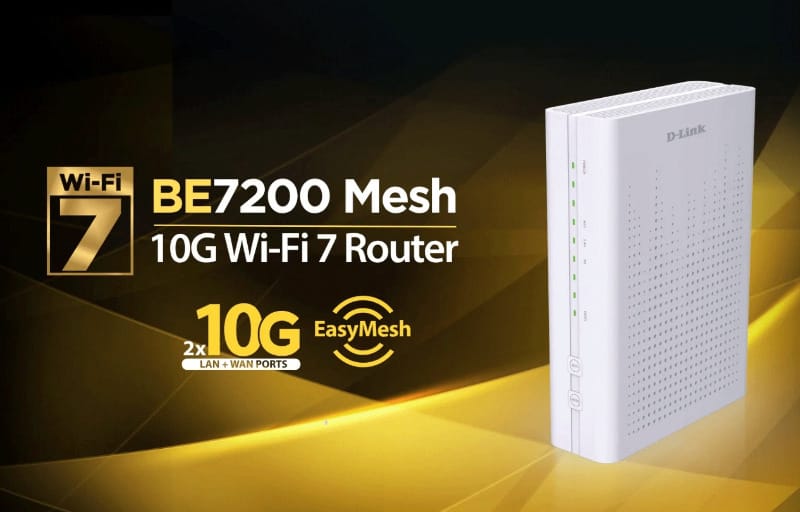
Home internet plans have quietly outpaced the routers sitting on top of them, and the D-Link BE7200 10G Wi-Fi 7 Mesh Router is built squarely with that gap in mind. Marketed as the DPN-BE7212GR, it pairs the latest Wi-Fi 7 wireless standard with a genuinely rare inclusion at this level: a dedicated 10 Gigabit WAN port sitting alongside a matching 10 Gigabit LAN port. For Australian households edging towards faster NBN tiers or running fast local storage, that combination is worth a closer look.
Table of Contents
D-Link BE7200 review summary
The D-Link BE7200 Wi-Fi 7 Mesh Router pairs strong wireless performance with a rare dual 10 Gigabit WAN and LAN port combination, making it well suited to Australian households moving to faster NBN plans or running fast local storage. It handles multiple simultaneous devices smoothly thanks to Multi-Link Operation, OFDMA and MU-MIMO, while WPA3 security, EasyMesh expansion and a handy Smart VPN feature round out a genuinely useful feature set. Setup is quick, coverage is solid for typical homes, and wired throughput on the 10G LAN port delivers a noticeable step up for NAS or workstation use.
Highlights
- Dual 10 Gigabit WAN and LAN ports
- Wi-Fi 7 with Multi-Link Operation
- Smooth multi-device streaming and video calls
- WPA3 security and EasyMesh expansion
- Smart VPN without client software
Beyond the headline speed figures, this router leans on Wi-Fi EasyMesh to stretch coverage across larger homes, supports WPA3 encryption out of the box, and bundles a Smart VPN feature that lets connected devices reach a remote VPN server without installing any extra software. It is a router built to cover the basics well while adding a couple of genuinely useful extras on top.
This review walks through the design, the standout features, and what day to day life looks like with the BE7200 running as the main router in a home network. It covers setup, wireless performance, wired throughput, mesh expansion, and how the companion app and web interface hold up once the initial excitement of unboxing wears off.
Design and Functionality
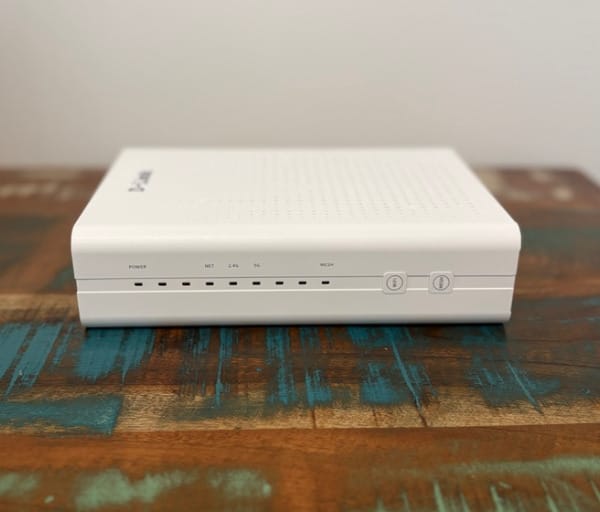
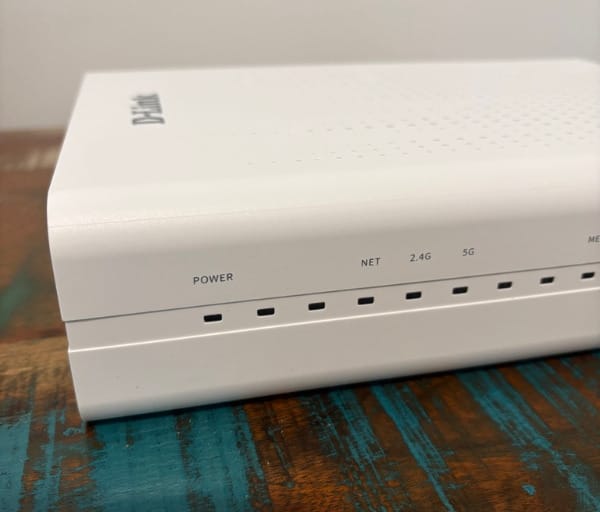
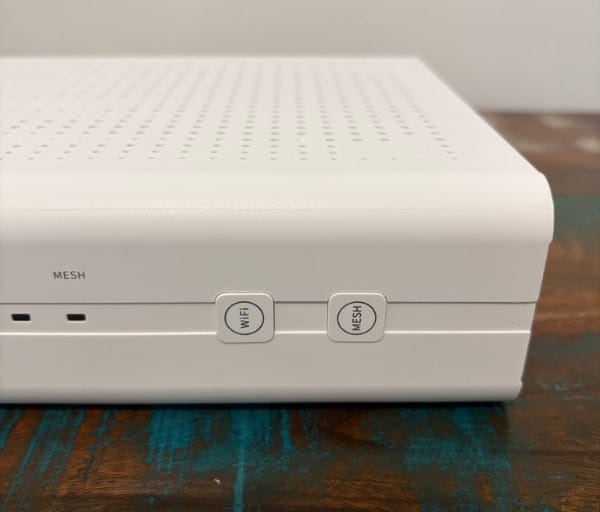
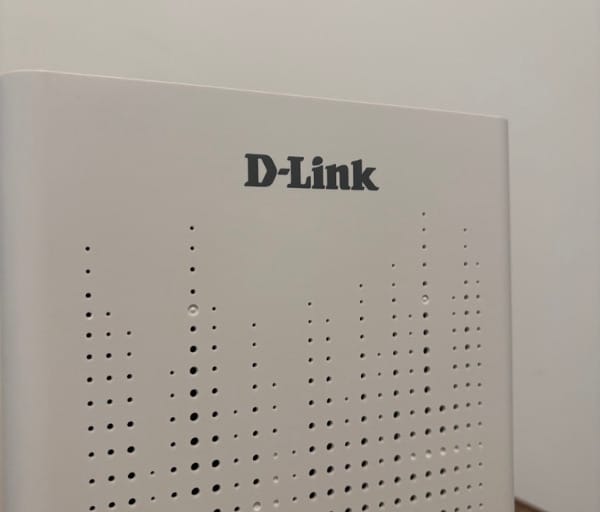
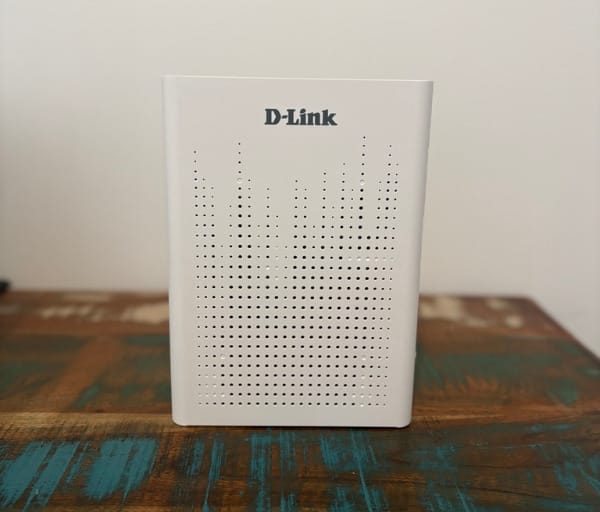
At first glance, the BE7200 doesn’t look like it’s trying to win a design award, and that’s very much the point. Measuring 235 x 170 x 60mm, it’s a compact, low profile unit finished in matte white with a geometric grille pattern across the top for ventilation.
There are no jutting antennas or aggressive angles here. Compared with the gaming-styled routers that dominate a lot of the Wi-Fi 7 conversation, this is a device designed to blend into a shelf, TV unit, or home office corner without drawing attention to itself.
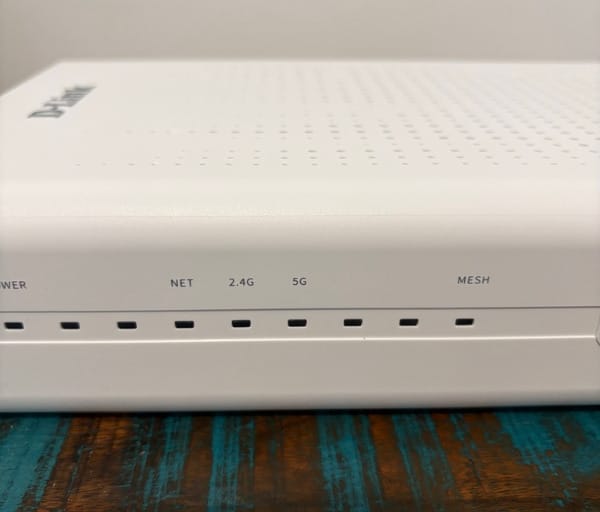
Small status LEDs on the front give a quick read on internet connectivity, wireless bands, and LAN activity, which is handy for spotting a dropped connection without needing to open the app. The plastic shell feels solid enough for a device that’s likely to sit untouched for years once it’s installed.
Inside, four high-gain antennas with beamforming do the heavy lifting rather than external whip antennas. Beamforming allows the router to direct signal more precisely towards connected devices rather than broadcasting evenly in every direction, which helps with both range and consistency in typical home layouts.
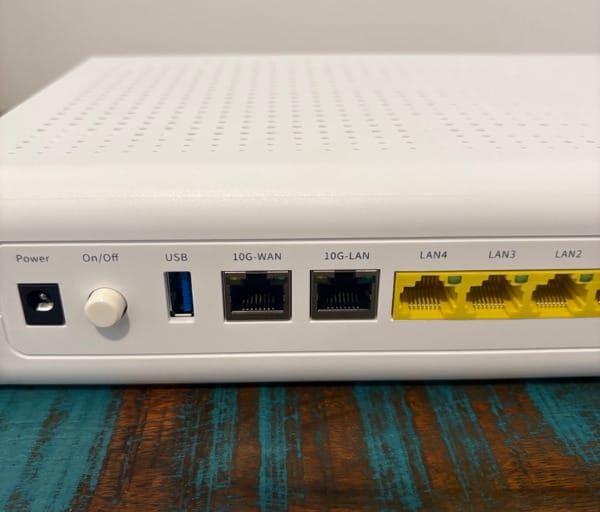
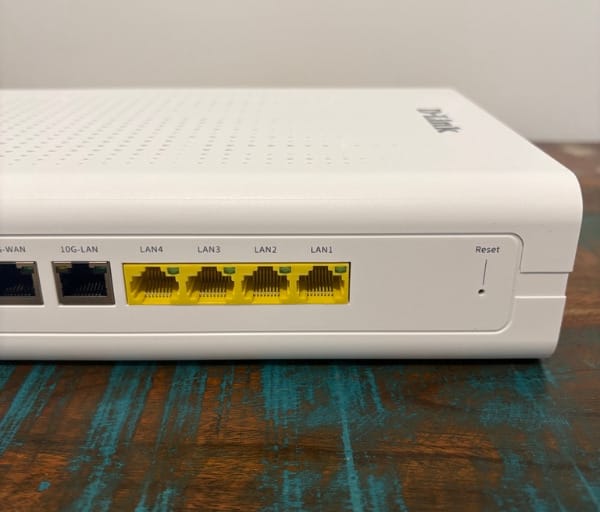
Flip the unit around and the rear panel tells most of the hardware story. There’s a 10 Gigabit WAN port, a 10 Gigabit LAN port, four standard Gigabit LAN ports, and a USB 3.0 port, giving five wired network connections in total plus USB expansion.
That dual 10 Gigabit arrangement is the real point of difference here. Most routers in this class still top out at Gigabit or, at best, a single 2.5 Gigabit port, so having both a 10G WAN and a 10G LAN port on the same unit is uncommon at this end of the market.
The practical upside shows up for anyone running network-attached storage, a multigig switch, or a fast desktop PC that benefits from more than a Gigabit ceiling. Files move between the router and that hardware without the usual bottleneck a single Gigabit port would introduce.
The USB 3.0 port adds further flexibility, letting a hard drive or printer be shared across the network directly through the router rather than needing a separate device to handle it. It’s a small inclusion but a genuinely useful one for households that don’t already run a dedicated NAS.
Driving all of this is a quad-core processor, which D-Link positions as delivering the performance headroom needed to juggle mesh coordination, wireless traffic management, and VPN encryption at the same time without the router itself becoming the bottleneck.
Cooling is handled passively through the vented top panel, and there’s enough clearance built into the design that the unit doesn’t need to sit in open air to avoid overheating, though a shelf with a little breathing room is still sensible.
The router is designed to sit flat on a shelf or desk rather than being wall-mounted, and the port layout on the rear panel is spaced generously enough that cable management doesn’t become a fiddly exercise, even with all five Ethernet ports and the USB port in use.
Mesh expansion is handled through the Wi-Fi EasyMesh standard rather than a closed, proprietary protocol. That means additional nodes from other EasyMesh-certified brands can, in theory, be added to extend coverage, not just matching D-Link hardware.
The trade-off with an open standard like EasyMesh is that it can be a touch slower to hand off between nodes than some proprietary mesh systems built entirely in-house. For most households, though, the extra flexibility of being able to mix and match hardware is a fair swap.
Network management is split across two paths: the D-Link Wi-Fi Assist mobile app for everyday adjustments, and a full web interface for anyone wanting deeper control. This two-tier approach is common across the router market and gives casual users a simple front door while keeping advanced settings available.
WPA3 encryption is baked into the design as the default security protocol, which matters more than it might sound given how many budget routers still ship with older WPA2 as the primary option.
Taken as a whole, the physical design doesn’t try to be flashy, and that restraint works in its favour. It’s a router happy to sit visible in a living room or hallway without looking like a piece of gaming hardware that’s wandered into the wrong room.
Key Features
Wi-Fi 7, built on the 802.11be standard, is the headline feature, and it brings Multi-Link Operation to the table. MLO allows a compatible device to connect across multiple wireless bands at once, which improves reliability and cuts down on interference compared with older single-band connections.
D-Link rates the BE7200 with combined wireless speeds of up to 7200Mbps, made up of 1376Mbps on the 2.4GHz band and 5764Mbps on the 5GHz band. That’s a substantial jump over the Wi-Fi 6 routers most Australian homes are still running.
OFDMA and MU-MIMO both feature here as well, and together they let the router serve multiple connected devices data at the same time rather than queuing requests one after another. In a household full of phones, laptops, smart TVs, and smart home gadgets, that translates to less waiting and less congestion during busy periods.
The 10 Gigabit WAN port is the standout inclusion for anyone eyeing off faster NBN plans. As fibre connections continue climbing past the old Gigabit ceiling, a WAN port capable of handling 10 Gigabit input means the router itself won’t be the limiting factor for years to come.
Matching that is a 10 Gigabit LAN port, which is where this router earns a lot of its appeal for enthusiasts. Feeding a NAS, a workstation, or a multigig switch through that port opens up local transfer speeds well beyond what a typical home network can currently achieve.
Four additional Gigabit Ethernet ports round out the wired side, covering everyday devices like game consoles, smart TVs, or desktop PCs that don’t need the extra headroom of the 10G port but still benefit from a stable wired connection.
The USB 3.0 port supports network drive sharing, giving households an easy way to create a basic shared storage point or serve up a printer across every connected device, without buying a separate NAS box.
WPA3 support brings the current generation of wireless security to the table, offering stronger encryption and better protection against common attack methods compared with the WPA2 standard still found on plenty of older routers.
Wi-Fi EasyMesh support means the BE7200 can act as the anchor point for a wider mesh system, extending coverage into larger homes or properties with awkward layouts, using either D-Link EasyMesh nodes or compatible third-party hardware.
Smart VPN is one of the more interesting inclusions on the feature list. It allows devices on the home network to connect through to a remote VPN server without needing VPN client software installed individually, while still supporting a normal internet connection running alongside it.
Guest network functionality is built in as standard, giving visitors internet access without exposing the main network or any connected smart home devices.
Parental controls extend across scheduling, custom device profiles, and internet access control, giving families a way to manage screen time or restrict access for specific devices without needing third-party software.
Firmware handling covers OTA updates, automatic updates, and manual updates, giving users the choice between a hands-off approach or more direct control over when updates are applied.
The router is built to work across the range of NBN and UFB connection types available in Australia and New Zealand, including FTTP, FTTC, HFC, satellite, and fixed wireless, so it isn’t locked to a single connection method regardless of how a home is connected to the network.
Experience Using the Product and Performance
Setting Up the Router
Getting the BE7200 out of the box and onto a shelf is the easy part. The default wireless network name and password are printed directly on the underside of the unit, which is a small but appreciated detail for anyone who prefers not to rely purely on an app.
The D-Link Wi-Fi Assist app walks through a guided setup process once the router is powered on, asking for basic details about the internet connection type before pulling the network online.
There’s no NFC tap-to-connect or one-button pairing here, so joining the router’s network for the first time means manually searching for it and entering the printed password, a slightly old-fashioned step compared with some rivals.
Once connected, the app moves quickly into a dashboard showing connected clients split across LAN, 2.4GHz, and 5GHz, with the option to block individual devices straight from that view.
For most households, the whole process from unboxing to a working internet connection takes only a few minutes, even with the manual network joining step included.
Everyday Wi-Fi Performance
Day to day, the BE7200 handles a mixed household of laptops, phones, smart speakers, and streaming devices without any noticeable strain. Multiple devices pulling data at once didn’t produce the kind of slowdown that older single-band routers are prone to.
Multi-Link Operation shows its value during busier periods, when several devices are active simultaneously. Video calls, downloads, and streaming running side by side didn’t produce the stutter that can creep in on routers without MLO support.
Streaming high-resolution video, including 4K content, ran smoothly with no buffering, and the extra headroom from Wi-Fi 7 means 8K streaming should be well within reach as more content and hardware support becomes available.
Video calls held up consistently across testing, without the dropped frames or audio glitches that can happen when a network gets congested during peak evening usage.
Coverage from a single unit is solid for a typical two to three bedroom home, reaching comfortably into most rooms without needing an additional node, though larger or multi-storey homes will benefit from adding EasyMesh extenders.
Band steering worked as expected, automatically shifting devices to whichever band suited them best, though as with most band steering implementations, a handful of older smart home gadgets occasionally needed a manual nudge back to 2.4GHz.
Wired and 10G Performance
Testing file transfers between a connected NAS and a laptop over the 10 Gigabit LAN port showed a clear step up compared with a standard Gigabit connection, with large file transfers completing noticeably faster and without any slowdown partway through.
Australian NBN plans currently top out around 2Gbps, so the full capability of the 10 Gigabit WAN port isn’t something most households will max out today. That said, having the headroom built in now means the router won’t need replacing the moment faster plans become widely available.
For anyone running a multigig switch elsewhere in the home, that 10G LAN port becomes the anchor point for a genuinely fast local network, rather than a bottleneck sitting between fast devices.
The four Gigabit ports handled everyday wired devices, including a games console and a desktop PC, without any issues, delivering consistent throughput for standard wired connections.
Across an extended testing period, the wired backbone of the router proved dependable, with sustained transfers running without drops or the kind of thermal throttling that can affect cheaper hardware under load.
Mesh Expansion and Coverage
Adding an EasyMesh-compatible node to extend coverage into a larger space produced a noticeable improvement in signal strength in previously weak spots, without requiring a complicated setup process.
Roaming between the main router and an additional node felt seamless during testing, with connected devices switching over without a manual reconnect or a dip in speed as they moved through the home.
Both wired and wireless backhaul options are supported for connecting additional nodes, giving flexibility depending on whether Ethernet cabling is already run through the property or not.
The open EasyMesh standard means non-D-Link hardware can theoretically join the same mesh network, which is a genuinely useful option for households that already own compatible gear from another brand and don’t want to start from scratch.
App and Web Management Experience
The D-Link Wi-Fi Assist app presents a clean, straightforward dashboard for everyday tasks, covering connected device management, guest network toggling, and a quick setup wizard for new installs.
Basic functions are easy to find and use, and the client list view makes it simple to spot an unfamiliar device on the network or check which band a particular gadget is connected to.
Deeper settings, including parental controls and VPN configuration, require switching over to the full web interface, which opens up a more complete set of options than the app alone provides.
The web interface covers everything from advanced Wi-Fi settings through to firmware update scheduling, and it’s where most of the router’s genuinely powerful features live.
There’s room for polish in a few corners of both the app and web interface, but the core functionality needed to run and monitor a home network is all present and reasonably easy to locate once you know where to look.
Security, VPN and Parental Controls in Practice
WPA3 encryption operates quietly in the background, requiring no manual configuration to benefit from the stronger security it provides over older standards.
Setting up Smart VPN involves entering the details of a remote VPN server through the web interface, after which any device on the home network can route through it without needing separate VPN software installed, while still allowing a standard internet connection to run alongside it.
The guest network kept visitor devices isolated from the main network during testing, which is exactly the behaviour you want when friends or family connect their phones while visiting.
Parental controls proved straightforward to configure, with scheduling and custom profiles letting different rules apply to different devices, such as limiting a kid’s tablet to set hours in the evening.
For families managing a household full of devices with different needs, the combination of guest networking, scheduled access, and per-device profiles gives a reasonable level of control without needing to dig through overly technical menus.
Conclusion
The D-Link BE7200 10G Wi-Fi 7 Mesh Router earns its place as a strong option for Australian households wanting to get ahead of where NBN speeds are heading, without needing to compromise on everyday Wi-Fi performance right now.
Its dual 10 Gigabit ports remain the standout feature, giving it genuine appeal for anyone running fast local storage or planning around faster fibre plans, while Wi-Fi 7 with Multi-Link Operation keeps everyday wireless use smooth across a busy household.
EasyMesh support adds welcome flexibility for larger homes, and the inclusion of Smart VPN, solid parental controls, and WPA3 security rounds out a feature set that covers far more than just raw speed. Full specifications and further detail are available on the official D-Link BE7200 product page.
For anyone building a network around future-proofed wired speed and dependable Wi-Fi 7 coverage, this router makes a compelling case for a spot on the shelf.