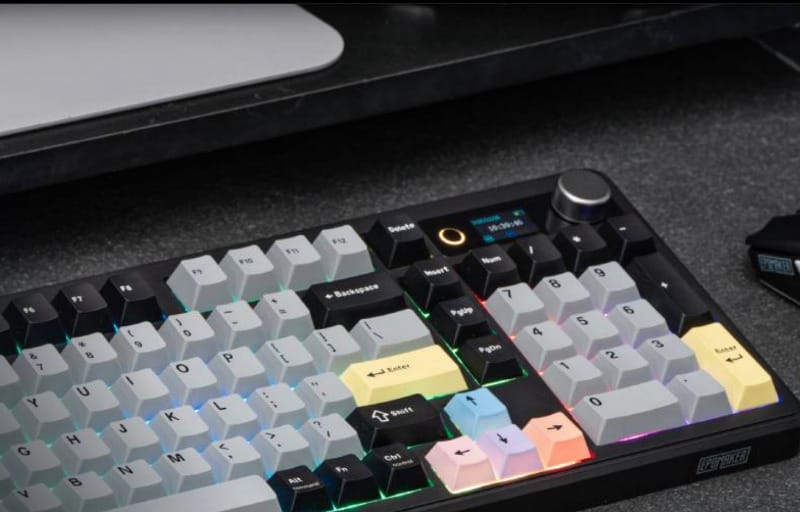
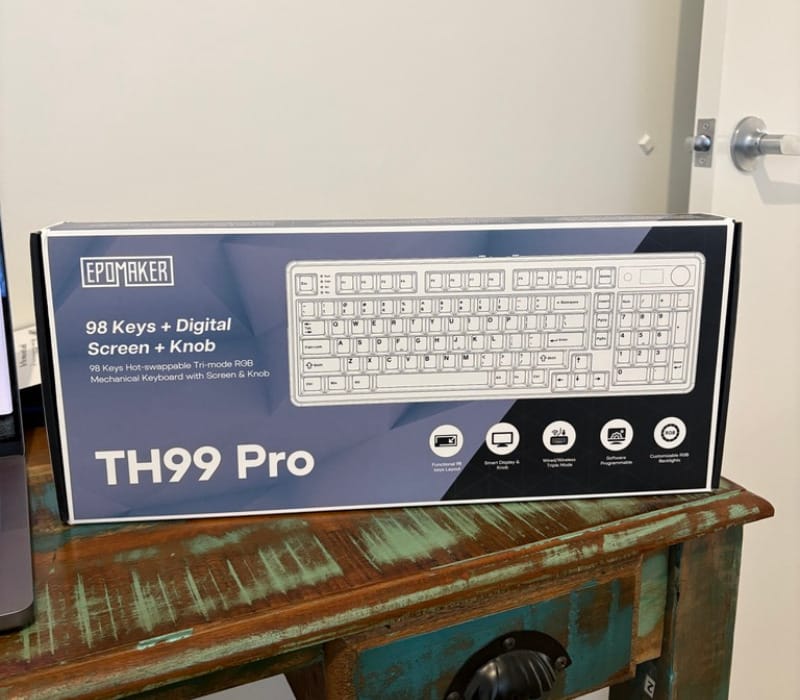
Mechanical keyboards have a habit of turning a mundane task into something genuinely enjoyable, and the Epomaker TH99 Pro is one of those keyboards that makes a strong case for switching away from whatever stock keyboard came bundled with a laptop or desktop. This particular unit arrives in the black and grey colourway, pairing a subdued exterior with a splash of personality once the RGB lighting and smart display are switched on. It sits in that sweet spot between a full-sized board and a compact 75 percent layout, offering a dedicated number pad without the bulk of a traditional full-size keyboard.
Review summary
Epomaker TH99 Pro
The Epomaker TH99 Pro pairs a compact 1800-layout design with genuinely thoughtful features, including hot-swappable sockets, a customisable TFT display and triple connectivity options. Build quality is consistently solid, from the double-shot PBT keycaps to the pre-lubed stabilisers, and the Sea Salt Silent Switch V2 delivers a quiet yet satisfying typing experience. It suits home office, gaming and hybrid desk setups alike, offering a well-rounded package rather than a checklist of unused extras.
Highlights
- ✓Quiet, smooth Sea Salt Silent Switch V2
- ✓Hot-swappable sockets for future customisation
- ✓Customisable TFT display with GIF support
- ✓Wired, Bluetooth and 2.4G connectivity with physical switch
- ✓Durable double-shot PBT keycaps in Cherry profile
What sets the TH99 Pro apart from a lot of the competition is not just its typing feel but the sheer amount of customisation on offer. It ships with Epomaker’s own Sea Salt Silent Switch V2, a switch designed specifically to keep noise down without sacrificing the tactile satisfaction that makes mechanical keyboards so addictive. Add in hot-swappable sockets, a small TFT screen capable of displaying custom GIFs, and three different ways to connect it to a computer, and there is a lot more going on here than a typical office keyboard.
This review takes a close look at how the TH99 Pro is built, what features it brings to the table, and how it holds up during day-to-day typing, gaming and general desk use. Anyone weighing up whether this keyboard suits a home office, a gaming setup or a hybrid of both should come away with a clear picture of what to expect.
Table of Contents
Design and Functionality
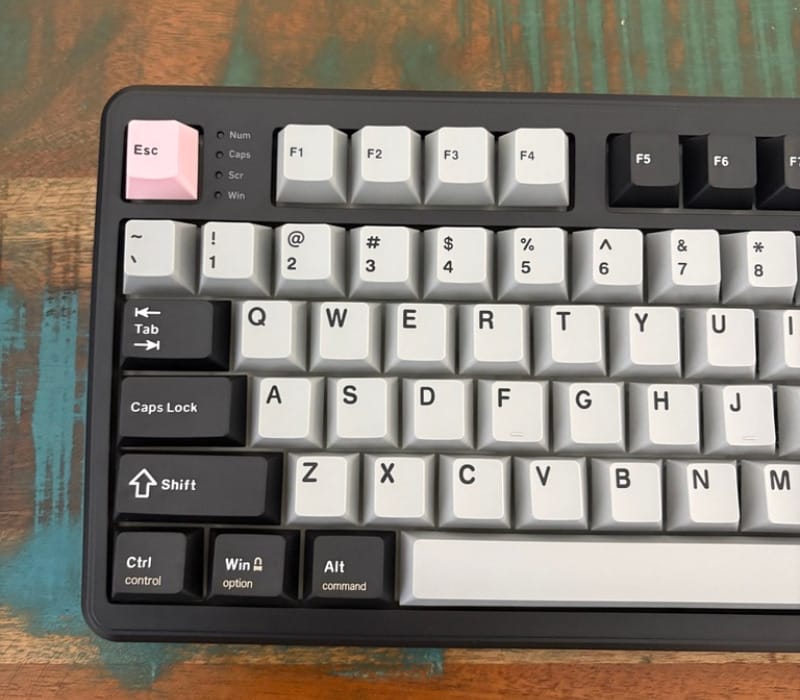
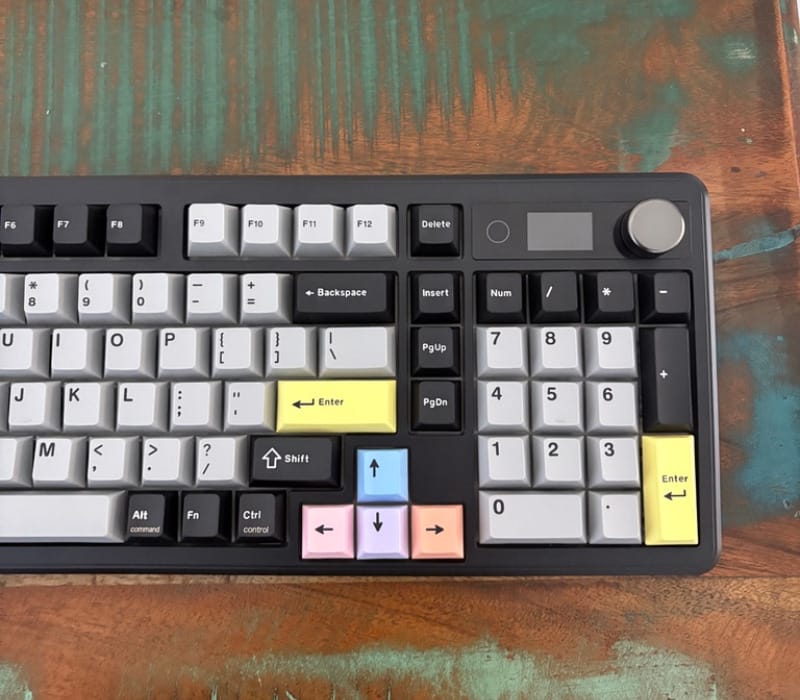
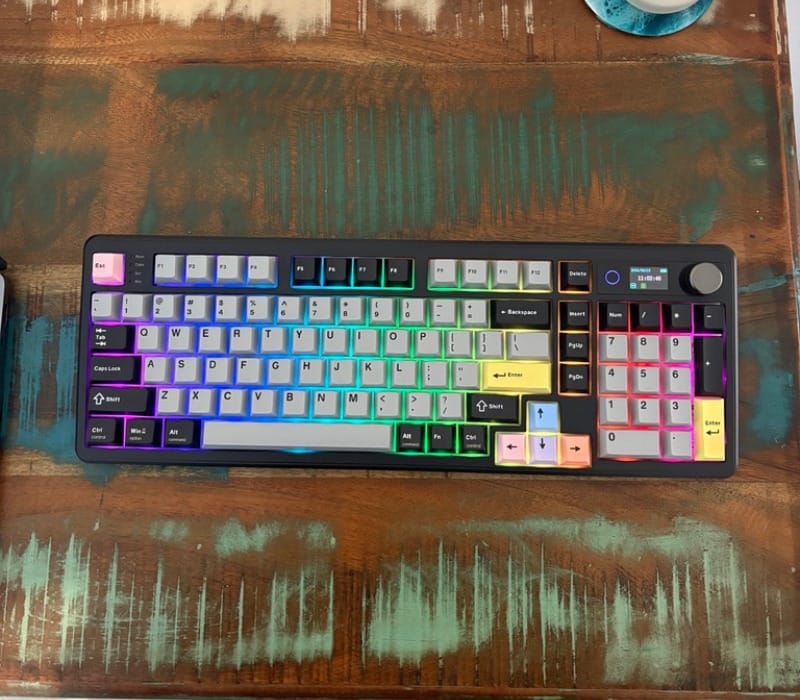
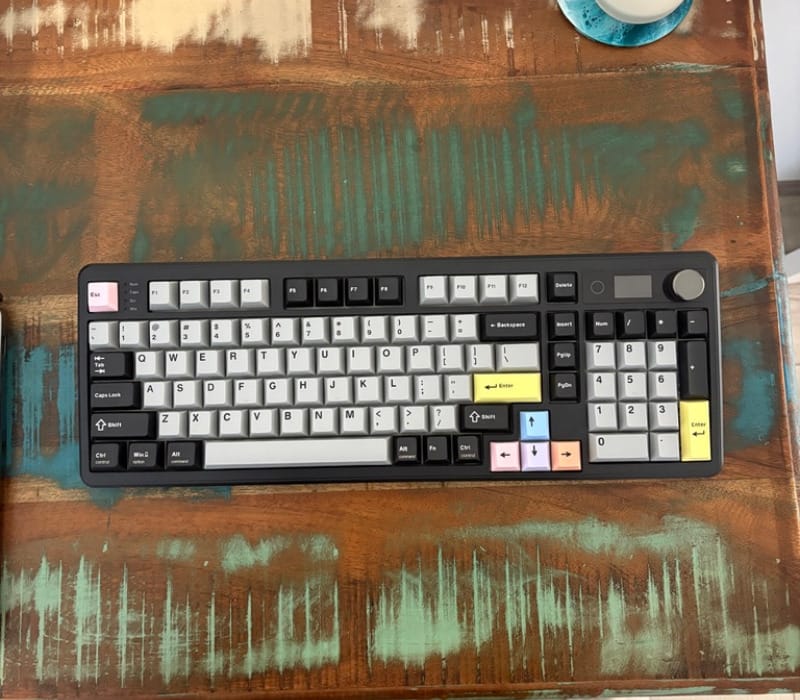
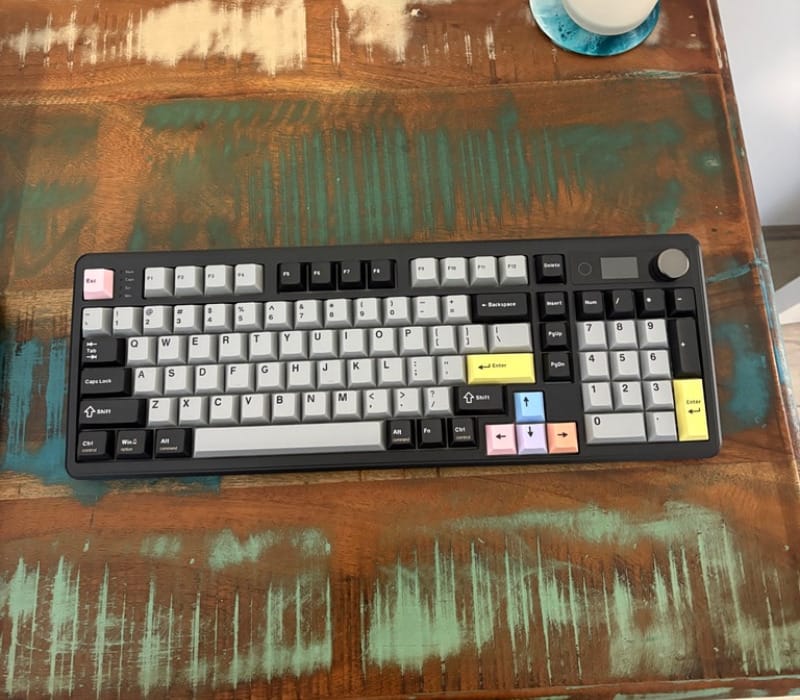
The TH99 Pro uses a 98-key layout, often referred to as an 1800 compact layout, which squeezes a full number pad and arrow cluster into a footprint noticeably smaller than a conventional full-size board. It manages this by tightening the spacing around the navigation cluster without making any of the keys feel cramped or oddly placed.
The case itself is built from high grade ABS plastic rather than metal, which keeps the overall weight manageable while still feeling solid on a desk. It does not wobble or flex under normal typing pressure, and the plastic has a pleasant matte texture in the black and grey colourway that resists fingerprints better than a glossy finish would.
Dimensions come in at roughly 41 by 14.5 by 4.7 centimetres, which is compact enough to leave room for a mouse mat and other desk accessories without dominating the workspace. For anyone who has previously used a full-size keyboard and found it too wide, this layout strikes a sensible middle ground.
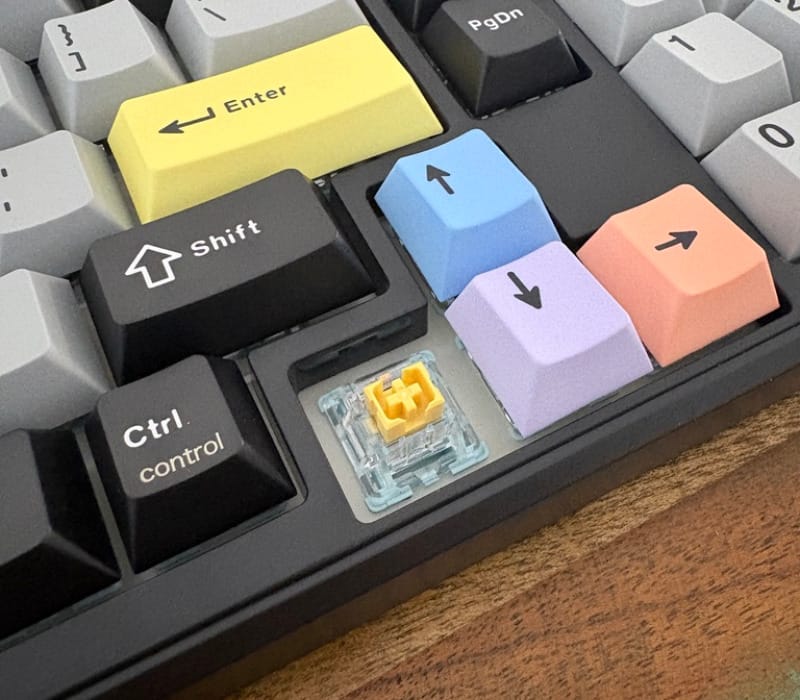
Underneath the keyboard sit adjustable kickstand feet, allowing the typing angle to be raised for those who prefer a steeper incline. They grip the desk securely at both the flat and raised positions, so there is no unwanted sliding during faster typing sessions or gaming.
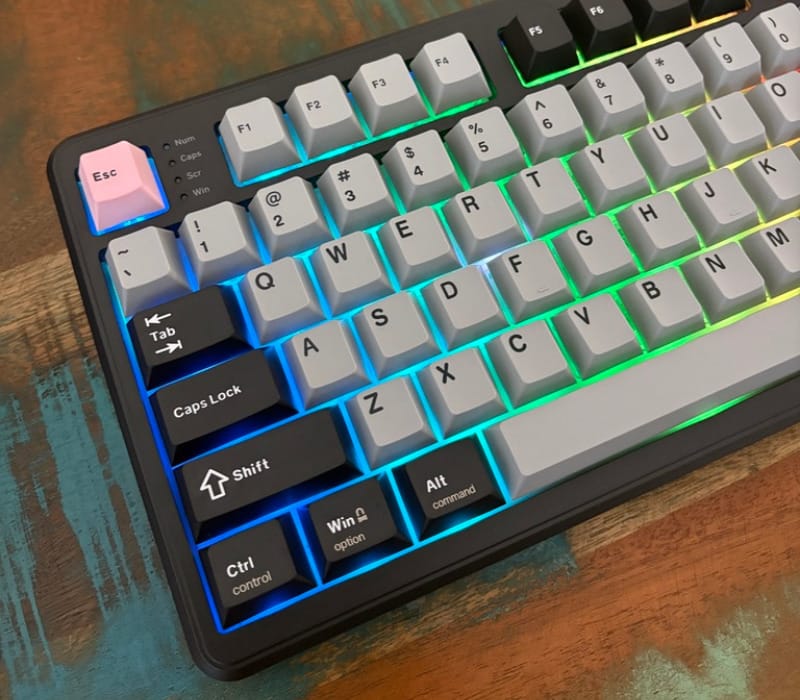
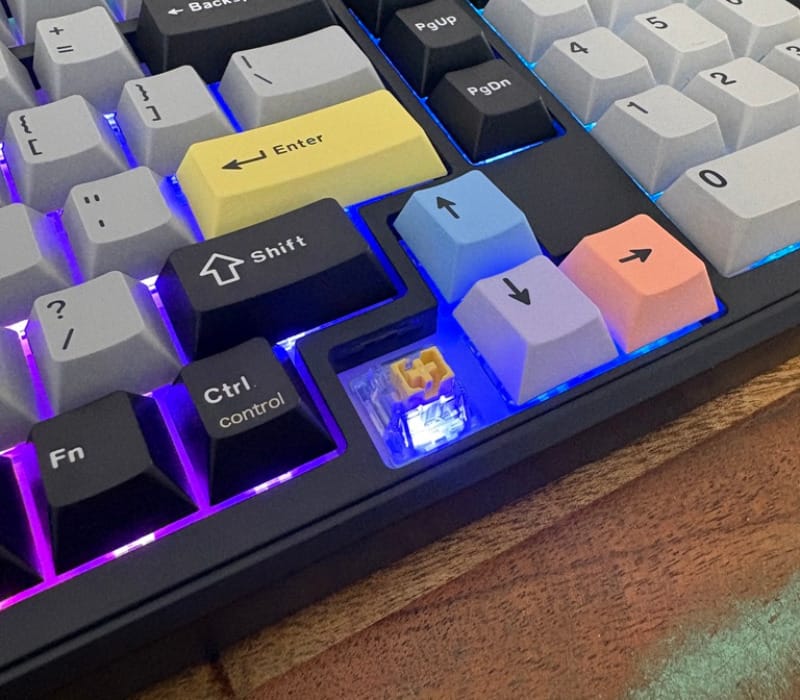
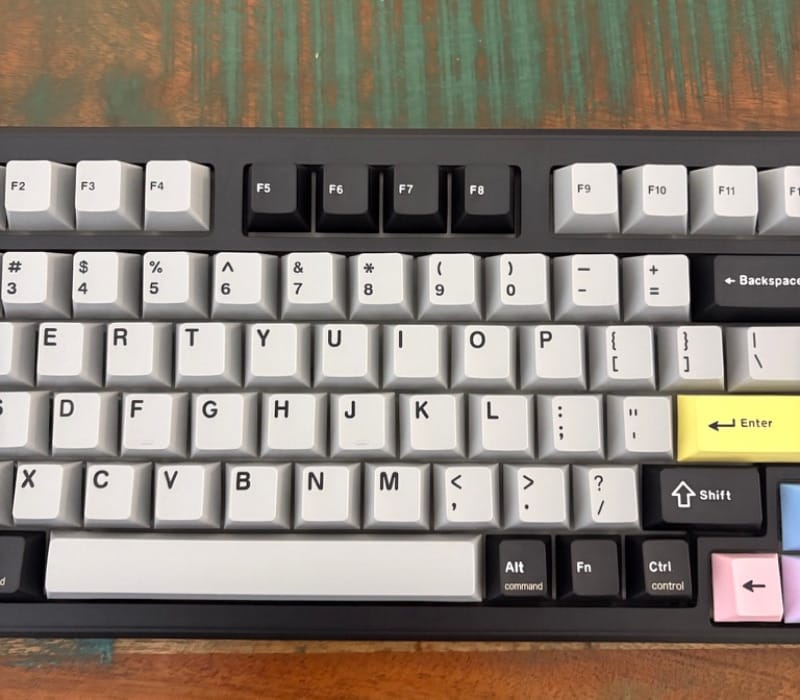
The keycaps are made from PBT plastic using the double-shot manufacturing method, which embeds the legends through the material rather than printing them on the surface. This construction method is widely regarded as the gold standard for keycaps because it keeps the lettering legible for years, and it also gives the keycaps a slightly grainy texture that resists the shine that cheaper ABS keycaps develop over time.
Those keycaps are moulded in a Cherry profile, which sits lower and more sculpted than the taller OEM profile found on many budget boards. The lower profile reduces the angle the wrist has to bend at, which is a small but noticeable comfort improvement during long typing sessions.
Flip the board over and there is a small storage compartment for the 2.4G USB dongle, a thoughtful inclusion that prevents the dongle from being misplaced in a desk drawer. It is a small detail, but anyone who has lost a wireless dongle before will appreciate having a dedicated home for it built into the keyboard itself.
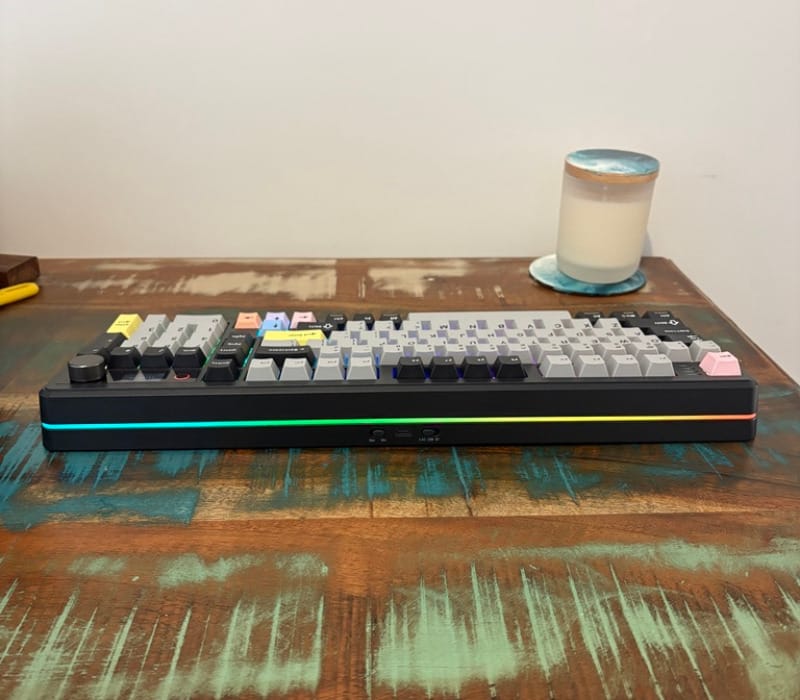
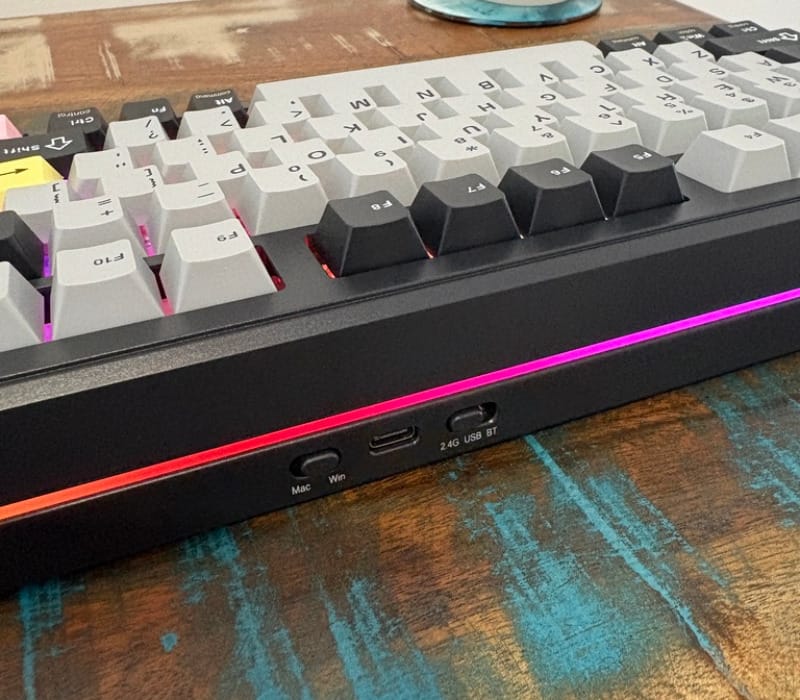
Along the rear edge sits the USB-C charging and data port, positioned centrally so the supplied cable does not create an awkward cable run regardless of which side of the keyboard a computer sits on. The port feels snug rather than loose, which matters for anyone who plans to keep the keyboard wired most of the time.
Next to the USB-C port are two small physical switches, one toggling between 2.4G, Bluetooth and wired USB modes, and the other switching between Mac and Windows key mappings. Having these as physical switches rather than key combinations makes changing modes far quicker than digging through a manual for a keyboard shortcut.
Because the Mac and Windows switch is physical, the keycap legends are printed with both operating systems in mind. The Alt and Command keys, for example, carry labels for both platforms, which removes the guesswork that often comes with keyboards designed primarily for one ecosystem.
Hot-swappable switch sockets sit beneath every keycap, meaning switches can be pulled and replaced without any soldering. This is a genuinely useful inclusion for anyone who wants to experiment with different switch types down the track, whether that means going louder, lighter, or heavier on the actuation force.
Build quality around the plate feels consistent, with minimal keycap wobble across the board including the larger keys like the spacebar and enter. Stabilisers on those larger keys are pre-lubed from the factory, which cuts down on the rattle that often plagues unmodified stabilisers on cheaper keyboards.
The overall weight sits at roughly 1.12 kilograms, which is light enough to move around a desk easily but still substantial enough that it does not slide during vigorous typing or gaming sessions. It strikes a sensible balance between portability and desk stability.
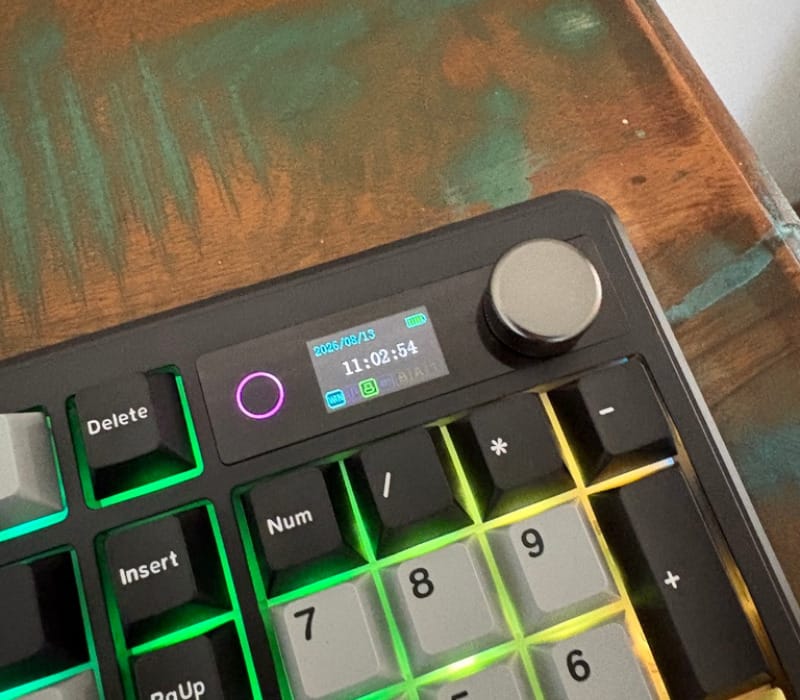
A rotary volume dial sits near the top right corner, next to the smart display, giving quick physical access to volume control without needing to reach for a media key combination. Pressing the dial toggles mute, and it has a satisfying, slightly weighted click when pressed.
The retail packaging includes the keyboard itself, a braided USB-C cable, a keycap and switch puller, and a printed manual, everything needed to get the board set up and to start swapping switches without having to source extra tools separately.
Build quality across the whole package feels well considered rather than an afterthought, from the placement of the physical switches to the inclusion of a dongle storage slot. Little details like these tend to separate a keyboard that has been designed with real users in mind from one that has simply been assembled to hit a feature checklist.
Taken together, the design leans heavily into practicality without giving up on style, and the black and grey colourway in particular looks understated enough to suit a professional office while still lighting up nicely once the RGB is switched on.
Key Features
Connectivity is one of the TH99 Pro’s strongest selling points, with support for wired USB-C, Bluetooth 5.0 and 2.4G wireless all built into the same board. Switching between them takes a single flick of the physical toggle rather than a fiddly key combination, which makes jumping between a work laptop and a home desktop far less of a chore.
Epomaker rates the wired connection at 2 milliseconds of latency, the 2.4G wireless connection at 5 milliseconds, and Bluetooth at 11 milliseconds. These figures put the 2.4G mode firmly in gaming territory while still leaving Bluetooth as a perfectly usable option for typing and general productivity work.
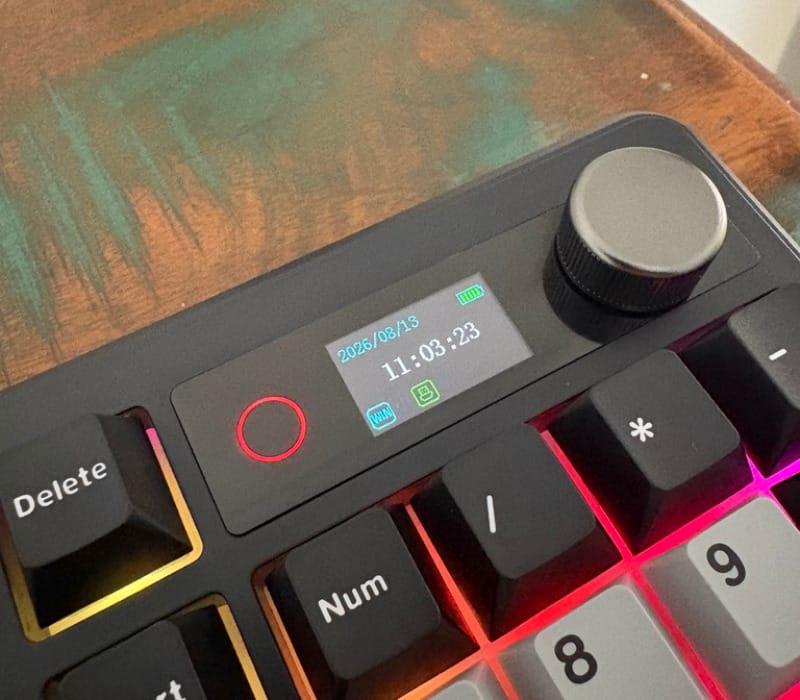
Central to the TH99 Pro’s identity is the 1.06 inch TFT smart display positioned above the number pad. By default it shows the time and date, battery percentage, current connection mode and whether the board is in Mac or Windows mode, giving a useful at-a-glance status readout without needing to check a phone or system tray.
The display becomes far more interesting once the companion software is involved, because it supports custom GIF uploads rather than just static icons. Anyone wanting a small animated flourish on their desk, whether that is a retro game sprite or a looping animation, can upload it directly through Epomaker’s online configuration tool.
RGB lighting runs underneath the keycaps and along the side of the case, with several built-in effects and colour options that can be adjusted through the same software used for the display. It is bright enough to be noticeable without becoming distracting, and the effects can be dialled back or switched off entirely for anyone who prefers a more subdued look.
Battery capacity sits at 10,000 mAh, a generous size for a keyboard of this class. Epomaker rates this at between 150 and 200 hours of use with the RGB lighting switched off, dropping to roughly 40 hours with the lighting active, figures that reflect the trade-off inherent in running a backlit display alongside RGB.
The included Sea Salt Silent Switch V2 is the headline feature for anyone sensitive to keyboard noise. These switches use five layers of internal dampening material, which noticeably softens both the bottom-out sound and the upstroke compared to a standard linear switch, while still retaining a smooth, satisfying keystroke.
Because the board is hot-swappable, those Sea Salt switches are not a permanent choice. Anyone who later decides they want a louder, more textured switch, or a heavier actuation force for gaming, can swap them out without any soldering equipment.
The dedicated volume dial doubles as a mute button, giving physical media control that many keyboards leave out entirely in favour of function-key combinations. It is positioned close enough to the smart display that both can be operated without looking away from the screen for long.
Epomaker’s configuration software handles more than just the display and lighting. It also allows key remapping and macro creation, giving the TH99 Pro a level of customisation that extends well past the physical hardware switches on the back of the unit.
The dongle storage slot underneath the keyboard is a small but genuinely useful feature that keeps the 2.4G receiver attached to the keyboard itself rather than loose in a drawer or laptop bag. It is easy to overlook until the day a dongle goes missing on a keyboard that lacks this feature.
The physical Mac and Windows switch changes key mapping instantly, adjusting modifier key behaviour to suit whichever operating system is in use. Combined with the dual-labelled keycaps, this makes the TH99 Pro one of the more genuinely cross-platform keyboards in its price bracket.
Double-shot PBT keycaps in a Cherry profile round out the feature set from a materials perspective, offering long-term durability alongside a lower, more ergonomic typing angle than taller OEM profile keycaps.
Taken as a whole, the feature list reads less like a spec sheet padded out for marketing purposes and more like a genuinely considered set of tools aimed at people who actually use their keyboard for hours at a time, whether for work, gaming or both.
Experience Using the Product and Performance
Typing Feel and Sound
The Sea Salt Silent Switch V2 delivers exactly what its name promises: a hushed, muted keystroke that avoids the sharp clack often associated with mechanical switches. Bottoming out produces a soft thud rather than a clatter, which makes the TH99 Pro genuinely suitable for shared workspaces or open-plan offices.
Despite the noise dampening, the switches retain a smooth linear travel that still feels distinctly mechanical rather than mushy. This balance is not always easy to strike, and a lot of silent switches on the market end up feeling numb in the process of quietening them down, which is not the case here.
Stabilisers on the larger keys, including the spacebar and enter key, feel well controlled with minimal rattle. This matters more than it might seem, because unstable stabilisers can undo a lot of the good work done on the switches themselves.
Keycap texture from the PBT material feels slightly grainy under the fingertip, which helps avoid the slippery feel that glossy ABS keycaps can develop after a few months of regular use. Combined with the Cherry profile shape, typing accuracy feels consistently good across long sessions.
Layout and Ergonomics
The 1800 compact layout takes a little adjustment for anyone coming from a smaller 75 percent board, mostly around remembering where the number pad and navigation cluster sit relative to the main alphanumeric keys. Within a day or two, muscle memory catches up and the layout starts to feel entirely natural.
Having a full number pad again after using a smaller keyboard is a genuinely welcome change for anyone who regularly works with spreadsheets, invoicing software or any task involving repeated numeric entry. It removes the need to reach for the number row above the letters, which speeds up data entry noticeably.
The kickstand feet make a real difference for typing comfort, particularly for anyone who prefers a steeper typing angle. Switching between the flat and raised positions takes a moment and holds firmly in either configuration.
At 1.12 kilograms, the board is light enough to reposition easily on a desk but heavy enough that it does not shift around during fast typing or gaming inputs, striking a sensible balance most keyboards in this weight range manage well.
Connectivity in Practice
Switching between wired, Bluetooth and 2.4G modes using the physical toggle is genuinely quick, taking a fraction of a second rather than requiring a key combination or software intervention. This is one of the more practical quality of life improvements on the TH99 Pro compared to keyboards that bury the wireless toggle under a removable keycap.
Bluetooth pairing with a new device is straightforward, following the instructions in the included manual without any unexpected hiccups. Multiple devices can be paired and switched between, which suits anyone who splits their time between a laptop and a desktop computer.
The 2.4G connection, once paired with its dongle, reconnects instantly whenever the keyboard wakes from sleep, with no noticeable lag creeping into fast typing or gaming inputs. This mode feels like the best all-rounder for anyone who wants wireless convenience without any compromise on responsiveness.
Latency across all three connection modes feels imperceptible during normal use, whether typing quickly or reacting to fast-paced game inputs. The rated figures of 2 milliseconds wired, 5 milliseconds over 2.4G and 11 milliseconds over Bluetooth line up with how responsive each mode actually feels in practice.
Wired mode remains the most dependable option overall, and for anyone chasing the lowest possible latency for competitive gaming, it is the mode to default to. That said, the gap between wired and 2.4G is small enough that most people would struggle to notice a difference outside of a controlled test.
Battery Life and Charging
With RGB lighting switched off, battery life comfortably stretches across multiple work weeks before a recharge is needed, in line with Epomaker’s stated range of 150 to 200 hours. This makes the keyboard easy to forget about in terms of charging, which is exactly what a wireless peripheral should achieve.
Turning the RGB lighting on brings that figure down substantially, closer to the 40-hour mark Epomaker quotes, which is still a reasonable window for a keyboard running a backlight and a colour display simultaneously. Anyone who wants maximum battery longevity would be best served leaving the lighting off, or using it sparingly.
Charging via USB-C is fast and the keyboard remains fully usable while plugged in, meaning there is no need to pause work or gaming to top up the battery. The centrally placed port also means the cable does not create an awkward angle regardless of desk orientation.
The Smart Display and Software
The 1.06 inch display is small but genuinely crisp, rendering the date, time, battery percentage and connection status clearly even at a glance from a normal seated distance. It is a small but consistently useful addition to have visible information without needing to check a phone or taskbar.
Uploading a custom GIF through Epomaker’s online software is straightforward, and the results look noticeably better in person than they do when captured on a phone camera. Colours are vibrant and motion plays back smoothly, adding a genuinely fun personalisation option that few keyboards at this level offer.
The software itself, while not the most polished interface on the market, covers everything needed including key remapping, macro assignment, lighting effects and display customisation without feeling overly complicated to navigate.
Leaving the display on its default status screen is perfectly functional for anyone who is not interested in custom GIFs, and switching between display modes takes only a couple of clicks within the software.
RGB Lighting in Daily Use
The RGB lighting along the underside and edges of the case adds a pleasant glow without becoming garish, and the effects cycle smoothly between colours rather than flickering or stuttering. It suits the black and grey colourway particularly well, with the lighting providing a visual contrast against the darker case tones.
Brightness and effect speed are both adjustable, giving enough control to tone the lighting down for a work environment or ramp it up for a gaming setup without needing to disable it entirely.
Leaving the RGB on constantly does eat into battery life more noticeably than the display alone, so anyone chasing maximum runtime should consider dialling the lighting back rather than switching it off completely.
Hot-Swap Switches and Customisation
Pulling the pre-installed Sea Salt Silent switches with the included tool is simple, and the hot-swap sockets grip new switches firmly without needing excessive force. This makes experimenting with other switch types, including Epomaker’s own Creamy Jade option, a genuinely accessible option for anyone who wants a different feel down the track.
For anyone who prefers a switch with more audible feedback and texture, swapping away from the Sea Salt Silent switches is a five-minute job rather than a soldering project, which meaningfully extends the useful life of the keyboard.
Everyday Practicality
The physical Mac and Windows toggle proves its worth quickly for anyone who regularly moves between the two ecosystems, instantly remapping modifier keys without needing to dig through software settings. Paired with the dual-labelled keycaps, there is never any confusion about which key does what.
The dongle storage compartment underneath the keyboard earns its keep almost immediately, removing the small but recurring anxiety of losing a wireless receiver in a bag or drawer.
The volume dial becomes a genuinely useful habit within the first few days, offering quicker access to audio control than reaching for function key combinations or a phone.
Across weeks of regular typing, gaming sessions and general desk use, the TH99 Pro holds up consistently, with no drop-off in wireless performance, no unexpected disconnections, and no degradation in the smoothness of the switches or stabilisers.
For anyone building out a broader desk setup, the TH99 Pro pairs neatly alongside other precision peripherals, whether that is the Razer Viper V4 Pro for gaming or a competitive mouse like the Logitech G Pro X2 Superstrike for anyone chasing a fully rounded, low-latency workstation.
Conclusion
The Epomaker TH99 Pro manages to combine a genuinely quiet typing experience with a thoughtful set of features that go well beyond the basics expected of a mechanical keyboard. The Sea Salt Silent Switch V2 strikes a rare balance between hushed acoustics and satisfying feedback, while the hot-swappable sockets mean that balance is never locked in permanently.
Tri-mode connectivity, a dedicated physical toggle, and a storage slot for the 2.4G dongle all point to a design team that has thought carefully about how people actually use a wireless keyboard day to day, rather than simply bolting wireless support on as a feature tick.
The smart display and its GIF customisation add a genuinely fun personalisation option, and the black and grey colourway keeps the overall look understated enough for an office desk while still looking sharp with the RGB lighting active.
For anyone after a compact number-pad keyboard that can move seamlessly between Mac and Windows, stay quiet enough for a shared office, and still hold its own for gaming thanks to low wired and 2.4G latency, the TH99 Pro is a genuinely well-rounded option worth serious consideration.