Razer has spent close to two decades refining the idea that a mouse can be more than just a pointing device, and the Razer Naga V3 Pro is the latest proof of that philosophy. Built on 17 years of MMO mouse design, it arrives with three swappable magnetic side plates, a faster optical sensor and a handful of new buttons designed to keep pace with everything from raid bosses to ranked shooters. It is a mouse that tries to be genuinely multi-genre rather than a niche accessory for spreadsheet-style hotbars.
Review summary
Razer Naga V3 Pro
The Razer Naga V3 Pro refines nearly two decades of MMO mouse design with swappable magnetic side plates, a faster Focus Pro 50K sensor and a reworked scroll wheel, resulting in a genuinely multi-genre mouse rather than a niche accessory. Build quality remains premium despite a notable weight reduction, and the added DPI buttons, HyperShift button and lockable inputs give it up to 23 programmable controls without sacrificing comfort during long sessions. It performs equally well in raids, shooters and everyday use, making it a versatile option for players who want one mouse across multiple genres.
Highlights
- ✓Three magnetic swappable side plates for tailored control
- ✓Focus Pro 50K Gen-3 sensor shared with the Viper V4 Pro
- ✓Lighter 112g base weight with no loss of build quality
- ✓Up to 23 programmable inputs including new DPI and HyperShift buttons
- ✓Hyperscroll Tilt Wheel Gen 2 with multiple scrolling modes
The MMO genre has always demanded a strange kind of dexterity from players, with dozens of abilities, mounts and macros crammed onto a keyboard that was never designed to hold them. Reaching for the number row every few seconds during a raid is not exactly ergonomic, and that is the gap the Naga lineup has filled since its very first release. The Naga V3 Pro continues that mission while also trying to prove it belongs in a Battle Royale lobby or a MOBA match just as comfortably.
This review looks at how Razer has evolved the formula with the V3 Pro, covering its design and build, the features that set it apart from a standard gaming mouse, and how it actually feels to use across long sessions and different genres. There is a lot packed into this mouse, from a reworked scroll wheel to new lockable buttons, and each of those additions is worth unpacking properly before deciding whether it deserves a spot on the desk.
Table of Contents
Design and Functionality
At a glance, the Naga V3 Pro keeps the same silhouette Razer has used since the Naga V2 Pro, measuring 119.5 x 75.5 x 43.5mm. It is a wider, shorter shape than most flagship gaming mice, built specifically to give MMO players a stable base to rest their palm on during marathon sessions.


The shell is finished in matte black plastic, with three RGB lighting zones spread across the scroll wheel, the palm-rest logo and the side panel. It is a subtle approach to RGB compared with some gaming peripherals, letting the lighting accent the mouse rather than dominate it.


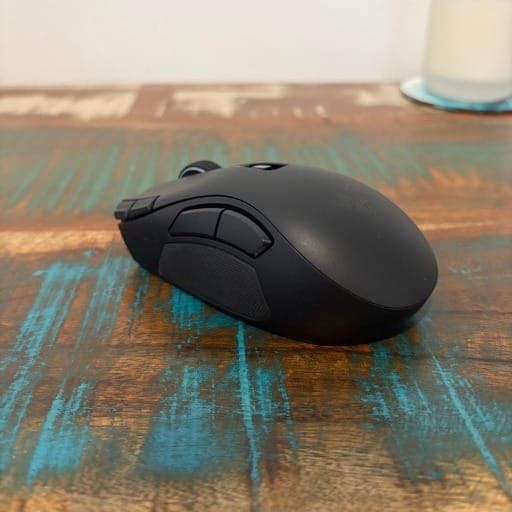

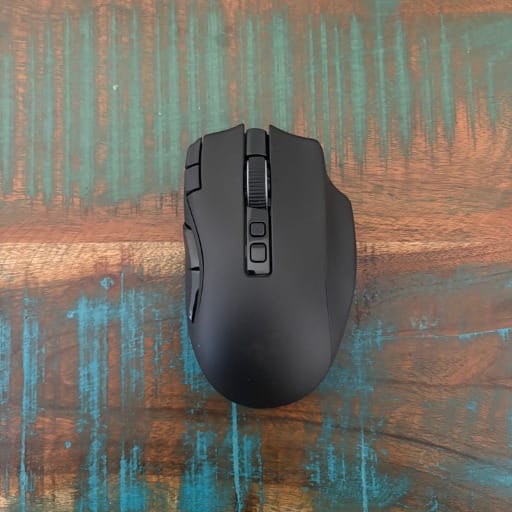


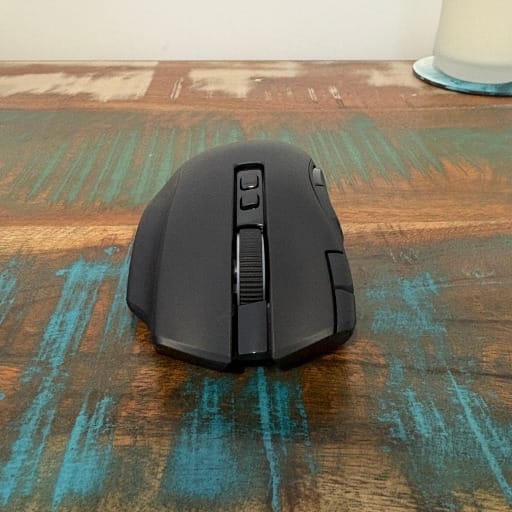
Razer has trimmed the weight this time around, with the bare mouse coming in at 112g without a side plate or cable attached. That is a noticeable drop from the Naga V2 Pro, which sat at 134g regardless of which plate was fitted.
Each of the three side plates adds its own weight to that base figure, with the 12-button plate weighing 20g, the six-button plate at 17g, and the two-button plate the lightest at 15g. It means the overall feel of the mouse can shift slightly depending on which configuration is attached, giving players a small say in how the mouse balances in hand.
The magnetic swap mechanism is one of the simplest and most satisfying parts of the design. Plates click into place with a firm magnetic snap and can be swapped in a matter of seconds, without any tools or fiddly latches involved.
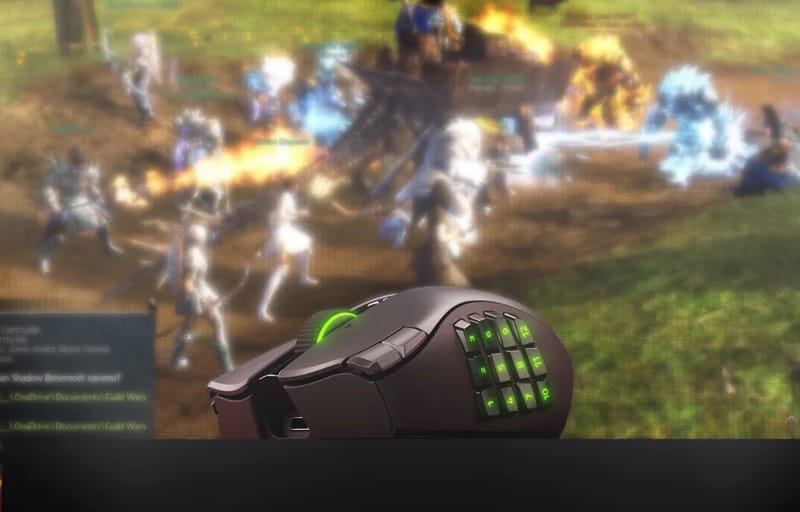
The headline plate is the 12-button layout, arranged in a hex grid inspired by the classic T9 phone keypad. It puts a dozen skills, macros or mounts within thumb’s reach, and Razer has fitted it with doubleshot moulded keycaps so the button markings will not fade or peel after months of use.
That hex arrangement is genuinely well thought out, with a combat-optimised layout designed to minimise thumb travel between buttons. Each key actuates cleanly no matter the angle the thumb approaches from, which matters when reaching for a specific ability mid-fight.
The six-button plate trims things down for games with a smaller pool of abilities, striking a middle ground between the full MMO experience and something more streamlined. It still offers a healthy spread of extra inputs without overwhelming a player who does not need a dozen keybinds.
For shooters, MOBAs or everyday desktop use, the two-button plate strips things back to the essentials. It turns the Naga V3 Pro into a clean, distraction-free mouse that does not feel like it is carrying unnecessary bulk for genres that do not need a full skill bar on the thumb.
Beyond the swappable plates, Razer has added two new buttons sitting beside the primary left click, within easy reach of the index finger. These are built for instant DPI shifts, letting players jump between a precise aiming sensitivity and a faster one for map navigation without opening any menus.
The ring-finger rest on the right-hand side has also been turned into a functional button, bound by default to Razer’s HyperShift feature for layered inputs. A physical lock switch sits nearby, letting players disable that button entirely to avoid accidental presses during intense sessions.
Between the side plate, the two new DPI buttons, the ring-finger button, the tilt wheel and the profile switch underneath, the Naga V3 Pro can offer up to 23 programmable inputs in its fullest configuration. That is a genuinely enormous amount of control packed into a single mouse.
The overall shape still favours a palm grip, with a gentle curve in the faceplate that supports the whole hand rather than just the fingertips. A groove for the ring finger on the right side helps larger hands settle into a natural, repeatable position without needing to glance down at the mouse.
Build quality feels suitably premium given Razer’s positioning of the Naga range as a flagship product. Despite the weight reduction, nothing about the shell feels hollow or fragile, and the side plates lock in firmly enough that there is no rattle during fast movements.
A small compartment sits underneath the removable side plate, designed to store the 2.4GHz wireless receiver when it is not in use. It is a practical touch for anyone who wants to toss the mouse in a bag for LAN parties or a change of desk.
In the box, Razer includes a USB Type-A to USB Type-C cable, with the wireless dongle itself plugging in via USB Type-A. It is a small but useful inclusion for anyone whose setup relies on newer USB-C ports.
Key Features
The most significant internal change in the Naga V3 Pro is its optical sensor, upgraded to Razer’s Focus Pro 50K Gen-3. It supports up to 50,000 DPI, tracks at speeds of up to 930 inches per second, and can handle acceleration up to 90G, with a claimed resolution accuracy of 99.8 percent.
That sensor is the same unit found in the Razer Viper V4 Pro, one of Razer’s most performance-focused mice, which says a lot about how seriously Razer is treating tracking accuracy in its MMO lineup this generation.
Underneath the primary buttons sit new optical switches rated for 100 million clicks, built to hold up through years of raid nights and long grinding sessions without the mushy feel that mechanical switches can develop over time.
Connectivity spans three modes, with Razer’s HyperSpeed Wireless technology over a 2.4GHz dongle, Bluetooth for longer battery life, or a traditional wired USB connection when every millisecond matters.
Out of the box, the Naga V3 Pro polls at 1,000Hz, but that figure can be pushed to 8,000Hz using Razer’s Mouse Dock Pro or HyperPolling Wireless Dongle, both sold separately as optional upgrades for players chasing the lowest possible latency.
Helping keep battery consumption in check is Razer’s FrameSync technology, which synchronises the sensor’s scanning with the system’s polling rate so it only captures data when it is actually needed, cutting down on wasted power draw.
The result is a mouse rated for extended battery life that can comfortably stretch across weeks of regular play before it needs to be topped up again, which is a genuine convenience for anyone who dislikes charging peripherals mid-session.
Razer Synapse unlocks the full depth of customisation, including single-DPI-step adjustments for pixel-perfect sensitivity tuning and the ability to port DPI settings across from a previous mouse to speed up setup.
Lift-off and landing distance can be tuned individually across up to 26 levels, and an auto-calibration mode keeps that distance consistent no matter which mousing surface is being used.
The Hyperscroll Tilt Wheel Gen 2 brings genuine variety to scrolling, with Tactile mode for notched precision, Free-Spin mode for fast unrestricted scrolling, and a Precision Tactile mode offering twice the steps of the standard tactile setting for finer control through menus and inventories.
- Smart Reel automatically switches between Tactile and Free-Spin modes based on scroll speed, with five adjustable sensitivity levels in Synapse.
- Scroll acceleration dynamically speeds up scrolling the faster the wheel is spun, also configurable across five levels.
- The wheel tilts left and right, useful for navigating wide spreadsheets, timelines or webpages.
Razer Workshop rounds out the software side, giving MMO players a way to upload and download game-specific macro profiles rather than building every keybind from scratch.
A dedicated ChatGPT shortcut button gives instant access to Razer’s AI assistant integration for brainstorming or summarising content, and like every other button on the mouse, it can be freely remapped in Synapse if that is not a feature a player wants front and centre.
Up to five onboard profiles can be stored and swapped instantly using a button on the base of the mouse, which is handy for anyone jumping between a raiding setup and a productivity configuration without needing to open software first.
Wireless charging is supported for anyone who picks up a compatible Razer charging mouse mat with its dedicated puck, or a select inductive charger, and current buyers can also unlock an exclusive Jade Dye Kit as part of a Guild Wars 2 14th Anniversary tie-in running from August 28, giving Tyria explorers a fresh cosmetic to go with their new gear.
Experience Using the Product and Performance
Picking up the Naga V3 Pro for the first time, the reduced weight compared with the Naga V2 Pro is immediately noticeable, especially during quick flicks across the desk. It still feels substantial rather than featherlight, but the extra grams have clearly been trimmed from somewhere that does not compromise the mouse’s stability.
Fitting the 12-button plate and jumping into an MMO immediately shows why the Naga lineup has such a loyal following. Skills that would normally require an awkward stretch across the keyboard sit right under the thumb, and the hex arrangement makes it surprisingly quick to build muscle memory for which button sits where.


Games like Final Fantasy XIV benefit enormously from that full 12-button layout, since it has enough of a skill rotation to make use of every extra input without feeling excessive. Switching to a game with a smaller ability pool, the six-button plate feels like the natural fit, offering just enough extra control without cluttering the thumb area.
Swapping to the two-button plate for a competitive shooter session highlights how versatile this mouse actually is. It transforms from an MMO command centre into a clean, low-profile mouse in seconds, with none of the bulk that might otherwise get in the way during fast-paced aiming.
The two new DPI buttons positioned beside the left click prove genuinely useful in practice, particularly for quickly dropping sensitivity to check a map or inventory screen before snapping back to a higher DPI for aiming. It is a small addition, but one that gets used constantly once the habit forms.
The ring-finger button, tied to HyperShift by default, effectively doubles the functionality of every other button on the mouse by adding a secondary layer of inputs. During dungeon runs or raid encounters, that extra layer means cooldown rotations and utility skills can be split intelligently rather than crammed onto a single layout.
The physical lock switch for that ring-finger button earns its place quickly, since resting the ring finger naturally against the side of the mouse could otherwise lead to the occasional accidental HyperShift activation. Flicking the lock on removes that concern entirely without disabling any of the mouse’s other functions.
Grip-wise, the Naga V3 Pro clearly favours a palm grip over a claw or fingertip style, and testing across all three grips confirms that a full palm rest is where the mouse feels most natural. The curve of the faceplate and the groove for the ring finger both work in tandem to support that grip properly.
Larger hands in particular will appreciate how the mouse fills the palm without feeling cramped, while the side plates themselves have just enough of an inward curve to guide the thumb into a comfortable resting position without needing to glance down and check.
Tracking performance from the Focus Pro 50K Gen-3 sensor is excellent across every surface tested, from a hard mousepad to a cloth one. Cursor movement stays smooth and predictable even during fast flicks, with no perceptible jitter or skipping at higher DPI settings.
Given this is the same sensor found in the Razer Viper V4 Pro, it is no surprise that tracking accuracy holds up just as well here, even though the Naga V3 Pro’s extra weight naturally means it will not match a lightweight esports mouse for raw flick speed.
The optical switches beneath the main buttons feel crisp and consistent, registering clicks with minimal travel and a satisfying, tactile response. Over extended sessions there is no sense of the switches softening or becoming less precise, which matters given Razer’s 100 million click durability rating.
The tilt wheel is one of the standout upgrades on this mouse. Tactile mode gives a reassuring notch-by-notch feel that suits cycling through weapons or hotbar items, while Free-Spin mode lets the wheel spin freely for rapid scrolling through long web pages or documents.
Precision Tactile mode, with its doubled step count over standard Tactile, proves genuinely useful for navigating dense inventories or skill trees where finer increments make a difference. Smart Reel’s automatic switching between modes based on scroll speed works reliably in the background without needing constant manual toggling.
Scroll acceleration adds another layer of convenience, particularly when scrolling through long crafting lists or auction house menus, where a faster spin naturally covers more ground the harder the wheel is pushed.
Tilting the wheel left and right is a feature that gets more use than expected, especially when working through wide spreadsheets or timeline-based software outside of gaming, proving the mouse is just as capable for productivity tasks as it is for combat.
Wireless performance over Razer’s HyperSpeed Wireless connection feels indistinguishable from a wired setup during regular play, with no noticeable input lag even in fast-paced encounters. Bluetooth mode, while slightly less snappy, is a sensible option for everyday desktop use when battery conservation matters more than absolute latency.
The default 1,000Hz polling rate is more than sufficient for the vast majority of MMO, RPG and even casual shooter play. Competitive players chasing every possible millisecond will want to invest in the optional Mouse Dock Pro or HyperPolling dongle to unlock the full 8,000Hz ceiling, though most people are unlikely to notice a dramatic difference in everyday play.
Battery life across testing lines up with Razer’s claims, easily lasting through weeks of regular sessions before needing a recharge. FrameSync’s efficiency clearly plays a role here, since the sensor is not constantly scanning at full intensity when it does not need to be.
Razer Synapse remains one of the more approachable pieces of peripheral software on the market, with DPI stages, lift-off distance and button remapping all sitting in clearly labelled menus rather than being buried in submenus. Setting up separate profiles for different games takes only a few minutes.
Switching between the five onboard profiles using the button at the base of the mouse works exactly as expected, letting a raiding profile and a general browsing profile sit side by side without needing Synapse open in the background at all times.
Auto-calibration for lift-off distance proved reliable across different mousepad surfaces during testing, adjusting automatically rather than requiring manual recalibration every time the mouse moved to a new mat.
Porting DPI settings over from a previous mouse inside Synapse is a genuinely handy shortcut for anyone switching from another Razer device or even a competitor’s mouse, cutting down the usual trial and error of dialling in a new sensitivity from scratch.
The dedicated ChatGPT button is easy enough to ignore for players who do not want it, and remapping it to something more useful, such as an extra macro slot or a quick chat command, takes seconds inside Synapse.
Razer Workshop’s macro sharing is a genuinely useful addition for MMO players who do not want to build every rotation from scratch, letting the community’s pre-built macros speed up setup for popular titles.
Compared directly with the Razer Naga V2 Pro, the differences are more evolutionary than revolutionary, but they are noticeable in daily use. The lighter overall weight, the upgraded sensor, the quieter and crisper switches, and the more durable doubleshot keycaps all add up to a mouse that feels like a genuine refinement rather than a reinvention.
The two new DPI buttons and the lockable ring-finger button are the most tangible upgrades for existing Naga owners, since they add functionality that was not available on the previous generation without requiring any relearning of the existing layout.
For players who split their time between MMOs and other genres, the ability to swap down to the two-button plate means the Naga V3 Pro does not feel like a compromise outside of its home turf. It holds up well as an everyday mouse for browsing, productivity work or fast-paced shooters.
The storage compartment for the wireless dongle under the side plate is a small but appreciated detail for anyone who travels with their gear, whether that is heading to a LAN event or simply moving between a desktop and a laptop setup.
RGB customisation through Razer Chroma is straightforward, with the scroll wheel, logo and side panel all controllable independently, letting the lighting match a broader Chroma-enabled setup without much fuss.
Across every genre tested, from MMO raiding to fast shooter matches to general desktop use, the Naga V3 Pro consistently performs like a mouse built by a team that understands exactly who is buying it and what they need it to do.
Conclusion
The Razer Naga V3 Pro takes an already well-loved formula and sharpens nearly every part of it, from the faster Focus Pro 50K Gen-3 sensor to the more durable optical switches and the smarter tilt wheel. It is a mouse built specifically for players who refuse to be boxed into a single genre.
MMO players get the full 12-button experience they have always relied on, while the six-button and two-button plates make it just as viable for everything from ranked shooters to everyday browsing. That kind of genuine flexibility is rare in a gaming mouse of any price point.
Existing Naga V2 Pro owners will recognise most of the shape and philosophy here, but the new DPI buttons, lockable HyperShift trigger and refined sensor make a real difference in day-to-day use, even if the changes are more incremental than dramatic.
Anyone considering a new MMO mouse, or simply after a single peripheral that can adapt across genres, should take a close look at the full specification sheet and configuration options on the Razer Naga V3 Pro product page before deciding which side plate suits their playstyle best.