
ASUS has pushed out an urgent ASUS Wi-Fi 7 firmware update to close a critical security hole that let attackers seize full control of affected routers without needing a password. The flaw, described by ASUS as an improper authentication vulnerability, sits in the 3.0.0.6_102 firmware series running on its newest Wi-Fi 7 router models, and owners are being told to patch immediately.
Key takeaways
- ✓ASUS pushed an emergency firmware fix for an improper authentication bug in its Wi-Fi 7 routers.
- ✓The flaw let an unauthenticated attacker on a nearby network gain full admin access with no password.
- ✓Only routers running the 3.0.0.6_102 firmware series are affected.
- ✓ASUS recommends disabling WAN remote access and using strong, unique passwords if an update isn't possible yet.
- ✓A full reboot after installing the patch is required to fully close the hole.
According to the official ASUS security advisory, an unauthenticated attacker on an adjacent network could exploit the bug to bypass login checks entirely and gain full administrator access to the router. That means someone within range of the Wi-Fi signal, rather than anyone on the open internet, could potentially take over the device that sits at the centre of a home or small office network, no credentials required.
Table of Contents
What the ASUS Wi-Fi 7 firmware update actually fixes
The “adjacent network” requirement does narrow the threat somewhat. An attacker generally needs to be within physical range of the router’s wireless signal or already connected to the same local network segment, rather than targeting the device remotely from anywhere in the world. That rules out the worst-case scenario of mass internet-wide exploitation.
Even so, security researchers consistently rank authentication bypass bugs on networking gear among the most serious kinds of flaws. A router controls DNS settings, port forwarding, connected device lists, and often doubles as a VPN endpoint or smart home hub. Full admin access without a password hands an attacker the ability to redirect traffic, snoop on connected devices, or plant persistent malware on the network’s gateway.
Which routers are affected and how to update
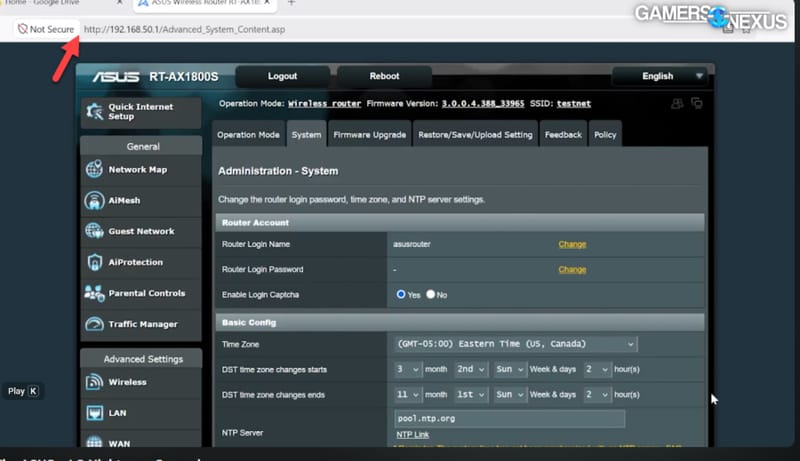
The vulnerability is specific to ASUS’s current Wi-Fi 7 router lineup running the 3.0.0.6_102 firmware branch. Owners can check their installed firmware version from the router’s web administration portal, which also handles the update itself in most cases. ASUS has built automatic update detection into that same interface, so many routers should be able to fetch and install the patch without extra steps.

For anyone who prefers a manual approach, or whose router isn’t picking up the update automatically, ASUS has made the patched firmware files available directly through its official Support site, alongside the full advisory for the affected models. The broader product details for the Wi-Fi 7 range can also be found on ASUS’s Wi-Fi router product pages. Anyone using the ASUS Router app, which also handles firmware updates and AiMesh setup, should see the update appear there as well, making it one of the simpler ways to confirm a device is protected.
Temporary mitigations if a patch isn’t possible yet
Not every household or business can flash new firmware the moment it drops, particularly in managed environments where changes need testing first. For those cases, ASUS has laid out several stopgap measures to reduce exposure until the update can be applied.
- Disable remote access from the WAN side entirely, so the admin interface can only be reached from trusted devices already on the local network.
- Set a strong, unique administrator password and a separate strong Wi-Fi password, avoiding anything reused from other accounts.
- Keep a close eye on connected devices and remove anything unrecognised from the network.
- Review and revoke any unfamiliar sessions tied to the ASUS companion app.
- Perform a full reboot of the router once the firmware update is eventually installed, since a restart is needed to fully apply the fix.
None of these steps are a substitute for installing the actual patch, but together they meaningfully shrink the window an attacker has to work with.
Why this matters beyond one firmware release
Wi-Fi 7 routers are still relatively new to the market, and ASUS has been among the more aggressive vendors pushing the standard into mainstream homes alongside ASUS’s latest Wi-Fi 8 router launch and ongoing pressure from rivals like TP-Link rolling out their own next-generation routers. Newer firmware stacks built to support faster standards also mean more code, and more code generally means more opportunities for bugs like this one to slip through before launch.
This is not the first time a router maker has had to scramble a fix for an authentication flaw, and it won’t be the last. What makes this particular case worth paying attention to is how little an attacker needed: no stolen password, no phishing email, just proximity to the network and knowledge of the bug. That combination is exactly why security advisories like this one get labelled critical rather than merely important, and why ASUS is urging every affected owner to act rather than wait.
Frequently asked questions
Which ASUS routers are affected by this vulnerability?
The flaw affects ASUS’s current Wi-Fi 7 router models running the 3.0.0.6_102 firmware series. Owners should check their firmware version in the router’s admin portal to confirm whether their device needs the update.
Do I need to be connected to my Wi-Fi for someone to exploit this bug?
An attacker needs to be on an adjacent network, generally meaning within range of the router’s wireless signal or already on the same local network segment, rather than attacking purely over the internet.
What should I do if I can’t update my router’s firmware right away?
Disable remote WAN access to the admin interface, set strong unique passwords for both the router login and Wi-Fi network, and monitor connected devices closely until the patch can be installed.
Is rebooting the router necessary after installing the update?
Yes. ASUS advises a full system reboot after flashing the new firmware to ensure the fix is properly applied and the vulnerability is fully closed.