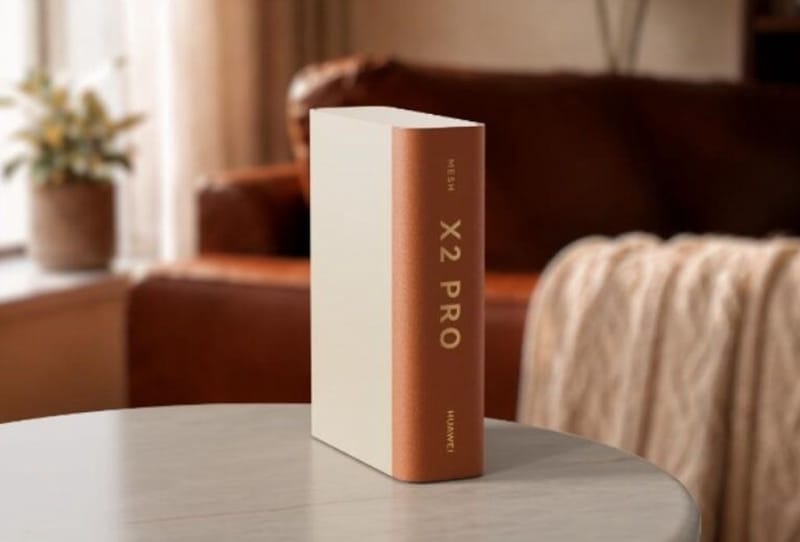
The Huawei Router X2 Pro looks nothing like a typical home router, swapping the usual cluster of antenna legs for a slim, book-like shell that can sit on a shelf without drawing attention to itself. It pairs that styling with Wi-Fi 7+ connectivity and AI-driven mesh networking, aiming at buyers who want a tidy-looking network box rather than another plastic spider parked on the hallway table.
Key takeaways
- ✓The Huawei Router X2 Pro uses book-inspired styling instead of visible antennas.
- ✓It supports Wi-Fi 7+ connectivity for faster, more stable wireless speeds.
- ✓AI Mesh networking automatically manages coverage across multiple units.
- ✓Interchangeable covers let owners match the router to their decor.
- ✓It targets budget-conscious buyers who still want modern mesh features.
Router design has barely changed in a decade. Most mesh and standalone units still rely on external antennas jutting out at odd angles, a look that works fine tucked away in a cupboard but sits awkwardly on open shelving or a desk. Huawei’s answer is a flat, rectangular unit with a textured cover that resembles a hardback book spine, designed to blend into a bookshelf or media unit rather than stand out as obvious networking hardware.
Table of Contents
A router built to not look like a router
The Huawei Router X2 Pro hides its antennas internally, which is what allows the book-spine shape in the first place. Instead of the usual black or white plastic shell, the unit ships with a choice of removable covers, letting owners swap the finish to match a room’s decor or simply refresh the look over time without buying a new router.
That interchangeable-cover approach is a small but practical touch. Routers tend to live in visible spots because that is where the Wi-Fi signal reaches furthest, so a design that can actually fit a living room or study, rather than being hidden away and muffling the signal, has a genuine functional upside alongside the aesthetic one.
Wi-Fi 7+ speeds and AI Mesh coverage
Under the cover, the Huawei Router X2 Pro runs Wi-Fi 7+, Huawei’s enhanced take on the Wi-Fi 7 standard, which brings higher theoretical throughput, wider channel bandwidths and lower latency than Wi-Fi 6 hardware. For households streaming 4K video, running smart home devices and gaming online at the same time, that extra headroom should translate into fewer dropouts during peak usage.
Huawei has also built in AI Mesh networking, a system that automatically balances traffic and adjusts coverage when multiple X2 Pro units are deployed around a home. Rather than requiring manual channel tuning, the AI layer monitors connected devices and shifts bandwidth allocation on the fly, a feature increasingly common on flagship mesh systems but still relatively rare at this end of the market.
| Feature | Detail |
|---|---|
| Wireless standard | Wi-Fi 7+ |
| Networking mode | AI Mesh, multi-unit support |
| Design | Book-inspired shell, hidden internal antennas |
| Customisation | Interchangeable, swappable covers |
How it stacks up against rival routers
Most of the recent attention in home networking has gone to Wi-Fi 8 hardware, including ASUS’s own Wi-Fi 8 router for gamers and TP-Link’s recent Wi-Fi 8 router push, both of which target enthusiasts chasing the fastest possible speeds. The Huawei Router X2 Pro takes a different path, sticking with the more mature and widely supported Wi-Fi 7+ standard while focusing its energy on design and everyday usability instead of chasing a new wireless generation.
That is a sensible trade-off for most households. Wi-Fi 8 devices remain scarce, so a router built around Wi-Fi 7+ is still future-friendly without demanding buyers replace every connected gadget to see a benefit. It is also worth remembering that wireless hardware isn’t immune to security issues, as shown by the security patches issued for other Wi-Fi 7 routers earlier this year, so ongoing firmware support will matter as much as the initial spec sheet.
What it means for buyers
The Huawei Router X2 Pro slots into a growing category of networking gear that treats looks as seriously as throughput numbers. For renters and apartment dwellers who can’t hide a router in a wiring cupboard, a unit that can sit openly on a shelf without looking like lab equipment is a genuine quality-of-life improvement, not just a marketing gimmick.

It also signals where the budget end of the mesh router market is heading. Features like AI-assisted traffic management, once reserved for premium systems, are filtering down to more affordable hardware, putting the Huawei Router X2 Pro alongside other budget-friendly home networking gear that no longer asks buyers to choose between a decent network and a tidy-looking home.
Frequently asked questions
What is Wi-Fi 7+ on the Huawei Router X2 Pro?
Wi-Fi 7+ is Huawei’s enhanced version of the Wi-Fi 7 standard, offering wider channel bandwidths and lower latency than Wi-Fi 6, aimed at smoother streaming and gaming on busy home networks.
Does the Huawei Router X2 Pro work as a mesh system?
Yes. It supports AI Mesh networking, which lets multiple X2 Pro units work together to extend coverage and automatically balance traffic across a home.
Can the cover be changed on the Huawei Router X2 Pro?
The router ships with interchangeable, swappable covers, so owners can change its finish to suit different rooms or simply update its look without replacing the hardware.
Is the Huawei Router X2 Pro meant to compete with Wi-Fi 8 routers?
Not directly. It sticks with Wi-Fi 7+ rather than the newer Wi-Fi 8 standard, prioritising design, ease of use and broad device compatibility over chasing the latest wireless generation.