The Keychron Orca Echo is a new split ergonomic keyboard that packs a built-in trackball, hidden touch scroll pads and support for two different switch heights into one board. It is aimed at typists who want the wrist comfort of a split layout without giving up a pointing device or advanced customisation.
Key takeaways
- ✓Keychron Orca Echo is a 49-key split ergonomic keyboard with a built-in trackball under the right thumb
- ✓Hidden touch-sensitive scroll pads sit above the caps key and the B key for cursor-free navigation
- ✓A new Nova socket lets the board support both low-profile and full-height MX switches via a plate swap
- ✓Magnetic halves snap together for travel, and fold-out feet allow tenting for wrist comfort
- ✓The bundled switch shares a pin layout with Gateron Low-Profile 3.0 but is not compatible with Keychron's Milk POM switches
Keychron has been on a tear lately, following up gaming mouse and steampunk keyboard launches with something aimed squarely at ergonomics-minded buyers. The Orca Echo takes the brand’s split keyboard experience and loads it with features that would normally require several separate accessories, all while keeping a 49-key layout that should feel approachable to anyone moving away from a standard board for the first time.
Table of Contents
A split layout built around the Keychron Orca Echo’s trackball
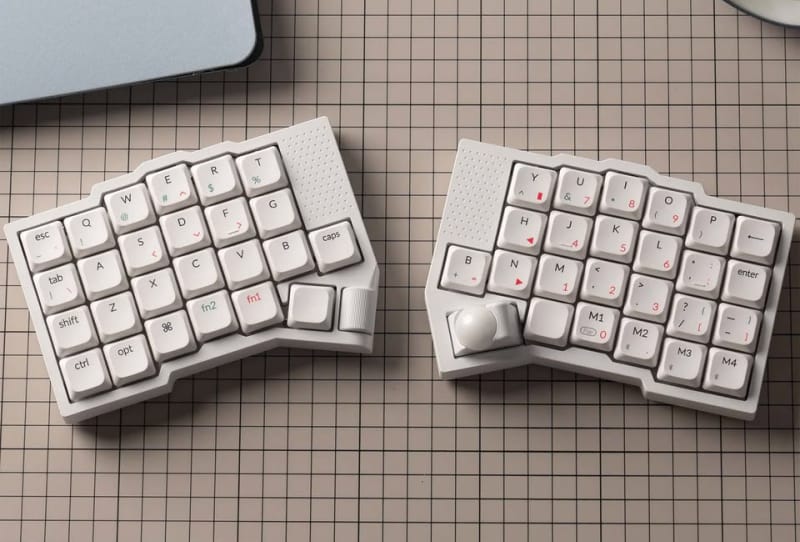
At its core, the Orca Echo is a 49-key split ergonomic keyboard with a moderate columnar stagger, the kind of layout that nudges each finger into a straighter line without throwing total beginners into deep end territory. Under the right thumb sits a built-in trackball, paired with a roller in the same area for scrolling and secondary input.
Above the caps key on the left half and the B key on the right half, Keychron has hidden two touch-sensitive scroll pads. These let a typist scroll through documents or web pages using a light swipe, rather than reaching for a mouse or lifting a hand off the keyboard entirely. It is a small addition, but one that fits the board’s broader goal of keeping hands planted during long work sessions.
Nova socket and dual switch-height support
The more technically interesting part of the Orca Echo is what Keychron calls the Nova socket, a new switch-mounting design that sits partially inside the keyboard’s PCB. Keychron claims this allows for a noticeably lower-profile board than designs built around traditional MX, Gateron, or Kailh sockets, which typically sit flush on top of the plate.
The board ships with a new Keychron switch that uses a pin layout similar to Gateron’s Low Profile 3.0 switch pin layout, which means it is not compatible with Keychron’s own Milk POM switches. The upside is flexibility elsewhere: the Orca Echo can run either low-profile or full-height MX switches, though moving between the two requires swapping the plate, a system similar to what NuPhy used on its Kick75 keyboard.
Keychron has also built magnets into the base of each half, letting the two sides of the Orca Echo snap together for easier transport. Fold-out feet on the underside of each half allow for tenting, a technique that angles the halves inward and is commonly recommended for reducing wrist and forearm strain during extended typing.
Keychron Orca Echo specifications at a glance
| Feature | Detail |
|---|---|
| Layout | 49-key split, moderate columnar stagger |
| Pointing device | Built-in trackball and roller under right thumb |
| Navigation extras | Touch-sensitive scroll pads above caps key and B key |
| Switch socket | New Nova socket, partially recessed into the PCB |
| Switch compatibility | Low-profile or full-height MX switches, plate swap required |
| Bundled switch | New Keychron switch, pin layout close to Gateron Low Profile 3.0 |
| Portability | Magnetic halves that snap together for travel |
| Ergonomics | Fold-out tenting feet on each half |
How it stacks up against other ergonomic boards
Split ergonomic keyboards with a trackball are not new, but most competing designs force a choice between a dedicated pointing device and a low-profile build. Keychron’s approach of combining both, while also offering a switch-height swap similar to the NuPhy Kick75, puts the Orca Echo in a fairly small group of boards trying to do everything at once.
The Orca Echo also slots into a busy stretch for Keychron more broadly. The brand recently launched its G6 HE wireless gaming mouse, unveiled a steampunk-themed Q19 HE keyboard with an 8K polling rate, and introduced the Nape Pro wireless trackball mouse. Seen together, those releases suggest Keychron is pushing harder into pointing-device hybrids and ergonomic form factors, rather than sticking solely to its traditional mechanical keyboard lineup.
For readers who have followed other ergonomic keyboards built for comfort, the Orca Echo’s trackball integration stands out as a genuine point of difference rather than a marketing afterthought.
What the Orca Echo means for buyers
Keychron has opened a pre-launch page for the Orca Echo, though full availability details and regional rollout have not been confirmed. For anyone shopping for their first split keyboard, the appeal lies in not having to bolt on a separate trackball or buy a second board down the line if a switch-height preference changes.
It also reflects a wider trend across the keyboard market, where brands keep adding modular or swappable elements rather than locking buyers into one fixed configuration. That mirrors moves seen in budget mechanical keyboards adding advanced features once reserved for premium boards, and in more experimental modular keyboard designs built around swappable parts. Whether the Orca Echo’s mix of trackball, scroll pads and dual switch support justifies the added complexity will come down to how it feels in daily use once review units start circulating.
Frequently asked questions
What switches does the Keychron Orca Echo use?
It ships with a new Keychron switch that shares a pin layout with Gateron’s Low Profile 3.0 switches. The board supports both low-profile and full-height MX-style switches, but swapping between the two heights requires changing the plate.
Does the Orca Echo work with Keychron’s existing switches?
Not directly. The Nova socket’s pin layout means the Orca Echo is not compatible with Keychron’s Milk POM switches, even though it still accepts standard MX-style switches through a plate change.
Can the two halves of the Orca Echo be used separately?
Yes. The keyboard splits into two halves, each with fold-out feet for tenting, and magnets built into the base let the halves snap back together for storage or travel.
Is the Keychron Orca Echo available to buy now?
Keychron has only opened a pre-launch listing so far, and the brand has not confirmed a firm on-sale date or regional availability at this stage.