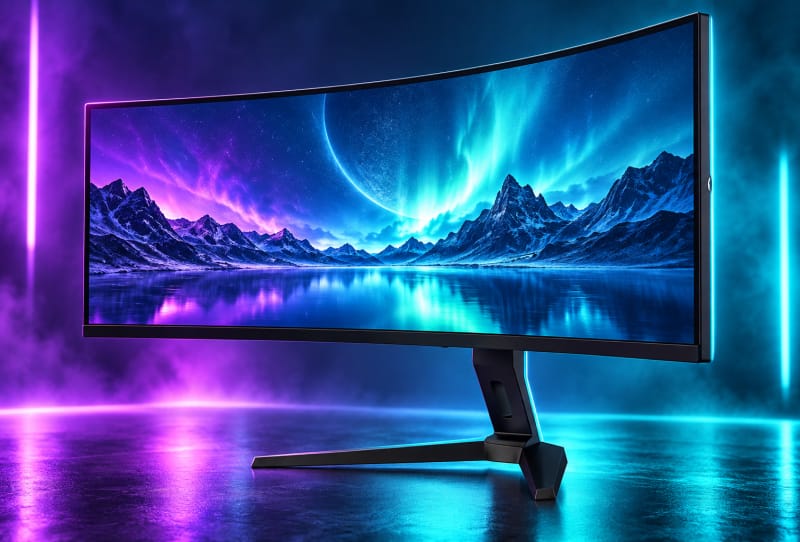
iiyama’s new 49-inch curved monitor fuses two QHD displays into a single bezel-free screen, giving office workers and multitaskers a 5120 x 1440 canvas without a seam down the middle. The ProLite XCB4994DQSU-B1 is built for people who juggle spreadsheets, browser tabs, and video calls side by side, and it leans on a wide 32:9 aspect ratio to do it. Rather than chasing the fastest refresh rate on the market, iiyama has aimed this panel squarely at productivity.
Key takeaways
- ✓iiyama's ProLite XCB4994DQSU-B1 is a 49-inch curved monitor with a 32:9 aspect ratio.
- ✓Native resolution is 5120 x 1440, equal to two QHD screens joined with no centre bezel.
- ✓The VA panel uses a 1000R curve, 120Hz refresh rate, and 400 nit typical brightness.
- ✓Colour coverage reaches 100% sRGB and 80% NTSC, with HDR10 and Adaptive Sync support.
- ✓Connectivity includes dual HDMI 2.0, dual DisplayPort 1.2, and a USB-C hub with charging.
The screen’s native resolution works out to exactly two 2560 x 1440 QHD monitors placed edge to edge, which is a useful way to picture it if dual-monitor setups are already familiar. A 1000R curvature wraps the edges gently toward the viewer, and the VA panel carries a matte finish that cuts down on glare from overhead office lighting.
Table of Contents
What the iiyama 49-inch curved monitor actually offers
Beyond the headline resolution, the ProLite XCB4994DQSU-B1 supports refresh rates up to 120Hz, which is a healthy jump for a monitor pitched at office and productivity use rather than competitive gaming. Brightness sits at a typical 400 nits, paired with a 3,000:1 static contrast ratio and a 2ms gray-to-gray response time. Those numbers won’t trouble a dedicated esports display, but they’re solid for a screen this size doing double duty as a work and media panel.
Colour coverage lands at 100% of the sRGB gamut and 80% of NTSC, figures that suit general content creation, design review, and everyday office tasks without stretching into professional colour-grading territory. HDR10 support adds a bit more dynamic range for video playback, and Adaptive Sync tackles screen tearing, with a variable refresh window of 48 to 120Hz over DisplayPort and 48 to 60Hz over HDMI.
iiyama has also included the usual comfort features expected on a panel built for long sessions: flicker-free backlighting and a blue light reduction mode. Neither is flashy, but both matter for anyone staring at a 49-inch curved monitor for a full workday.

Display specs at a glance
| Specification | Detail |
|---|---|
| Screen size | 49 inches, 32:9 aspect ratio |
| Native resolution | 5120 x 1440 (dual QHD) |
| Panel type | VA, matte finish, 1000R curve |
| Refresh rate | Up to 120Hz |
| Brightness / contrast | 400 nits typical, 3,000:1 static |
| Response time | 2ms gray-to-gray |
| Colour coverage | 100% sRGB, 80% NTSC |
| HDR | HDR10 |
| Adaptive Sync range | 48-120Hz (DisplayPort), 48-60Hz (HDMI) |
Connectivity and everyday usability
Ports on the ProLite XCB4994DQSU-B1 cover the common bases without overreaching. There are two HDMI 2.0 inputs and two DisplayPort 1.2 inputs, enough to run a laptop and a desktop at once without constant cable swapping. An integrated USB hub rounds things out with two USB-A 3.2 Gen 1 ports and two USB-C ports, all capable of 5Gbps data transfer.
Power delivery is modest but useful. The USB-A ports supply up to 4.5W, while the USB-C ports push 7.5W, enough to keep a phone or small accessory topped up during the day rather than charging a laptop outright. A headphone jack and two built-in 5W speakers mean the monitor can function without a separate desktop speaker setup, though anyone serious about audio will likely plug in headphones instead.
The stand adjusts for height and tilt, and the panel supports a 100 x 100mm VESA mounting standard, so buyers who prefer a monitor arm aren’t locked into the included base. That flexibility matters on a screen this wide, since desk space and viewing angle become real constraints once a monitor stretches past 45 inches.
How it compares with other ultrawide and dual-display options
The dual-QHD approach puts the ProLite XCB4994DQSU-B1 in a slightly different lane to the high-refresh gaming ultrawides that dominate headlines. Where something like MSI’s 1440p 360Hz monitor chases competitive frame rates on a flat panel, iiyama’s screen trades raw speed for sheer desktop real estate and a gentler curve suited to document work and spreadsheets.
It also sits apart from panels like AOC’s dual-mode 5K monitor, which targets gamers who want to switch between ultra-high resolution and extreme refresh rates on the same screen. iiyama isn’t chasing that crowd. The ProLite XCB4994DQSU-B1 is closer in spirit to large-format creative displays such as JAPANNEXT’s 6K creative monitor, where resolution and screen real estate matter more than chasing the highest possible Hz count.

For readers trying to decide between a single giant ultrawide and a pair of separate monitors, the trade-off is mostly about the bezel. A 49-inch curved monitor like this one removes the gap between screens entirely, which suits anyone who drags windows across the middle of the display regularly. Those shopping specifically for fast-paced gaming might still want to check a dedicated guide to choosing a competitive gaming monitor before committing, since this panel’s 120Hz ceiling and VA response time sit below what serious FPS players typically chase.
Frequently asked questions
What resolution does the iiyama ProLite XCB4994DQSU-B1 use?
It runs at a native 5120 x 1440 resolution, which matches two 2560 x 1440 QHD monitors placed side by side without a bezel between them.
Is this iiyama 49-inch curved monitor good for gaming?
It can handle casual gaming thanks to 120Hz refresh and Adaptive Sync, but its VA panel and response time are tuned more for productivity than competitive esports titles.
Does it support HDR?
Yes, the panel includes HDR10 support alongside 100% sRGB and 80% NTSC colour coverage, suited to general content viewing rather than professional colour work.
What ports does the monitor include?
It has two HDMI 2.0 inputs, two DisplayPort 1.2 inputs, two USB-A 3.2 Gen 1 ports, and two USB-C ports with data and limited charging support.