The Corsair Air 5400 arrives as a bold reimagining of what a mid-tower can be, offering a wide-body layout that immediately sets it apart. Its triple-chamber architecture introduces a fresh approach to airflow separation, giving builders more control over thermals without complicating the build process. From the moment you see it out of the box, it’s clear Corsair has aimed to modernise both cooling and presentation.
This case blends form and function with surprising finesse, delivering generous internal space while maintaining a clean, modern aesthetic. Subtle touches like the tinted glass panels and refined exterior lines help it stand out without being overly flashy. It’s a design that feels purpose-built, especially for systems running high-performance components.
What makes the Air 5400 compelling is Corsair’s focus on user-friendly engineering, ensuring that the case is easy to work in despite its advanced structure. The internal layout has been crafted to simplify installation, cable organisation, and airflow planning. For anyone seeking a smooth-running build with plenty of visual appeal, the Air 5400 offers an inviting starting point.
Table of Contents
Design and Functionality
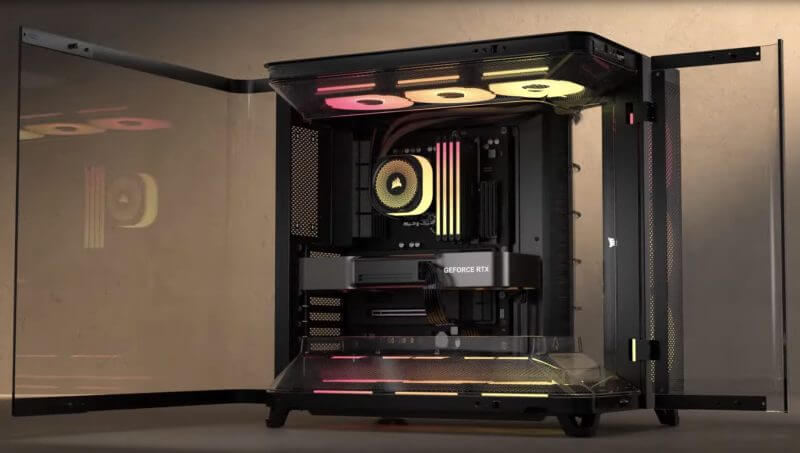
Corsair has taken a distinctive direction with the Air 5400’s overall shape, opting for a noticeably wider frame that gives internal components plenty of breathing room. This extra width allows hardware to be spaced out more effectively, reducing crowding and giving complex builds a cleaner, more open feel. The tempered glass panels, lightly tinted for subtlety, continue this spacious impression by offering an uninterrupted view of the system.
The triple-chamber layout is one of the most defining aspects of the case, separating the CPU cooling loop, GPU airflow path, and storage/power supply area. By isolating these zones, each component group receives its own dedicated cooling environment. This approach reduces heat transfer between major components, contributing to more stable temperatures in long-running workloads.
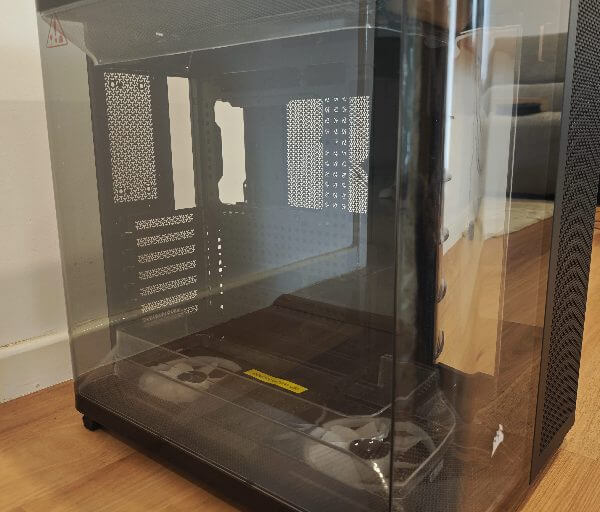
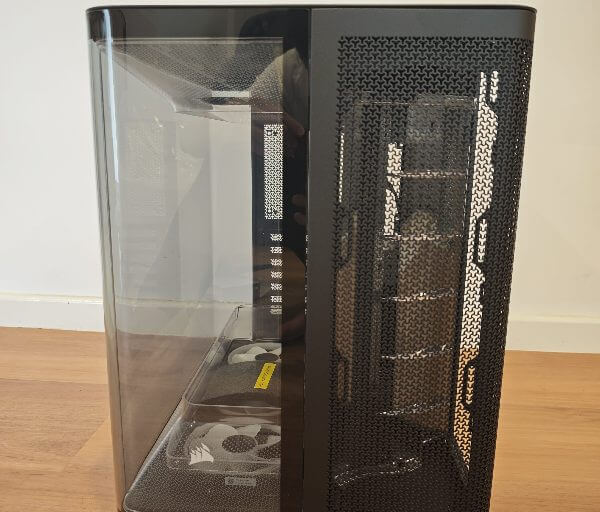
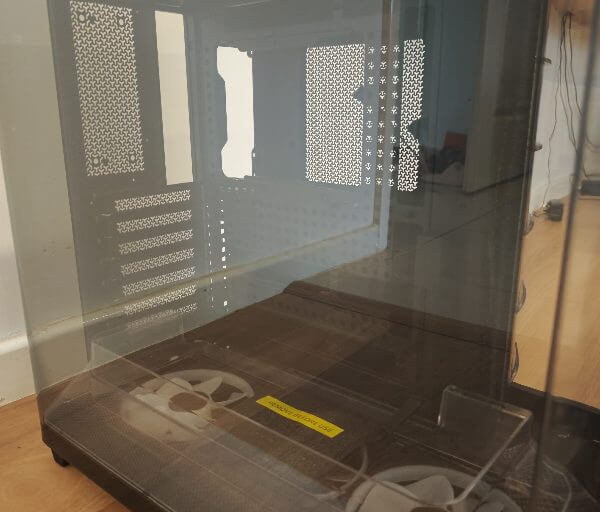
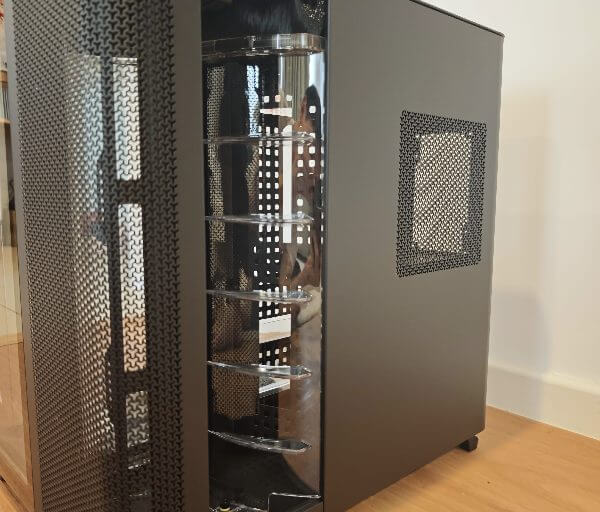
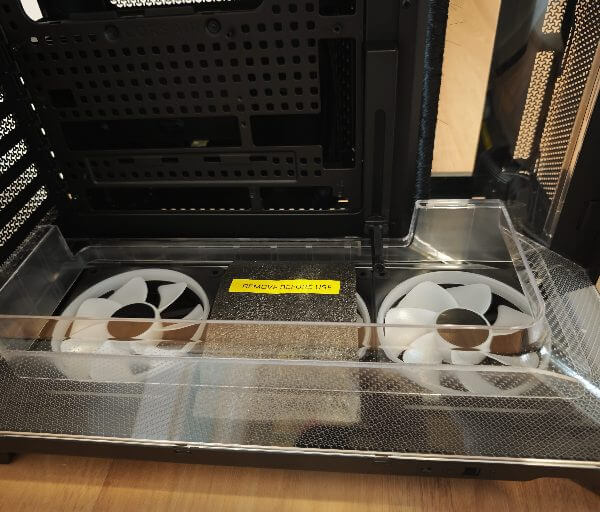
Corsair’s decision to use hinged side panels creates a more accessible design that allows instant entry to the system’s internals. Instead of removing four screws every time you want to make an adjustment, these doors pivot outward smoothly, making routine cleaning and part swapping far easier. The hinges feel sturdy and well-engineered, lending confidence when opening and closing the panels frequently.
The front glass panel is carefully accented with Corsair’s sails emblem, which is applied in a tasteful, understated manner. This touch adds personality without overwhelming the design, complementing the clean lines of the case. Combined with the wraparound glass presentation, it creates a panoramic display window ideal for showcasing internal components.
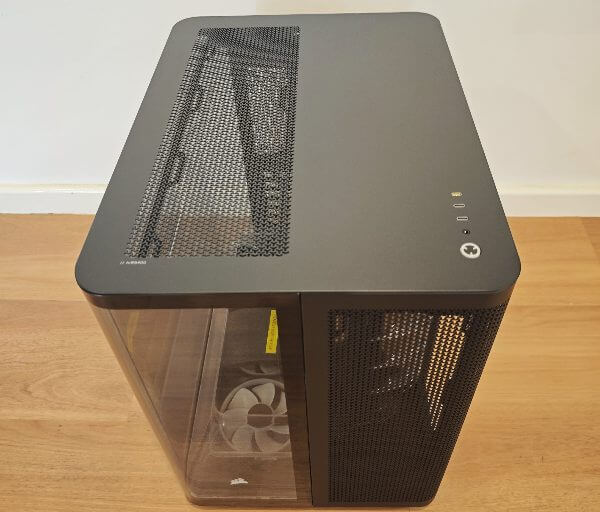
Ventilation has been handled thoughtfully, especially across the roof and base of the case. The top section includes a removable panel with a secure connection via POGO pins, meaning no trailing cables get caught during removal. This area offers room for three 120 mm fans or a full-size radiator, helping warm air escape as it naturally rises.
The bottom of the case features a full-length dust filter that slides out from the side for quick maintenance. This makes regular cleaning a simple task, particularly for systems placed under desks or in tight spaces. The four feet, equipped with rubber pads, keep the case stable while further reducing vibration transfer.
Inside the main chamber, builders will find support for a wide range of motherboard formats including reverse-ATX layouts. The simplified mounting options make it easy to experiment with different configurations depending on airflow preferences or aesthetic goals. With space for up to a 360 mm radiator in three locations, cooling hardware can be positioned exactly where it performs best.
Corsair has shaped the top and bottom fan shrouds to act as directional guides for airflow. These shrouds help streamline movement through the case by reducing turbulence and directing cool air towards the GPU. The upper shroud also offers extra clearance for VRM heatsinks, making it easier to install larger or more complex boards without conflict.
A dedicated chamber along the right side of the case allows CPU radiator exhaust to exit directly rather than circulating back into the system. This targeted ventilation path is particularly beneficial for high-capacity all-in-one coolers, ensuring their warm discharge air leaves the chassis immediately. The moulded structure guiding this airflow feels deliberate and well-planned.
Cable management benefits from Corsair’s second-generation RapidRoute system, which uses movable and ratcheting tie blocks on a pegboard-style tray. These blocks can be repositioned or rotated to match your cable paths, making routing straightforward even with multiple accessories connected. The added flexibility helps maintain a tidy build without forcing cables into awkward angles.
Between each chamber, Corsair replaces traditional rubber grommets with nylon brush dividers. These brushes maintain separation while still allowing cables to pass through cleanly, preventing bunching and reducing visual clutter. They contribute to a more refined internal layout that looks cohesive from every angle.
Storage installation is handled through a combination drive plate positioned beneath the power supply area. This plate supports either a single 3.5-inch drive or two 2.5-inch drives, giving enough room for both mass storage and high-speed SSDs. The design keeps drives secure and out of the main airflow pathways, preserving the case’s thermal efficiency.
Key Features
The Air 5400’s triple-chamber structure is one of its standout features, separating the CPU cooling loop from the GPU intake zone to minimise heat crossover. This layout ensures each major component benefits from a fresh, direct air supply, improving temperature consistency during demanding tasks. A third chamber neatly houses storage, the power supply, and excess cabling to keep the main interior uncluttered.
Dual airflow ducts built into the top and bottom of the case support a continuous vertical airflow path. Cool air is drawn in through the lower chamber and directed straight into the graphics card, helping maintain stable temperatures under load. As heat rises, it is guided through the upper ducting and out of the chassis, assisted by additional top-mounted fan positions.
Corsair includes three reverse-rotor 120 mm ARGB fans installed along the floor of the case. These fans draw cool air directly from outside and push it upwards through the GPU area, helping maintain stable performance during graphically intensive applications. Their reverse-rotor design allows the illuminated side of the fan to face outward without sacrificing airflow.
The case’s glass panels function like French doors, wrapping around the front and side and swinging open from the corner. This design makes accessing internal components effortless while offering a wide, uninterrupted view of the system. The wraparound glass also adds a premium visual appeal that suits RGB-heavy or display-focused builds.
Corsair’s RapidRoute 2.0 system enhances cable management with modular, ratcheting cable tie blocks that can be repositioned along a pegboard tray. These adjustable blocks help guide cables cleanly, allowing for highly customised routing without relying on fixed anchor points. The system is especially useful for complex builds involving multiple accessories and lighting elements.
To keep the multiple chambers visually clean, Corsair uses nylon brush dividers instead of traditional grommets for cable pass-through. These brushes are flexible enough to accommodate thick or bundled cables while maintaining neat separation between compartments. They also help reduce cable friction and wear when making adjustments.
A dedicated exhaust opening on the right side of the case allows warm air from CPU liquid coolers to exit immediately. This prevents radiator discharge air from cycling back into the system and elevating internal temperatures. The moulded ducting around this opening ensures the warm air is channelled smoothly and efficiently outwards.
The modernised front I/O array consists exclusively of USB Type-C ports, offering a streamlined, future-ready interface. With multiple USB 3.2 Gen 1 Type-C ports and a high-speed 20 Gb/s Type-C connection, fast data transfer is always accessible. The power and audio jacks are positioned conveniently for everyday use.
A complete iCUE Link system hub is included, allowing builders to manage lighting and fan control with a single, simplified cable ecosystem. This reduces the amount of wiring running through the chambers and makes the build feel more organised. For users already in the iCUE ecosystem, this integration helps tie the whole system together.
Support for an extensive range of cooling hardware gives builders plenty of freedom in designing their airflow layout. With room for 360 mm radiators in the top, front, and bottom, the case can accommodate high-performance cooling setups without compromise. The additional rear fan bracket offers optional VRM-focused airflow for even greater thermal control.
Tech Specifications
Case Type:
Mid-tower chassis
Materials:
Steel frame with tempered glass panels
Motherboard Support:
Mini-ITX, Micro-ATX, ATX, E-ATX (up to 305 mm x 277 mm)
Reverse-ATX supported
Dimensions:
Height: 467 mm
Length: 470 mm
Width: 340 mm
Weight:
16.7 kg
Side Panels:
Left: Tempered glass
Right: Steel
Expansion Slots:
7 horizontal slots
Power Supply Support:
ATX units up to 200 mm in length
Maximum Component Clearances:
GPU length: Up to 360 mm
CPU cooler height: Up to 180 mm
Cable routing space: 134 mm
Drive Bays:
1 × 3.5-inch
2 × 2.5-inch
Front I/O Connectivity:
1 × USB 3.2 Gen 2×2 Type-C
2 × USB 3.2 Gen 1 Type-C
1 × Audio in/out
Motherboard headers: HD Audio, USB 3.2 Gen1, USB 3.2 Gen 2×2 Type-E, F_PANEL
Fan Support:
Top: 3 × 120 mm
Front: 3 × 120 mm
Bottom: 3 × 120 mm
Rear: 1 × 120 mm
Included Fans:
3 × iCUE LINK LX-R RGB (bottom intake)
Radiator Support:
Front: 240 mm / 360 mm
Top: 360 mm
Bottom: 240 mm / 360 mm
Rear: 120 mm
Cooling Compatibility:
Supports Corsair liquid coolers including: H60, H100, H115, H150, Nautilus, Titan
Additional Features:
Reverse connector motherboard support
RapidRoute cable management system
Full dust filtration
Tempered glass panoramic window
Nylon brush chamber dividers
iCUE LINK System Hub included
Experience Using the Product and Performance
Building inside the Corsair Air 5400 is immediately refreshing thanks to the extra width of the chassis. The additional space along the rear chamber gives your hands more room to work, reducing the cramped feeling common in slimmer mid-tower cases. This makes every stage of installation feel controlled and straightforward.
The hinged glass panels play a major role in this ease of use. Being able to open them like doors rather than remove them entirely saves time and reduces the chance of accidental drops. Their smooth swing-out motion also makes quick adjustments far simpler during the build process.
One of the most helpful aspects of the interior is the generous cable-routing channel behind the motherboard tray. With up to 134 mm of space available, cables can be managed without forcing thick bundles into tight recesses. This space also improves airflow by keeping wiring clear of the main chamber.
Corsair’s RapidRoute 2.0 system further simplifies cable organisation, especially for those who enjoy a clean, polished final look. The ratcheting cable blocks snap securely into place on the pegboard tray, allowing custom paths that match your specific setup. This flexibility makes it easy to adjust layouts without having to undo entire sections.
Routing the front I/O cables was equally smooth thanks to the clearly marked connectors and tidy pass-through locations. The nylon brush dividers provide a clean transition between chambers without restricting thicker cables like power leads. This helps maintain neat lines throughout the build.
Assembling the power supply was surprisingly easy due to the dedicated rear chamber, giving you open access to all connections. Unlike many cases where PSU installation requires flipping the case or contorting your hands, the Air 5400 leaves ample room to secure cables before placing the supply in position. This speeds up what is typically a fiddly task.
Installing storage drives on the combination mounting plate is equally straightforward. The plate sits at a convenient height and angle, allowing screws to be inserted easily without awkward arm positions. Once mounted, the drives reside out of view and away from the main airflow paths.
The included iCUE Link hub greatly reduces wiring clutter during assembly. Connecting the pre-installed fans requires only a single daisy-chain cable, removing the mess of splitter cables that often complicate fan installation. This cable-light approach enhances the building experience dramatically.
Fitting a motherboard into the main chamber was smooth due to the unobstructed mounting space and well-placed standoffs. Even with larger E-ATX boards, the chamber remains open with plenty of room to route EPS power cables without conflict. The shrouded corners also help hide cable entry points.
GPU installation benefits from the vertical airflow pattern originating from the bottom intake fans. The spacious slot area allows large cards to slide in easily without brushing against the glass panel or neighbouring components. Aligning the card with the rear expansion slots feels guided and deliberate.
Installing cooling hardware is where the Air 5400 truly stands out. With support for 360 mm radiators in three different positions, you have the freedom to place your AIO where it fits your system best. Mounting a radiator in the front chamber feels particularly intuitive due to the accessible screw channels.
The top chamber’s radiator support is just as accommodating thanks to the removable top panel. Being able to lift the panel away gives you direct overhead access that simplifies lining up radiator brackets. This is especially useful when working with heavy or multi-fan cooling assemblies.
The bottom radiator support offers yet another option for liquid cooling layouts. Builders who prefer GPU-focused airflow can align their radiators here without blocking intake paths. This encourages more creative cooling configurations for specialised builds.
The dedicated exhaust chamber for CPU cooling is one of the Air 5400’s most impressive features in real-world use. Warm air from the radiator leaves the case through a wide vent rather than circulating internally, noticeably reducing overall thermal buildup. This helps maintain more consistent temperatures during long gaming or rendering sessions.
During testing, the triple reverse-rotor fans performed exceptionally well at pushing cool air directly into the graphics card area. Their vertical airflow lift gives the GPU a steady stream of fresh intake, reducing thermal spikes under high load. The fans operate quietly even at higher speeds thanks to their balanced blade design.
The top duct structure reinforces the natural upward movement of warm air. As heat escapes from the GPU and motherboard area, it is collected and guided smoothly towards the ceiling of the case. This reduces hotspots and encourages steady system airflow even without additional top fans installed.
Adding fans to the top deck further enhances this airflow pattern. With three mounts available, a strong exhaust setup can be created that works harmoniously with the bottom intake. During heavy benchmarking, this combination proved effective and stable.
The rear fan bracket is surprisingly helpful for VRM-focused airflow. Even though the area looks minimal at first glance, the optional fan helps stabilise motherboard temperatures during CPU-intensive workloads. It’s a thoughtful inclusion for advanced builders.
Noise levels remain impressively low despite the strong airflow potential. The wide chassis helps distribute noise-producing components across more space, reducing the concentration of sound. Combined with the tempered glass panels, the case maintains a calm acoustic profile.
The front I/O array worked seamlessly throughout testing. The multiple USB-C ports delivered consistently fast data transfers and had no compatibility issues with modern peripherals. Their placement makes them easy to reach without interrupting the clean lines of the case.
The removable dust filter at the base makes regular maintenance quick and efficient. Sliding it out from the side avoids the need to tip or shift the case into awkward positions. This encourages more frequent cleaning, helping preserve airflow performance.
Handling the hinged panels during operation feels natural and reliable. Their durability gives confidence that they will hold up over years of frequent opening and closing. They also make system upgrades much more appealing due to the ease of access.
The case’s internal lighting looks exceptionally clean thanks to the reverse-rotor fans and glass layout. The lighting accents are visible from all angles without appearing overwhelming or obstructed. This enhances the display appeal of RGB-focused builds.
Thermal performance remained consistently strong across extended usage scenarios. The isolated CPU and GPU chambers prevent component groups from heating each other unnecessarily. This separation makes the case especially suitable for high-end hardware.
In everyday use, the Air 5400 feels stable and grounded due to its weight and wide feet. Even when moving or adjusting the system, the case maintains excellent balance. This inspires confidence in its structural integrity.
The Air 5400 delivers a building experience that is easy, intuitive, and enjoyable, even for complex hardware setups. From airflow planning to cable routing to hardware installation, the case removes many of the common frustrations of PC assembly. Its performance and build quality reinforce its position as a strong choice for enthusiasts seeking a reliable, stylish, and user-friendly chassis.
Conclusion
The Corsair Air 5400 stands out as a thoughtfully engineered mid-tower that merges modern aesthetics with a highly functional internal layout. Its wide-body design, glass panels, and multi-chamber structure present a distinctive approach that both looks impressive and serves a clear purpose. From the exterior finish to the internal structure, the case feels like a carefully considered evolution of airflow-focused design.
Throughout testing, the Air 5400 demonstrated excellent thermal performance thanks to its dedicated cooling zones and vertical airflow path. The separation of CPU and GPU cooling environments helps maintain consistent temperatures, even during extended workloads. This predictable cooling behaviour gives the case a reassuring sense of reliability for both gaming and productivity-focused builds.
The Air 5400 also excels in user experience, offering a building process that feels smooth and well-supported. Features such as hinged glass doors, generous cable-routing space, and simplified fan wiring make system assembly less stressful and more enjoyable. Whether installing high-end components or planning a visually striking setup, the case remains easy to work in.
With its blend of accessibility, cooling innovation, and premium presentation, the Corsair Air 5400 makes a strong argument for builders who want a chassis that looks striking and performs at a high level. It provides a solid foundation for enthusiast systems while maintaining a user-friendly approach that suits both new and experienced builders alike.