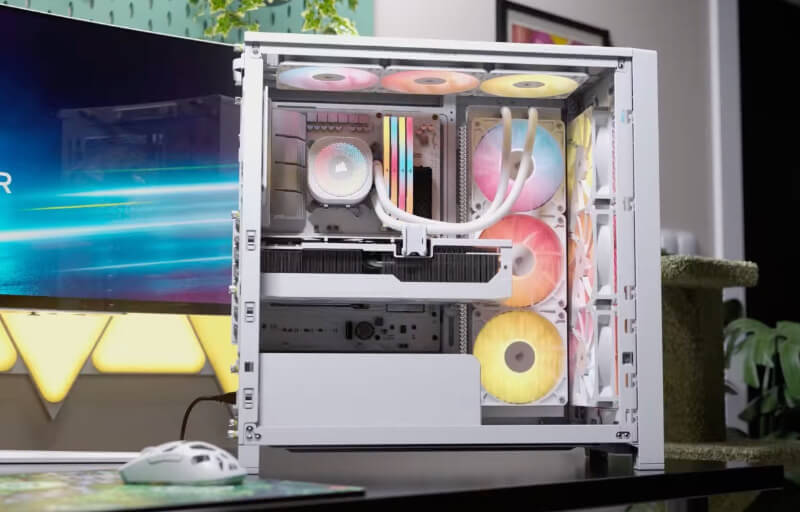
The Corsair FRAME 4000X RS is a mid-tower case designed for builders who want a combination of strong airflow, flexible hardware support and a clean presentation. In the white finish, it has a bright, modern appearance that works particularly well with RGB lighting and carefully selected components, while the tempered glass side panel gives the finished system plenty of visual impact.
Its biggest strength is the amount of flexibility built into the chassis. Corsair has designed the FRAME 4000X RS around a modular layout, giving users a wide range of options for fan placement, radiator positioning, cable routing and internal configuration, while also supporting everything from Mini-ITX through to E-ATX motherboards.
Cooling support is equally generous, with space for up to 13 120 mm fans, multiple 360 mm radiators and four RS120 PWM fans included as standard. Combined with the ventilated RGB front panel, reverse-connector motherboard support, GPU anti-sag hardware and a practical front I/O layout, the FRAME 4000X RS is clearly aimed at enthusiasts who want a case that is easy to build in while still leaving plenty of room for future upgrades.
Table of Contents
Design and Functionality
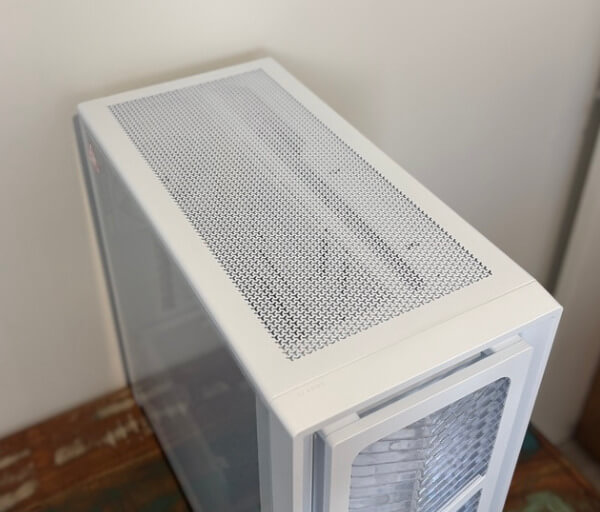
The Corsair FRAME 4000X RS immediately makes a strong visual impression in its white finish, combining a clean exterior with a layout that feels purpose-built for modern gaming and enthusiast systems. Its dimensions of 486 mm high, 488 mm long and 239 mm wide give it a substantial presence without pushing it beyond the practical proportions expected from a mid-tower chassis.
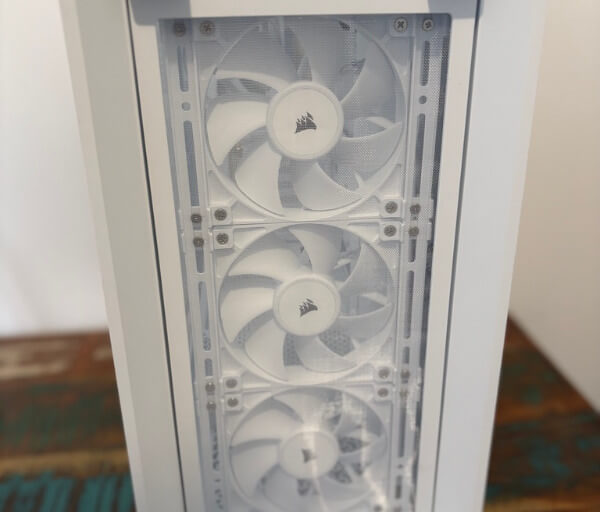
The front panel is one of the most distinctive parts of the design. Rather than using a plain mesh surface, Corsair has integrated airflow openings with ARGB lighting, creating a front section that contributes to both cooling and presentation without making the case look overly busy.
A full-length tempered glass panel occupies the left side, giving the internal hardware a clear showcase once the system is complete. The white exterior helps contrast darker components particularly well, while also complementing white motherboards, graphics cards, coolers and memory modules for builders aiming for a coordinated setup.
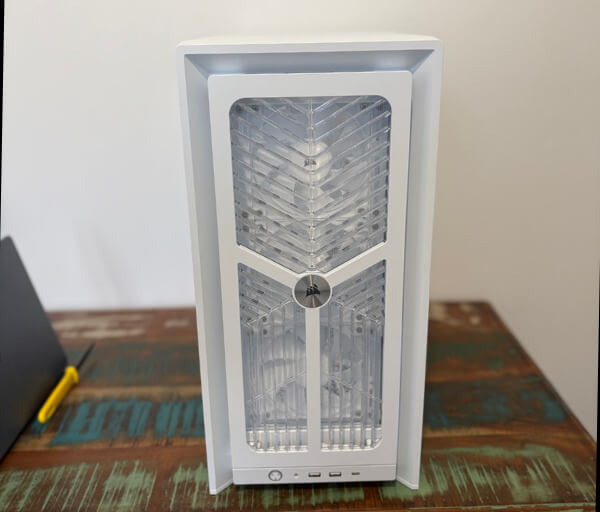


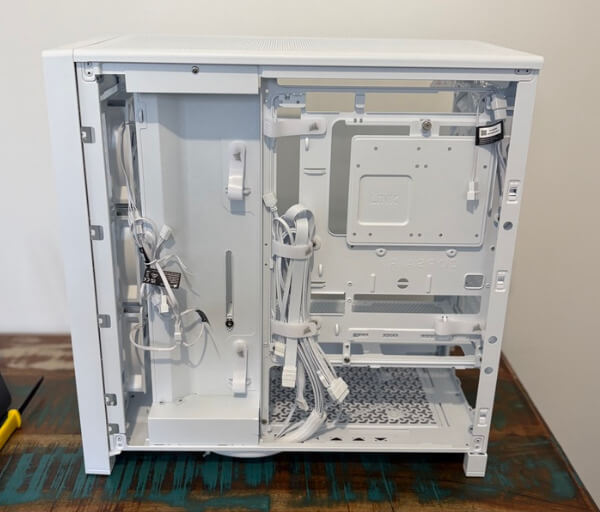
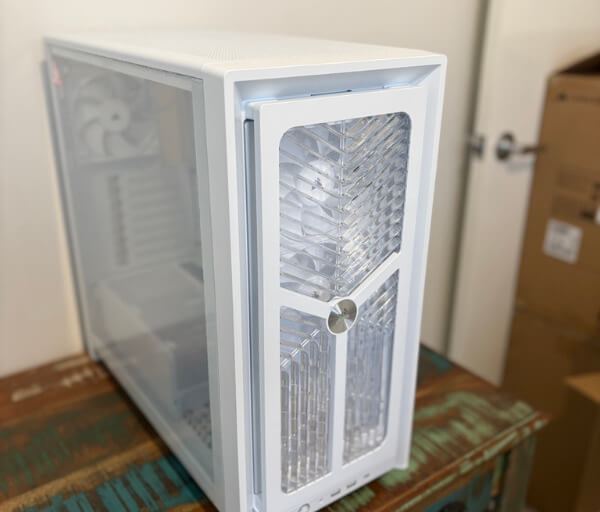
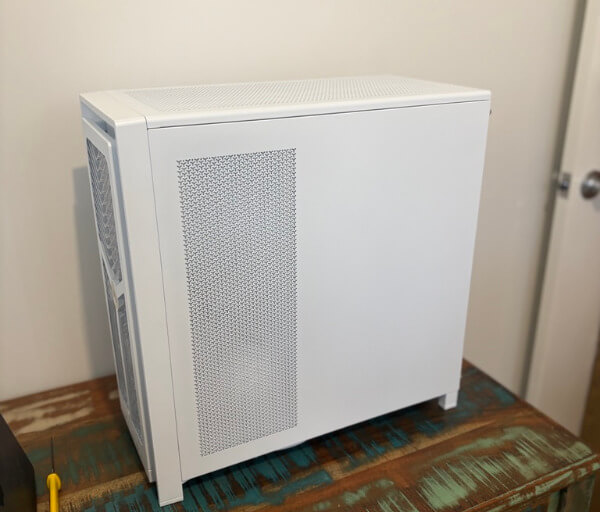


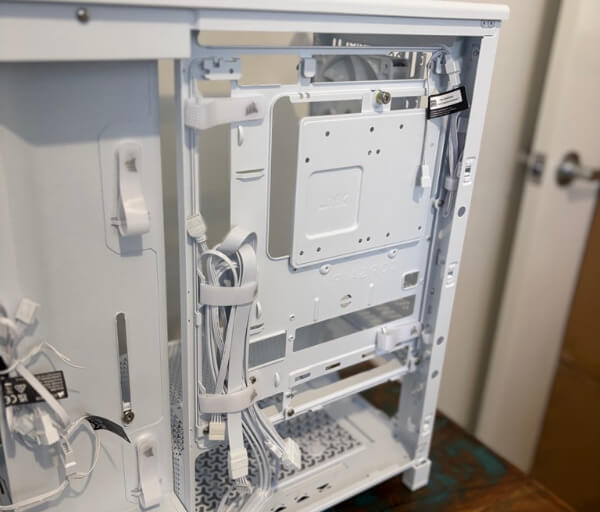
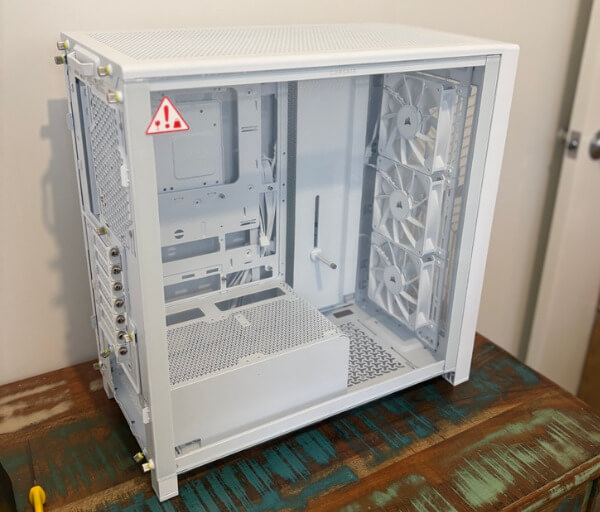
The opposite side uses a more traditional steel panel that keeps the cable-management area concealed. This keeps the visual focus on the main chamber while still providing a solid exterior finish on the rear-facing side of the system.
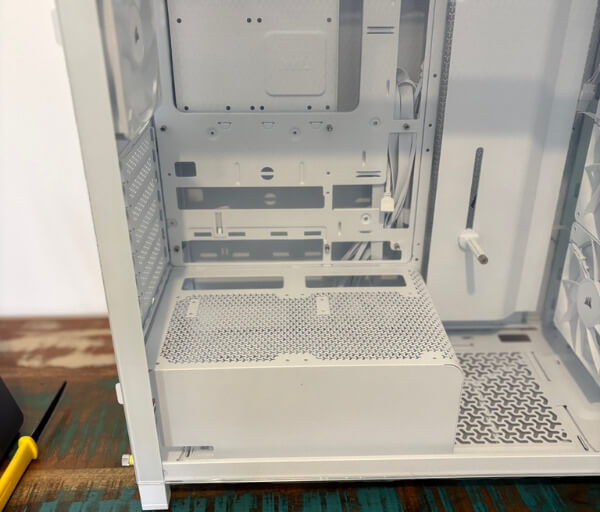
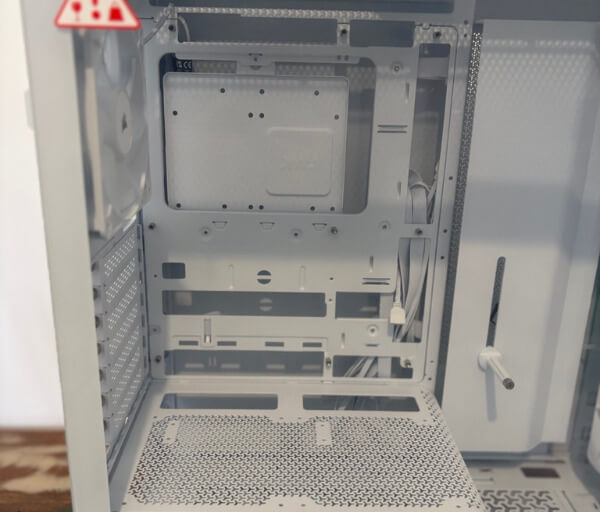
Accessing the interior is straightforward, with the side panels secured in a way that makes routine maintenance and hardware changes simple. Once opened, the internal layout feels spacious and organised, with clearly defined areas for the motherboard, graphics card, cooling hardware and power supply.
One of the most important aspects of the FRAME 4000X RS is its modular construction. Several internal components can be removed or changed, allowing builders to adapt the chassis around the hardware they want to install instead of having to work around a completely fixed layout.
Motherboard support ranges from Mini-ITX through Micro-ATX and ATX to E-ATX boards measuring up to 305 x 277 mm. This makes the case suitable for a wide variety of systems, from compact gaming builds through to larger enthusiast configurations with more expansion capability.
Corsair has also included support for reverse-connector motherboards, which can significantly improve the appearance of the main chamber. By routing major power and connectivity cables behind the motherboard tray, builders can achieve a much cleaner front-facing layout with fewer visible leads.
There is up to 37 mm of cable-routing space behind the motherboard area, giving builders useful room for power cables, fan wiring and front I/O connections. This extra depth becomes particularly valuable in systems with several fans or RGB components, where cable density can increase quickly.
Graphics card support is similarly generous, with up to 430 mm of maximum GPU length available depending on the configuration. Even with standard 25 mm front fans installed, there is enough clearance for graphics cards up to 405 mm long, which leaves ample room for many large modern GPU designs.
An adjustable GPU anti-sag stabilisation arm is integrated into the chassis to help support heavier graphics cards. This is a practical addition for larger systems because it reduces the need to add a separate support bracket while helping keep the graphics card level inside the case.
The expansion area can accommodate seven horizontal slots or three vertical slots, giving builders another way to customise how the finished system is presented. Vertical GPU mounting is supported, although a compatible riser card is required separately, making it an option for users who want to place more emphasis on the graphics card.
The top section uses a removable ventilated panel that provides direct access to the upper cooling mounts. This makes installing or servicing roof-mounted fans and radiators more convenient, particularly during the initial build when components may need to be repositioned several times.
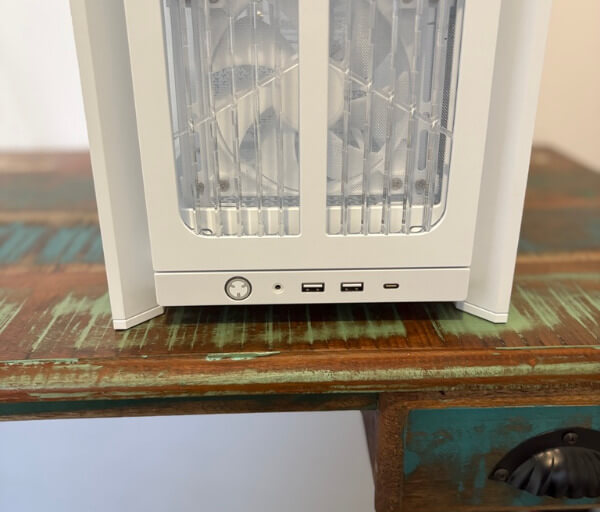
The front I/O is positioned for easy access and includes one USB 3.2 Gen 2×2 Type-C port, two USB 3.2 Gen 1 Type-A ports and a combined audio connection. Corsair also integrates ARGB lighting into the power button, giving even the functional controls a visual connection to the illuminated front panel while maintaining the clean styling of the white chassis.
Key Features
Cooling flexibility is one of the strongest features of the Corsair FRAME 4000X RS, with support for a large number of fans across several mounting positions. Builders can install up to 13 120 mm fans throughout the chassis, giving plenty of scope to create a high-airflow configuration around demanding hardware.
The front of the case supports three 120 mm fans, two 140 mm fans or two 200 mm fans, while the roof can accommodate three 120 mm or two 140 mm fans. Additional mounting positions are available at the side, rear and lower sections of the chassis, allowing airflow to be tailored around the specific components being used.
Corsair includes four RS120 PWM fans with the case, giving builders a strong starting point without needing to populate every mount immediately. Their daisy-chainable connections help reduce cable clutter, while magnetic dome bearings are designed to provide smooth operation with a useful balance between airflow and acoustics.
Radiator support is equally extensive, with mounting options for 120 mm, 140 mm, 240 mm, 280 mm and 360 mm radiators depending on position. The front, roof and side areas can each accommodate radiators up to 360 mm, making the chassis suitable for substantial liquid-cooling configurations.
The InfiniRail fan mounting system adds another layer of flexibility to the cooling layout. Rather than forcing fans into a small number of fixed mounting points, the adjustable rails allow compatible fans to be repositioned more precisely, helping builders target airflow where it is needed most.
The RGB front panel is another defining feature and combines illumination with practical ventilation. Its integrated 5V ARGB lighting can connect to compatible motherboard headers, allowing the front lighting to be synchronised with other system components through supported motherboard software.
Storage support is kept simple and focused, with space for one 3.5-inch drive or up to two 2.5-inch drives. This arrangement suits modern systems that rely heavily on motherboard-mounted NVMe storage while still retaining options for additional SATA-based drives when required.
CPU cooler clearance reaches up to 170 mm, which provides room for many substantial air coolers. Power supplies up to 220 mm long are also supported, giving users the freedom to choose higher-capacity ATX units for systems built around more powerful processors and graphics cards.
The case supports horizontal and vertical graphics card installation, which gives builders more freedom when deciding how they want the finished system to look. The integrated anti-sag stabilisation arm is particularly useful for large graphics cards, helping support their weight and reduce strain around the PCIe slot.
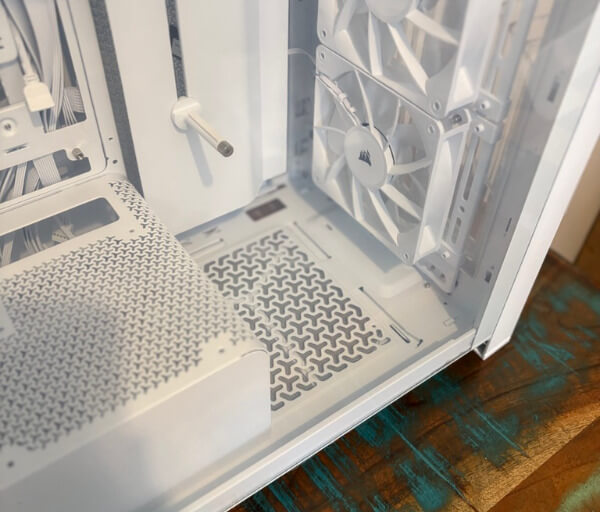
Dust management is handled through removable filtration across key intake areas. Filters positioned around the front, side and bottom sections help reduce the amount of dust entering the chassis while remaining accessible enough to make routine cleaning straightforward.
Reverse-connector motherboard compatibility is an especially useful feature for anyone focused on creating a tidy interior. By supporting motherboards that move major connectors to the rear, the FRAME 4000X RS can hide more cabling behind the motherboard tray and leave the main chamber looking noticeably cleaner.
The modular FRAME design ties many of these features together by allowing selected panels and internal components to be swapped or reconfigured. This gives the case more long-term flexibility than a completely fixed chassis, making it easier to adapt the system as cooling requirements, hardware choices or aesthetic preferences change.
Experience Using the Product and Performance
Building a system inside the Corsair FRAME 4000X RS is a straightforward experience, largely because the interior provides plenty of space around the main components. The open layout makes it easy to position the motherboard, graphics card and cooling hardware without constantly working around restrictive internal structures.
Installing the motherboard is particularly simple thanks to the accessible tray area and generous working room around the edges. There is enough clearance to reach mounting points comfortably, which helps reduce the frustration that can sometimes come with tighter chassis designs.
The PSU installation process is similarly uncomplicated, with the lower chamber keeping the power supply separated from the main component area. This arrangement helps maintain a cleaner presentation while also making it easier to manage thicker power cables before the rest of the system is completed.
Cable routing is one of the areas where the case performs especially well in day-to-day use. With up to 37 mm of space behind the motherboard tray, there is enough depth to route larger power cables, fan leads and front I/O wiring without placing excessive pressure on the rear side panel.
The additional space also helps when several cooling components are installed. A system using multiple fans, RGB lighting and an AIO cooler can quickly accumulate a significant number of cables, so having extra room behind the motherboard tray makes the final build considerably easier to organise.
The daisy-chain design of the included RS120 PWM fans further simplifies this process. Fewer individual connections need to be routed back towards the motherboard, which keeps the internal wiring more manageable and reduces the amount of unnecessary cable clutter.
The four included fans provide a useful cooling foundation straight away. Builders can create a balanced intake and exhaust arrangement without immediately needing to fill every available mounting position, while the remaining fan mounts leave plenty of room for future expansion.
Airflow through the front of the chassis is strong thanks to the ventilated panel design. Cool air can move directly towards the graphics card and CPU cooling area, helping create a steady flow through the main chamber rather than relying on small or heavily obstructed intake openings.
The illuminated front panel does not compromise the practical airflow-focused design. Its lighting adds visual interest when the system is running, particularly against the white exterior, while the ventilation remains a central part of the panel rather than being treated as a secondary feature.
The roof provides another effective pathway for warm air to leave the system. With support for multiple large fans or a substantial radiator, heat generated around the processor can be directed upwards and away from the core components efficiently.
Side-mounted cooling provides another valuable option, especially for builds using liquid cooling. Being able to position a radiator or additional intake fans beside the motherboard allows users to experiment with different airflow strategies depending on the hardware configuration.
The flexibility of the InfiniRail system becomes particularly useful while fine-tuning fan placement. Instead of simply accepting fixed locations, the mounting rails allow compatible fans to be shifted into more useful positions, making it easier to direct airflow towards specific areas.
This can be especially beneficial when using a large graphics card. Positioning intake airflow closer to the GPU can help supply fresh air directly to its cooling system, which is useful in performance-focused gaming builds where the graphics card is likely to generate a significant amount of heat.
The generous GPU clearance also makes installation less stressful. There is ample room to manoeuvre larger cards into position, and the ability to remove or adjust nearby components can make the process even easier when working with particularly substantial hardware.
Once installed, the integrated GPU anti-sag arm provides useful additional support. Large modern graphics cards can place noticeable weight on the PCIe slot, so having an adjustable support already built into the chassis helps keep the card level without adding another visible accessory.
The tempered glass panel makes the finished system particularly rewarding to look at. With the white chassis acting as a bright frame around the internal components, RGB lighting and carefully selected hardware are easy to see without the case itself dominating the presentation.
The front RGB lighting complements this effect nicely. It gives the exterior its own identity while still allowing internal lighting to remain visible through the side panel, creating a more cohesive appearance when the system is powered on.
Lighting control is also easy to integrate into a broader setup because the front panel uses a standard 5V ARGB connection. This allows compatible motherboard software to coordinate the front illumination with fans, memory, coolers and other supported components.
Noise characteristics can be managed effectively through fan control because the included RS120 units support PWM operation. This gives users the ability to create quieter profiles during light workloads while allowing higher fan speeds when the system is under sustained load.
The case also works well for builders who prefer air cooling rather than an AIO. With support for CPU coolers up to 170 mm tall, there is enough space for many larger tower coolers while still maintaining useful airflow around the rest of the system.
For liquid-cooling users, the multiple 360 mm radiator positions provide considerably more choice. The ability to choose between front, roof and side mounting makes it easier to build around component clearance and personal preferences rather than being locked into a single radiator location.
Dust maintenance is simple thanks to the removable filtration around the main intake areas. Being able to access these filters without dismantling the system encourages more regular cleaning, which can help maintain consistent airflow over longer periods of use.
The front I/O arrangement is practical during everyday use, especially for systems positioned on or beside a desk. Having both USB Type-A and USB Type-C connectivity readily available makes it convenient to connect external storage, peripherals, phones and other commonly used devices.
The combined audio connection keeps the front panel uncluttered while still providing easy headset access. Its placement alongside the USB ports means the most frequently used connections remain within reach without disrupting the clean appearance of the case.
Reverse-connector motherboard compatibility can make an especially noticeable difference once a build is complete. Moving key connections behind the motherboard removes a significant amount of visible cabling from the main chamber, helping the hardware and lighting become the focus.
Thermal Performance
For thermal testing, the Corsair FRAME 4000X RS was configured with an Intel Core i7-13700K processor, cooled by a Corsair Nautilus 360 liquid cooler, alongside a Gigabyte RTX 4070 Ti graphics card. This combination gives the case a solid workload to manage, particularly with the i7-13700K capable of producing a substantial amount of heat under sustained processing loads.
At idle, the CPU recorded a temperature of 36°C, which is an excellent result for a system of this specification. The strong front ventilation, included RS120 fans and generous internal spacing help maintain a steady supply of cool air through the chassis while preventing heat from lingering around the motherboard area.
Under load, the CPU reached 63°C, which demonstrates how effectively the FRAME 4000X RS can support a high-performance cooling setup. The Corsair Nautilus 360 benefits from the case’s extensive radiator support and unrestricted airflow pathways, allowing heat from the processor to be moved out of the chassis efficiently.
The large internal volume also gives the Gigabyte RTX 4070 Ti plenty of breathing room, with front and side airflow options capable of directing fresh air towards the graphics card. This is particularly valuable in gaming and GPU-intensive workloads, where maintaining consistent airflow around the card can help support stable cooling performance over extended sessions.
These results highlight the practical benefit of the FRAME 4000X RS cooling-focused design. With an idle CPU temperature of 36°C and a load temperature of 63°C in our test system, the case provides an excellent foundation for powerful hardware while leaving plenty of scope to further customise fan and radiator placement.
The Corsair FRAME 4000X RS ultimately feels designed around making the entire building process more flexible and less restrictive. Its spacious interior, modular structure, extensive cooling support and strong cable-management options make it easy to create a clean, well-cooled and visually impressive white system while leaving plenty of room for future upgrades.
Conclusion
The Corsair FRAME 4000X RS is a well-designed mid-tower that combines strong cooling potential, modular flexibility and a clean visual style. The white finish gives it a particularly modern appearance, while the tempered glass panel and illuminated front provide an excellent showcase for carefully selected hardware.
Its extensive fan and radiator support makes it especially suitable for powerful gaming and enthusiast systems. Our Intel Core i7-13700K test system maintained a CPU temperature of 36°C at idle and 63°C under load with the Corsair Nautilus 360, demonstrating how effectively the chassis can support demanding components.
Building inside the case is also pleasantly straightforward, helped by generous internal space, useful cable-routing clearance, reverse-connector motherboard compatibility and the integrated GPU support arm. The modular FRAME design provides additional freedom to adapt the layout as hardware and cooling requirements change.
For anyone looking to build a clean, high-performance white PC with plenty of cooling flexibility and room for future upgrades, the Corsair FRAME 4000X RS is an excellent choice. It successfully balances presentation, practicality and enthusiast-friendly functionality without making the building process unnecessarily complicated.