Microsoft’s latest Xbox PC app update promises games will launch up to 60% faster, while menus and in-app windows open far more quickly too. The change arrives as part of a broader push to make the Xbox experience feel consistent whether someone is sitting at a console, a PC or using a browser.
Key takeaways
- ✓Microsoft's Xbox PC app update makes game launches up to 60% faster
- ✓Navigating sections like the Store and Game Pass is up to 50% quicker
- ✓In-app windows now open up to 65% faster than before the update
- ✓The revamped Xbox Cloud Gaming web interface is becoming the default experience
- ✓Search now surfaces games, DLC and people from across the entire Xbox ecosystem
The update follows months of behind-the-scenes work on the app that millions of PC gamers use to buy, manage and launch their Xbox and Game Pass library. Microsoft has been candid about the app’s reputation for feeling sluggish compared to rivals like Steam, and this release is clearly aimed at closing that gap rather than adding flashy new features.
Table of Contents
Xbox PC app update: what’s actually faster
According to Microsoft, launching a game through the app is now up to 60% quicker than before. That single change should matter most to everyday players, since it’s the action people perform most often and the one where delays are most noticeable.
Navigation has also been reworked. Moving between sections such as the Store, the Game Pass catalogue and a player’s personal library is up to 50% faster. In-app windows, including things like store listings and settings panels, now open as much as 65% quicker. Together, these figures suggest Microsoft has gone after the app’s underlying responsiveness rather than just its visual polish.
| Action | Reported speed improvement |
|---|---|
| Launching a game | Up to 60% faster |
| Navigating between sections (Store, Game Pass, library) | Up to 50% faster |
| Opening in-app windows | Up to 65% faster |
This isn’t the first attempt Microsoft has made at fixing the app’s performance. The company previously tested an earlier project codenamed Garrison aimed at rebuilding the app from the ground up, which suggests this latest rollout may be the public result of that longer-running internal effort rather than a quick patch.
Finding games and friends gets easier
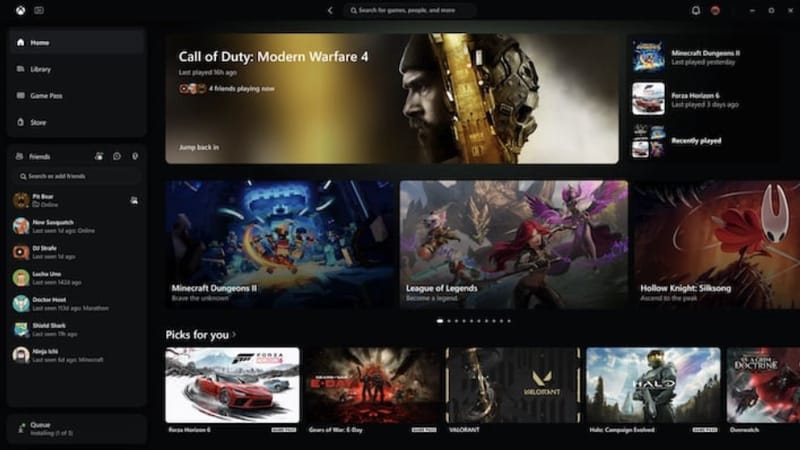
Speed isn’t the only focus of this release. Microsoft is also adding new filters and sorting options to help players dig through larger libraries, which has become more useful as Game Pass subscribers accumulate dozens or even hundreds of installed titles over time.
Search has been broadened as well. Instead of returning only game titles, results will now pull in downloadable content and even other Xbox users, making the app function more like a hub for the whole ecosystem rather than just a storefront. Social features are moving into the main navigation bar too, putting friends and activity closer to the surface instead of buried in a side menu.
Those changes line up with other recent app updates, including guides on adjusting console settings through the Xbox app and enabling console sharing features within the app, both of which point to Microsoft treating the PC app as a genuine control centre for the wider Xbox ecosystem.
Xbox Cloud Gaming’s new look becomes the default
Alongside the Xbox PC app update, Microsoft is widening the rollout of its refreshed Xbox Cloud Gaming web interface. That redesign, which first reached Xbox Insiders earlier this year, brings the browser experience closer to what players see on a physical console.
Until now, trying the new interface meant digging through settings to switch it on manually. Microsoft says that extra step is going away, with the updated look set to become the default experience for users streaming games through a browser. There’s no confirmation yet on whether people who prefer the older cloud interface will retain any option to switch back.
Why the update matters
Microsoft has leaned heavily into making Xbox feel platform-agnostic, letting players jump between console, PC and cloud streaming without relearning an interface each time. A faster, more consistent Microsoft’s official announcement frames this update as part of that strategy, rather than an isolated performance fix.
For PC gamers who have long complained about the app feeling heavier and slower than Valve’s Steam client, these numbers offer a concrete reason to give it another look. Whether the improvements hold up once the update reaches the full install base remains to be seen, but Microsoft publishing specific percentage gains rather than vague marketing language is a reasonable sign of confidence. Anyone wanting to explore the broader Xbox ecosystem on PC can find more detail through Xbox’s official site.
Frequently asked questions
When is the Xbox PC app update rolling out?
Microsoft has begun rolling out the update, though as with most staged releases it may reach different users at different times rather than all at once.
Does the update change how Game Pass works?
No. The update focuses on speed, navigation, search and the Xbox Cloud Gaming interface rather than changing Game Pass pricing, tiers or library access.
Will the old Xbox Cloud Gaming interface still be available?
Microsoft hasn’t confirmed whether users will be able to opt back into the previous cloud gaming layout once the new interface becomes the default.
Is this related to the earlier Garrison project?
It appears likely. Microsoft previously tested a rebuild of the Xbox PC app under the Garrison codename, and the performance gains in this release suggest that work has now reached a public rollout.