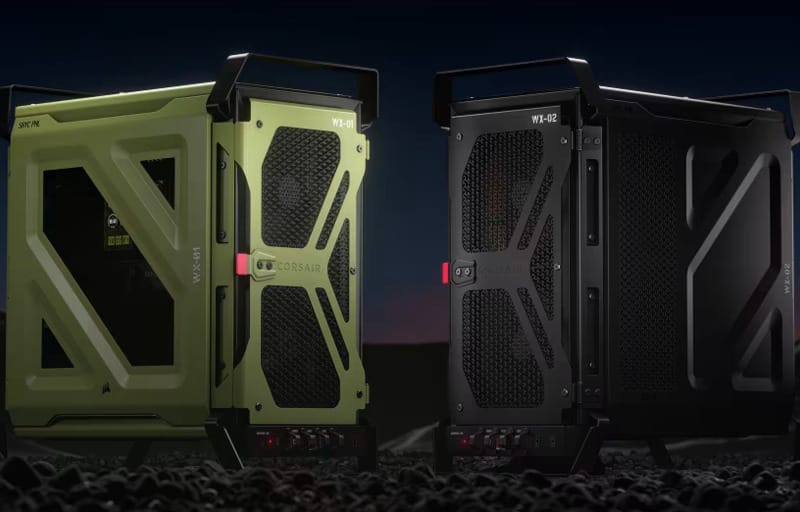
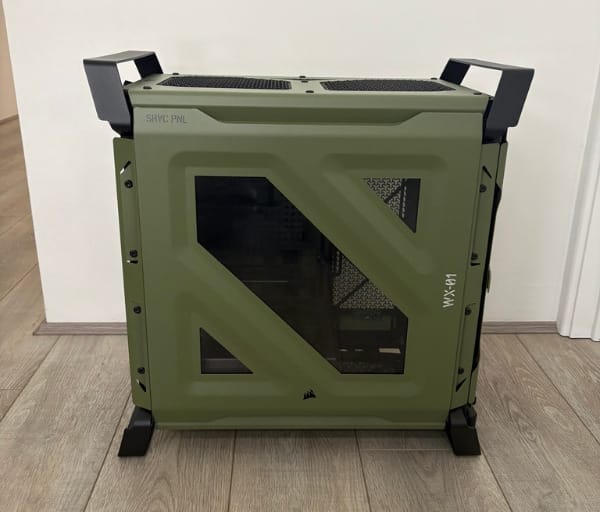
Corsair has taken its popular Frame 4000D platform and given it a distinctly tactical makeover with the Warthog RS, reviewed here in the striking Olive Drab finish as detailed on the official Warthog RS Olive Drab product page. Rather than chasing the glass-panelled, ARGB-saturated aesthetic that dominates most mid-tower cases right now, Corsair has leaned into rugged steel panelling, a matte green paint job and purposeful venting that gives the whole build a military equipment vibe.
Review summary
Corsair Warthog
The Corsair Warthog RS delivers a genuinely functional alternative to the glass-and-RGB aesthetic that dominates mid-tower cases, combining rugged military-inspired styling with practical engineering features. Thicker steel construction, integrated carry handles and thoughtful details like rear I/O lighting make this case as capable as it is distinctive. Pre-installed RS fans and flexible radiator support accommodate serious cooling setups without compromise.
Highlights
- ✓Solid steel construction with tactical Olive Drab finish
- ✓Integrated carry handles and tilt-clip side panels
- ✓Exceptional cable management with RapidRoute 2.0 pegboard tray
- ✓Supports up to 13 fans with InfiniRail flexibility
- ✓Pre-installed RS200 and RS120 fans included
It is a refreshing change of pace in a market where nearly every case on the shelf looks like a slight variation on the last one. The Warthog RS stands out not just because of its colour, but because the styling is backed by genuine functional choices, from the fan line-up to the way cables are routed behind the motherboard tray.
This review walks through the design, the headline features that make the RS edition worth a look, and what it is actually like to build in and live with day to day. By the end, readers should have a clear picture of whether this case suits their next build.
Table of Contents
Design and Functionality
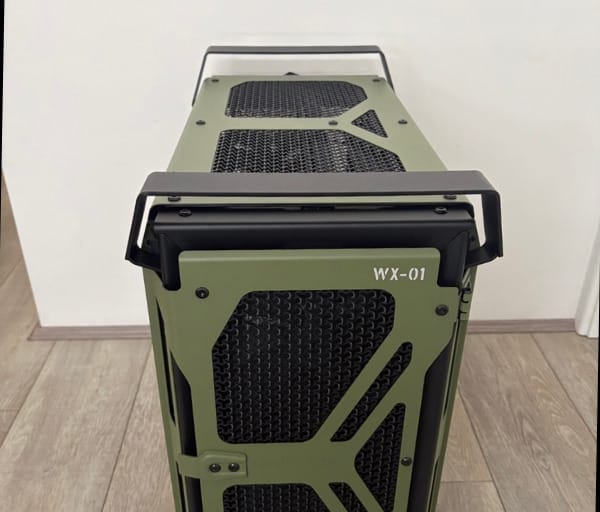
The first thing anyone notices about the Warthog RS is the construction. Corsair has used a thicker gauge steel than is typical for a mid-tower case in this class, and it shows in how solid the panels feel when handled. There is none of the flex or hollow resonance that cheaper chassis sometimes exhibit.
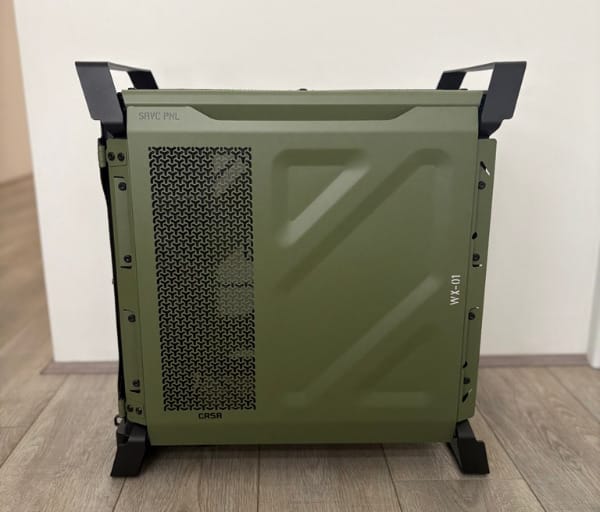
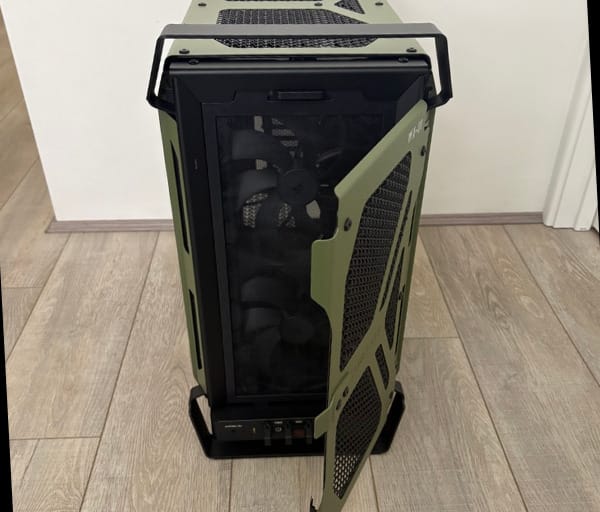
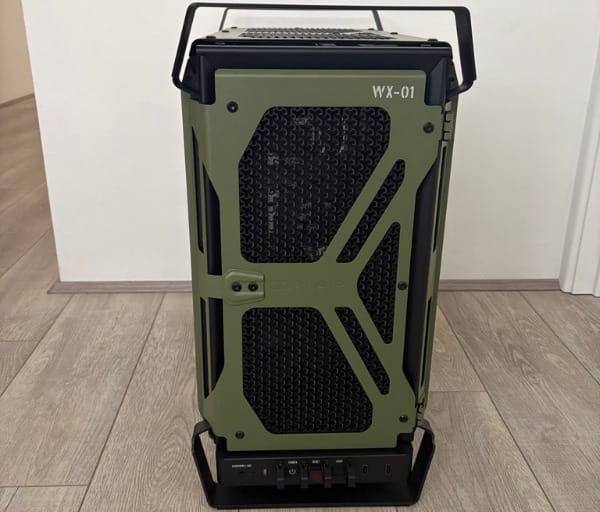
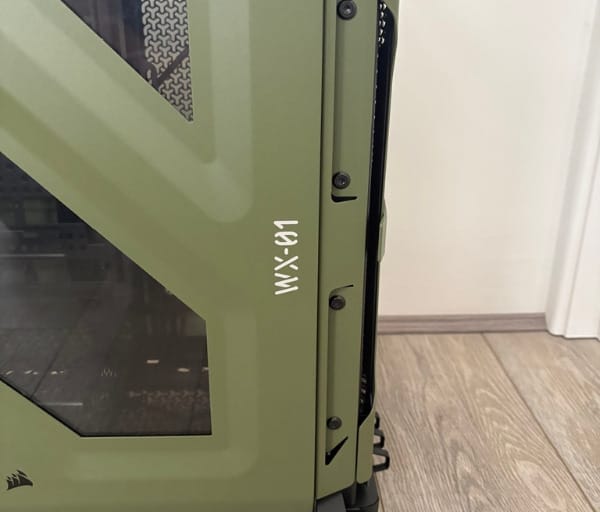
The Olive Drab colourway is more than a simple paint swap over the standard black version. It carries a slightly textured, matte finish that catches light differently depending on the angle, giving the case a tactical, almost field-equipment character rather than looking like a toy soldier colour scheme.
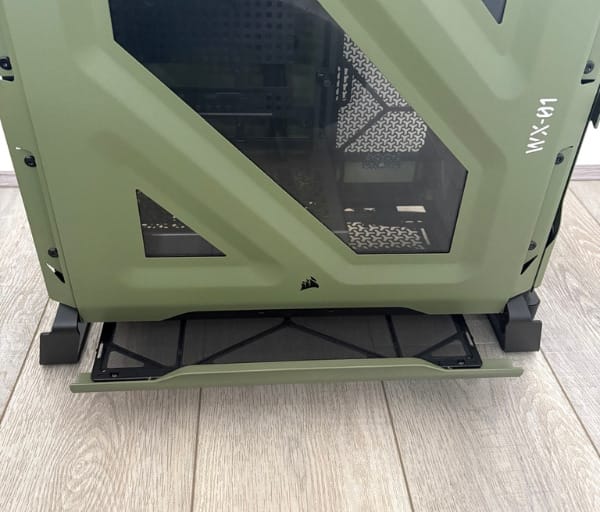
Dimensionally, the case measures 284mm wide, 534mm deep and 548mm tall, putting it firmly in mid-tower territory while still offering a genuinely spacious interior. That footprint leaves enough room for serious cooling hardware without ballooning into full-tower proportions.
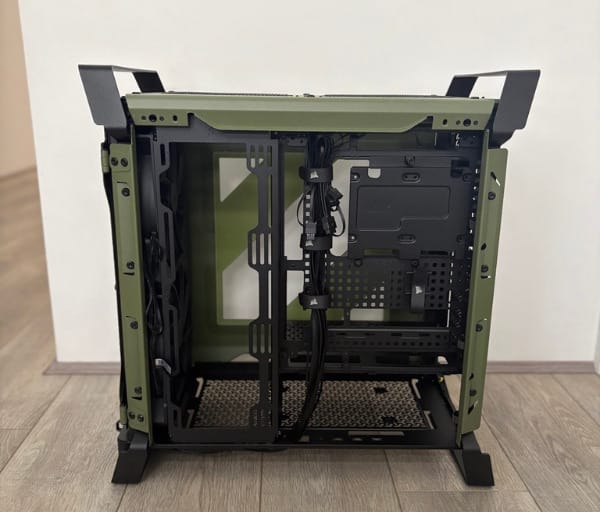
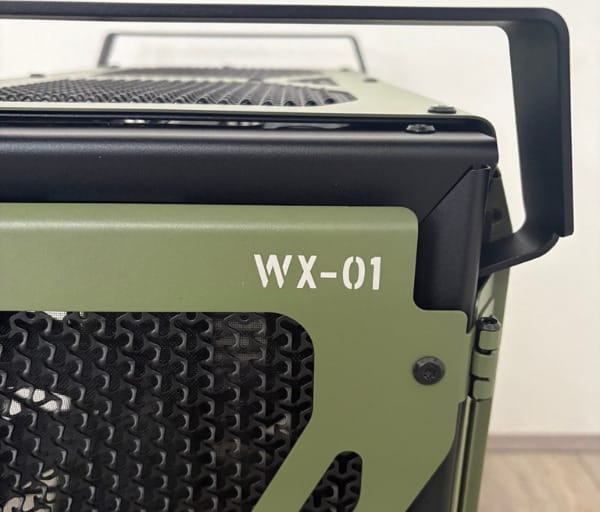
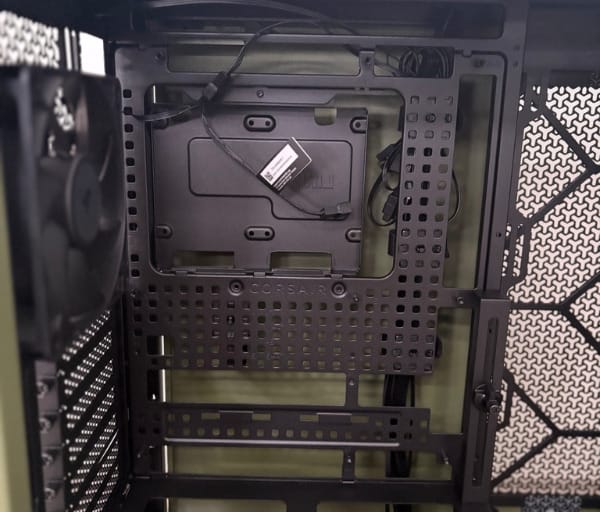
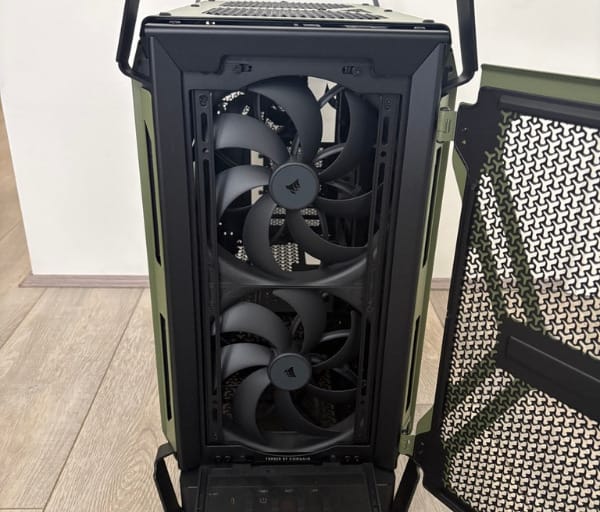
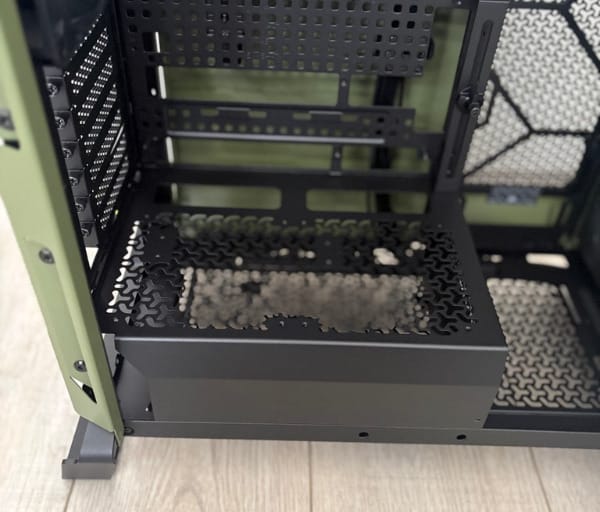
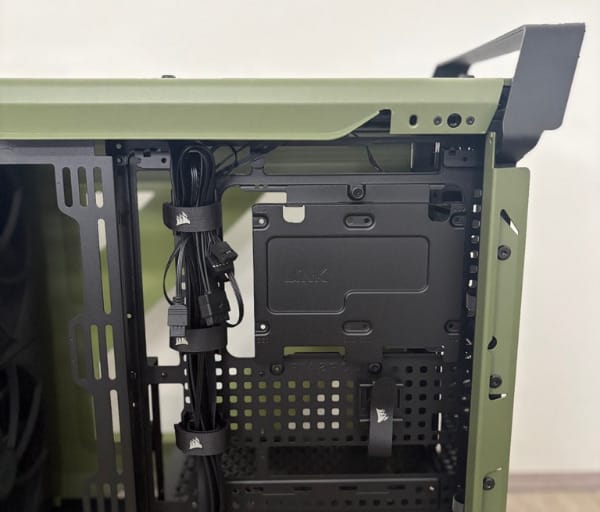
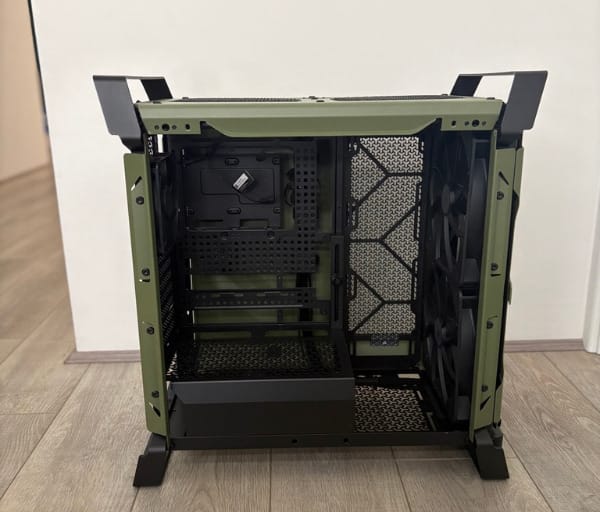
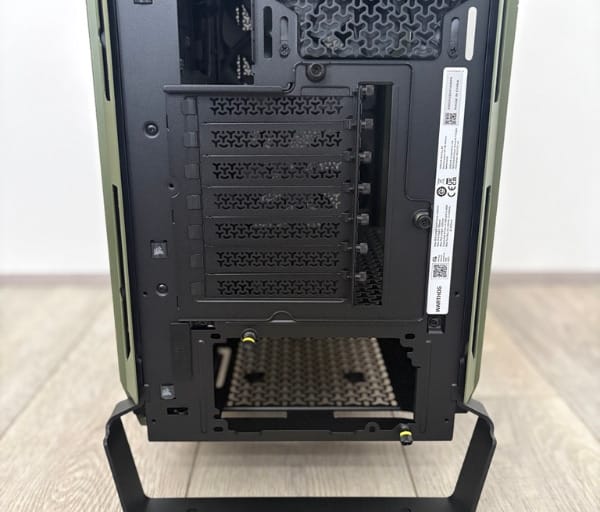
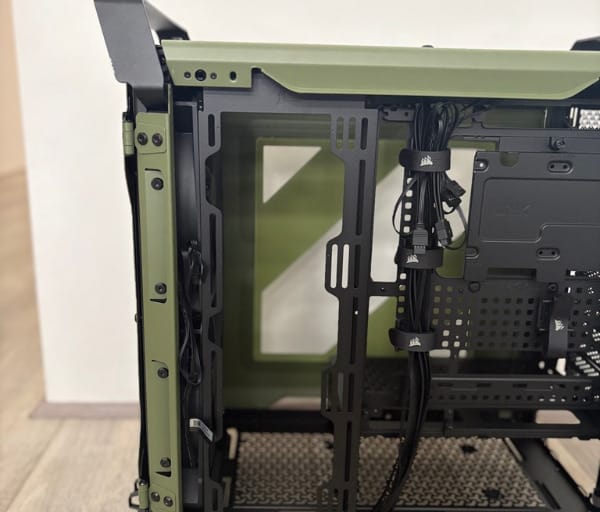
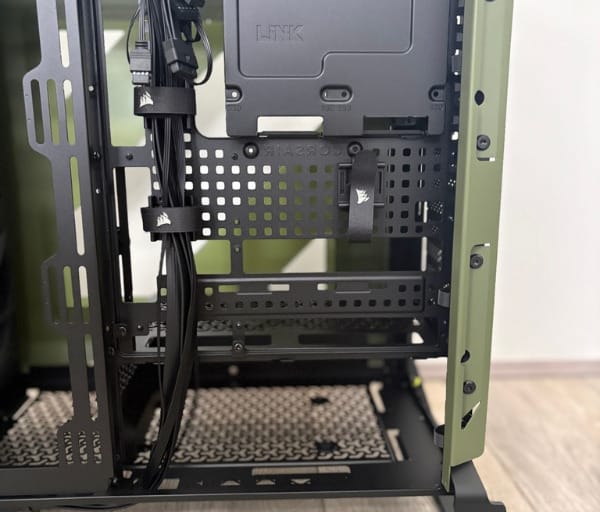
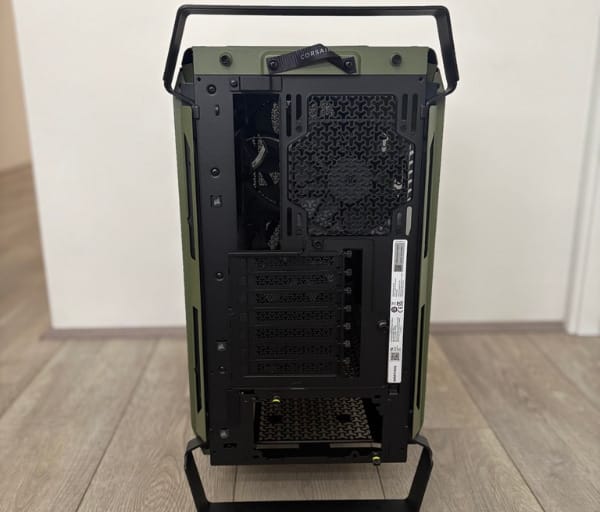
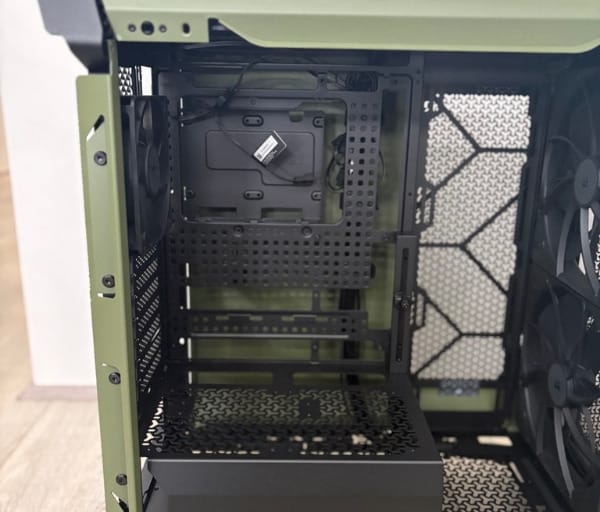
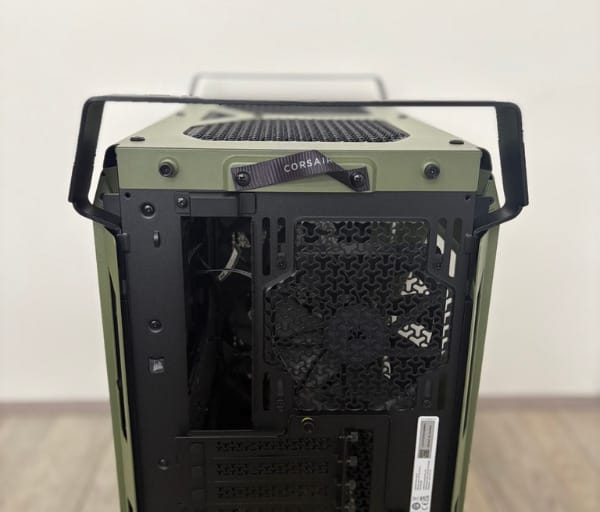
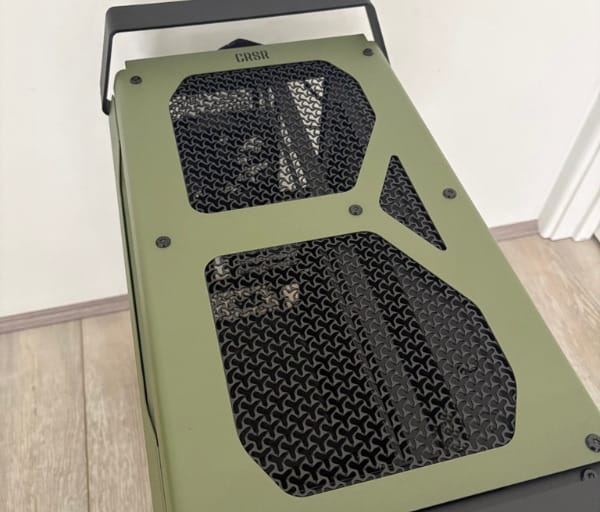
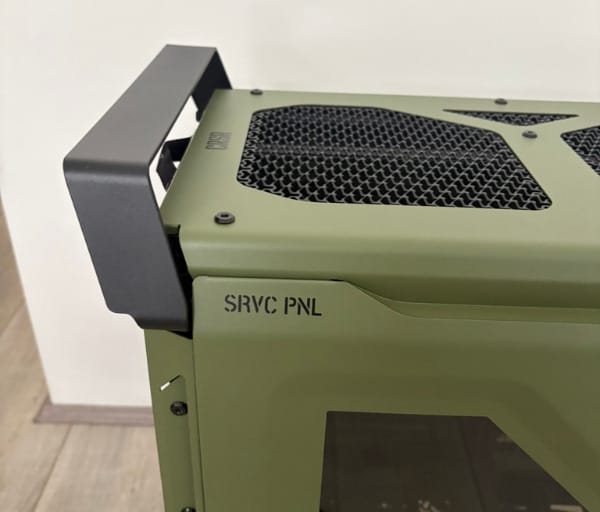
One of the standout design touches is the pair of integrated top-mounted carry handles. These are not bolted-on afterthoughts; they are structurally part of the chassis, meaning the whole unit can be lifted and carried with confidence rather than gingerly nudged along the floor.
That portability focus makes sense once the intended use case becomes clear. Whether it is heading to a LAN event, moving between a home office and a workshop, or simply being relocated during a house move, the handles turn what is usually an awkward two-person job into something one person can manage comfortably.
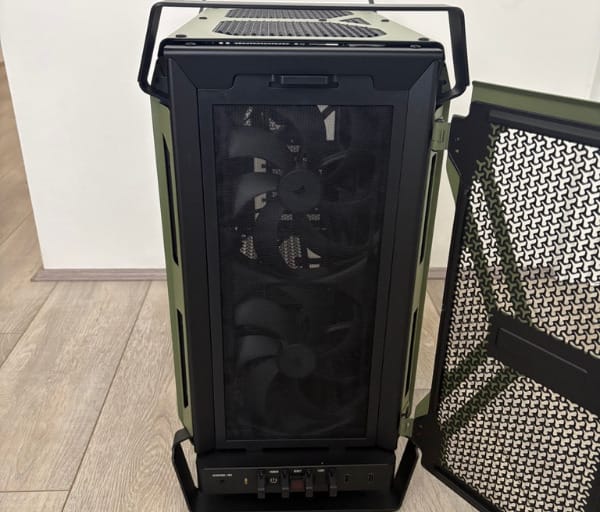
The side panels use a tilt-and-clip mechanism that slots into a lower channel before locking into place. It is a simple system but an effective one, allowing panels to be removed and refitted quickly during the build process without fiddly thumbscrews getting in the way.
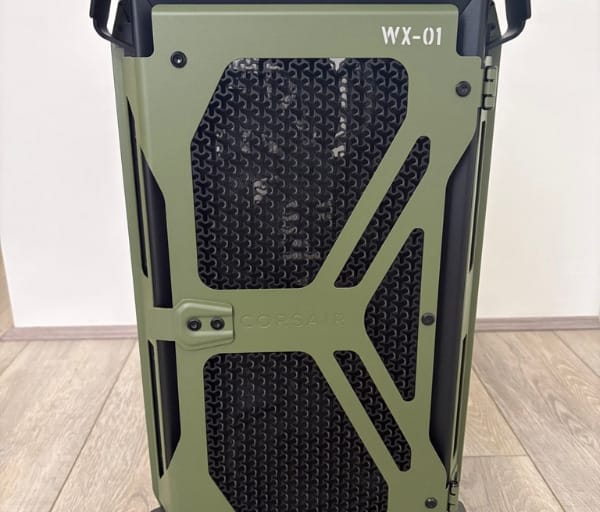
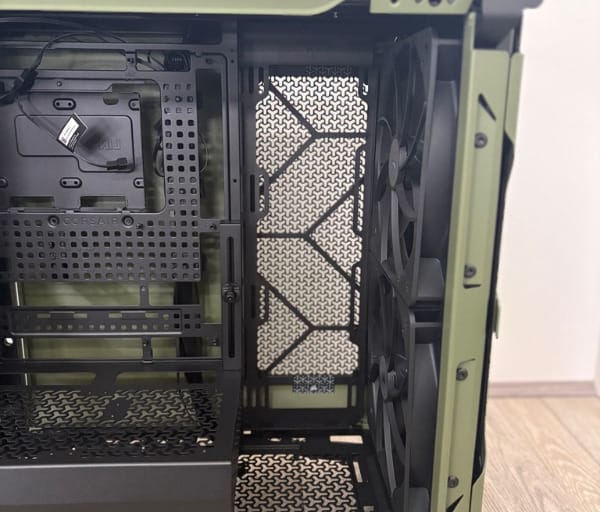
Mesh dominates the front and top surfaces, reinforcing the sense that this case is built around airflow rather than sealed-in showroom aesthetics. The front panel in particular uses a textured 3D-Y pattern that will be discussed in more detail further on, but from a pure design standpoint it adds visual depth rather than looking like a flat grille.
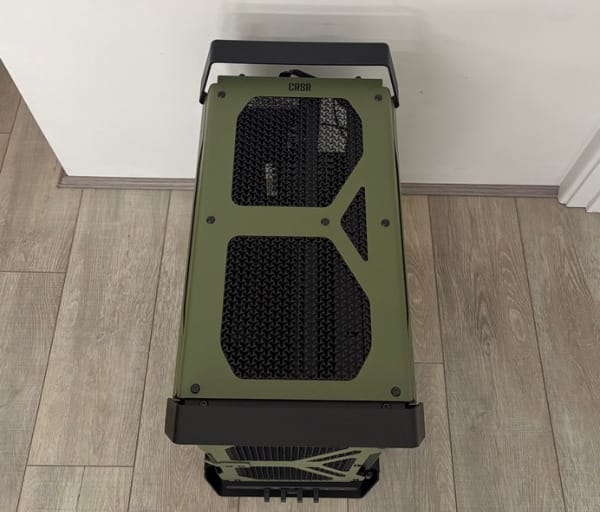
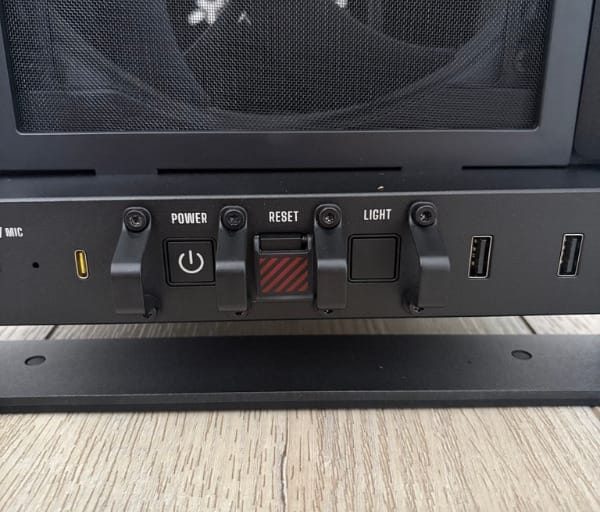
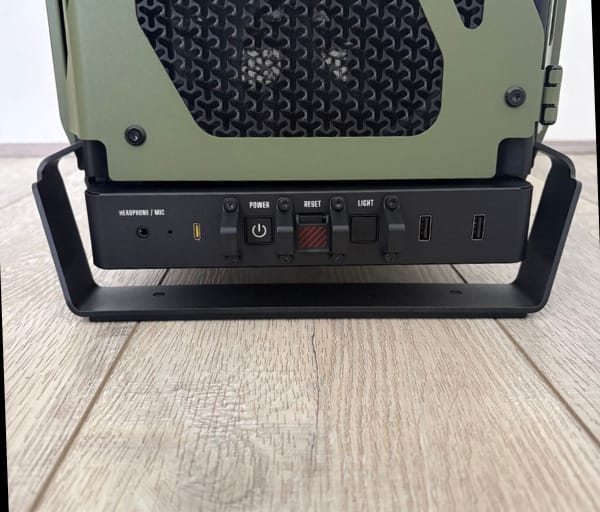
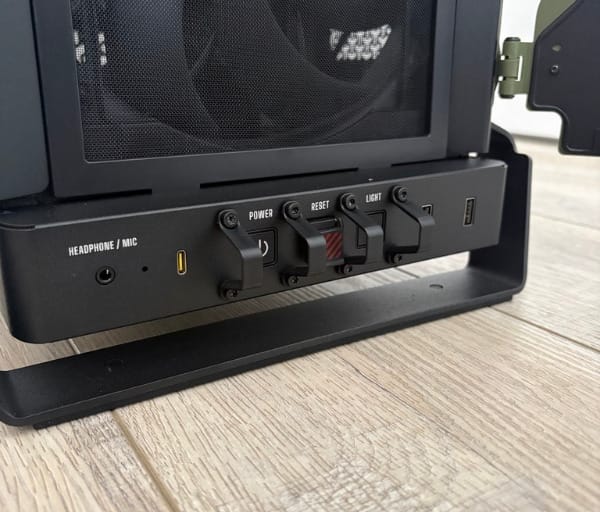
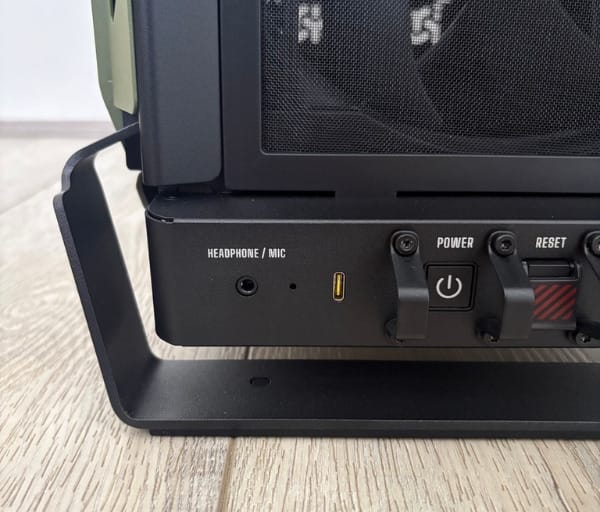
Front I/O is grouped sensibly along the top-front edge, keeping the power button, reset button, a dedicated light button and the headphone and microphone jack within easy reach. Nothing is hidden away or awkwardly placed, which matters more than it sounds once a case is tucked under or beside a desk.
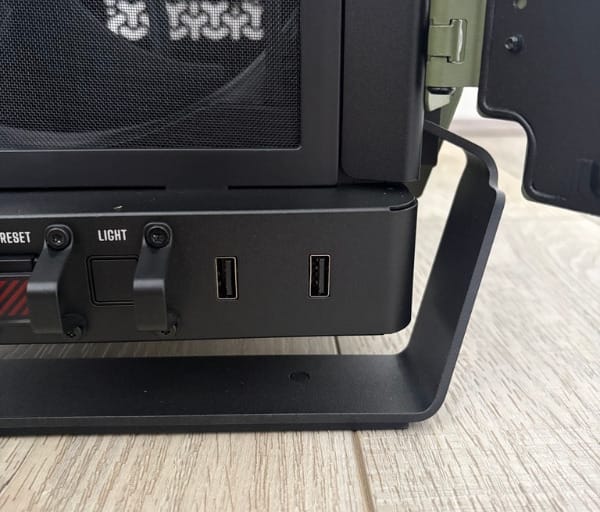
Corsair has added physical guards around the front buttons to prevent accidental presses, and the reset button specifically uses a flip-up cover. It is a small detail, but it is the kind of thoughtful touch that shows real consideration for how a case gets used once it leaves the box.
Around the back, a switch activates integrated rear I/O lighting, illuminating the rear panel area to make cable connections easier in dim rooms or under a desk. It is a practical feature rather than a decorative one, and it is the sort of thing that only becomes obvious as useful once experienced firsthand.
The power supply shroud has been kept deliberately compact, preserving space for more ambitious cooling configurations elsewhere in the case. It still supports a 120mm fan mounted on the case floor in front of the shroud, and its ventilated top surface can pair with a further 120mm fan to boost airflow around the graphics card.
Motherboard support spans E-ATX boards up to 277mm, standard ATX, Micro-ATX and Mini-ITX, giving builders a wide range of options regardless of the scale of their project. Seven expansion slots are available, which covers everything from a single graphics card build to setups with additional capture cards or expansion hardware.
Storage is handled by a tray that accepts either one 3.5-inch hard drive or two 2.5-inch SSDs, and the tray itself can be removed entirely if a builder wants to free up extra space for cable routing. It is a sensible nod to the reality that many modern builds now rely almost entirely on M.2 storage.
Graphics card support extends to 400mm with the RS200 intake fans installed, which comfortably covers the vast majority of current high-end cards on the market. The included GPU Anti-sag Stabilisation Arm helps keep heavier cards level, addressing a problem that has become increasingly common as flagship GPUs have grown in size and weight.
Reverse connector motherboard support is also baked into the design, with validated compatibility for Asus BTF, MSI Project Zero and Gigabyte Project Stealth boards. Even builders using conventional motherboards benefit from the extensive connector cutouts and tie-down points that this requirement has driven into the tray design.
Taken together, the design language of the Warthog RS feels coherent rather than gimmicky. Every rugged visual cue, from the handles to the mesh panels to the Olive Drab finish, is matched by a practical function underneath, which is what elevates it above a simple reskin of an existing case.
Key Features
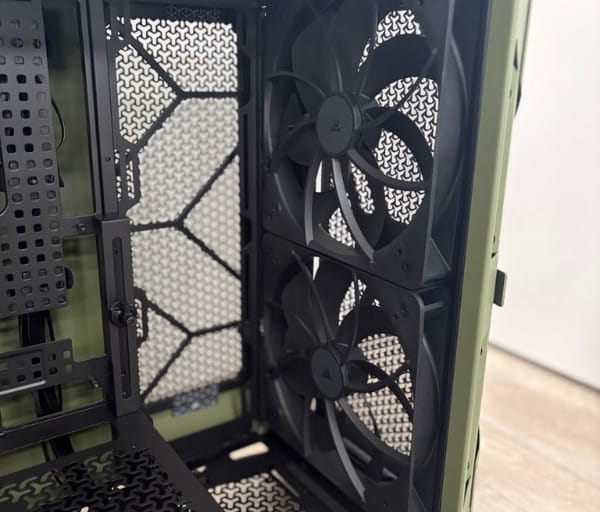
The RS designation on this particular Warthog signals the inclusion of Corsair’s RS fan line-up straight out of the box, and this is arguably the single biggest differentiator from the standard Warthog. Two 200mm RS200 fans arrive pre-installed at the front as intakes, working alongside a 120mm RS120 fan mounted at the rear as exhaust.
The RS200 front fans are rated to a maximum of 1,000rpm, which is a relatively low ceiling for a 200mm fan but reflects the fact that larger fan blades can move significant air volume at lower rotational speeds. The RS120 rear exhaust fan spins considerably faster, topping out around 2,100rpm to keep hot air moving out of the case efficiently.
All three fans support a Zero RPM mode, allowing them to spin down completely during light loads for near-silent operation. They also use daisy-chainable connections, meaning a single 4-pin PWM header from the motherboard, or a fan controller such as the Corsair Commander Duo, can manage the entire set without a tangle of individual cables.
Corsair’s InfiniRail fan mounting system is one of the more genuinely useful engineering features included here. It is a steel multi-point rail system that lets builders slide fan positions along the front and roof rather than being locked into fixed mounting holes, supporting fans up to 200mm at the front and 140mm in the roof.
This flexibility matters most once radiators enter the picture. The Warthog RS supports 360mm or 280mm radiators in three separate locations: front, roof and side, plus a 120mm or 140mm radiator at the rear. In total, the case can accommodate up to 13 individual 120mm fans across all its mounting points.
The front and top panels use what Corsair calls a 3D-Y pattern, a textured cutout design that increases airflow by 12.7% compared to a standard flat-cut mesh panel. It is a subtle engineering change but one that compounds nicely with the pre-installed fan line-up to push more air through the chassis overall.
Cable management gets a dedicated feature in the form of RapidRoute 2.0, a pegboard-style motherboard tray with customisable mounting points for tie-downs and buckles. Six cinching straps and two pairs of wire looms are included in the box, and builders who want to go further can even 3D print additional accessories to suit their own routing preferences.
Increased spacing behind the motherboard tray complements RapidRoute 2.0 nicely, giving thicker cable bundles somewhere to sit without bulging the side panel outward. This is a detail that often gets overlooked on cheaper cases but makes a real difference once a build is fully wired.
QuikMount screws are a small but appreciated inclusion. These motherboard screws are designed to attach easily to a magnetic screwdriver, cutting down on the frustration of dropped screws landing somewhere awkward inside a half-built system, while built-in run-off protection reduces the risk of accidental contact with the motherboard surface.
The Frame modular case system philosophy carries through into the Warthog RS, with select components such as the motherboard tray and PSU shroud designed to be user-replaceable. This gives the case a degree of long-term flexibility that most chassis simply do not offer once they leave the factory.
Front I/O connectivity is modern and well specified, including two USB 3.2 Gen 1 Type-A ports and a single USB 3.2 Gen 2×2 Type-C port capable of 20Gbps transfer speeds, alongside a combined headphone and microphone jack. That Type-C port in particular is fast enough for external SSD transfers or quick device charging without reaching around to the rear panel.
The rear I/O lighting switch mentioned earlier deserves another mention here as a feature in its own right rather than just a design flourish, since it genuinely changes how easy it is to plug in cables in low-light conditions. It is the sort of feature that is easy to dismiss on a spec sheet but genuinely useful in practice.
The GPU Anti-sag Stabilisation Arm ties into the key features list as well, since it is specifically engineered to support graphics cards up to the case’s maximum supported length. As card weights have climbed with larger coolers and multiple fans, this kind of built-in solution removes the need for aftermarket support brackets.
Below is a quick reference table summarising the core specifications of the Warthog RS Olive Drab.
| Specification | Detail |
|---|---|
| Dimensions | 284mm (W) x 534mm (D) x 548mm (H) |
| Motherboard support | E-ATX (up to 277mm), ATX, Micro-ATX, Mini-ITX |
| Expansion slots | 7 |
| Pre-installed fans | 2x RS200 200mm front intake (max 1,000rpm), 1x RS120 120mm rear exhaust (max 2,100rpm) |
| Radiator support | 360mm/280mm front, side and roof; 120mm/140mm rear |
| GPU clearance | Up to 400mm with RS200 fans installed |
| Storage | 1x 3.5-inch or 2x 2.5-inch drive tray |
| Front I/O | 2x USB 3.2 Gen 1 Type-A, 1x USB 3.2 Gen 2×2 Type-C (20Gbps), audio jack |
| Colour | Olive Drab |
Experience Using the Product and Performance
Unboxing the Warthog RS confirms the first impression given by its promotional imagery. The Olive Drab panels look even better in person than in photos, with the matte finish avoiding the slightly plasticky sheen that sometimes afflicts coloured steel cases.
Lifting the case out of its packaging is where the carry handles immediately prove their worth. Even before any components are installed, the bare chassis has a reassuring heft to it, and the handles make manoeuvring it into position on a desk or under a bench straightforward.
Removing the side panels for the first time confirms the tilt-and-clip mechanism works exactly as intended. A light upward tilt followed by a gentle pull disengages the panel cleanly, with no awkward wiggling or risk of scratching the paintwork against the frame.
Inside, the layout is immediately familiar to anyone who has built in a modern mid-tower, but the pegboard-style RapidRoute 2.0 tray stands out straight away. The perforations give an obvious sense of where tie-down points will be useful before a single cable is even threaded through.
Installing a standard ATX motherboard is a painless process, and the QuikMount screws genuinely do make a difference during this step. Being able to pick up a screw on a magnetic driver tip rather than fumbling it into position by hand saves real time, particularly in the tighter corners near the rear I/O shield.
Builders working with an E-ATX board up to 277mm will find the tray accommodates it without any awkward overhang, and the additional screw points line up exactly where expected. Smaller Micro-ATX and Mini-ITX boards, by contrast, leave considerably more open space for cable routing and airflow.
For those building around a reverse connector board such as an Asus BTF or MSI Project Zero model, the extra cutouts and tie-down points behind the tray come into their own, letting cables disappear almost entirely from view. Even with a standard motherboard, though, the increased rear clearance still makes for a noticeably tidier build than a typical mid-tower allows.
Routing cables through the included wire looms and cinching straps is intuitive, and six straps proved to be a reasonable number for a moderately complex build involving fan headers, RGB cables, front panel connectors and a 24-pin ATX cable. Builders with more elaborate setups may want to source a few extra straps, but the included set covers a typical build comfortably.
Fitting the power supply is straightforward thanks to the compact shroud design, and there is enough clearance around it to also mount a 120mm fan on the case floor if extra airflow toward the graphics card area is desired. That floor-mounted fan option is a nice touch for builders running particularly hot GPUs.
Drive installation is quick given the flexibility of the included tray. A single 3.5-inch mechanical drive slots in without fuss, while those who prefer two 2.5-inch SSDs can mount both side by side. Builders relying solely on M.2 storage can remove the tray altogether, opening up additional space behind the motherboard area.
Installing a graphics card reveals just how useful the Anti-sag Stabilisation Arm actually is in practice. A heavier flagship-class card slotted in and sat noticeably more level with the arm supporting it, compared to how the same card would typically droop over time in a case without this kind of bracket.
With the RS200 fans occupying the front intake position, the effective graphics card clearance comes in at 400mm, which comfortably fits the vast majority of current high-end cards, including large triple-fan designs from major partner brands. Only the longest flagship models from either AMD or NVIDIA’s current line-up would approach that limit.
Fitting a 360mm radiator at the front demonstrates the benefit of the InfiniRail mounting system clearly. Being able to slide the rail to the exact position needed, rather than working around fixed holes, made aligning the radiator with the intake fans a quick and painless process.
Builders pairing the Warthog RS with an all-in-one cooler such as the Corsair Nautilus 360 RS LCD will find the front, roof and side mounting options give plenty of flexibility over where the radiator and its accompanying fans end up, depending on how the rest of the build is laid out.
Once powered on, the RS200 intake fans run almost silently at idle thanks to their Zero RPM mode, which is a welcome trait for anyone using the system in a quiet home office or living room setup. There is no audible fan noise at all during light desktop use or casual browsing.
Under sustained gaming or rendering loads, the fans naturally spin up to move more air, and the increase in airflow is noticeable both in terms of sound and in how quickly the interior temperature stabilises. The 3D-Y pattern panels appear to genuinely assist here, with air flowing through with minimal obstruction compared to flatter mesh designs.
The rear RS120 exhaust fan, with its higher maximum speed, does the heavy lifting of clearing warm air out of the case once the system is under load. Paired with the front intake fans, the overall airflow path through the case feels well considered rather than an afterthought.
A high-wattage build featuring a modern flagship CPU and GPU combination puts real demands on any mid-tower chassis, and the Warthog RS copes with this reasonably well given its fan configuration and radiator support. Systems drawing several hundred watts under combined CPU and GPU load are well within what this case is designed to handle.
The rear I/O lighting switch earns its keep during actual use, particularly when reaching around the back of the case to plug in a peripheral or swap a cable in a dimly lit room. Flicking it on removes the need to crane around with a phone torch, which is a surprisingly common annoyance with most other cases.
Daily use of the front I/O cluster is smooth, with the USB 3.2 Gen 2×2 Type-C port proving genuinely handy for quickly offloading files from an external drive or topping up a phone without reaching behind the desk. The two USB Type-A ports cover everyday peripherals without issue.
The protective guards around the front buttons prove their worth over time rather than immediately, preventing the kind of accidental knee or desk-leg presses that can otherwise interrupt a gaming session or reboot a system unexpectedly. The flip-up reset cover specifically adds a tactile, almost mechanical feel to pressing it.
Living with the Olive Drab colourway day to day continues to impress, as the finish resists fingerprints and smudges noticeably better than glossy black panels tend to. It also photographs well under typical room lighting, which matters for anyone who shares build photos online.
The steel panels show no signs of flex or vibration even with the fans running at higher speeds, reinforcing the sense that the rugged aesthetic is backed by genuinely solid engineering rather than just cosmetic styling. Knocking on the side panel produces a reassuringly dull thud rather than a hollow rattle.
Portability remains a standout trait throughout extended use. Moving the completed build between rooms, or packing it up for a LAN event, is noticeably less stressful than with cases lacking proper carry points, and the integrated handles never feel like they are under strain even with a fully loaded system inside.
Maintenance is relatively painless thanks to the mesh-heavy front and top panels, which make it easy to spot and remove accumulated dust without needing to fully disassemble the case. The tilt-and-clip side panels also mean quick checks on internal components do not turn into a lengthy process.
Builders experimenting with different fan layouts will appreciate how quickly the InfiniRail system allows reconfiguration. Shifting from a dual-front intake setup to a different fan count or spacing takes minutes rather than requiring a full teardown of the front panel assembly.
Those working with reverse connector motherboards get the most visually dramatic results, since cables are almost entirely hidden from view once routed through the dedicated cutouts. Even standard motherboard builds benefit from a cleaner look than is typical for this case size, courtesy of the extra tray depth.
Content creators and streamers who want their setup to look distinctive on camera will find the Warthog RS delivers exactly that without needing to add any aftermarket lighting or panel modifications. The Olive Drab finish alone carries enough visual identity to stand out in a shared screen or webcam shot.
Gamers prioritising cooling headroom for future upgrades will appreciate the generous radiator support across three mounting zones, giving plenty of scope to add bigger cooling solutions later without needing to replace the case itself. That future-proofing is a genuine practical benefit beyond the immediate build.
Across the full range of builds it could reasonably house, from a compact Mini-ITX gaming rig to a heavily loaded E-ATX workstation, the Warthog RS adapts without feeling stretched at either extreme. That versatility, combined with the fan line-up and airflow-focused panels, makes it a genuinely capable all-rounder rather than a style-first novelty.
Conclusion
The Corsair Warthog RS in Olive Drab, fully detailed on the official Warthog RS Olive Drab product page, succeeds in doing something genuinely different in a crowded case market. It takes a proven platform in the Frame 4000D and reworks it with rugged steel panelling, a distinctive military-inspired finish and a sensible fan line-up that backs up the looks with real airflow performance.
The feature set goes well beyond surface-level styling, from the InfiniRail fan mounting system and RapidRoute 2.0 cable management through to the GPU Anti-sag Stabilisation Arm and reverse connector motherboard compatibility. These are the kinds of engineering touches that matter during an actual build rather than just on a spec sheet.
Builders who want their PC to look like serious hardware rather than another glass box full of ARGB strips will find plenty to like here, particularly given the genuine portability the integrated handles provide. It suits anyone moving between a home setup and LAN events, or simply anyone who wants their rig to have real presence on a desk.
Anyone considering a mid-tower build with strong cooling potential, generous radiator support and a design that stands apart from the usual crowd should put the Warthog RS firmly on their shortlist. It blends distinctive styling with genuinely useful engineering in a way that few cases in this category manage to pull off convincingly.
Frequently asked questions
What makes the Corsair Warthog RS different from other mid-tower cases?
Instead of the glass-and-RGB look, it uses thicker-gauge steel panelling and a matte Olive Drab finish for a rugged, military-equipment style, backed by practical touches like integrated carry handles and tilt-clip side panels.
How many fans can the Warthog RS hold, and does it include any?
It supports up to 13 fans thanks to the InfiniRail mounting system, and ships with pre-installed RS200 and RS120 fans so you can run a capable cooling setup straight out of the box.
Is the Corsair Warthog RS good for cable management?
Yes. The RapidRoute 2.0 pegboard tray behind the motherboard makes routing and securing cables straightforward, keeping the build tidy without extra accessories.
What size is the Warthog RS and what builds does it suit?
It measures 284mm wide, 534mm deep and 548mm tall, a mid-tower with a spacious interior and flexible radiator support, so it comfortably handles serious air or liquid cooling builds.