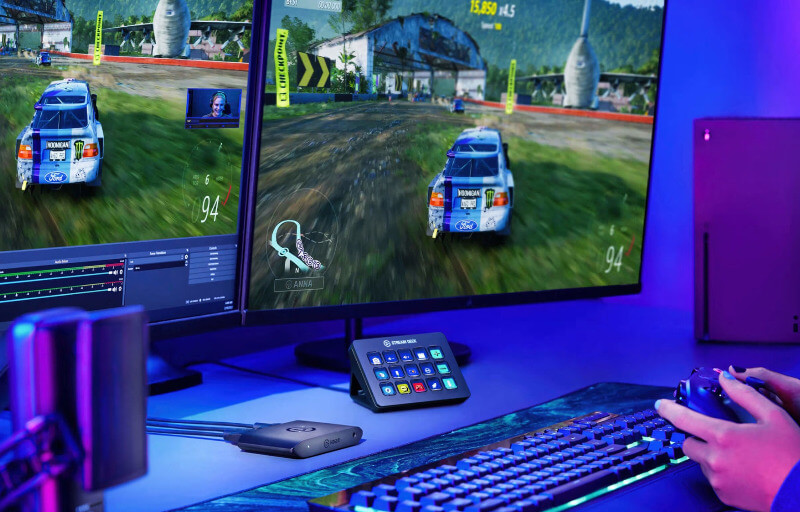
The Elgato HD60 X is designed for gamers and content creators who want a straightforward way to capture high-quality gameplay without compromising the experience on their main display. Its ability to record smooth 1080p60 footage while passing through higher-resolution signals makes it particularly well suited to modern console and PC setups where the player wants to maintain sharp visuals and responsive gameplay. It also keeps the hardware side of streaming relatively simple, which is valuable for anyone building a clean and practical content creation setup.
One of the HD60 X’s biggest strengths is the flexibility it offers across different gaming systems and display configurations. It supports 4K60 HDR passthrough, as well as higher refresh rate modes such as 1440p120 and 1080p240, allowing the connected gaming display to retain the performance characteristics many players expect. At the same time, captured footage can be recorded at resolutions including 1080p60 and 1440p60, giving creators useful options depending on how they intend to edit, upload or stream their content.
Its compact external design also makes the HD60 X easy to add to an existing setup without requiring internal PC installation or significant desk space. Compatibility with PlayStation, Xbox and PC systems gives it broad appeal, while Elgato’s capture software provides an accessible way to manage recording settings, monitor incoming video and work with captured footage. For creators looking for a capable external capture device that balances image quality, ease of use and modern passthrough support, the HD60 X offers a very polished starting point.
Table of Contents
Design and Functionality
The Elgato HD60 X has a compact external design that makes it easy to incorporate into a gaming or streaming setup without taking up much desk space. Measuring 11.2 x 7.2 x 1.8 cm and weighing just 91 g, it is small enough to sit neatly beside a console, monitor or laptop while remaining easy to move when required.
Its low-profile shape gives the unit a clean and understated appearance that suits modern gaming environments without drawing unnecessary attention. The angular casing adds a little visual character, while the restrained branding keeps the overall presentation professional and uncluttered.
The lightweight construction also makes the HD60 X particularly convenient for creators who do not always record from the same location. It can easily be packed alongside a laptop, controller and other accessories, which is useful for portable streaming setups, event coverage or recording sessions away from a permanent desk.
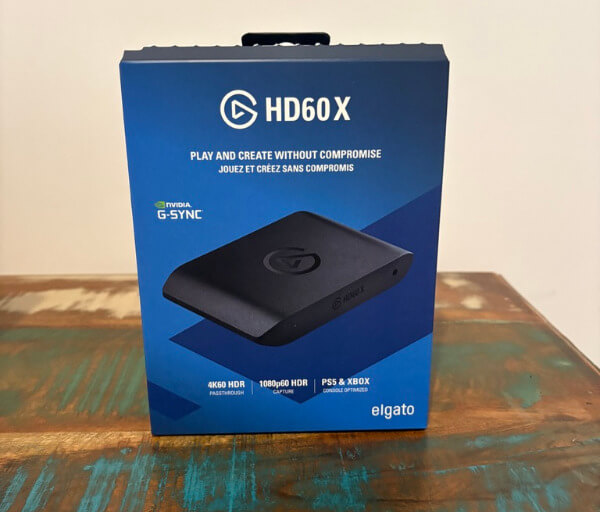


Despite its small size, the enclosure feels suitably sturdy for regular use. The exterior is primarily plastic, but the build feels purposeful and well assembled, with the ports integrated cleanly into the chassis rather than making the device feel overly complicated.
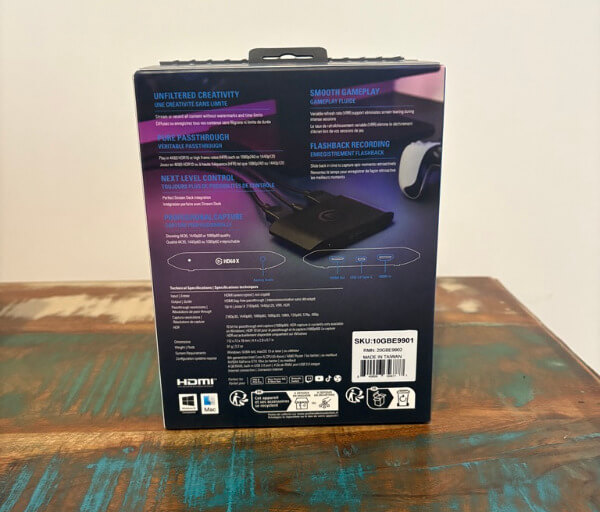
Connection placement is straightforward, which helps make installation much easier for anyone unfamiliar with capture hardware. HDMI input and output connections handle the video path between the gaming device and display, while USB-C provides the link to the capture computer.
This arrangement means the HD60 X can be positioned directly between a console or gaming PC and the main display. The gaming signal enters the capture card, passes through to the monitor or television, and is simultaneously made available to the connected computer for recording or streaming.
Elgato includes the necessary HDMI and USB cables, which helps simplify initial setup. The supplied USB 3.0 C-to-A cable is 180 cm long, while the HDMI cable measures 150 cm, providing enough flexibility for most typical desktop and entertainment unit arrangements.
A small status indicator provides useful visual feedback without adding distracting lighting to the device. This fits well with the understated design philosophy, particularly for users who prefer functional hardware rather than accessories covered in bright illumination.
The HD60 X also includes a 3.5 mm analogue audio input, adding another layer of flexibility to its physical design. This can be useful in recording setups where additional audio needs to be routed directly through the capture device, including certain commentary or console audio configurations.
Functionally, one of the most important parts of the HD60 X is its ability to maintain a high-quality gaming signal while capturing footage separately. The unit supports passthrough resolutions including 2160p60, 1440p120 and 1080p240, allowing players to continue using higher-resolution or higher-refresh-rate display modes while creating content.
Variable Refresh Rate passthrough is another valuable inclusion, particularly for gaming displays designed around smoother frame delivery. This allows supported systems and displays to continue taking advantage of VRR while the capture card remains active in the signal chain.
HDR10 passthrough is supported as well, helping compatible games retain their expanded colour and brightness presentation on the connected display. This is especially useful for console players using a modern HDR television or monitor who do not want their capture hardware to interfere with the way games are presented during play.
The HD60 X is not designed as a completely standalone recording system, so it works in conjunction with a connected computer through USB. This approach keeps the hardware compact while allowing the computer to handle recording, streaming, file management and software-based configuration.
The combination of its small footprint, logical port arrangement and versatile passthrough support makes the physical design closely aligned with how modern creators actually use capture equipment. It can remain installed as part of a permanent streaming setup or be moved between systems with relatively little effort, giving the HD60 X a practical design that works equally well for console and PC content creation.
Key Features
One of the central features of the Elgato HD60 X is its support for smooth 1080p60 capture. This resolution and frame rate remain a strong fit for streaming, gameplay uploads and edited video content, providing a good balance between image clarity, motion quality and manageable file sizes.
The capture card can also record at 1440p60, which gives creators another useful option when working with higher-resolution gameplay. This is particularly handy for PC users and anyone producing content where a little more image detail is desirable without moving entirely into 4K recording workflows.
For players using modern consoles or powerful gaming PCs, the HD60 X supports 4K60 HDR passthrough. This allows the gaming display to continue receiving a high-resolution HDR signal while the capture card handles recording separately, helping preserve the visual experience for the person actually playing.
Higher refresh rate passthrough is supported as well, including 1440p120 and 1080p240. These modes make the HD60 X well suited to competitive gaming setups where responsiveness and fluid motion matter just as much as the quality of the captured footage.
Variable Refresh Rate passthrough adds further flexibility for compatible displays and gaming systems. VRR can help smooth out fluctuations in frame delivery, and being able to keep this functionality active means the capture device is less likely to become a limitation in a modern gaming setup.
HDR10 passthrough and capture support provide additional options for creators who work with HDR content. On compatible Windows systems, HDR recording can be enabled through Elgato’s software, giving users more control over how they preserve the visual presentation of supported games.
The HD60 X works with Elgato’s 4K Capture Utility, which provides a straightforward interface for monitoring the incoming signal and configuring recordings. Settings such as recording bitrate and HDR capture can be adjusted without requiring a particularly complicated setup process.
Flashback Recording is another useful software feature for creators who do not always know when something worth saving is about to happen. It continuously keeps a temporary recording buffer, allowing recent gameplay to be retrieved and trimmed after the event has already occurred.
Elgato’s Instant Gameview technology is designed to provide highly responsive video monitoring through the capture software. This makes the preview window practical for checking gameplay, framing and signal quality without introducing the kind of obvious delay that would make monitoring frustrating.
The HD60 X is also compatible with widely used third-party streaming and capture applications. This gives users the freedom to build their workflow around their preferred software rather than being restricted to a single recording environment.
Stream Deck compatibility is particularly useful for creators already using Elgato hardware within their setup. Recording, streaming and other capture-related actions can be incorporated into a broader control layout, making it easier to manage content creation tasks without constantly switching between windows.
Audio flexibility rounds out the feature set, with the 3.5 mm analogue input providing another way to bring audio into a recording setup. The HD60 X can also work with recording formats that allow audio elements to be handled separately during editing, giving creators more control when balancing gameplay, commentary and other sound sources.
Experience Using the Product and Performance
Setting up the Elgato HD60 X is a straightforward process, particularly for anyone already familiar with connecting a console or gaming PC to an external display. Once the HDMI input, HDMI output and USB connection are in place, the device is quickly recognised by the capture computer and ready to use with compatible software.
The external format makes the initial installation feel much less involved than fitting an internal capture card. There is no need to open a PC case or plan around available expansion slots, which makes the HD60 X approachable for first-time streamers as well as more experienced creators.
In day-to-day use, one of the strongest aspects of the HD60 X is how little it interferes with the actual gaming experience. The passthrough connection allows gameplay to continue on the main display while the capture computer handles recording or streaming in the background.
This is especially important when playing at 4K60 with HDR enabled. The HD60 X allows compatible displays to continue receiving that higher-quality signal while the capture workflow runs separately, helping preserve the visual experience that modern consoles and gaming PCs are capable of delivering.
The same benefit applies when using a 1440p high refresh rate display. Support for 1440p120 passthrough means players can continue enjoying smooth motion and responsive gameplay rather than being forced into a lower refresh rate simply because they are capturing footage.
For competitive gaming setups, 1080p240 passthrough is another useful capability. Players using high refresh rate monitors can retain the fast display response they are accustomed to while still sending a separate signal to the capture computer.
Variable Refresh Rate support also contributes to a smoother experience on compatible systems. Being able to keep VRR active helps the display respond more naturally to changing frame rates, which can be particularly beneficial in games where performance fluctuates during demanding scenes.
Capture quality at 1080p60 is consistently well suited to streaming and general content creation. Motion remains smooth, fine details are retained well, and the resulting footage is easy to work with when preparing videos for online platforms.
For creators who want additional image detail, 1440p60 capture provides a useful step up. This can be particularly beneficial when working with PC gameplay, where higher rendering resolutions are common and the extra detail can improve the appearance of edited footage.
The HD60 X can also capture at 2160p30, giving users another option when resolution is more important than frame rate. While 60 fps capture is typically preferable for fast-moving gameplay, 4K30 recording can still be useful for slower-paced titles, demonstrations or footage where visual detail is the priority.
The Elgato 4K Capture Utility helps keep the recording workflow accessible. The application provides a clear view of the incoming signal and makes it relatively easy to confirm that the correct resolution and frame rate are being detected before recording begins.
Adjusting recording settings is similarly straightforward. Users can change bitrate and other capture parameters without having to work through an overly technical interface, which helps newer creators understand how their recording settings affect quality and storage requirements.
Flashback Recording can be particularly valuable during longer gaming sessions. Instead of needing to record every minute manually, the feature allows recent gameplay to be recovered after something worth saving has happened.
This is useful for unexpected moments such as impressive plays, unusual game events or spontaneous reactions. It reduces the pressure to predict exactly when something interesting will happen and can make capturing highlight footage feel much more natural.
Instant Gameview also performs well as a monitoring tool. The preview is responsive enough that it can be used confidently to check the incoming signal, and the low perceived delay makes it far more practical than capture solutions where the software preview noticeably trails behind the action.
Most users will still prefer to play directly from the connected television or monitor, particularly when using high refresh rate modes. However, having a responsive software preview is useful when testing a setup, adjusting scenes or confirming that the correct source is being captured.
The HD60 X also integrates effectively with popular streaming applications, making it easy to add the capture feed to an existing broadcasting layout. Once selected as a video source, it can be incorporated alongside webcams, overlays, alerts and other elements commonly used in livestream production.
This flexibility is useful for creators who have already developed a workflow around dedicated streaming software. The HD60 X does not require users to abandon those tools, which makes it easier to add the device to an established setup without changing the entire production process.
Console compatibility is another area where the device feels particularly polished. Connecting a PlayStation or Xbox requires little more than routing the HDMI signal through the capture card, making it easy to begin recording console gameplay on a PC.
PC capture is similarly useful for creators who use a dual-computer streaming arrangement. A gaming PC can send its display output through the HD60 X while a second computer manages encoding, broadcasting and recording, helping separate gaming performance from content production tasks.
The compact size becomes more noticeable once the capture card has been used for an extended period. It occupies very little room around a monitor or console and can easily be positioned out of the way, which helps maintain a cleaner desk or entertainment area.
Its portability is equally useful for anyone who regularly changes where they record. Moving the HD60 X between a desktop setup, console area or laptop-based recording environment is simple, and the lightweight design makes it easy to include in a small equipment bag.
Audio handling also works well as part of a broader content creation workflow. The analogue audio input provides another option for routing sound, while supported recording configurations can give editors greater flexibility when working with different audio sources after capture.
Having more control over audio during editing can make a substantial difference to the finished video. Gameplay sound, commentary and other elements can be balanced more carefully, helping creators produce cleaner and more professional-looking content.
In practical use, the HD60 X feels best suited to creators who want strong gameplay capture without complicating the gaming side of their setup. Its combination of responsive passthrough, flexible recording resolutions and broad software compatibility allows it to fit into a wide variety of streaming and recording environments.
For console players, PC gamers and creators working across multiple platforms, the HD60 X provides a dependable bridge between gaming hardware and content creation software. Its performance remains focused on the features that matter most during everyday use, making it an easy device to incorporate into a regular recording or streaming routine.
Conclusion
The Elgato HD60 X is a well-rounded external capture card for gamers who want to record or stream without compromising the experience on their main display. Its support for smooth 1080p60 capture, 1440p60 recording and high-quality passthrough makes it flexible enough for both console and PC content creation.
Support for 4K60 HDR, 1440p120, 1080p240 and VRR passthrough gives it particular appeal for modern gaming setups. These capabilities allow players to continue enjoying sharp visuals and high refresh rates while the HD60 X handles capture duties separately.
Elgato’s 4K Capture Utility keeps the recording process accessible, while compatibility with popular streaming applications makes the device easy to integrate into more advanced workflows. Features such as Flashback Recording, Instant Gameview, analogue audio input and Stream Deck compatibility further strengthen its usefulness for regular creators.
For anyone looking for a compact, reliable and easy-to-use capture solution, the HD60 X offers an excellent combination of performance and versatility. It is particularly well suited to creators who want dependable gameplay capture while keeping their console or PC gaming experience smooth, responsive and visually impressive.