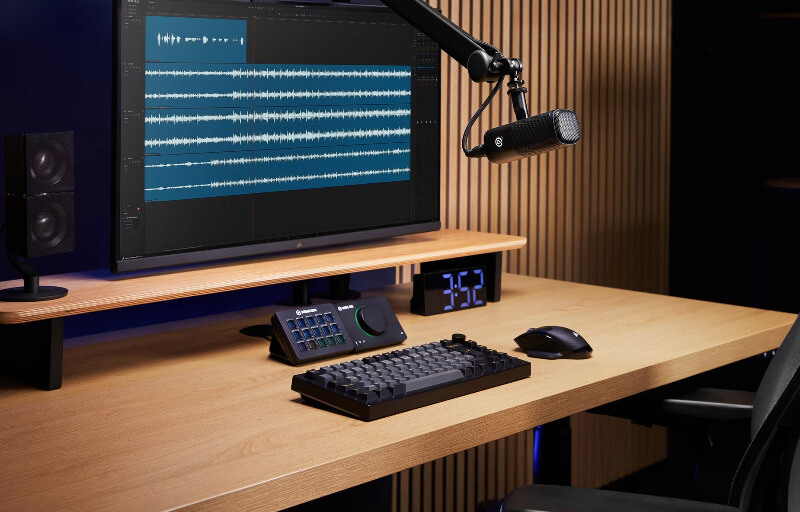
For streamers, podcasters and content creators, a good audio interface needs to do more than simply connect an XLR microphone to a computer. It should make setup easier, provide enough control to shape a clean vocal signal, and fit naturally into a wider desktop workflow without adding unnecessary complexity.
The Elgato Wave XLR MK.2 is designed around that idea, combining microphone amplification, onboard audio processing and monitoring controls in a compact unit that is easy to manage from the desk. With support for up to 80 dB of gain, integrated DSP effects, Clipguard protection and close integration with Wave Link, it brings together many of the tools creators would otherwise need to manage across several pieces of software.
What makes the Wave XLR MK.2 particularly appealing is the way it balances advanced capability with a simple operating experience. It offers enough flexibility for experienced users to fine-tune their audio chain, while features such as automatic gain adjustment, clear visual feedback and streamlined routing help make professional-sounding audio far more approachable for anyone building or upgrading a creator setup.
Table of Contents
Design and Functionality
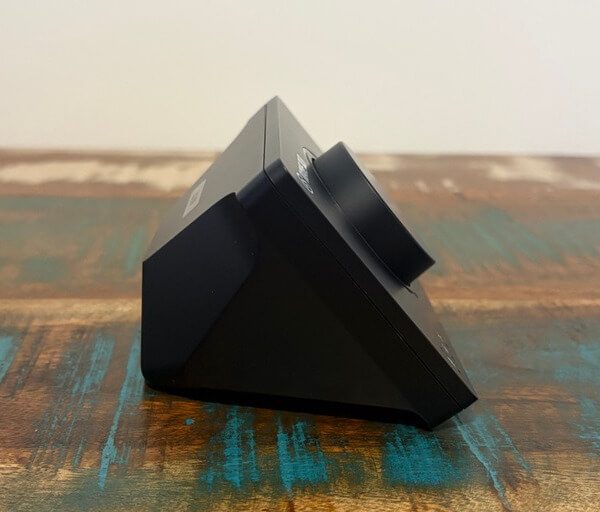
The Elgato Wave XLR MK.2 keeps its physical design compact, which makes it easy to position beside a keyboard, microphone arm or Stream Deck without taking over the workspace. Measuring 93 x 118 x 73 mm and weighing 320 g, it feels purpose-built for desktop use where available space is often at a premium.
Its black housing gives the unit a clean and understated appearance that suits both gaming and professional creator environments. The shape is simple, but the overall presentation feels polished enough to complement more elaborate streaming and recording setups.
A large rotary encoder dominates the front of the unit and serves as the main point of interaction. This control is easy to reach during a live stream or recording session, allowing quick adjustments without needing to open software or break concentration.
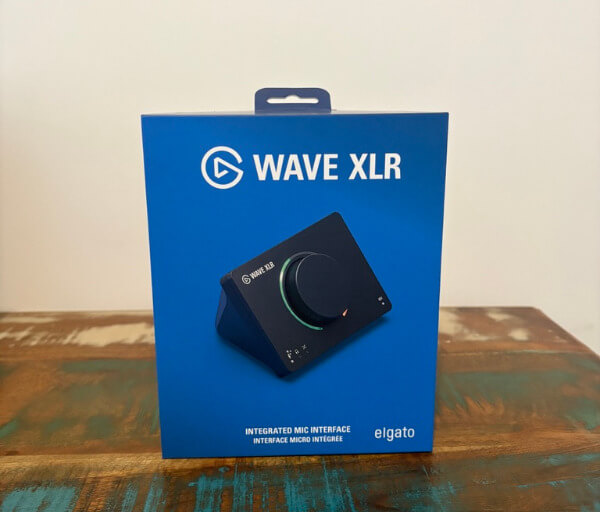
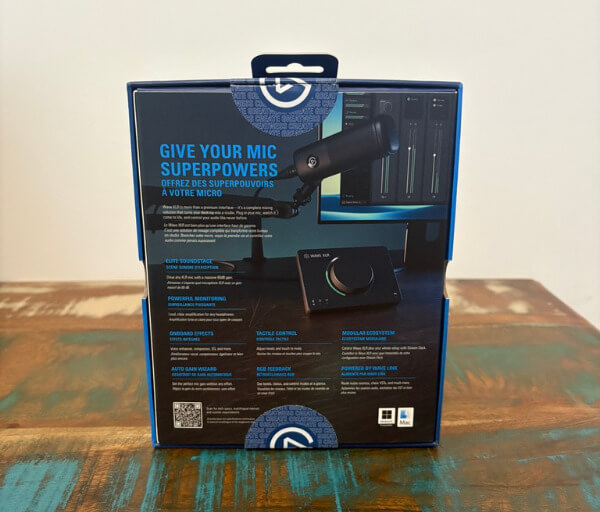
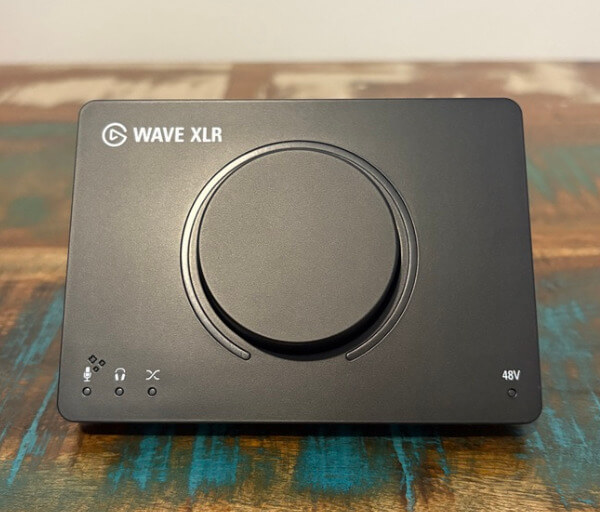
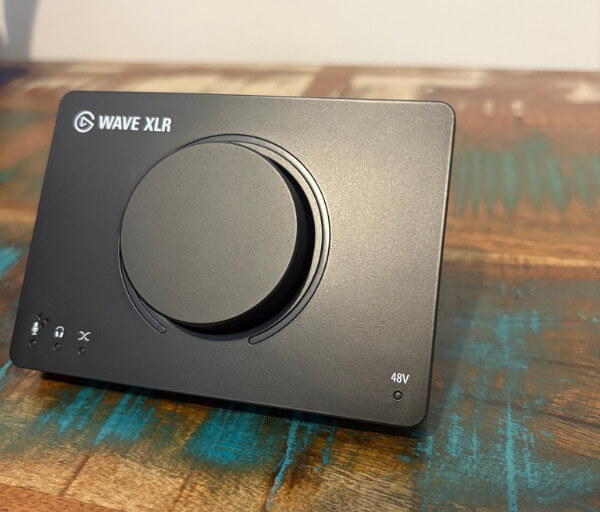
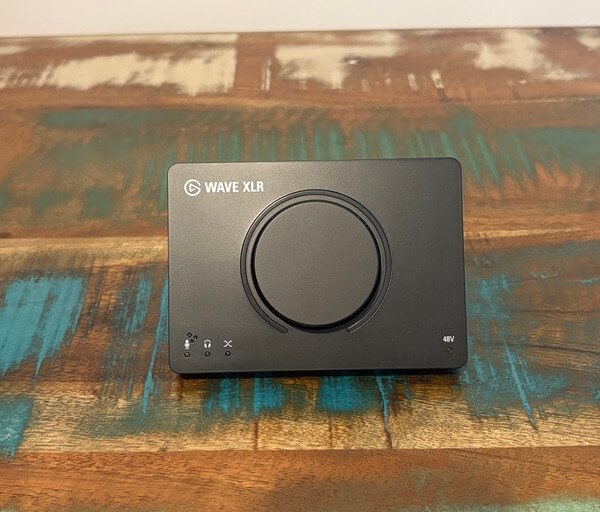
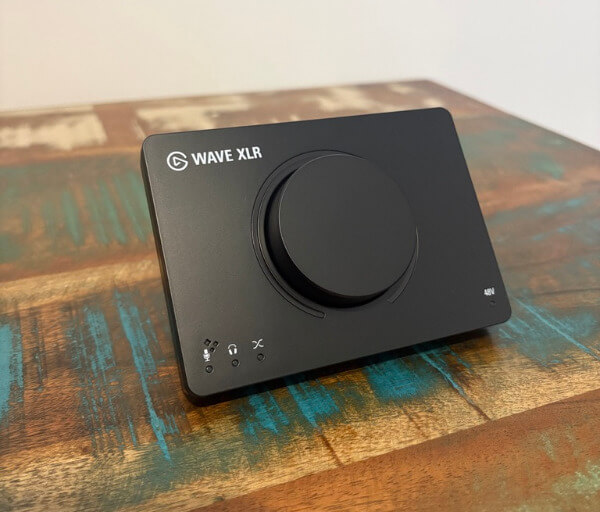
One of the most noticeable visual improvements is the illuminated RGB ring surrounding the encoder. Rather than acting purely as decoration, the lighting provides useful feedback by changing according to the active control mode, helping users quickly identify what they are adjusting.
This visual system makes it easier to distinguish between microphone gain, headphone volume and the microphone-to-PC monitoring balance. Being able to confirm the selected function at a glance is particularly useful during live production, where fast adjustments are often more important than navigating menus.
The encoder itself also contributes to the approachable nature of the Wave XLR MK.2. Its centralised control method keeps the front panel uncluttered, while still giving access to the settings creators are most likely to change frequently.
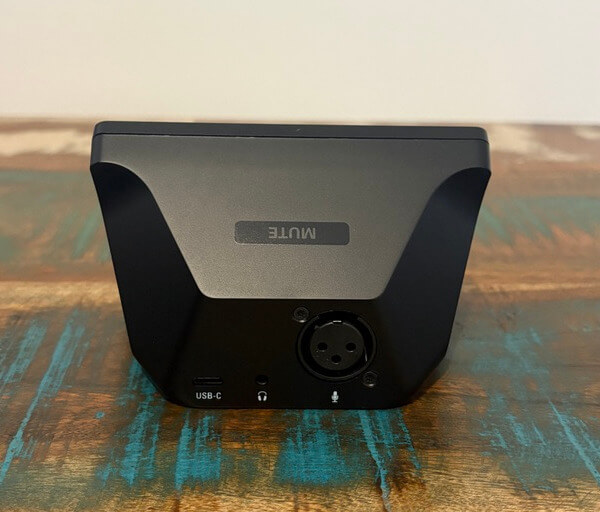
On the top of the interface is a capacitive mute control designed for fast microphone silencing. A light touch is enough to activate it, which removes the need for a mechanical button press and keeps muting quiet during recordings, calls or broadcasts.
This touch-based approach works particularly well when unexpected interruptions occur. Instead of searching for a software mute button or pressing a noisy switch, the microphone can be silenced almost instantly from the interface itself.
Connectivity is kept straightforward, with the main ports positioned at the rear of the unit. There is an XLR input for the microphone, USB-C for the host connection and a 3.5 mm stereo headphone output for direct monitoring.
Keeping these connections at the back helps maintain a tidy desk, especially when cables are routed behind a monitor or through a cable management system. It also leaves the front of the device free from dangling leads that could interfere with the main controls.
The XLR input supports a broad range of microphones and provides up to 80 dB of gain, giving the Wave XLR MK.2 enough flexibility for many dynamic and condenser microphone setups. This generous gain range is especially useful for microphones that need stronger amplification before reaching an appropriate recording level.
Headphone monitoring is equally important to the design, allowing users to hear their microphone and computer audio directly through the interface. The revised monitoring controls provide greater flexibility over how these sources are blended, which makes it easier to create a comfortable listening balance during longer sessions.
Another welcome design choice is the removable front knob and faceplate. This modular approach allows the appearance of the interface to be personalised more easily, giving creators an opportunity to better match the unit with the rest of their workspace.
Taken together, the physical layout and control system make the Wave XLR MK.2 feel deliberately focused on fast desktop operation. Its compact dimensions, clear feedback, accessible controls and neatly arranged connections all contribute to an interface that is easy to understand while still offering the functionality expected from a more advanced creator audio setup.
Key Features
A major strength of the Elgato Wave XLR MK.2 is its dedicated Wave FX Processor, which handles audio effects directly on the hardware. This allows important voice processing tasks to take place without relying entirely on the computer, helping to create a cleaner and more responsive audio workflow.
The onboard DSP can process effects such as equalisation, compression, expansion, low cut filtering and voice tuning. Having these tools available at hardware level gives creators more freedom to shape their microphone sound while reducing the amount of processing that needs to be handled elsewhere.
This approach also helps simplify the signal path. Instead of depending on additional virtual microphone devices or complicated routing arrangements, the processed microphone signal can remain part of a more direct audio chain that is easier to understand and manage.
Clipguard 2.0 is another important feature, providing additional protection against unwanted clipping when vocal levels suddenly increase. This is particularly useful during energetic streams, podcasts or live recordings where speaking volume can change without warning.
Rather than forcing users to constantly monitor their levels, Clipguard 2.0 works in the background to help preserve a cleaner signal. It adds a useful layer of reassurance for creators who want to focus on what they are saying rather than continuously worrying about audio peaks.
The Auto Gain Wizard makes initial microphone setup considerably easier as well. By analysing a short sample of the user’s voice, the Wave XLR MK.2 can determine an appropriate gain setting automatically, removing much of the guesswork from setting input levels.
This can be especially helpful when changing microphones or rebuilding a recording setup. Instead of repeatedly adjusting gain and testing the result, creators can establish a sensible starting point quickly and then make smaller changes if they want a more personalised level.
Wave Link is central to the wider experience, acting as the software hub for managing microphones, applications and other audio sources. It allows different sounds to be organised into separate channels, making it easier to control exactly what is heard during a stream, recording session or voice chat.
Creators can use Wave Link to manage sources such as game audio, music, browser content, communication apps and microphone input from one interface. Separate mixes can also be created for different purposes, which is useful when the audio sent to an audience needs to differ from what the creator hears through their own headphones.
Support for VST effects expands the available processing options beyond the built-in tools. This gives more experienced users room to develop a detailed vocal chain while still benefiting from the Wave XLR MK.2’s streamlined hardware and software integration.
Stream Deck integration adds another layer of practical control for creators already using Elgato’s wider ecosystem. Frequently used audio actions such as muting, adjusting levels or managing effects can be assigned to buttons, making it possible to control important functions without interrupting the content being produced.
From a technical perspective, the Wave XLR MK.2 records at 24-bit and 48 kHz, with an XLR input frequency response of 20 Hz to 20 kHz and a stated dynamic range of 135 dB. Combined with an equivalent input noise rating of -130 dB A-weighted, these specifications support the clean, detailed audio capture required for streaming, podcasting, voice recording and other creator-focused applications.
Experience Using the Product and Performance
Using the Elgato Wave XLR MK.2 feels straightforward from the moment it is connected. The interface avoids unnecessary complexity, making it easy to establish a working microphone signal and begin adjusting levels without spending a long time learning the hardware.
The large front encoder quickly becomes the control that gets used most often. Its size and position make it easy to reach during a recording session, and switching between the available functions feels natural once the layout becomes familiar.
The illuminated ring around the encoder is particularly useful in day-to-day use. It provides immediate visual confirmation of the active adjustment mode, which reduces the chance of accidentally changing microphone gain when the intention was to alter headphone volume.
Gain adjustment feels precise and predictable, which is important when working with microphones that require a substantial amount of amplification. With up to 80 dB available, the Wave XLR MK.2 has enough headroom to accommodate a wide range of XLR microphones without requiring additional gain hardware in many setups.
This flexibility makes experimenting with different microphones considerably easier. Moving between models with different sensitivity levels does not require rebuilding the audio chain, and the available gain range gives plenty of room to find a suitable operating level.
The Auto Gain Wizard is especially useful when setting up a microphone for the first time. Rather than relying on trial and error, it can establish a sensible gain setting based on the user’s speaking level, making the initial configuration process much faster.
It also works well when multiple people use the same recording setup. A different speaker can quickly establish an appropriate input level without needing to understand the finer details of microphone gain staging.
Once levels are configured, the Wave XLR MK.2 produces a clean and detailed microphone signal. Speech comes through with good clarity, allowing the character of the connected microphone to remain intact rather than being masked by unwanted noise from the interface.
The low equivalent input noise is particularly valuable when working with microphones that require higher gain settings. Raising the input level does not introduce the distracting background hiss that can become noticeable with less capable interfaces.
For spoken content, this gives voices a more polished foundation before any additional processing is applied. Podcasts, live streams, video narration and voice chat all benefit from having a clean source signal to work with.
The onboard DSP becomes one of the most useful aspects of the Wave XLR MK.2 once a preferred sound has been configured. Equalisation can be used to refine vocal tone, while compression helps create more consistent volume between quieter and louder parts of speech.
Low cut filtering is also practical for reducing unwanted low-frequency energy. Desk vibrations, air-conditioning rumble and other low-end sounds can become less intrusive, helping spoken audio remain focused and easier to listen to.
The expander provides another useful tool for cleaning up the microphone signal. When configured appropriately, it can reduce the prominence of quieter background noises during pauses without making the voice itself feel unnaturally processed.
Because the DSP processing happens on the interface, the experience feels responsive. Vocal effects remain closely tied to the microphone signal, which is useful when monitoring through connected headphones and listening to the processed voice in real time.
This hardware-based processing also helps keep the computer’s resources available for other tasks. Streaming software, games, video editing applications and browser windows can already place significant demands on a system, so shifting some audio processing away from the CPU is a sensible advantage.
Clipguard 2.0 is another feature that proves its value during more energetic recordings. A sudden laugh, raised voice or excited reaction can create a significant jump in input level, and the additional clipping protection helps prevent those moments from ruining otherwise usable audio.
That safety net makes the Wave XLR MK.2 particularly well suited to live content where every change in volume cannot be predicted. It lets the user speak more naturally without constantly watching an input meter or worrying about every louder moment.
Headphone monitoring is similarly well implemented. Connecting wired headphones directly to the interface provides a convenient way to hear the microphone alongside computer audio while keeping latency low enough for comfortable real-time monitoring.
Being able to adjust the balance between microphone and PC audio directly from the hardware is useful during longer sessions. The microphone can be made more prominent when checking vocal quality, then reduced again once the preferred monitoring balance has been established.
Wave Link adds considerably more flexibility once several audio sources are involved. Instead of treating the computer as one combined audio feed, individual applications can be separated and managed independently.
This becomes particularly useful for streaming, where microphone audio, gameplay, music, voice chat and browser content may all need different levels. Adjustments can be made without affecting the entire mix, giving the user much greater control over what the audience hears.
Separate monitoring and output mixes are another practical benefit. The creator can listen to one combination of sources through their headphones while sending a different balance to a recording or live audience.
That flexibility also helps when producing content away from a live stream. Recording narration, capturing gameplay commentary or producing a podcast becomes easier when each audio source can be organised and controlled without having to constantly change system-wide settings.
Stream Deck integration makes the experience even more efficient for users who already rely on physical shortcut controls. Muting the microphone, adjusting channels and managing effects can be placed alongside other production actions, reducing the number of times the user needs to interact with software during a session.
The capacitive mute surface on the Wave XLR MK.2 is equally useful when an immediate response is required. It operates silently and quickly, making it well suited to situations where a cough, interruption or private conversation needs to be kept out of a recording.
After spending time with the full hardware and software combination, the strongest aspect of the Wave XLR MK.2 is how little attention it demands once configured. It provides clean microphone amplification, useful protection against level problems, flexible processing and powerful routing while keeping everyday operation simple enough that the user can concentrate on creating content rather than managing the audio interface.
Conclusion
The Elgato Wave XLR MK.2 is a highly capable audio interface for creators who want strong microphone performance without turning their desktop setup into something unnecessarily complicated. Its combination of up to 80 dB of gain, clean 24-bit audio, onboard DSP processing and accessible hardware controls makes it suitable for streaming, podcasting, voice recording and everyday content creation.
Features such as Clipguard 2.0, Auto Gain Wizard and the dedicated Wave FX Processor add genuine value rather than simply increasing the specification list. They help simplify setup, protect recordings from sudden volume changes and give users practical tools for refining their microphone sound with less reliance on complex software routing.
Wave Link and Stream Deck integration further strengthen the experience by bringing microphone control, application audio and production shortcuts into one connected workflow. This makes the Wave XLR MK.2 especially appealing for creators who want to manage several audio sources efficiently while keeping their focus on the content itself.
For anyone looking to build a polished XLR microphone setup with plenty of room to grow, the Wave XLR MK.2 is an excellent option. It combines approachable operation with powerful processing and flexible audio management, making it a strong foundation for a modern creator desk.