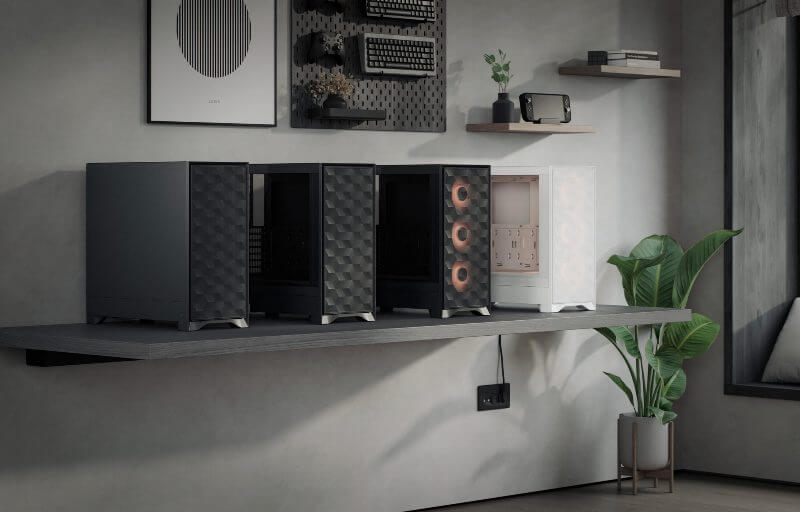
Fractal Design has built a strong reputation among PC enthusiasts for producing cases that combine understated aesthetics with thoughtful engineering. Rather than chasing flashy trends, the company often focuses on practical improvements that enhance the building experience and improve system performance. The Pop 2 Air continues that philosophy by refining the Pop series with a design that prioritises airflow, build flexibility, and a clean visual presence.
At first glance, the Pop 2 Air presents a modern mid-tower layout that feels well suited to contemporary PC hardware. The structure is designed to provide generous ventilation while maintaining the tidy, minimalist styling that Fractal Design is known for. By placing airflow and internal space at the centre of its design approach, the case aims to accommodate powerful components while keeping temperatures under control.
This refreshed approach gives the Pop 2 Air a clear identity as a practical case for builders who want both performance and simplicity. The spacious interior, modern cooling support, and integrated lighting options help create a platform that suits a wide range of systems. Whether the goal is a high performance gaming machine or a versatile everyday PC, the Pop 2 Air positions itself as a capable foundation for a clean and efficient build.
Table of Contents
Design and Functionality
The Pop 2 Air adopts a clean mid tower layout that reflects Fractal Design’s preference for subtle, practical aesthetics. The exterior keeps a minimalist appearance with smooth panels and a tidy front design that fits comfortably into both gaming setups and professional workspaces. Rather than relying on aggressive styling, the case focuses on a balanced look that allows the hardware and lighting inside the system to stand out naturally.
Ventilation is a central part of the Pop 2 Air’s design, with the front panel built around a large mesh intake that allows air to move freely into the system. This mesh structure is designed to encourage consistent airflow across the front-mounted fans, helping cool the internal components effectively. The open design also contributes to a system that feels well prepared for modern graphics cards and powerful processors.







The top panel continues this airflow-focused approach by using perforated metal that matches the solid construction of the surrounding panels. This not only improves the durability of the case but also provides additional ventilation options for builders who want to install extra cooling hardware. The panel attaches using magnetic strips, making it simple to remove for cleaning or maintenance.
Fractal Design places the front I O ports along the top edge of the chassis, where they remain easy to reach whether the system sits on a desk or below it. Builders have access to a pair of USB ports, a headset combo jack, and lighting control buttons for the integrated RGB system. The illuminated power button adds a subtle visual accent that fits neatly with the overall design.
The side panel made from tempered glass allows users to showcase their hardware and lighting setup. This transparent panel adds a premium touch while also letting the interior components become part of the system’s visual identity. The glass is sturdy and provides a clear view of the internal layout without distracting from the case’s clean exterior.
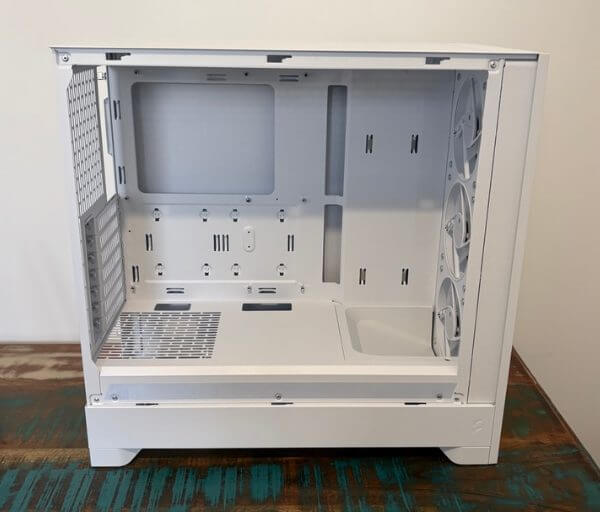
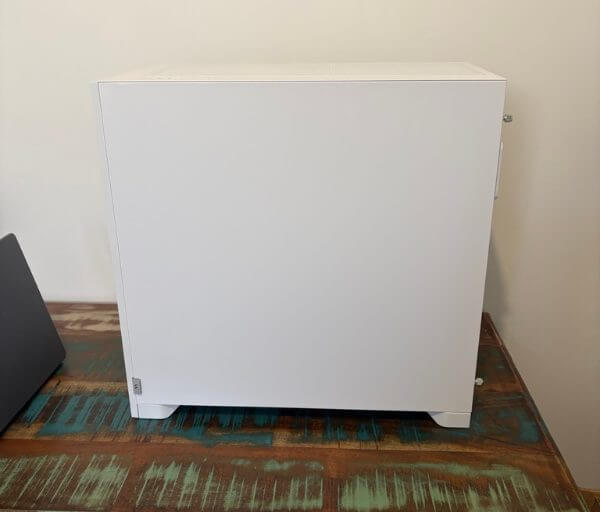
On the opposite side, the steel panel provides a solid enclosure that helps keep cable management hidden and the system looking tidy. Removing the panel reveals a dedicated area for routing cables behind the motherboard tray. The layout offers enough space to organise wiring comfortably, helping builders achieve a neat and professional looking result.
Inside the chassis, the Pop 2 Air provides support for a wide range of motherboard sizes, including larger enthusiast boards. The internal frame feels open and uncluttered, which makes installing components straightforward. Builders have plenty of room to work with when installing graphics cards, cooling hardware, and power supplies.
Storage options are arranged in a way that balances flexibility with simplicity. Dedicated mounting points behind the motherboard tray allow solid state drives to be installed neatly without interrupting airflow inside the main chamber. These mounts keep drives secure while maintaining a clean internal layout.
The power supply shroud at the bottom of the case houses a removable drive cage that can hold traditional hard drives. This compartment keeps bulkier storage devices out of sight while also helping to separate cables and airflow paths. The design keeps the interior looking organised while still offering practical storage support.
Cooling compatibility is another area where the Pop 2 Air demonstrates thoughtful design. The top panel includes mounting support for large radiators, giving builders the flexibility to install advanced liquid cooling solutions. With sufficient clearance between the motherboard and cooling components, the case supports a wide variety of radiator and fan combinations.
The rear section of the case includes an adjustable mounting area for a rear exhaust fan. The positioning flexibility allows builders to optimise airflow depending on the size of the graphics card or cooling setup installed. This helps fine tune the balance between intake and exhaust airflow inside the system.
Construction feels sturdy and well considered, with panels that align cleanly and internal features designed to simplify the building process. Small details such as accessible mounting points and generous component clearance make the Pop 2 Air approachable for both experienced builders and those assembling their first PC. The design prioritises practicality while maintaining the refined appearance that Fractal Design cases are known for.
Key Features
One of the most noticeable features of the Pop 2 Air is its strong emphasis on airflow. The front of the case uses a large mesh intake that allows fresh air to pass through easily, helping maintain stable temperatures for demanding hardware. This approach supports high performance components while keeping the overall cooling system efficient and consistent.
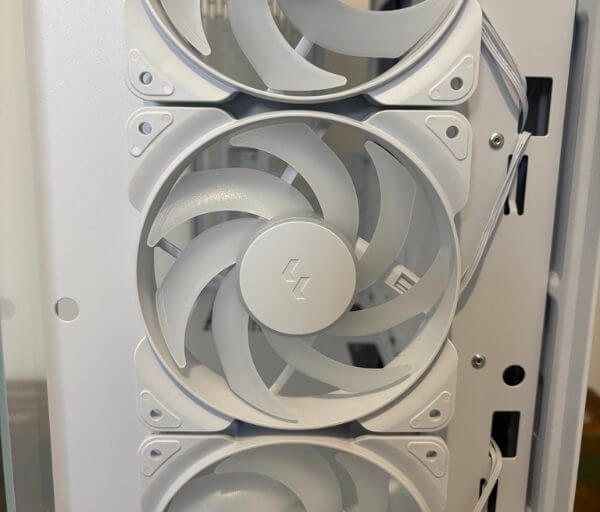
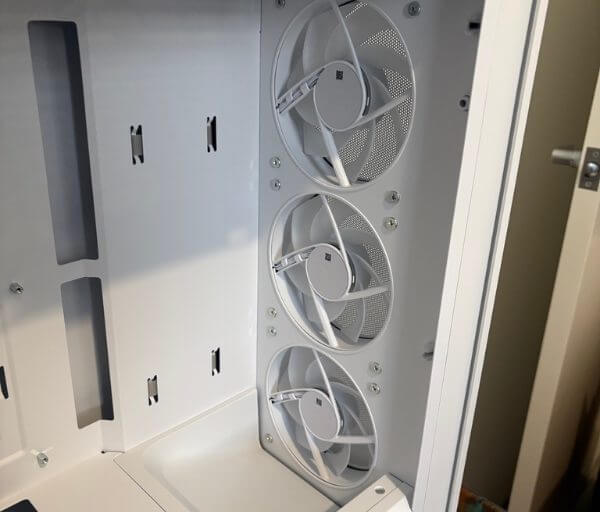
Included with the case are three Fractal Design ARGB fans that provide both airflow and visual appeal straight out of the box. These fans feature a distinctive frame design that integrates neatly with the front panel layout. The lighting effect adds a vibrant glow to the front of the system while still maintaining the understated style of the chassis.
The ARGB lighting system is managed by an integrated controller that allows users to cycle through different lighting patterns and colour options. This built in controller offers a convenient way to customise the lighting without requiring additional software. With a range of lighting combinations available, it becomes easy to match the case illumination with the rest of a system’s aesthetic.
Another highlight is the generous graphics card clearance offered inside the Pop 2 Air. The spacious interior allows builders to install large modern GPUs without feeling constrained by limited space. This makes the case well suited to gaming systems that rely on powerful graphics hardware.
Radiator compatibility is also impressive, with support for large cooling setups on both the top and front of the chassis. Builders have the flexibility to install multi fan radiators for liquid cooling solutions that deliver strong thermal performance. This level of compatibility ensures the case can handle systems designed for heavy workloads or high performance gaming.
Storage flexibility is another strength of the design. Dedicated mounting points behind the motherboard tray allow users to install solid state drives in a clean and organised manner. These mounts help keep the main chamber uncluttered while still offering practical storage options.
The removable drive cage located within the power supply compartment provides additional support for traditional hard drives. This design allows builders to include larger storage drives without affecting the appearance of the main interior space. The separation between storage and primary components helps maintain a tidy build.
Cable management is supported through the layout behind the motherboard tray, where builders can route cables neatly out of sight. The case includes useful mounting points that make it easier to secure cables and maintain a clean internal presentation. This contributes to improved airflow while also creating a more professional looking build.
Another thoughtful feature is the flexible rear fan mounting area, which allows adjustments to better accommodate different component layouts. Builders can position the rear exhaust fan to optimise airflow depending on their system configuration. This adaptability makes it easier to achieve balanced cooling performance.
The Pop 2 Air also includes a well organised accessory kit that contains essential mounting hardware and useful extras for assembling a system. Items such as screws, cable ties, and vibration dampening components help streamline the building process. These additions reflect Fractal Design’s attention to detail and commitment to creating a builder friendly experience.
Experience Using the Product and Performance
Building a system inside the Pop 2 Air quickly highlights how well the interior layout has been planned. The chassis provides plenty of working room, which makes installing major components far less cramped than in many mid tower designs. This extra space helps simplify the entire building process, particularly when installing large graphics cards or multiple cooling components.
The motherboard tray is positioned in a way that allows builders to easily access mounting points and route cables without obstruction. During assembly, it becomes clear that the layout was designed with convenience in mind. Even when installing multiple components in succession, the process feels organised and intuitive.
Installing the motherboard is straightforward thanks to clearly positioned standoffs and helpful alignment points. The internal structure holds the board securely while still allowing room for adjustments during installation. This makes the process smoother for builders who want to carefully position their hardware.
Large graphics cards fit comfortably within the case, and the available clearance ensures there is no sense of crowding near the front intake fans. This is particularly useful for modern GPUs, which continue to grow in size with each generation. The Pop 2 Air easily accommodates these larger cards without compromising airflow.
Once the graphics card is installed, the spacious interior becomes even more noticeable. There is still ample room around the card for airflow and cable routing, which helps prevent the build from feeling cluttered. This contributes to a system that looks organised when viewed through the tempered glass panel.
The front intake fans play an important role in maintaining strong airflow throughout the system. During operation, these fans move a steady stream of air across the main components. This helps maintain stable temperatures for the CPU, GPU, and other hardware inside the case.
Cooling performance remains consistent even when the system is under heavier workloads. The mesh front panel allows air to enter the chassis with minimal restriction. This design choice ensures that the intake fans can operate efficiently while keeping internal temperatures under control.
The top ventilation area also contributes to the cooling performance of the case. Builders who install additional fans or a radiator in this location can create an effective upward airflow path. This allows warm air to exit the system naturally, which supports balanced airflow throughout the chassis.
Installing liquid cooling hardware is also a smooth experience within the Pop 2 Air. The available mounting positions allow radiators to be installed without interfering with other components. This flexibility makes it possible to design a cooling setup that suits a wide range of performance requirements.
When using air cooling, the case still performs very well thanks to the unobstructed intake design. The combination of mesh ventilation and multiple fan mounts provides plenty of airflow potential. This helps keep temperatures stable even when powerful components are installed.
Cable management behind the motherboard tray is another area where the case performs strongly. There is enough space to route power cables and fan wiring without forcing them into tight corners. Builders can take their time arranging cables neatly, which results in a cleaner final build.
The included cable tie points make it easier to secure wiring in place once everything is connected. This helps keep cables organised and prevents them from interfering with airflow inside the main chamber. The result is a system that looks tidy and professional.
Installing storage devices is simple thanks to the dedicated mounting points behind the motherboard tray. Solid state drives can be attached quickly without requiring complicated brackets. This keeps the process efficient while maintaining a clean internal layout.
For those who use traditional hard drives, the lower drive cage provides a convenient mounting location within the power supply compartment. This placement keeps larger storage drives out of sight while still allowing easy access during installation. It also helps maintain a streamlined look inside the main chamber.
Power supply installation is also straightforward thanks to the open design of the lower compartment. Builders have plenty of room to slide the unit into place and connect the necessary cables. The surrounding space helps make cable routing less restrictive.
The front fans contribute not only to airflow but also to the visual appeal of the finished build. When the system is powered on, the ARGB lighting creates a bright and vibrant display behind the front mesh panel. The lighting is visible without being overwhelming, which suits the case’s refined design.
Lighting customisation is easy to manage using the built in controller. Cycling through colours and lighting effects can be done directly from the case controls. This allows users to adjust the appearance of the system quickly without relying on additional software.
Viewing the completed system through the tempered glass panel highlights the spacious interior and tidy component layout. The lighting from the front fans reflects softly across the hardware, creating a clean and polished appearance. This makes the case particularly appealing for builders who enjoy showcasing their components.
Noise levels remain comfortable during normal operation, thanks in part to the efficient airflow design. The fans are able to move air effectively without needing to run at extremely high speeds. This contributes to a system that feels well balanced between performance and acoustics.
During extended use, the airflow focused design continues to prove beneficial. The steady intake of fresh air helps maintain reliable cooling even when the system is running demanding applications. This makes the Pop 2 Air suitable for gaming sessions or productivity workloads.
The case also feels sturdy when moving or adjusting the system. The panels fit securely and the structure does not flex easily when handling the chassis. This solid construction adds confidence that the system will remain well protected over time.
Maintenance tasks such as cleaning or adjusting components are also relatively easy. Panels can be removed quickly, and the open interior provides good access to the hardware. This makes routine upkeep less time consuming.
Builders who enjoy upgrading their systems will appreciate the flexibility the Pop 2 Air offers. With generous clearance and multiple mounting options, future hardware upgrades can be installed without difficulty. This ensures the case can continue supporting evolving system configurations.
Even after completing the build, the case continues to feel thoughtfully designed in everyday use. Airflow remains steady, the lighting looks striking, and the internal layout stays organised. These qualities combine to create a chassis that feels reliable and enjoyable to work with.
Conclusion
The Fractal Design Pop 2 Air presents a refined take on a modern airflow-focused mid tower, combining practical engineering with a clean and understated appearance. Its open ventilation design and spacious interior make it well suited to contemporary PC hardware, while the minimalist styling ensures it fits comfortably into a wide variety of setups. Builders who appreciate a tidy and functional chassis will find the overall approach both sensible and appealing.
The internal layout is clearly designed with ease of building in mind. Generous component clearance, straightforward mounting points, and organised cable management areas help simplify the process of assembling a system. These thoughtful design choices make the case approachable for new builders while still offering the flexibility that experienced enthusiasts expect.
Cooling capability is another strong aspect of the Pop 2 Air. The combination of a mesh front panel, multiple fan mounts, and support for larger radiator configurations allows users to build systems that remain cool and stable even when running powerful components. Integrated ARGB lighting adds an extra visual dimension without compromising the case’s restrained aesthetic.
With its balance of airflow performance, clean design, and builder friendly layout, the Pop 2 Air provides a solid platform for a wide range of PC builds. It delivers the kind of reliability and usability that Fractal Design cases are known for, making it a compelling choice for anyone looking to create a capable and visually appealing system.