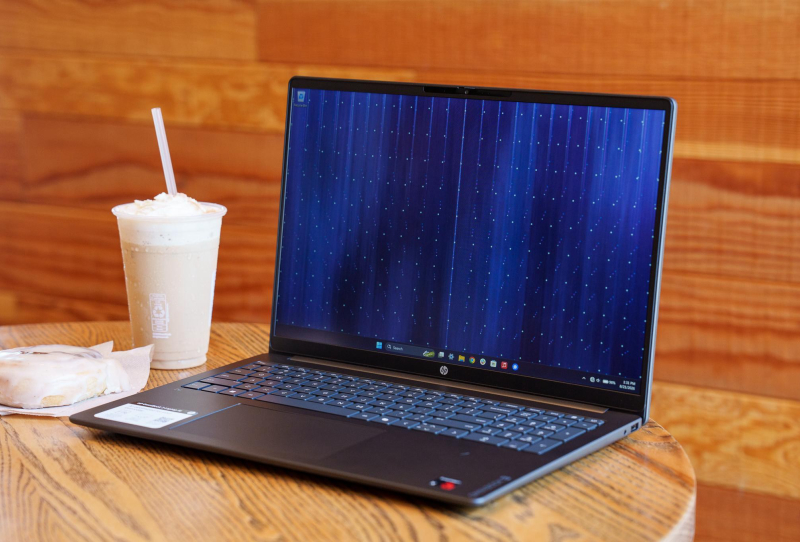
The HP OmniBook 3 16 is not a flashy laptop, and that is precisely why it has become a useful reference point right now. At a moment when memory prices have quietly wrecked the value equation for entire categories of PCs, this modest 16-inch machine ships with 16GB of RAM and a 512GB SSD, specs that plenty of far pricier competitors no longer bother to include as standard.
That gap matters more than it used to. Laptop pricing has traditionally followed a predictable pattern: a few hundred dollars bought something tolerable, and spending more bought better screens, sturdier chassis and nicer keyboards, while the core components stayed roughly similar. Memory chip shortages have broken that pattern. Manufacturers are now trimming RAM and storage on machines that would once have carried generous specs by default, even on laptops sitting well above entry-level pricing. The OmniBook 3 16 stands out simply by refusing to follow that trend.
Table of Contents
What’s Inside the HP OmniBook 3 16
The configuration under review pairs an 8-core Qualcomm Snapdragon X processor with 16GB of RAM and a 512GB solid-state drive. The display is a 16-inch, 1920 by 1200 IPS panel running at 60Hz with an anti-glare coating, backed by Windows Hello facial recognition for quick sign-ins. Charging happens over USB-C, and the laptop ships with a compact 65W GaN charger, a small but genuinely useful inclusion given how bulky some budget chargers can be.
| Component | Specification |
|---|---|
| Processor | 8-core Qualcomm Snapdragon X |
| Memory | 16GB RAM |
| Storage | 512GB SSD |
| Display | 16-inch, 1920 x 1200, 60Hz IPS, anti-glare, 300 nits |
| Colour gamut | Roughly 62.5 percent sRGB coverage |
| Charging | USB-C, 65W GaN charger included |
| Webcam | 1080p with Windows Hello support |
None of those numbers look remarkable on paper for a 2026 laptop. What makes them notable is that HP has kept them intact on a machine positioned firmly at the budget end of the market, rather than trimming memory or storage the way several rivals have done to protect their margins.
Why 16GB of RAM Changes the Whole Experience
Eight gigabytes of RAM has long been the bare minimum for comfortable everyday computing, and it is becoming genuinely inadequate as browsers, background apps and cloud services grow hungrier. Several laptops released this year, including some priced well above the OmniBook 3 16, still ship with 8GB as a base configuration. That decision saves manufacturers money on components, but it pushes the cost onto the user in the form of stutters, slow app switching and constant memory pressure once more than a handful of browser tabs are open.
The OmniBook 3 16 avoids that problem entirely. Running several applications alongside a couple of dozen open browser tabs and a streaming video in the background did not produce the kind of slowdown typically seen on 8GB machines. That headroom, rather than raw processing power, ends up being the deciding factor in how a laptop actually feels during a normal workday.
Design, Display and Everyday Usability
The build itself is plastic rather than metal, and there is some flex in the chassis along with the occasional creak, but it never feels flimsy in hand. At a maximum thickness of around 16mm, the laptop is impressively slim for its screen size, and it weighs barely more than a comparable 14-inch ultraportable despite the larger footprint.
The 1920 by 1200 screen is unremarkable by any objective measure, maxing out at 300 nits of brightness and covering only about 62.5 percent of the sRGB colour space, which makes it a poor choice for outdoor use or colour-sensitive work. Even so, it avoids the washed-out look or backlight bleed that plagues some cheaper panels. The trackpad uses a simple diving-board hinge but clicks with a satisfying, confident feel, and the 1080p webcam handles backlit rooms competently with only a slight green tint.
The keyboard is the one component that disappoints. HP typically builds comfortable keyboards, but this one feels stiffer than expected, occasionally missing keystrokes during fast typing. Anyone who types with a heavy hand may not notice, but lighter typists could find themselves correcting more errors than usual. The dual speakers are similarly average, lacking bass and leaning tinny, though they remain tolerable for casual video or music playback rather than serious listening.
Battery Life and Everyday Performance
Choosing a Snapdragon X chip instead of a traditional x86 processor rules out serious gaming and heavier content creation work in applications such as Adobe’s Creative Cloud suite. For everyday multitasking, web browsing, video calls and office work, though, the chip is more than capable, and its efficiency pays off in battery life. Mixed use involving web browsing alongside music or video streaming comfortably stretches to around 12 hours on a single charge, which is a genuinely strong result for a 16-inch laptop.
Compared with a similarly Snapdragon-powered rival carrying only 8GB of RAM, the OmniBook 3 16 actually feels quicker in daily use despite a slightly less powerful processor, simply because it never runs short of memory. It is a reminder that raw chip performance matters less than balanced specifications when it comes to how a laptop feels to actually use.
What It Means for Budget Laptop Buyers
The wider laptop market is under real pressure from rising memory costs, and that pressure typically shows up in one of two ways: higher prices for the same specifications, or the same asking price with weaker specifications hidden underneath. The HP’s own lineup includes machines like the OmniBook 5 that have faced similar scrutiny, and it is unclear how long HP can maintain this level of specification at the lower end of its range before component costs force a change.