Plenty of laptops now ship with Thunderbolt 5, yet most desk setups still rely on HDMI monitors, which means a lot of people are stuck juggling adapters just to get a dual-screen workspace running properly. The Kensington SD5010T5 EQ Thunderbolt 5 Triple 4K Docking Station is built specifically to solve that problem, giving HDMI-based multi-monitor setups a direct route to Thunderbolt 5 bandwidth without forcing buyers into a pile of dongles.
Review summary
Kensington SD5010T5
The Kensington SD5010T5 is a compact Thunderbolt 5 docking station that delivers multi-monitor support through two native HDMI 2.1 ports, eliminating the need for adapters in HDMI-based setups. It combines solid build quality with practical features like 140W power delivery, SD card readers and a zero-footprint mounting option, making it well-suited for professionals running dual or triple 4K monitor configurations.
Highlights
- ✓Two native HDMI 2.1 outputs eliminate adapter clutter
- ✓Compact aluminium design with zero-footprint mounting available
- ✓Up to 140W dynamic power delivery with KonstantCharge technology
- ✓UHS-II SD and microSD card readers built in
- ✓3-year warranty and broad Thunderbolt 5/USB4/USB-C compatibility
At its core, the SD5010T5 is a compact docking station that pairs a Thunderbolt 5 upstream connection with two dedicated HDMI 2.1 outputs, a healthy spread of USB-A and USB-C ports, built-in SD and microSD card readers, 2.5Gb Ethernet and up to 140W of dynamic Power Delivery. The outer case is made from 100% post-consumer recycled aluminium, it supports a zero-footprint mounting option, and it includes a Kensington security lock slot for shared or open-plan offices.
This dock is aimed squarely at professionals running Thunderbolt 5, Thunderbolt 4, USB4 or USB-C laptops on either Windows or macOS who want a tidy, high-speed HDMI monitor setup rather than a Thunderbolt daisy-chain of accessories. This review walks through the design, the headline features and what day-to-day use with the SD5010T5 actually looks like.
Table of Contents
Design and Functionality
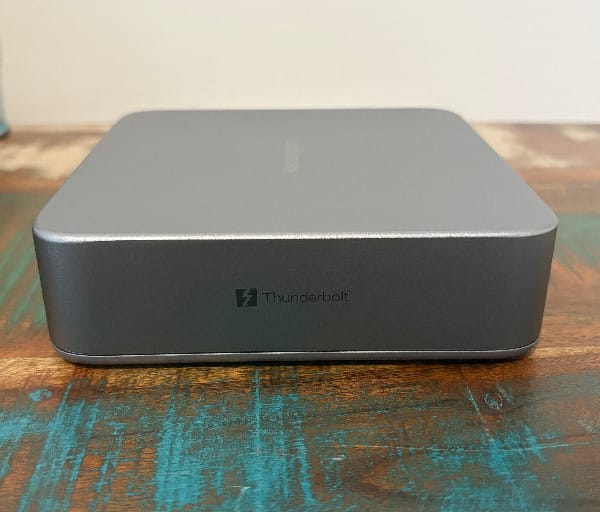
Kensington has given the SD5010T5 a solid, understated aluminium shell that feels more at home on a tidy desk than a typical plastic hub. The use of post-consumer recycled aluminium in the outer casing is a nice touch for anyone weighing up the environmental footprint of their desk gear, and it doesn’t come at the cost of rigidity or finish quality.

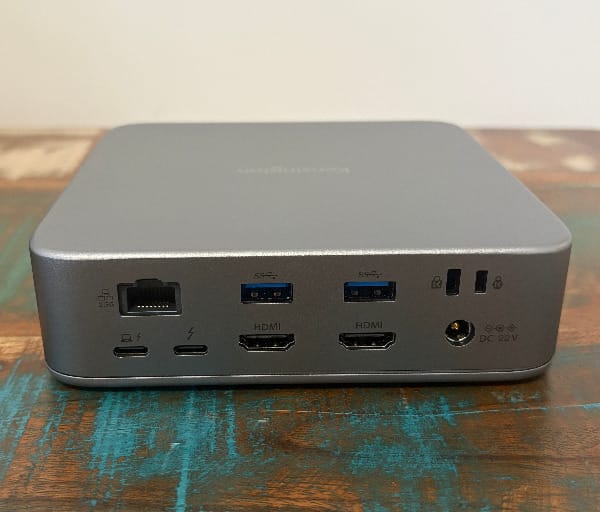
The dock keeps a genuinely compact footprint, measuring roughly 140 x 140 x 40mm. That’s small enough to sit comfortably beside a laptop stand or monitor base without dominating the desk, and it echoes the kind of small-form-factor thinking that’s made compact docking stations popular alongside similarly sized mini desktops.
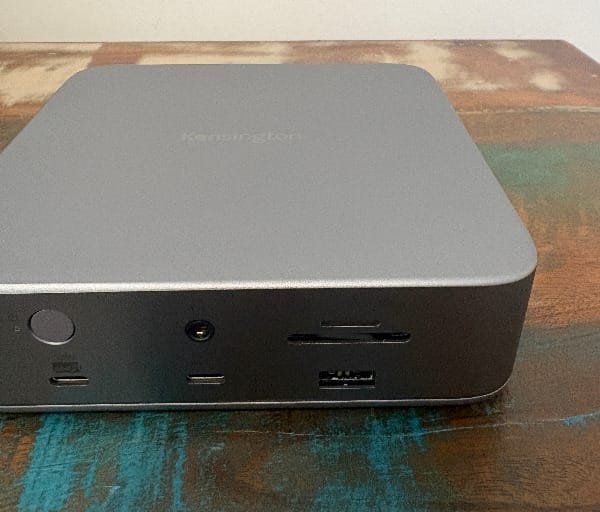
Up front, Kensington has grouped the ports people reach for most often during the day. That includes the UHS-II SD and microSD card readers, a 10Gbps USB-C port rated at 30W, and a 3.5mm combo audio jack, all positioned for quick access without having to crane around the back of the dock.
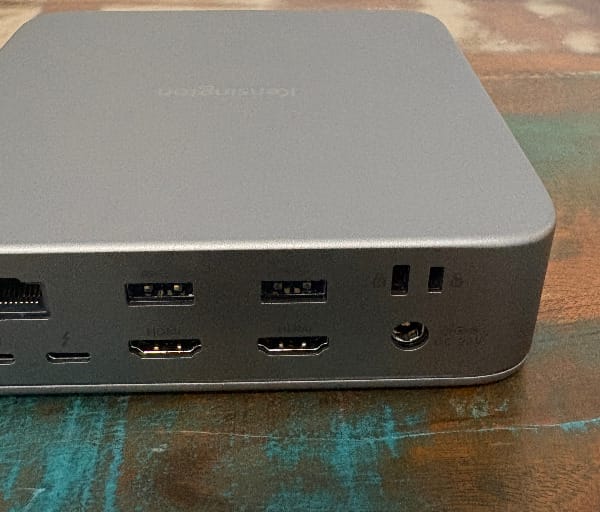
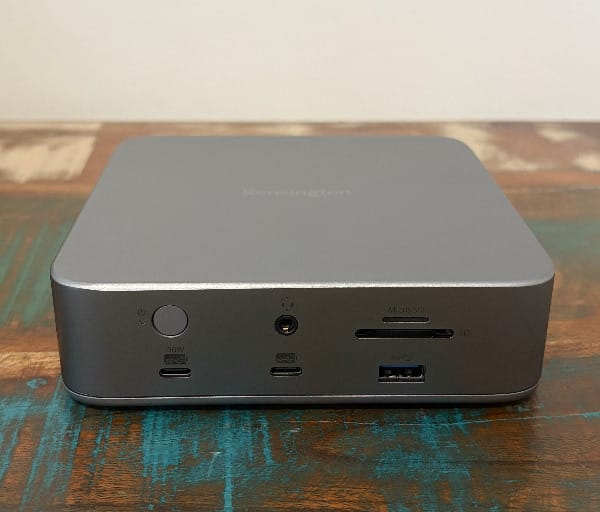
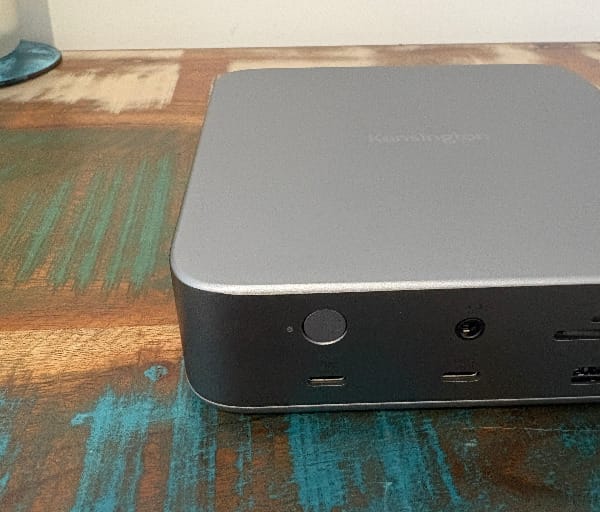
Around the back sits the bulk of the connectivity: the upstream Thunderbolt 5 port that connects to the host laptop, a single downstream Thunderbolt 5 port, the two HDMI 2.1 outputs, the 2.5Gb Ethernet jack, a second USB-C port and a trio of USB-A ports. It’s a sensible split that keeps semi-permanent cables like the monitor and network leads tucked away.
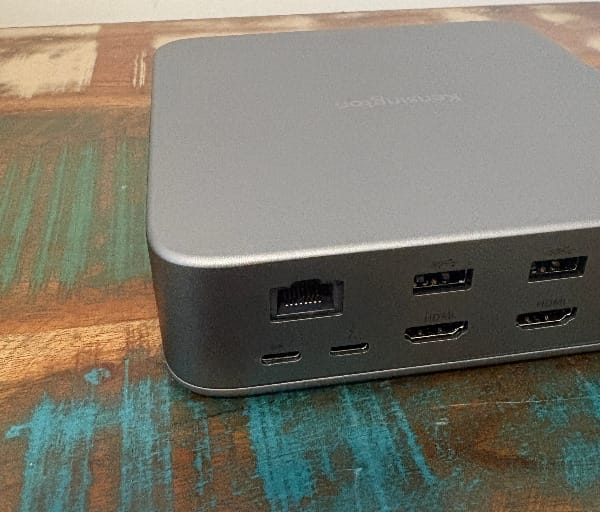
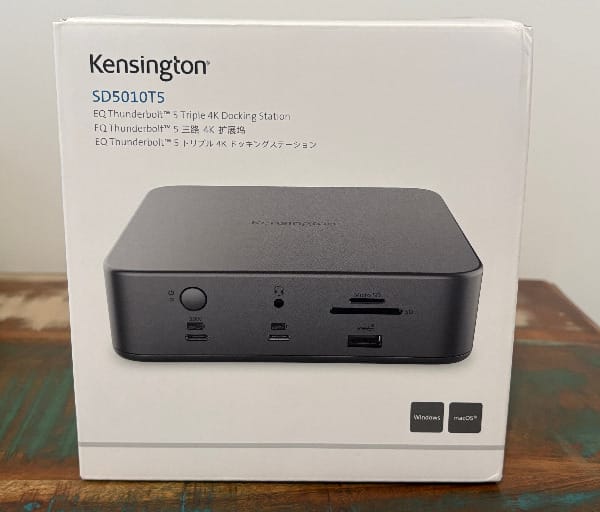
The decision to dedicate two ports to HDMI 2.1 rather than adding a third Thunderbolt 5 output is the single biggest design choice that defines this dock. For anyone whose monitors connect natively via HDMI, which covers a huge share of displays on the market, it removes the need for USB-C to HDMI adapters entirely.
The trade-off is that only one Thunderbolt 5 port remains available downstream for daisy-chaining additional Thunderbolt accessories or displays. Buyers who want three downstream Thunderbolt 5 ports instead of HDMI outputs can look to Kensington’s own SD5000T5 dock, which swaps the HDMI pair for extra Thunderbolt connectivity.
The upstream Thunderbolt 5 connection is where the SD5010T5 does its heaviest lifting, carrying data, video and power back to the host laptop over a single cable. It’s the kind of single-cable convenience that makes docking stations worth having on a desk in the first place.
That lone downstream Thunderbolt 5 port is still genuinely useful for connecting a fast external SSD, a Thunderbolt display, or another TB5 peripheral, even if it can’t match the flexibility of a dock with multiple downstream Thunderbolt ports. For most HDMI-first setups, one spare Thunderbolt 5 port is enough headroom.
The secondary USB-C port carries 7.5W of power, which sits above the 4.5W offered by each of the three USB-A ports but below the primary USB-C port’s 30W. It’s a sensible hierarchy that reserves the fastest charging for the port most likely to be used for a phone, tablet or second laptop.
Kensington has built in a zero-footprint mounting option, which lets the dock be fixed out of the way rather than taking up desk real estate. Combined with compatible mounting hardware, this suits people who prefer clipping accessories to a monitor arm, desk edge or cubicle wall to free up surface space.
A Kensington security lock slot is built into the chassis, which is a small but meaningful inclusion for shared offices, open coworking spaces or any environment where hardware needs to be physically secured overnight.
Cable routing around the back of the dock is tidy enough that a typical HDMI-plus-Ethernet-plus-power setup doesn’t turn into a tangle. The ports are spaced with enough room between them that bulkier cable heads and adapters don’t collide with neighbouring connectors.
Power comes from an external supply, which keeps heat generation away from the dock’s own chassis and allows it to deliver up to 140W of dynamic Power Delivery to the host laptop while still running everything else connected to it.
The compact dimensions mean the SD5010T5 doesn’t dominate a desk the way some larger Thunderbolt hubs with built-in SSD bays do, which suits anyone who wants dock-level connectivity without the visual bulk.
The neutral aluminium finish is understated enough to blend into most home office or corporate desk setups, whether it’s sitting next to a MacBook Pro or a Windows Ultrabook.
Kensington backs the SD5010T5 with a 3-year limited warranty, which is a solid length of cover for a piece of hardware that’s likely to sit at the centre of a daily workflow for years.
Key Features
The headline feature is Thunderbolt 5 itself, with the SD5010T5 capable of data transfer speeds up to 80Gbps, plus a Bandwidth Boost mode that pushes available bandwidth up to 120Gbps for video-intensive tasks like editing high-resolution footage or running multiple displays at once.
On Windows laptops, the display support is genuinely impressive for a dock this size: up to three 4K monitors, or two 8K monitors, connected through the two HDMI 2.1 ports plus the Thunderbolt 5 port.
On macOS, the dock supports dual 6K plus 4K configurations, with the exact ceiling depending on the host chip. Mac laptops with M4 or M5 base chips, along with M-series Pro and Max chipsets, can drive two 4K displays at 60Hz through the HDMI ports, or swap one of those for a single display up to 6K via the Thunderbolt 5 port.
Apple’s own chip tiers have long dictated how many external displays a MacBook can run, and that logic carries through here. Stepping up to an M5 Pro or M5 Max chip unlocks support for three external displays through this dock at once, which is a meaningful jump for anyone running a multi-monitor creative or trading setup.
Power delivery is another standout spec, with the SD5010T5 offering up to 140W of dynamic Power Delivery through Kensington’s KonstantCharge technology, which is enough headroom to fast-charge even larger 16-inch class laptops while keeping everything else connected powered up too.
Built-in UHS-II SD and microSD card readers give photographers and videographers a direct route to offload footage without needing a separate card reader cluttering up the desk, which is a genuinely practical inclusion rather than a box-ticking spec.
Compatibility is broad by design, with the SD5010T5 working across Thunderbolt 5, Thunderbolt 4, USB4 and USB-C devices, and running natively on both Windows and macOS without needing separate drivers for basic functionality.
The outer casing’s use of 100% post-consumer recycled aluminium is a feature worth highlighting on its own, since it signals a genuine sustainability consideration rather than just a marketing line, without sacrificing the dock’s structural solidity.
The zero-footprint mounting option is listed as a dedicated feature for good reason, since it lets the dock disappear from the desk surface entirely for anyone who prioritises a clean, minimal workspace.
A built-in Kensington security lock slot rounds out the physical feature set, giving IT departments and shared workspaces an easy way to physically secure the dock to a desk.
Kensington bundles free DockWorks software with the SD5010T5, giving users a way to manage firmware updates, check port status and configure the dock without needing to dig through system settings manually.
The 3-year limited warranty is a genuine feature in its own right for a piece of hardware this central to a daily setup, offering a longer cover period than many rival docks in this category.
The dock includes a 2.5Gb Ethernet port, which comfortably outpaces standard Gigabit Ethernet for wired network tasks. Kensington notes that Ethernet performance on Apple devices reached approximately 1.6Gbps during its own testing, which is still a strong real-world result for anyone shifting large files across a wired network.
Rounding out the connectivity, a front-facing 3.5mm audio jack and a spread of USB-A ports mean older peripherals, wired headsets and legacy accessories all still have a home without needing extra adapters.
| Port or Feature | Detail |
|---|---|
| Upstream connection | Thunderbolt 5, up to 80Gbps (120Gbps Bandwidth Boost) |
| Downstream Thunderbolt | 1x Thunderbolt 5 port |
| Video outputs | 2x HDMI 2.1 |
| Power Delivery | Up to 140W dynamic PD with KonstantCharge |
| Networking | 2.5Gb Ethernet |
| Card readers | UHS-II SD and microSD |
| Build material | 100% post-consumer recycled aluminium |
| Warranty | 3-year limited warranty |
Experience Using the Product and Performance
Setting the SD5010T5 up for the first time is about as simple as docking gets: one Thunderbolt 5 cable to the laptop, power to the wall, and the rest of the peripherals plug straight into the back and front of the unit.
Connecting a Thunderbolt 5-equipped MacBook Pro to the dock brought everything online immediately, with displays, Ethernet and USB peripherals all recognised without hunting through driver installers or system preferences.
Pairing the dock with a Windows laptop running Thunderbolt 5 was just as straightforward, with Windows picking up the dual HDMI outputs and the full USB complement on first connection.
Running two HDMI monitors off the Mac side worked exactly as advertised, with both panels landing at 4K and 60Hz without any flickering or handshake delays during the switch from laptop display to external monitors.
On the Windows side, pushing three 4K displays simultaneously through the two HDMI ports and the Thunderbolt 5 port kept everything stable, which is a genuinely useful ceiling for anyone running a trading desk, coding setup or creative workstation.
Switching one of the Mac-side displays to run through the downstream Thunderbolt 5 port instead of HDMI bumped that panel up to 6K, confirming the flexibility Kensington promises between the HDMI and Thunderbolt video paths.
With an M5 Pro-class chip in play, a third external display came online cleanly, confirming that the three-display ceiling on Mac hardware is tied to the chip tier rather than any limitation in the dock itself.
Testing file transfer speeds through the single downstream Thunderbolt 5 port with a fast external SSD showed the kind of snappy large-file transfer performance expected from Thunderbolt 5 bandwidth, with multi-gigabyte folders copying over in a fraction of the time a USB 3.0 connection would take.
Everyday file copying through the USB-A ports felt perfectly adequate for backup drives, USB sticks and wired peripherals, even if these ports don’t carry the same headline bandwidth as the Thunderbolt or primary USB-C connections.
The SD card reader proved genuinely handy during a quick photo import test, pulling a folder of high-resolution images off a card noticeably faster than many laptops’ built-in readers.
The microSD reader earned its keep when offloading drone footage, saving the hassle of swapping a microSD-to-SD adapter in and out of a single slot.
Running a wired network speed test over the 2.5Gb Ethernet port on a Mac returned results in line with Kensington’s own stated figure of around 1.6Gbps, which is still a solid step up from typical home Wi-Fi or Gigabit Ethernet performance.
Charging performance was one of the more reassuring parts of the experience, with the host laptop’s battery climbing steadily even while the dock was simultaneously driving multiple displays and powering accessories.
Plugging a phone into the secondary 30W USB-C port topped it up quickly during a work session, confirming that port’s higher power allocation is genuinely useful rather than just a spec sheet number.
The front-facing 3.5mm audio jack handled a wired headset without any dropouts or latency during a run of video calls, which matters more than it sounds for anyone relying on a dock for daily meetings.
Kensington’s DockWorks software presented a clean, straightforward interface for checking connected devices and confirming the dock was running the latest firmware, without burying anything behind confusing menus.
Running a firmware update through DockWorks took only a couple of minutes and completed without needing to disconnect and reconnect the dock manually.
Across a typical workday of video calls, browser tabs and document editing spread over three monitors, the dock didn’t introduce any noticeable lag or display flicker, which is exactly what a dock in this position should deliver.
Thermally, the SD5010T5 stayed cool to the touch during extended use, and with no internal fan there was no operating noise to speak of even under a heavier Thunderbolt and display load.
Cable management under the desk was noticeably tidier than running a laptop directly to two separate monitors, since the dock consolidates video, network, power and peripherals into that single Thunderbolt 5 cable back to the laptop.
Mounting the dock off the desk surface using a compatible bracket freed up a surprising amount of usable desk space, and the zero-footprint design meant the chassis stayed firmly in place rather than wobbling when cables were plugged or unplugged.
Using the Kensington lock slot to physically secure the dock to a desk in a shared workspace took seconds and offered real peace of mind for hardware left out overnight.
Putting the host laptop to sleep and waking it back up consistently brought the dock’s displays, Ethernet and peripherals back online without needing to unplug and replug the Thunderbolt cable.
Switching the same dock between a MacBook Pro and a Windows laptop across different work sessions showed no compatibility hiccups, with both platforms recognising the full port set without extra configuration.
Compared with Kensington’s own SD5000T5, which trades the HDMI pair for extra downstream Thunderbolt ports, the SD5010T5 felt better suited to this specific HDMI-monitor workflow, while the SD5000T5 would suit someone running Thunderbolt displays or storage instead.
The difference between this dock and relying on a bag of individual dongles was obvious within the first day of use, with a single cable replacing what would otherwise be three or four separate adapters.
Having the card readers and a fast-charging USB-C port on the front panel made quick, casual tasks like importing a photo card or topping up a phone noticeably more convenient than digging around the back of the dock.
The external power brick, while not pocket-sized, is compact enough to toss in a bag for anyone who moves between a desk and a meeting room or home office regularly.
The one limitation that showed up repeatedly during testing was the single downstream Thunderbolt 5 port, which is fine for one extra accessory but doesn’t leave room for daisy-chaining several Thunderbolt devices at once.
By the end of extended testing, the SD5010T5 held up as a dependable, no-fuss docking solution that handled displays, charging, storage and networking without a single dropped connection or unexpected hiccup.
Conclusion
The Kensington SD5010T5 earns its place on a desk by solving a specific, common problem: getting full Thunderbolt 5 bandwidth and power to a laptop while driving HDMI monitors without a drawer full of adapters. The combination of 80Gbps Thunderbolt 5 speeds, a 120Gbps Bandwidth Boost mode and 140W of dynamic Power Delivery makes it feel built for genuinely demanding desk setups rather than casual use.
Anyone running dual or triple HDMI monitors off a Thunderbolt 5, Thunderbolt 4, USB4 or USB-C laptop on either Windows or macOS is the natural buyer here, especially those who also value the fast card readers, 2.5Gb Ethernet and the sustainability angle of a recycled aluminium chassis.
People who need multiple downstream Thunderbolt 5 ports for daisy-chaining Thunderbolt displays or storage rather than HDMI monitors are better served by Kensington’s own SD5000T5, which swaps the HDMI pair for extra Thunderbolt connectivity. That trade-off is really the only thing standing between the SD5010T5 and a near-universal recommendation.
For HDMI-based multi-monitor workflows, though, the Kensington SD5010T5 delivers exactly what it promises: fast, reliable, single-cable desktop connectivity backed by a 3-year warranty and genuinely useful everyday features.
Frequently asked questions
Does the Kensington SD5010T5 work with both Windows and Mac laptops?
Yes, the dock is compatible with Thunderbolt 5, Thunderbolt 4, USB4 and USB-C devices and runs natively on both Windows and macOS, though the maximum display configuration differs slightly between the two platforms.
How many monitors can the SD5010T5 support?
Windows laptops can run up to three 4K displays or two 8K displays through the two HDMI 2.1 ports and the Thunderbolt 5 port. Mac laptops can run dual 4K via HDMI or one display up to 6K via Thunderbolt 5, with M5 Pro or M5 Max chips unlocking support for a third external display.
Does the dock include any software or warranty support?
Kensington includes free DockWorks software for managing the dock and keeping its firmware current, and the SD5010T5 is covered by a 3-year limited warranty.
Is Ethernet speed reduced when using the dock with Apple devices?
The dock’s Ethernet port is rated for 2.5Gb connections, though Kensington notes that real-world Ethernet performance on Apple devices reached approximately 1.6Gbps during its own testing, which is still well ahead of standard Gigabit Ethernet.