The Logitech G512 X 75 brings together the familiar feel of a mechanical keyboard with the added flexibility of magnetic switch technology. Its compact 75% layout keeps essential keys within easy reach while reducing the amount of space it occupies on a desk.
Finished in black, the keyboard has a clean and understated appearance that suits both gaming setups and everyday workspaces. The combination of customisable switches, programmable controls and detailed lighting options gives it plenty of personality without making the design feel overly complicated.
What makes the G512 X 75 especially interesting is its ability to blend traditional mechanical switches with TMR analogue switches in selected positions. This approach gives users more control over how individual keys respond, making the keyboard suitable for fast-paced gaming, regular typing and anyone who enjoys fine-tuning their setup.
Table of Contents
Design and Functionality
The Logitech G512 X 75 uses a compact 75% layout that balances desk space with practical access to frequently used controls. It retains the function row, arrow keys and a selection of navigation buttons while removing the wider footprint of a full-sized keyboard.
Its black finish gives the keyboard a clean and versatile appearance that blends easily with dark gaming systems, monitors and desk accessories. The understated colour also allows the RGB lighting to stand out more clearly around the keys and lightbar.
The chassis feels solid and well suited to regular gaming or daily typing. Its compact proportions make it easier to position alongside a mouse, particularly for users who prefer extra room for broad movements during gameplay.


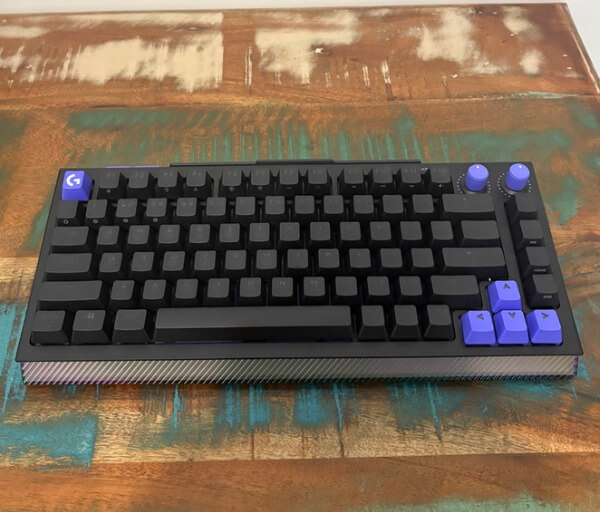




Logitech has arranged the keys in a familiar way, so adapting to the reduced layout requires very little time. The spacing remains comfortable, and the dedicated arrow cluster helps the keyboard remain practical for productivity tasks as well as gaming.
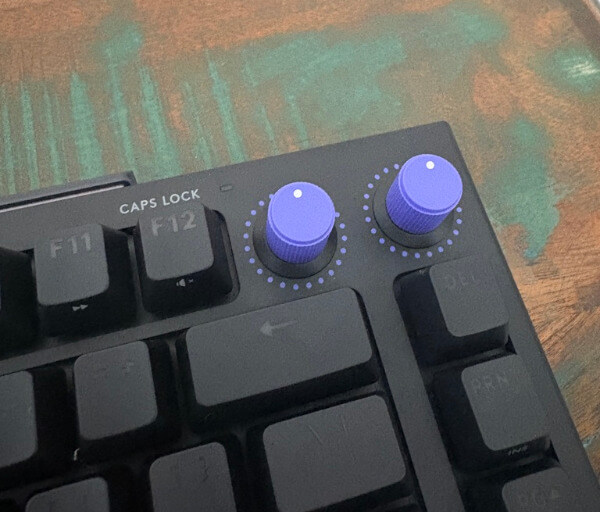
Two control knobs sit along the upper-right edge of the keyboard. These can be used for functions such as volume adjustment and lighting brightness, while additional customisation is available through Logitech G Hub.
The knobs are easy to locate by touch and provide a convenient alternative to repeated key combinations. Their placement keeps them accessible without interfering with the main typing area.
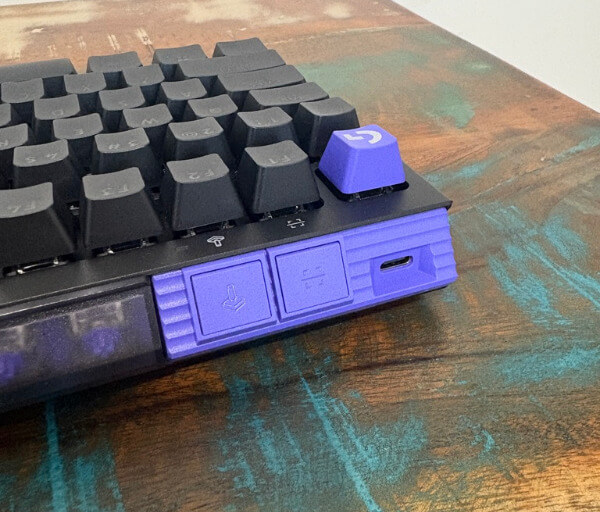
A removable USB-C to USB-A cable handles the wired connection. The detachable design makes the keyboard easier to transport, store or reposition, while the 1.8 metre length provides flexibility for different desk arrangements.
Along the upper edge is a dedicated Game Mode button that can disable disruptive inputs during play. This is useful for preventing an accidental press of the Windows key or another assigned key from interrupting a session.
An analogue scan button is positioned nearby and plays an important role when switches are changed. Pressing it allows the keyboard to identify newly installed analogue switches so the correct controls can be configured within the software.
The rear of the keyboard includes integrated storage for the supplied TMR switches and accessories. This keeps the additional components close at hand and reduces the chance of losing small parts between customisation sessions.
Logitech also includes keycap and switch removal tools, making it easier to alter the keyboard without needing separate equipment. Their integration into the design helps reinforce the G512 X 75 as a product intended for experimentation and ongoing personalisation.
All 81 switch positions support replaceable mechanical switches, giving users considerable freedom to adjust how different parts of the keyboard feel. Compatible switches can be installed without soldering, which makes the process accessible even for users who are new to keyboard modification.
Among these positions, 39 support Logitech’s TMR analogue switch technology. This hybrid arrangement lets users place advanced magnetic switches on gaming-focused keys while retaining conventional mechanical switches elsewhere.
The result is a design that remains familiar while offering much deeper control than a standard mechanical keyboard. Its compact form, integrated storage, programmable dials and flexible switch system make the G512 X 75 feel carefully organised rather than overloaded with unnecessary hardware.
Key Features
The defining feature of the Logitech G512 X 75 is its Dual Swap design, which supports both mechanical and TMR analogue switches. This allows the keyboard to deliver the familiar response of traditional mechanical keys while introducing advanced magnetic control where it matters most.
All 81 switch positions are hot-swappable, giving users the freedom to change the feel of the keyboard without soldering. This makes it possible to experiment with different compatible switches and create a setup that better suits gaming, typing or a mixture of both.
A total of 39 positions support Logitech’s TMR analogue technology. These switch beds are concentrated around commonly used gaming areas, allowing users to add more responsive controls to keys such as movement inputs and frequently assigned actions.
Nine linear magnetic switches are included and stored directly on the keyboard. This built-in storage makes it easy to keep the spare switches organised and available whenever users want to change their layout.
The analogue switches support adjustable actuation from 0.1 mm to 4 mm. A shallow setting can make a key respond to an extremely light press, while a deeper setting can reduce accidental inputs and provide a more deliberate feel.
Rapid Trigger support allows compatible keys to reset based on movement rather than a fixed release point. This can make repeated inputs feel faster and more responsive during games that rely on quick direction changes or frequent key presses.
Dual-stage input functionality allows one key to perform two actions depending on how far it is pressed. A light press could activate one command, while a deeper press can trigger a second action, creating more control without requiring additional keys.
The supplied second actuation pressure point rings can add extra resistance at a chosen stage of the keypress. This physical feedback can make it easier to distinguish between the first and second assigned actions when using dual-stage controls.
Logitech KeyControl expands the keyboard’s customisation through G Hub. Individual keys can be assigned macros, application shortcuts, layered functions and game-specific commands, giving users far more flexibility than a standard layout.
The two programmable knobs can also be adapted to suit personal preferences. While volume and RGB brightness are practical default functions, users can assign other compatible controls to better match their workflow or gaming habits.
The G512 X 75 supports both 1,000 Hz and 8,000 Hz report rates. The higher setting allows the keyboard to communicate inputs more frequently, which helps provide rapid and consistent response during competitive gameplay.
LIGHTSYNC RGB lighting offers access to 16.8 million colours across the keys and surrounding lightbar. Effects, brightness and colour patterns can be adjusted through G Hub, making it easy to coordinate the black keyboard with the rest of a gaming setup.
Experience Using the Product and Performance
Using the Logitech G512 X 75 for the first time feels familiar because the layout remains close to a conventional keyboard despite its smaller footprint. The reduced width creates more room for mouse movement without forcing users to give up the function row or dedicated arrow keys.
The black finish gives the keyboard a polished appearance once it is placed on a desk. It works particularly well with the RGB illumination, as the darker surface helps the colours appear more vivid without making the keyboard look overly flashy when the lighting is switched off.
Typing on the pre-installed mechanical switches feels consistent across the board. Each press has a clear response, making the keyboard comfortable for writing documents, browsing the web and handling everyday desktop tasks between gaming sessions.
The 75% arrangement is also easy to adapt to for users moving from a larger keyboard. Most important controls remain directly accessible, so there is little need to rely on complicated secondary layers during normal use.
Its compact size makes a noticeable difference during longer gaming sessions. More space can be left between the keyboard and mouse, helping the arms remain in a comfortable position while allowing greater freedom for wide mouse movements.
The two programmable knobs are especially convenient during regular use. Adjusting volume or changing lighting brightness can be done quickly without leaving a game or searching for a function-key combination.
The knobs offer a smooth and controlled feel when turned. Their location in the upper-right corner keeps them easy to reach while ensuring they do not interfere with typing or fast in-game inputs.
Changing switches is a straightforward process with the included tools. Removing a keycap and lifting out the switch requires little effort, which encourages users to try different combinations instead of treating the original configuration as permanent.
The included TMR switches can be placed beneath the keys that benefit most from analogue control. Installing them under movement keys is an obvious choice, although they can also be assigned to actions that require rapid or carefully measured input.
Once the switches are installed, the analogue scan button simplifies the setup process. Activating the scan allows the keyboard and G Hub to recognise the changed positions, reducing the amount of manual configuration required.
Adjusting the actuation point has an immediate effect on how responsive a key feels. At the shallowest setting, inputs register with only a slight movement, making frequently pressed gaming controls feel exceptionally quick.
Deeper actuation settings are useful for keys that should respond more deliberately. This flexibility helps reduce unwanted presses while allowing important movement or action commands to remain highly sensitive.
Creating separate profiles is the most practical way to take advantage of these settings. A fast configuration can be prepared for gaming, while a deeper and more controlled profile can be used for typing and general computer use.
Rapid Trigger gives the compatible keys a particularly lively response. Inputs can reset as soon as the key begins moving upwards, helping repeated presses and rapid changes in direction feel smooth and immediate.
This function is most noticeable when alternating between opposing movement keys. The keyboard reacts cleanly to quick finger movements, allowing commands to feel closely connected to the physical position of each switch.
Dual-stage actuation adds another layer of control without requiring additional buttons. Assigning two commands to different depths of the same key can make complex layouts feel more manageable once the user becomes familiar with the pressure needed.
The second actuation pressure point rings can help distinguish between the two stages. They introduce an additional tactile cue that makes it easier to recognise when a deeper input is about to activate.
This feature benefits from some experimentation, as every user applies pressure differently. Taking time to adjust the actuation depths and test the rings can produce a setup that feels natural rather than overly sensitive.
G Hub provides a wide selection of options for changing the keyboard’s behaviour. Key assignments, macros, analogue functions, lighting effects and knob controls are arranged in one place, making it easier to refine the keyboard for different applications.
KeyControl is useful for creating shortcuts beyond gaming. Frequently opened programs, repeated commands and productivity functions can be assigned to convenient keys, helping the keyboard adapt to a broader range of daily tasks.
Layered commands provide additional flexibility without overcrowding the compact layout. A key can retain its standard function during a quick press while activating a separate command when held, giving users access to more controls from the same physical space.
The 8,000 Hz report rate complements the responsive switch system. Inputs are communicated frequently and consistently, helping the keyboard maintain a precise feel during fast sequences and rapid repeated actions.
For everyday use, the 1,000 Hz option remains smooth and responsive. Being able to choose between the two report rates lets users select the setting that best matches their system and personal requirements.
The LIGHTSYNC illumination gives the black keyboard a more distinctive appearance at night or in a dim room. Individual colours and animated effects can be adjusted to match a preferred theme, while lower brightness settings keep the presentation subtle.
Game Mode is useful whenever uninterrupted input is important. Disabling selected keys helps prevent accidental commands from interrupting gameplay, particularly when the hands are moving quickly around the lower-left section of the keyboard.
The G512 X 75 performs well as both a customisable gaming keyboard and a dependable everyday input device. Its mechanical foundation keeps it approachable, while the TMR switches, adjustable actuation and programmable functions provide meaningful options for users who want to fine-tune how their keyboard responds.
Conclusion
The Logitech G512 X 75 offers an appealing combination of mechanical familiarity and advanced TMR customisation. Its hybrid switch design gives users the freedom to enhance important gaming keys without losing the consistent feel of a traditional mechanical keyboard across the rest of the layout.
Its compact 75% format, black finish and programmable control knobs make it practical for modern gaming desks. Integrated switch storage, included removal tools and simple analogue scanning also make hardware adjustments approachable for users who are new to keyboard customisation.
Adjustable actuation, Rapid Trigger, dual-stage commands and extensive KeyControl options provide plenty of room to refine how the keyboard performs. These features can be configured for fast gaming inputs, comfortable everyday typing or personalised shortcuts that support productivity.
The G512 X 75 is a strong choice for anyone who wants to explore analogue keyboard technology while retaining the flexibility of hot-swappable mechanical switches. It delivers responsive performance, extensive personalisation and a polished design that can adapt as the user’s preferences develop.