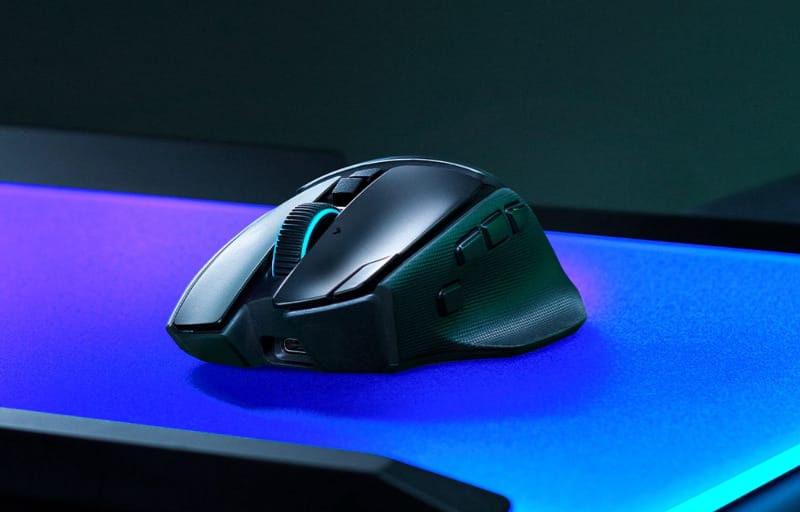
The Razer Basilisk V4 Pro is the newest flagship in Razer’s long-running ergonomic mouse family, and the black unit used for this review pairs a familiar contoured shape with a meaningfully upgraded sensor and switch package underneath. Full specifications and configuration options sit on Razer’s official Basilisk V4 Pro product page, but the more useful question for most buyers is whether the changes beneath that shell are substantial enough to matter day to day.
Review summary
Razer Basilisk V4 Pro
The Basilisk V4 Pro refines Razer's established ergonomic mouse formula with meaningful upgrades to its sensor, switches and weight, delivering improved tracking precision and responsiveness without abandoning the familiar shape that existing users rely on. The 50,000 DPI optical sensor, reduced 100-gram weight and additional programmable button make it a solid choice for competitive players and genre-switchers alike, though those preferring heavier mice may need adjustment time.
Highlights
- ✓50,000 DPI optical sensor with 99.8% accuracy and Frame Sync technology
- ✓12 grams lighter than previous generation for faster flick response
- ✓14 programmable buttons and four-mode HyperScroll wheel
- ✓Proven ergonomic shape with minimal design changes
- ✓Wireless charging compatibility and multi-device support
Razer’s Basilisk line has always leaned on a shape that borrows heavily from the ergonomic playbook popularised by rivals, with a wide palm rest and a dedicated thumb shelf that keeps the hand from sliding around during long sessions. The V4 Pro keeps that silhouette largely intact while swapping in a new optical sensor, revised switches and a second-generation scroll wheel, aiming squarely at players who already like the Basilisk grip but want sharper tracking and more customisation underneath it.
This review walks through the design and build of the black Basilisk V4 Pro, breaks down its headline features, and then gets into how it actually feels to use across different genres and grip styles, so anyone deciding between this and the previous Basilisk V3 Pro 35K has a clear picture of what has genuinely changed.
Table of Contents
Design and Functionality
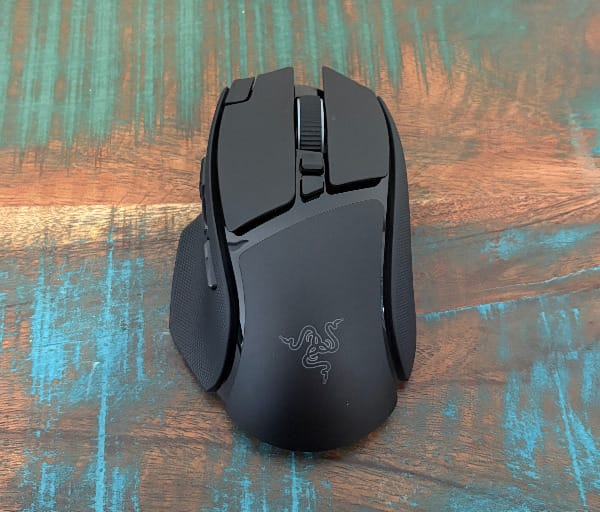
Picked up for the first time, the Basilisk V4 Pro immediately feels like a continuation of the existing Basilisk shape rather than a reinvention. The body is wide through the middle, tapering toward the front, with a pronounced thumb rest on the left side that keeps the thumb from dragging across the desk mat during fast swipes.
The review unit arrived in Razer’s black colourway, which keeps the design understated. The matte top shell pairs with a slightly glossier side panel, and the overall look sits comfortably alongside most desk setups without shouting for attention the way some brighter special editions do.
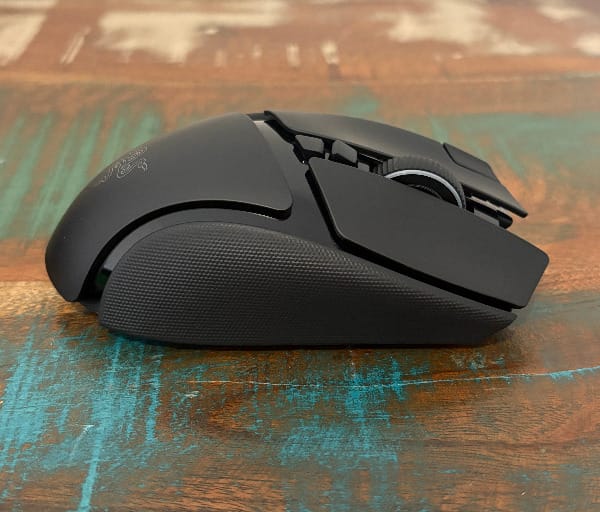
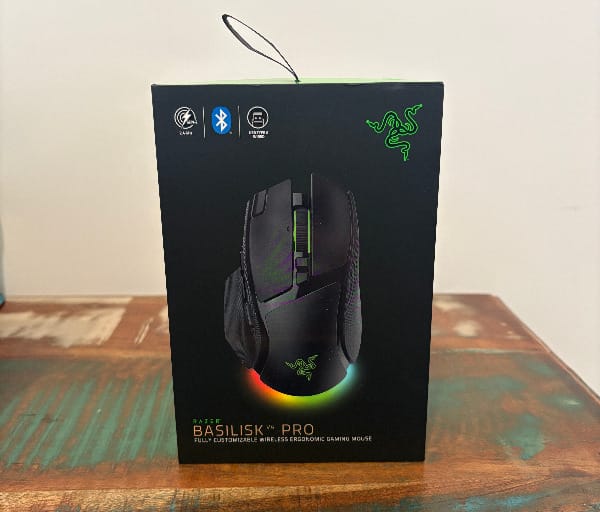
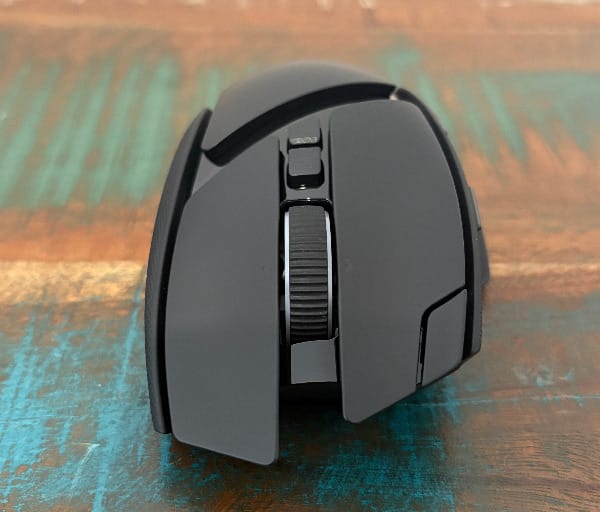
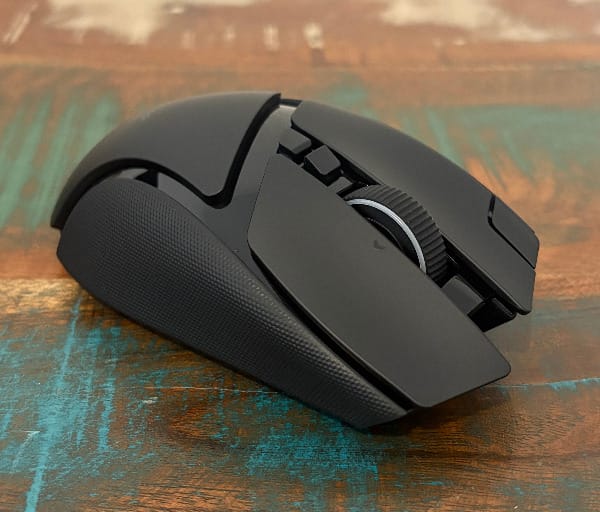
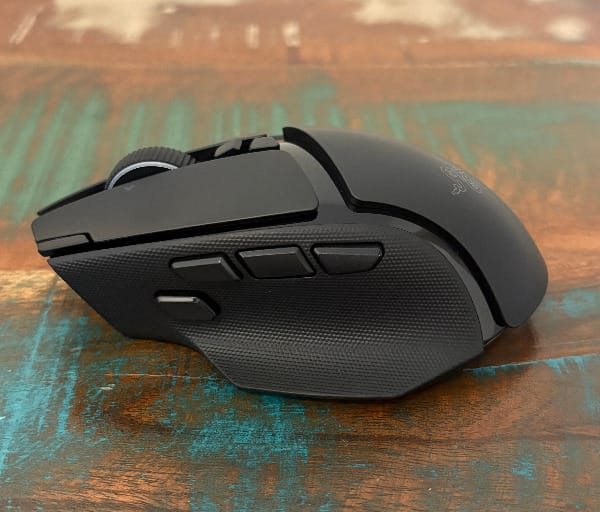
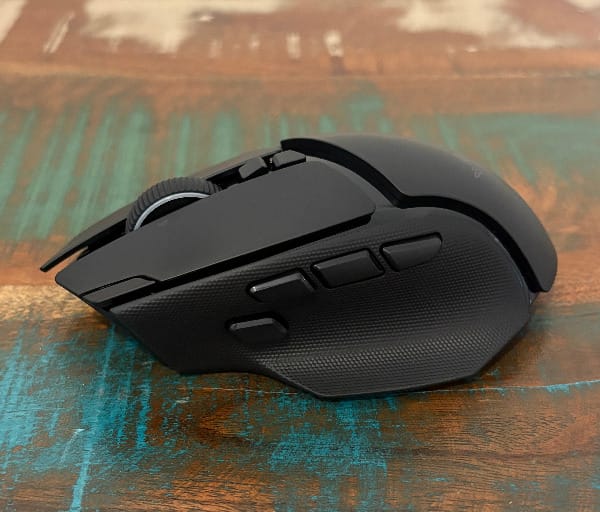
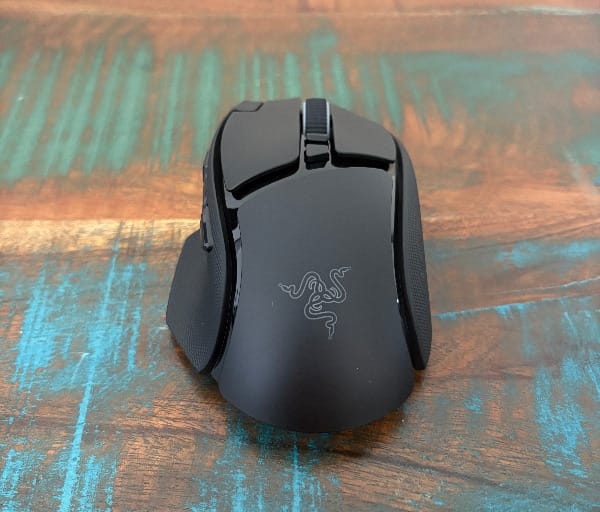
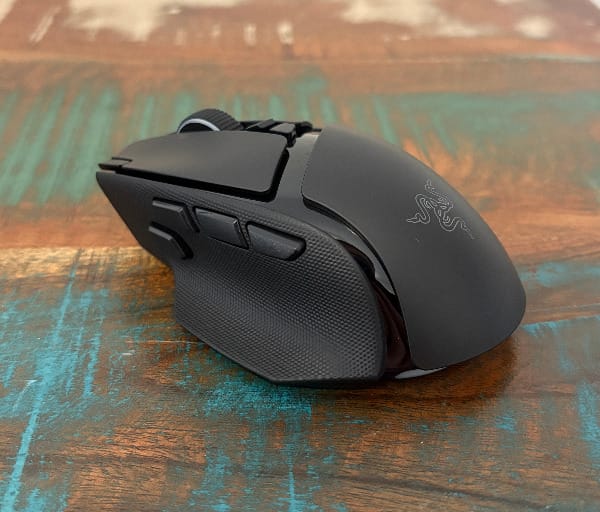
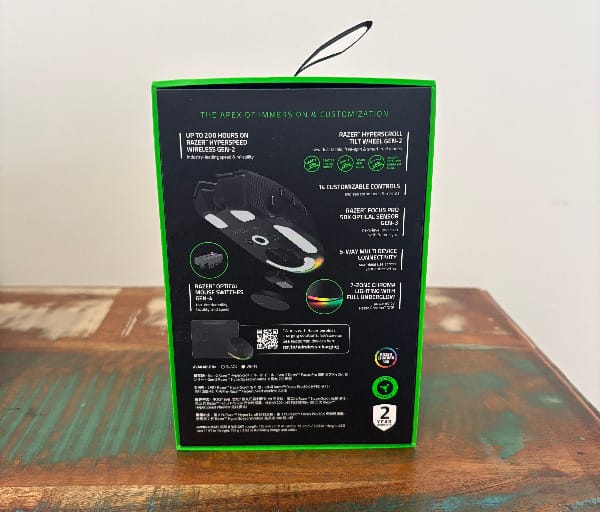
Weight is one of the most noticeable changes from the previous generation. At 100 grams, the Basilisk V4 Pro is 12 grams lighter than the Basilisk V3 Pro 35K, and that difference is immediately obvious when picking the two mice up side by side.
For players who prize fast flicks and quick direction changes, that lighter frame is a clear positive, since less mass means less effort to redirect the cursor mid-swing. Those who preferred the heftier feel of the older Basilisk, however, may need a session or two to recalibrate their muscle memory.
The underside uses PTFE skates, which glide smoothly across cloth and hard mats alike. On a glass mousepad specifically, the combination of the skates and a flat glass surface produces very low friction, so large swipes require minimal wrist effort while still offering enough control to stop precisely.
Button placement follows the familiar Basilisk layout, with primary left and right clicks, a scroll wheel cluster, a pair of thumb buttons, and additional buttons dotted around the thumb rest area. Razer has added one extra programmable button compared with the Basilisk V3 Pro 35K, bringing the total to 14 programmable inputs.
That extra button is a welcome addition for anyone who maps skill rotations, inventory shortcuts or macro commands directly to the mouse, since it means one less compromise when deciding what goes where. MMO and MOBA players in particular will appreciate having another input to play with without needing a dedicated MMO mouse.
The scroll wheel sits front and centre, and it is a tactile, metal-edged wheel that feels sturdy under the fingertip. It also doubles as a button that can be pressed down, and it tilts left and right for additional inputs, adding further flexibility to the button count.
Underneath, the Basilisk V4 Pro retains full underglow RGB lighting, a signature Razer touch that illuminates the base of the mouse and syncs with other Chroma-enabled gear. It is a cosmetic flourish rather than a functional one, but it is executed cleanly and does not feel tacked on.
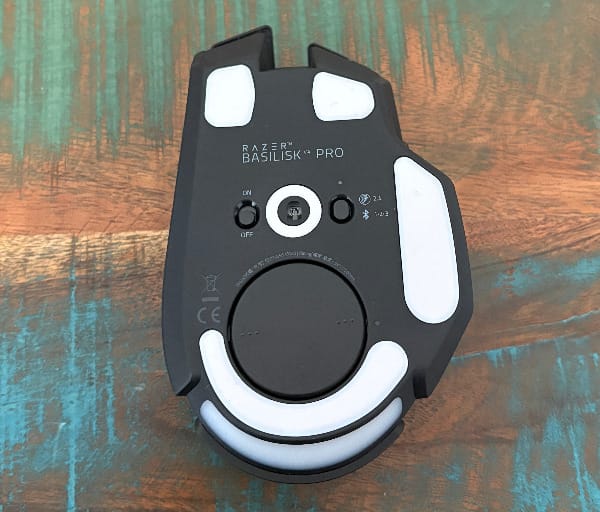
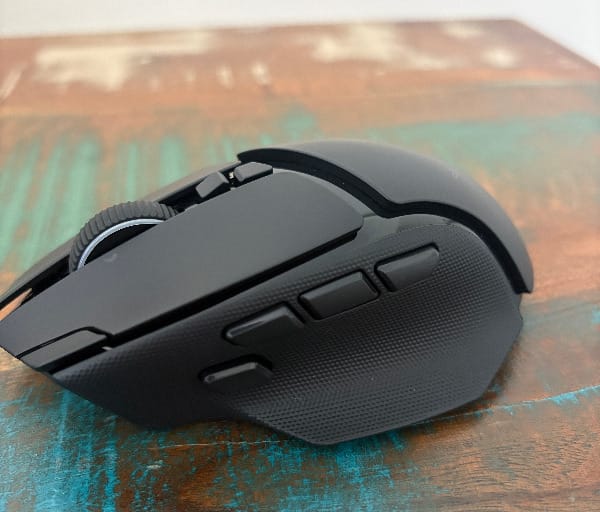
Build quality throughout feels solid, with no creak or flex noticeable when gripping the shell firmly or lifting the mouse off the desk. The side panels have a slightly textured finish that helps with grip, particularly on the thumb rest where sweat and friction build up over long sessions.
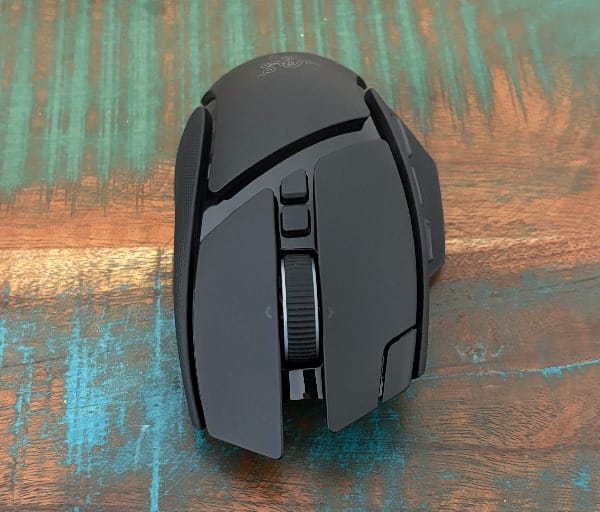
The main clicks use Razer’s latest-generation optical switches, which are rated for a long service life and provide a crisp, confident actuation. Compared with the mechanical-style switches found on cheaper mice, the optical design also reduces input latency at the point of the click itself.
Connectivity runs through Razer’s HyperSpeed Wireless protocol, a low-latency wireless standard the company has refined across several generations of peripherals. A USB-C port on the front of the mouse handles charging and allows for a wired connection when needed.
One of the more practical design decisions is support for Razer’s multi-device wireless ecosystem, which allows the Basilisk V4 Pro to connect through compatible charging docks and wireless charging mouse mats rather than relying solely on a USB dongle plugged into the PC. For anyone already juggling several USB devices on a crowded desk, this is a genuinely useful inclusion.
The mouse pairs naturally with the Razer Mouse Dock V2 Pro, which was designed alongside this generation of Basilisk mice and offers a tidy charging solution that avoids cable clutter entirely. It is not a required purchase, but it slots into the overall design philosophy of the mouse well.
Software setup runs through Razer Synapse, which has become noticeably more streamlined over recent years. Button remapping, DPI stage adjustments, scroll wheel mode selection and lighting configuration are all handled from a single, relatively uncluttered interface.
Taken as a whole, the design of the Basilisk V4 Pro reads as a careful refinement rather than a ground-up redesign, and that is largely the point. Razer has kept the shape that long-time Basilisk users already rely on while quietly upgrading the components that actually affect performance.
Key Features
The headline upgrade in the Basilisk V4 Pro is its new optical sensor, which pushes tracking resolution up to 50,000 DPI. That is a substantial jump over the 35,000 DPI ceiling of the Basilisk V3 Pro 35K, though in practical terms, few players will ever run sensitivity anywhere near that ceiling.
More relevant than the DPI figure itself are the supporting numbers: a maximum tracking speed of 930 inches per second and up to 90G of acceleration tolerance. These figures mean the sensor keeps up even during extremely fast, erratic mouse movements, which matters far more in practice than raw DPI headroom.
Razer also claims the sensor delivers resolution accuracy of up to 99.8 percent, positioning it as the most precise tracker the company has shipped in a gaming mouse to date. For competitive players, that kind of consistency reduces the chance of the cursor drifting or misreading fast flicks during intense moments.
The new sensor also enables Razer’s Frame Sync technology, a feature first introduced alongside the Razer Naga V3 Pro. Frame Sync aligns the sensor’s polling with the PC’s own frame timing, which cuts down on stale or mistimed frames being sent to the system.
In practical terms, Frame Sync is designed to make tracking feel more consistent moment to moment, particularly in fast-paced shooters where a single mistimed frame can mean the difference between landing a shot and missing it. It is a subtle feature rather than a flashy one, but it is the kind of under-the-hood improvement that adds up over long play sessions.
Dynamic sensitivity is another feature carried over and refined in this generation, automatically adjusting DPI based on how the mouse is being used. This can smooth out the transition between slow, precise aiming and fast, sweeping movements without the user needing to manually cycle through DPI stages.
Mouse rotation is a smaller but genuinely handy inclusion, letting the software compensate for the slight angle many players naturally grip their mouse at. Rather than forcing a perfectly square grip, the Basilisk V4 Pro can be calibrated to match how a player actually holds it, which improves straight-line accuracy for anyone who grips at even a slight angle.
The scroll wheel gets its own significant feature set in the form of the second-generation HyperScroll wheel, which offers four distinct modes: free spin, tactile, precision tactile and smart-reel. Each mode changes how much resistance and feedback the wheel provides, and switching between them is as simple as pressing a button beneath the wheel itself.
Free spin mode lets the wheel spin freely with minimal resistance, ideal for quickly scrolling through long web pages or spreadsheets. Tactile and precision tactile modes add defined notches back in, which suits games that use the scroll wheel to cycle weapons, items or abilities where overshooting a selection is frustrating.
Smart-reel mode automatically switches between free spin and tactile based on how fast the wheel is being turned, essentially trying to offer the best of both worlds without manual input. It is a clever addition that reduces the need to think about which mode is active at any given moment.
With 14 programmable buttons in total, the Basilisk V4 Pro offers plenty of room for custom macros, DPI shortcuts or in-game ability bindings. This is one more button than the Basilisk V3 Pro 35K offered, and while a single button might not sound significant, it does open up an extra layer of customisation for genres that benefit from quick-access inputs.
HyperSpeed Wireless remains the backbone of the mouse’s connectivity, offering a wireless connection that Razer positions as competitive with wired latency. Multi-device support allows it to pair with other compatible Razer gear simultaneously, reducing the need for multiple wireless dongles.
Battery life is handled sensibly, with the mouse able to be topped up via USB-C cable, a compatible charging dock, or a wireless charging mouse mat for anyone building out a fuller Razer ecosystem. This flexibility means charging can be worked into a routine without ever needing to plug in a cable mid-session.
Underglow Chroma RGB rounds out the feature list, offering customisable lighting effects that sync across other Chroma-compatible Razer peripherals through Synapse. It is a nice-to-have rather than a performance feature, but it adds a bit of personality to the overall package.
Experience Using the Product and Performance
Picking up the Basilisk V4 Pro after spending time with the previous Basilisk V3 Pro 35K, the shape feels instantly familiar, almost like returning to a well-worn pair of shoes. The thumb rest sits exactly where expected, and the palm swell supports the hand without forcing an awkward grip.
During extended gaming sessions, whether grinding through MMO content or working through a long shooter session, the mouse never became uncomfortable to hold. Hand fatigue, which can creep in with poorly shaped mice over multi-hour sessions, simply was not an issue here.
The lighter 100 gram weight is the single most noticeable difference compared with the previous generation, and opinions on it will likely be split depending on personal preference. Players who like a lighter, flick-friendly mouse for fast-paced shooters will likely prefer this version outright.
Those who preferred the heftier, more planted feel of the older Basilisk for general use may find themselves missing that extra mass, particularly during slower, more deliberate movements like careful MMO camera panning. It is not a flaw so much as a deliberate trade-off Razer has made in chasing competitive responsiveness.
In fast-paced shooters, the lighter frame pays clear dividends. Quick flicks to track enemy movement feel snappier, and the reduced mass means less effort is needed to redirect aim mid-swing during close-quarters exchanges.
The 50K sensor and Frame Sync combination is most noticeable in exactly these high-intensity moments. Tracking felt consistent even during rapid, erratic movements, with no perceptible stutter or skipped frames during testing across several shooter sessions.
the jump from the previous generation’s sensor to this new 50K unit is subtle in isolation. Most players will not consciously notice a difference in day-to-day tracking, but the improvement shows up in the margins, during the fastest and most demanding moments where every frame counts.
Switching over to MMO-style gameplay, the Basilisk V4 Pro handled hotkey-heavy combat rotations comfortably by mapping ability shortcuts to the side buttons near the thumb rest. It does not offer the sheer button density of a dedicated MMO mouse, but the trade-off is a more natural, ergonomic shape that stays comfortable for far longer.
For players who split time between MMOs and shooters, that balance is likely to be appreciated, since it avoids forcing a compromise between comfort and functionality depending on genre. The extra fourteenth button also meant one more rotation could be mapped directly to the mouse without reaching for the keyboard.
The mouse rotation feature made a genuine difference for anyone who grips the mouse at a slight angle rather than perfectly straight. After a short calibration process in Synapse, straight-line tracking felt noticeably more accurate, particularly during precise flick shots in competitive shooters.
Dynamic sensitivity worked quietly in the background throughout testing, smoothing transitions between slow aim adjustments and fast sweeping movements without any jarring sensitivity jumps. It is the kind of feature that is hard to point to directly but is missed once it is turned off.
The HyperScroll wheel’s four modes each found a natural use case during testing. Free spin mode made quick work of scrolling through long inventory lists and web pages, flicking through dozens of entries with a single light spin.
Precision tactile mode proved ideal for weapon or item cycling in shooters and survival games, where each distinct click of the wheel corresponded to a single, deliberate selection. This prevented the frustrating experience of overshooting a weapon slot during a tense firefight.
Smart-reel mode was the pleasant surprise of the set, automatically shifting between free spin and tactile resistance depending on scroll speed without ever needing to manually toggle modes. For general desktop use, it meant rarely having to think about which scroll setting was active at any given time.
Switching modes itself is handled with a small button beneath the wheel, and it became second nature within a session or two of regular use. The physical click to change modes is distinct enough to confirm by feel alone, without needing to glance down at the mouse.
The new optical switches produce a crisp, confident click that feels slightly more pronounced than the previous generation’s switches. Whether this translates into a measurable competitive advantage is hard to say definitively, but the tactile feedback itself is satisfying during fast-paced clicking sequences.
Button placement around the thumb rest remained easy to reach without needing to shift grip, even during fast-paced gameplay that demanded quick presses mid-movement. None of the side buttons were accidentally triggered during testing, which can be an issue on mice with more cramped button layouts.
Wireless performance through HyperSpeed felt consistently responsive throughout testing, with no noticeable input lag compared with a wired connection. Connection stability also held up well across different rooms and with other wireless devices nearby, without dropouts or stuttering.
Multi-device support proved genuinely useful for anyone with other HyperSpeed-compatible Razer gear already connected, since it avoided the need for a second USB dongle taking up a port. This kind of ecosystem thinking makes a meaningful difference on crowded desk setups with multiple wireless peripherals.
Battery life held up comfortably across a typical week of mixed gaming and everyday use, with charging handled easily through the USB-C port when topping up was needed. For those who invest in a compatible charging dock, battery management becomes almost a non-issue, since the mouse can simply be set down between sessions.
Synapse software continued to feel more approachable than in previous years, with button remapping, DPI stage configuration and lighting effects all accessible from clearly labelled menus. Setting up the mouse rotation profile and reassigning the extra side buttons took only a few minutes.
Comparing grip styles, the Basilisk V4 Pro suited palm grip users best, thanks to its generous palm swell and wide body. Claw grip users could still use it comfortably, though the mouse’s size means fingertip grip users may find it slightly large for their preferred style.
During productivity tasks outside of gaming, such as general browsing and document work, the free spin scroll mode and the comfortable palm rest made the mouse a pleasant daily driver beyond gaming scenarios. It did not feel like a purely gaming-focused peripheral that becomes awkward for everyday computer use.
Testing across competitive titles highlighted the benefit of the lighter frame paired with the upgraded sensor most clearly, since fast target acquisition and tracking felt sharp and reliable throughout extended play sessions. Precision during slow, deliberate aim adjustments also felt accurate, without any noticeable jitter.
Comparisons with Razer’s other recent flagship mice, including the Razer DeathAdder V4 Pro and the Razer Viper V4 Pro, show a clear family resemblance in sensor and switch technology, though the Basilisk’s ergonomic shape sets it apart from those more symmetrical, lightweight designs.
Players coming from a straight-shelled, symmetrical mouse may need an adjustment period to get used to the Basilisk’s more pronounced ergonomic curves. Those already comfortable with ergonomic shapes, however, should find the transition effortless.
RGB lighting performed exactly as expected throughout testing, syncing cleanly with other Chroma peripherals and offering enough customisation options to match most desk setups without feeling gimmicky. It remained a background detail rather than something that interfered with actual use.
The black colourway held up well cosmetically during testing, with the matte top coat resisting visible fingerprint smudging better than glossier finishes tend to. After repeated handling, the surface still looked clean without requiring constant wiping down.
Across every genre tested, from fast shooters to slower-paced MMO grinding, the Basilisk V4 Pro delivered consistent, reliable performance without any tracking hiccups, disconnections or software glitches. That consistency is arguably the most important takeaway from extended use, since a gaming mouse’s job is ultimately to simply work, session after session.
For anyone upgrading directly from the Basilisk V3 Pro 35K, the differences are real but incremental rather than transformative, concentrated mainly in the lighter weight, the extra button and the subtle sensor improvements. For anyone coming from an older or lower-tier mouse, however, the jump in comfort, precision and feature depth is considerably more noticeable.
Conclusion
The Razer Basilisk V4 Pro succeeds at what it set out to do: refine an already comfortable ergonomic shape with genuinely useful upgrades to its sensor, switches and scroll wheel, without breaking what long-time Basilisk users already liked. Full details on the exact configuration and compatible accessories can be found on Razer’s Basilisk V4 Pro product page.
The lighter 100 gram weight will divide opinion depending on personal preference, but for players chasing fast, responsive tracking in competitive shooters, it is likely to be welcomed rather than questioned. Those who preferred the heftier feel of the previous generation simply have a legitimate alternative preference rather than a legitimate complaint about build quality.
Features like the 50K sensor, Frame Sync, mouse rotation and the second-generation HyperScroll wheel all add genuine value rather than feeling like marketing checkboxes, and the extra fourteenth programmable button is a small but welcome touch for MMO and MOBA players especially.
For anyone currently happy with a Basilisk V3 Pro 35K, the upgrade is worth considering rather than essential, since the core experience remains close to what came before. For anyone shopping for a new ergonomic gaming mouse from scratch, though, the Basilisk V4 Pro stands as one of the most complete and comfortable options Razer currently offers.
Frequently asked questions
What colour options does the Razer Basilisk V4 Pro come in?
The unit covered in this review is finished in black, featuring a matte top shell paired with a slightly glossier side panel, which keeps the design understated while still showing off the underglow RGB lighting.
How does the Razer Basilisk V4 Pro compare to the Basilisk V3 Pro 35K?
The V4 Pro is 12 grams lighter at 100 grams, uses a new 50,000 DPI optical sensor with Frame Sync support, adds one extra programmable button for a total of 14, and includes a refined second-generation HyperScroll wheel with four distinct scroll modes.
Is the Razer Basilisk V4 Pro compatible with Razer’s charging docks?
Yes, the mouse supports Razer’s HyperSpeed Wireless multi-device ecosystem and can be charged via USB-C cable, a compatible charging dock such as the Razer Mouse Dock V2 Pro, or a compatible wireless charging mouse mat.
Does the Razer Basilisk V4 Pro suit all grip styles?
Its wide body and pronounced palm swell suit palm grip users best, with claw grip also working comfortably, though fingertip grip users may find the mouse slightly large compared with smaller, more compact gaming mice.