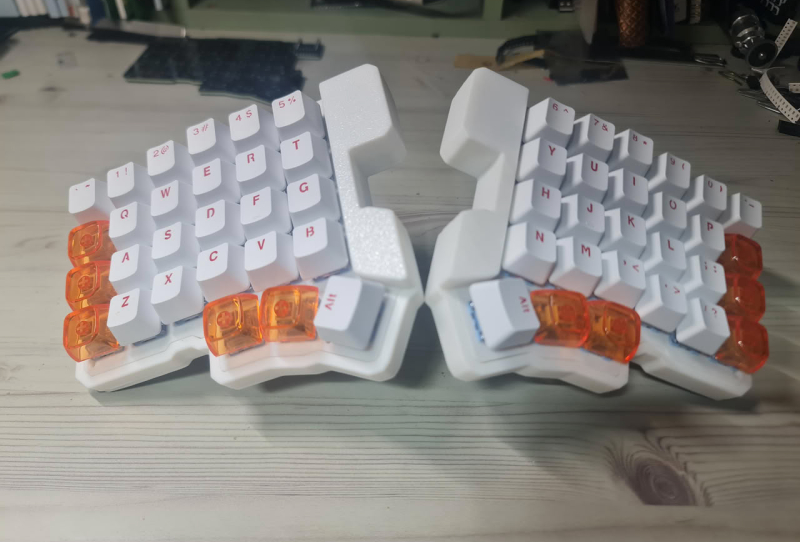
The Silakka54 HE keyboard has just given budget-minded gamers a rare third option in a niche that has been dominated by expensive, boutique gear. Split, ergonomic keyboards with Hall effect switches are still uncommon, and until now the only real choices were the pricey ASUS ROG Falcata and the Sunder keyboard line-up. A hobbyist project shared on GitHub has changed that by reworking the popular, low-cost Silakka54 split mechanical keyboard into a magnetic-switch version anyone can build.
Hall effect switches use magnets and sensors rather than physical contacts to register keypresses, which allows for features like adjustable actuation points and rapid trigger, both prized by competitive gamers. Those features have traditionally come at a premium, since brands like Wooting and Razer built their reputations on them. The Silakka54 HE project strips that cost barrier away by adapting an existing open-source design instead of starting from scratch.
Table of Contents
What the Silakka54 HE keyboard actually offers
The Silakka54 HE keeps the exact same layout as the original board it is based on. That means 54 keys arranged across six columns and four rows per half, plus two three-key thumb clusters for shortcuts, modifiers, or spacebar duties. Anyone already familiar with the standard Silakka54 will find the transition to the Hall effect version straightforward, since nothing about the physical key arrangement has changed.
Under the hood, the board runs on an RP2040 Zero microcontroller, a compact and inexpensive chip that has become a favourite among DIY keyboard builders for its processing headroom and wide community support. Firmware duties fall to open-source QMK, with compatibility for VIAL, the browser-based configuration tool that lets users remap keys and tweak settings without installing separate desktop software.
Connectivity is entirely wired. The two halves communicate over a TRRS cable, the same connector type found on many split keyboards, including commercial options. That link may cap the polling rate below what a fully wireless or USB-linked halves setup could achieve, though online reports around the standard mechanical Silakka54 suggest it can still hit at least 1 kHz, which is more than adequate for most gaming scenarios.
How it stacks up against the alternatives
Context matters here, because the split Hall effect segment is thin on options. The ASUS ROG Falcata uses the company’s own HFX V2 magnetic switches in a 75 percent split layout, aimed squarely at gamers who want premium build quality and are willing to pay for it. The Sunder E70 HE takes a similar high-end approach with a more compact footprint. Both are polished, commercially supported products, but neither is cheap, and that gap is exactly what the Silakka54 HE is trying to fill.
| Keyboard | Switch Type | Layout | Connection | Firmware |
|---|---|---|---|---|
| Silakka54 HE | Hall effect (open-source build) | 54-key split, 6×4 plus thumb clusters | Wired, TRRS between halves | QMK with VIAL support |
| Sunder E70 HE | Hall effect | 70-key split | Wired | QMK-based |
| ASUS ROG Falcata | ROG HFX V2 magnetic | 75% split | Wired/wireless options | Proprietary software |
The trade-off is obvious. Owners of the Silakka54 HE need to source parts, assemble the board, and flash the firmware themselves, which is a very different experience to unboxing a finished commercial product. In exchange, the total outlay should sit well below what either the Falcata or the Sunder E70 HE typically costs, since the design leans on widely available components rather than custom tooling.
Why this matters for the keyboard hobby
Open-source projects like this tend to move faster than commercial product cycles. Because the Silakka54 HE files sit publicly on GitHub, other builders can fork the design, swap in different microcontrollers, adjust the case geometry, or push firmware improvements without waiting on a manufacturer’s roadmap. That kind of community iteration has already reshaped other corners of the mechanical keyboard world, from custom cases to hot-swappable sockets, and Hall effect split boards look like the next frontier for it.
It also lowers the barrier to trying a split ergonomic layout in the first place. Plenty of people are curious about split keyboards for the posture benefits but hesitate at the price of a fully built commercial option. A cheaper, self-assembled alternative gives that audience a lower-risk entry point, even if it demands more technical confidence than simply plugging in a finished product.
For gamers specifically, the appeal is the combination of ergonomic comfort with the responsiveness Hall effect switches provide. Features like adjustable actuation and rapid trigger have become genuinely useful in fast-paced titles, and having them available on a split layout, rather than only on traditional gaming keyboards, expands the choices for players who have struggled with wrist strain during long sessions. As interest in split and ergonomic mechanical keyboards continues to grow, projects like the Silakka54 HE keyboard suggest the open-source community will keep pushing new switch technology into DIY builds well before it becomes standard on shelf products.