The Xodus Nexus launcher is a new open-source tool that gives SteamOS and Linux users a graphical way to browse, install and play Xbox Game Pass and Xbox PC games, replacing the command-line-only workflow of the original Xodus project it forked from. It wraps a modified Xodus runtime in a proper interface, meaning players no longer need to type terminal commands just to get a game running.
Key takeaways
- ✓Xodus Nexus is an open-source fork of the original Xodus project, adding a graphical launcher.
- ✓It runs a patched Nexus runtime that lets users browse the Xbox store and install Game Pass titles.
- ✓Unlike the original command-line-only Xodus, Nexus supports point-and-click installs and management.
- ✓The launcher supports Xbox cloud saves and sign-in for compatible games.
- ✓It relies on reverse-engineered runtimes paired with Valve's Proton compatibility layer to run Windows-based Xbox titles on Linux.
The project builds on groundwork laid by Xodus, an earlier open-source effort that reverse-engineered the runtimes needed to run Xbox PC titles outside Windows, pairing them with Valve’s Proton compatibility layer. That combination is what lets Windows-only Xbox games execute on a Linux-based system in the first place. Xodus Nexus takes that technical base and adds the missing piece most everyday users actually wanted: a usable front end.
Table of Contents
What the Xodus Nexus launcher actually does
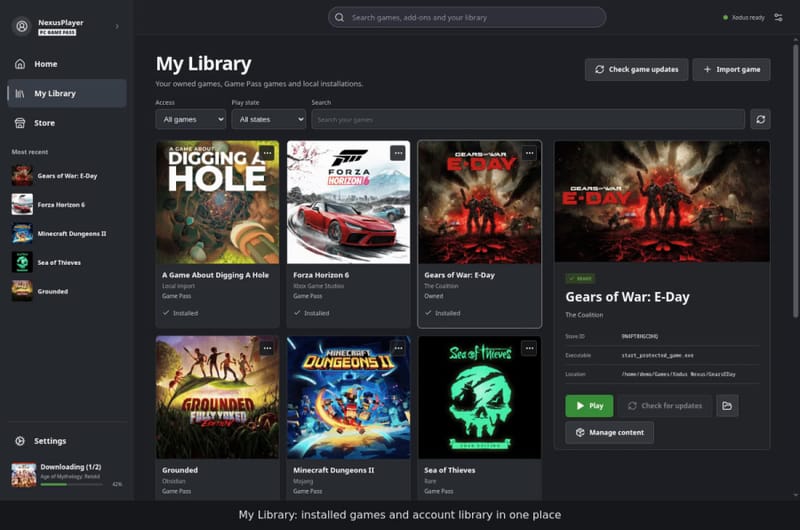
According to details published on the project’s GitHub page, Xodus Nexus runs a patched version of the Nexus runtime alongside its own backend service. From there, users can browse the Xbox storefront directly inside the launcher, see what is available through their purchased library or their Game Pass subscription, and trigger installs without leaving the app.
Cloud functionality is also baked in. The launcher supports signing in to Xbox accounts for games that allow it, and it can sync Xbox cloud saves, so progress carries over between a Windows PC and a Linux or SteamOS machine running the same title. That is a meaningful detail, because cloud save support is one of the features that typically separates a rough community hack from something closer to a genuinely usable Xbox client.
How it differs from the original Xodus project
The original Xodus tool proved the concept worked, but it demanded comfort with a terminal. Installing a game meant running commands, managing configuration files by hand, and troubleshooting without much visual feedback. That is fine for enthusiasts who already live in a Linux shell, but it is a hard sell for anyone coming from a standard Xbox app or Steam library.
Xodus Nexus exists specifically to remove that friction. The table below sums up the practical difference between the two projects.
| Feature | Xodus | Xodus Nexus |
|---|---|---|
| Interface | Command line only | Graphical launcher |
| Game installation | Manual terminal commands | Point-and-click install |
| Library browsing | Limited | Browse Xbox store in-app |
| Cloud saves | Not emphasised | Supported for compatible titles |
| Account sign-in | Basic | Supported for compatible games |
Both projects still rely on the same underlying idea: reverse-engineered Xbox runtimes running through Proton. Xodus Nexus has not reinvented that engineering work, it has simply made it accessible to people who would never touch a terminal to begin with.
Why this matters for SteamOS and Linux gaming
Valve’s push with the Steam Deck has pulled a large number of mainstream players onto SteamOS, and that shift has put pressure on every PC gaming service to either support Linux properly or risk being locked out of a growing audience. Microsoft has not shipped an official Xbox app for Linux, which has left Game Pass subscribers on SteamOS reliant on cloud streaming or community workarounds.
Projects like Xodus Nexus fill that gap unofficially. They are not endorsed by Microsoft, and there is always a risk that changes on the Xbox or Game Pass backend could break compatibility without warning. Still, the existence of a polished, GUI-driven option suggests the Linux gaming community sees enough demand to keep investing engineering time in local Xbox Game Pass support, rather than leaving cloud streaming as the only option for subscribers without a Windows machine.
That matters because Game Pass itself has been in flux. Microsoft has already tightened limits on its cloud gaming tier, and tools that let subscribers install and run titles locally, rather than depend on streaming caps, add genuine value for anyone who has run into those restrictions.
What to watch next
Xodus Nexus is still a community project, not an official release, so stability and game compatibility will vary title by title. Anyone trying it should expect some games to work flawlessly and others to need tweaks, patches, or simply more time before full compatibility lands. Microsoft could also alter its backend systems in ways that affect reverse-engineered runtimes, something that has happened to similar unofficial tools in the past.
For now, the project represents a notable step forward for Linux and SteamOS users who want local Xbox Game Pass access without juggling a terminal window. Development is active on GitHub, and further updates are likely as the maintainers expand game support and refine the interface.
Frequently asked questions
What is the Xodus Nexus launcher?
It is an open-source, community-built application that lets SteamOS and Linux users browse, install and play Xbox Game Pass and Xbox PC games through a graphical interface, rather than a command line.
Is Xodus Nexus an official Microsoft product?
No. It is an independent, reverse-engineered project built on top of Valve’s Proton compatibility layer, and it is not affiliated with or supported by Microsoft or Xbox.
Does Xodus Nexus support cloud saves?
Yes, for compatible titles. The launcher allows Xbox account sign-in and syncs Xbox cloud saves, so progress can carry across devices for supported games.
How is Xodus Nexus different from the original Xodus project?
Xodus required users to install and manage games through terminal commands. Xodus Nexus forks that same underlying runtime but wraps it in a graphical launcher with browsing, installation and account features built in.