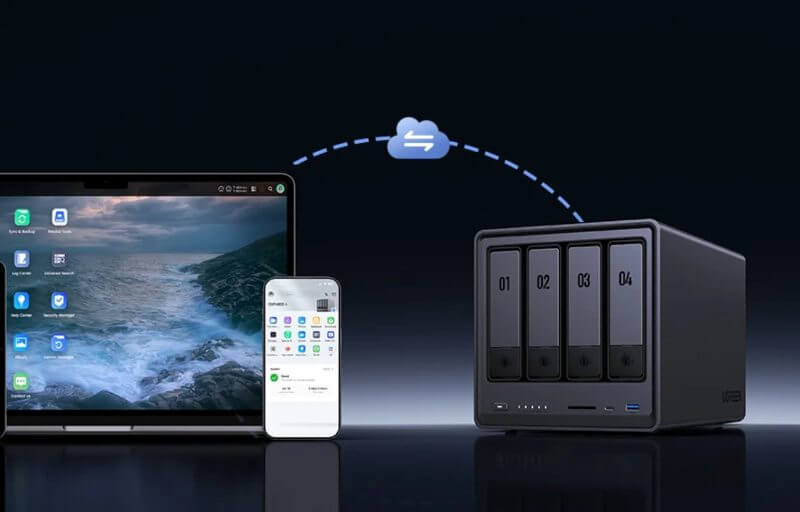
The UGREEN NASync DXP4800 Plus is designed for users who need a storage solution that goes far beyond holding files. It delivers the performance and flexibility required for media streaming, data protection, and business workloads, all packed into a sleek desktop form. With support for both traditional drives and ultra-fast NVMe SSDs, this model bridges everyday convenience with enterprise-level capability.
At first glance, the DXP4800 Plus stands out for its clean, professional look that blends seamlessly into any environment. It is compact enough to fit comfortably on a desk yet powerful enough to handle tasks ranging from Plex media streaming to running virtual machines. UGREEN has engineered it to be as practical as it is stylish, ensuring that it feels just as much at home in a lounge room as in a busy office.
Beyond the polished design, this NAS is a true multitasker. It comes equipped with modern hardware, a straightforward operating system, and a wide range of compatibility options. Whether you’re managing a growing photo library, safeguarding critical work files, or centralising your family’s entertainment, the DXP4800 Plus has the tools to keep everything secure, accessible, and running smoothly.
Table of Contents
Design and Functionality
The UGREEN NASync DXP4800 Plus is built with a focus on durability and elegance, featuring a black aluminium case that feels both solid and refined. The choice of materials helps with heat dissipation while giving the device a premium finish. Its understated look ensures it fits in discreetly whether placed in a modern office or at home.
The front panel is designed with usability in mind, housing four easily accessible drive bays. Each bay is tool-free for 3.5-inch drives, while 2.5-inch drives can be installed with screws for a secure fit. This approach offers flexibility depending on the storage medium you prefer to use.
Alongside the drive bays, the front also features a USB-A port, a USB-C port, and a microSD card reader. These high-speed connections allow for quick transfers of data without needing to access the rear panel. The positioning is practical for users who frequently move data from cameras, external drives, or portable storage.


On the rear, UGREEN provides a wide selection of connectivity options. The 10GbE and 2.5GbE LAN ports ensure fast network speeds suitable for large file transfers or multiple users accessing data at once. Additional USB ports and an HDMI output provide further flexibility for connecting peripherals or using the NAS as a direct media hub.
The cooling system is centred around a large rear-mounted fan with a magnetic dust filter. This thoughtful detail makes cleaning straightforward while protecting the internals from dust build-up. Keeping the fan in good condition helps prolong the lifespan of the device and maintain consistent performance.
Inside, the NASync DXP4800 Plus is equipped with 8GB of DDR5 RAM, expandable up to 64GB. This expandability makes it suitable for light users starting small as well as professionals running demanding applications. The RAM slots are easy to access, making upgrades simple when extra memory is required.
Storage expansion is another highlight of the design. Beyond the four SATA bays, there are two M.2 NVMe slots dedicated to fast SSD storage. These can be used for caching or as additional storage pools, giving users more control over performance and capacity. A separate SSD is also allocated for the operating system, keeping the main drives focused on data handling.
Drive security is also considered, with each bay fitted with a lock-and-key mechanism. While not everyone will use this feature, it provides reassurance for environments where multiple people may have physical access to the device. Small details like this demonstrate UGREEN’s attention to user needs.
The layout inside the case is tidy and efficient, with clear separation between the cooling system, RAM slots, and drive bays. This organisation simplifies both installation and maintenance. Users can swap drives or upgrade components without needing to dismantle large sections of the device.
From a size perspective, the DXP4800 Plus strikes a balance between capacity and footprint. Measuring just over 10 inches tall and 7 inches wide, it delivers substantial storage without overwhelming your workspace. It feels designed with everyday usability in mind, rather than just raw technical power.
The included accessories further enhance the practicality of the design. UGREEN supplies two CAT 7 network cables, a screwdriver, SSD screws, heat pads for the NVMe slots, and a magnetic dust filter. These thoughtful extras ensure that users have everything needed to get started without needing to source additional parts.
Every aspect of the design seems tailored for both beginners and advanced users. From the quick-release drive bays to the professional-grade connectivity, the DXP4800 Plus blends ease of use with forward-looking expandability. It’s a unit that grows with your needs rather than being limited to its initial configuration.
Key Features
One of the standout features of the UGREEN NASync DXP4800 Plus is its powerful processor. Powered by the Intel Pentium Gold 8505, it combines performance and efficiency cores to deliver smooth operation even under demanding workloads. This ensures the NAS can handle tasks like virtualisation, streaming, and simultaneous multi-user access with ease.
Memory support is another strong point. The NAS ships with 8GB of DDR5 RAM pre-installed, but users can upgrade to a maximum of 64GB. This flexibility allows it to adapt from simple storage and file sharing to running multiple virtual machines or Docker containers for advanced applications.
In terms of storage options, the DXP4800 Plus goes far beyond its four SATA drive bays. It includes two M.2 NVMe slots for ultra-fast SSDs, which can be configured for caching or primary storage. This mix of traditional hard drives and NVMe SSDs makes it a versatile system capable of both high capacity and speed.
The inclusion of a dedicated SSD for the operating system ensures the main storage drives are used entirely for data. This design choice improves overall responsiveness and stability when navigating the NAS interface and running applications. It is a subtle but important detail that contributes to everyday performance.
Connectivity is extensive, with dual LAN ports offering 10GbE and 2.5GbE speeds. This dual setup provides both backward compatibility and future-proofing, catering to different network environments. The addition of multiple USB ports and an HDMI output further expands how the NAS can be integrated into different workflows.
UGREEN’s UGOS Pro operating system is another highlight. Designed with an intuitive interface, it makes setting up users, groups, and shared folders straightforward. The OS also supports advanced features like snapshots, syncing, and backup options, ensuring data is always secure and easy to restore if needed.
The App Center expands the functionality even further. From media servers like Plex to productivity apps and security tools, the NAS can be customised to suit a wide range of personal and professional requirements. Docker and virtual machine support add another layer of versatility for those who want to experiment with more advanced applications.
For media enthusiasts, the HDMI output and support for 4K playback transform the NAS into a capable home entertainment hub. Combined with Plex or other streaming platforms, it allows direct playback of content without relying solely on network streaming. This makes it a flexible device for both work and leisure.
The built-in Photos app adds a touch of AI-driven convenience. With object and person recognition, along with GPS metadata mapping, it helps users organise and retrieve images more efficiently. For families or photographers managing large photo libraries, this feature can be a genuine time-saver.
WD Red Pro – No Better Match for the UGREEN NAS Lineup
When pairing the UGREEN NASync DXP4800 Plus with storage, we opted for the WD Red Pro 26TB drives. These drives were a natural fit, providing the high capacity and endurance needed to make the most of this powerful NAS. Installation was seamless thanks to the standard 3.5-inch format, and the system recognised them immediately without any issues. It felt like they were designed to work hand-in-hand with the DXP4800 Plus.
In day-to-day use, the drives delivered outstanding performance. The 7200 RPM spindle speed and 512 MB cache ensured that transfers were fast and consistent, whether we were moving large video files or handling simultaneous backups. Even when multiple users accessed the NAS at once, the system maintained a smooth, responsive experience. This showed just how well the Red Pro 26TB complements the Intel-powered architecture of the UGREEN unit.
The reliability of the WD Red Pro stood out during testing. Built for 24/7 workloads, these drives ran cool and stable even under heavy use, aided by their helium-sealed design that reduces drag and heat. Combined with UGREEN’s efficient cooling system, the drives remained quiet and comfortable to run around the clock. For anyone using their NAS as a central hub, this kind of consistency is invaluable.
Features like OptiNAND technology and NASware firmware provided noticeable advantages too. Metadata handling was efficient, which meant the drives didn’t slow down under pressure, while RAID rebuilds were fast and reliable. In the DXP4800 Plus, these technologies helped us take full advantage of RAID configurations for both performance and redundancy, ensuring data stayed safe while still being quickly accessible.
Vibration resistance is another area where the WD Red Pro shined. In a multi-bay environment like the DXP4800 Plus, drive vibrations can cause slowdowns or errors, but the built-in RV sensors kept performance steady even with all four bays populated. This gave us confidence that the system could scale up without sacrificing stability or speed.
The WD Red Pro 26TB feels like the perfect partner for the UGREEN NASync DXP4800 Plus. It provides the capacity needed for vast amounts of data, the performance for demanding applications, and the durability for continuous operation. Together, they create a robust storage solution capable of supporting everything from home media libraries to professional workloads, making them a combination we can wholeheartedly recommend.
Tech Specs
- Model / SKU: DXP4800 Plus / 35260
- Operating System: UGOS Pro
- CPU: Intel X86 12th Generation Pentium Gold 8505, 5 Cores / 6 Threads
- Memory: 8GB DDR5 (ODECC supported), expandable up to 64GB
- System Disk: 128GB SSD (flash memory)
- Drive Bays: 4 × SATA bays
- M.2 SSD Slots: 2 × NVMe PCIe 4.0 slots
- RAID Support: JBOD, Basic, 0, 1, 5, 6, 10
- Maximum Storage: 136TB (4 × 30TB + 2 × 8TB)
- LAN Ports: 1 × 2.5GbE RJ45, 1 × 10GbE RJ45
- Front Panel Ports: 1 × USB-C (10Gb/s), 1 × USB-A (10Gb/s), SD card reader (SD 3.0)
- Rear Panel Ports: 1 × USB-A (5Gb/s), 2 × USB-A 2.0 (480Mb/s), HDMI (4K)
- PCIe Expansion: Not supported
- Thunderbolt 4 Ports: Not supported
- Wireless Connectivity: None
- Product Dimensions: 10.1″ × 7.0″ × 7.0″
- Power Consumption: 42.36W (drive access) / 18.12W (drive hibernation)
Experience Using the Product and Performance
Setting up the UGREEN NASync DXP4800 Plus was refreshingly simple. After slotting in the WD Red Pro 26TB drives, connecting the supplied CAT 7 network cables, and powering it on, the NAS was ready to initialise through the UGOS Pro operating system. The guided process handled user creation, network setup, and storage pool configuration without overwhelming steps, making the initial experience welcoming.


The web interface felt modern and highly responsive. Navigating between apps, settings, and storage management was smooth, with no noticeable lag. Even during background processes like RAID initialisation, the system continued to run responsively, which showed off the optimisation of both the software and the hardware.
Once the NAS was ready, file transfers were the first area we explored. With the WD Red Pro drives inside, sustained speeds remained consistently high, even when handling very large files. Moving terabytes of data from external drives and across the local network proved fast and reliable.
Network performance took full advantage of the dual LAN setup. The 10GbE port excelled during bulk transfers, allowing massive amounts of data to move quickly between machines. Meanwhile, the 2.5GbE connection provided a reliable link for everyday use, ensuring smaller devices also benefitted from stable connectivity.
Streaming media was another test we wanted to put the system through. Using Plex, the NAS delivered 4K video to multiple devices without stuttering. Hardware transcoding kicked in seamlessly when needed, ensuring compatibility with different file formats and devices on the network.
The HDMI port proved to be a handy addition. By connecting the NAS directly to a television, playback of high-resolution media felt effortless. This expanded its role beyond storage into a fully fledged entertainment hub, capable of replacing dedicated media boxes.
Performance in virtualisation was equally impressive. With upgraded RAM, the NAS handled virtual machines with ease, letting us run environments for testing and productivity. Docker containers installed smoothly, allowing us to deploy services like Home Assistant in minutes.
The WD Red Pro drives showed their strength during simultaneous workloads. Whether users were backing up files, streaming video, or editing content directly off the NAS, performance stayed consistent. The drives’ CMR technology and large cache ensured no slowdowns, even with multiple streams of activity.
Data protection options within UGOS Pro added another layer of reliability. Snapshots created restore points that could be rolled back in case of accidental deletion. When tested, recovery worked quickly and effectively, providing peace of mind for anyone relying on the system for critical files.
Backups were straightforward to set up and versatile. We configured local backups between storage pools as well as cloud integration with Google Drive and OneDrive. This hybrid approach meant data could be protected both onsite and offsite with minimal effort.
Remote access was another highlight. Using the mobile app, we were able to access and share files while away from the network. Uploading photos, streaming media, and even managing settings felt as intuitive on mobile as it did on desktop.
Noise levels remained impressively low throughout. Even with all bays populated and under sustained operation, the large fan and helium-sealed drives worked quietly. This made the NAS comfortable to run in a home office or living space without disruption.
Thermal performance was well managed thanks to the rear-mounted cooling system and magnetic dust filter. Temperatures stayed within safe ranges, and the filter made maintenance as easy as removing and rinsing it periodically. It is a small feature that adds to the overall reliability of the system.
During stress testing, where we pushed simultaneous large backups, media streaming, and virtual machines, the NASync DXP4800 Plus continued to deliver. CPU usage stayed controlled, the drives handled throughput with ease, and the system never showed instability.
AI-driven features in the Photos app added a touch of modern convenience. Object and person recognition made organising large libraries simple, while GPS metadata mapping provided additional ways to sort and retrieve images. It felt more advanced than a basic file browser.
The NAS proved to be a practical productivity tool as well. With SMB folder linking, we could integrate it directly into workflows across different computers. This eliminated the need to manually copy files and kept projects synced across machines seamlessly.
Reliability remained the theme throughout extended use. The WD Red Pro 26TB drives kept performance consistent without faltering, and UGOS Pro’s firmware tuning kept everything running smoothly. Whether for backups, business documents, or creative projects, the system worked as a dependable backbone.
When expanding storage, adding new drives was straightforward. The NAS automatically detected them and guided us through creating or expanding pools. It made scaling capacity as simple as clicking through options, with clear explanations for different RAID levels.
Power efficiency also stood out. Even while operating continuously, power draw stayed reasonable compared to the performance delivered. Drive hibernation reduced consumption further when the system was idle, helping balance performance with energy savings.
For collaborative environments, the NAS handled multiple users effortlessly. Teams could access, edit, and stream content simultaneously without bottlenecks. It made the system feel just as suited for small business environments as it did for home media.
Long-term peace of mind was provided by both hardware and software. Between the durable Red Pro drives, the efficient cooling system, and the robust backup options, we felt confident storing critical data. It’s the kind of setup that inspires trust over years of use.
After weeks of use, the NASync DXP4800 Plus with WD Red Pro drives demonstrated a rare combination of performance, versatility, and dependability. It wasn’t just a storage solution; it became a central hub for media, productivity, and data protection. Everything worked together in a way that reinforced why this pairing is so effective.
The Perfect Media Server


The UGREEN NASync DXP4800 Plus stands out as one of the best NAS options for a media server because it combines strong hardware with an easy-to-use interface. When setting it up for Plex, the installation was quick and intuitive, with the UGOS Pro operating system guiding the process smoothly. This means you don’t need to be a networking expert to get it running, making it highly accessible for users who just want their media available everywhere.
A critical factor for Plex is the ability to transcode media, and the DXP4800 Plus excels here thanks to its Intel Pentium Gold 8505 processor. With its hybrid core design and integrated graphics, it can handle hardware transcoding efficiently, ensuring that media is always compatible with the device streaming it. Whether it’s a 4K movie being watched on a smart TV or a compressed version being streamed to a mobile phone, playback remains seamless.
Storage flexibility also makes this NAS ideal for media servers. With four SATA bays and two M.2 NVMe slots, there is plenty of room to store an extensive library of films, TV shows, and music. The NVMe slots can be used for caching, which boosts performance by speeding up access to frequently used media files. This hybrid approach helps keep the system responsive, even with thousands of files being indexed and accessed.
The dual LAN ports, including a 10GbE connection, are perfect for high-bandwidth tasks like media streaming. Multiple streams can be delivered simultaneously without saturating the network, ensuring that family members or housemates can watch different shows in high resolution at the same time. This scalability makes the DXP4800 Plus ideal for both small households and larger setups.
Noise and heat management are important in a media server, especially if the NAS is kept in a shared living space. The DXP4800 Plus runs quietly thanks to its large, efficient fan and the use of modern drives like the WD Red Pro 26TB, which remain cool and stable during continuous use. The magnetic dust filter also makes upkeep simple, keeping airflow clean for longer.
Plex users will also appreciate the HDMI output built into the NAS. By connecting directly to a TV, the NAS can function as a standalone media player, bypassing the need for another streaming device. This versatility allows it to serve both as a traditional Plex server and as a direct playback hub for local entertainment.
Expanding the system for more demanding media libraries is simple. With RAM support up to 64GB, the NAS can grow with your needs, ensuring smooth performance even as your Plex server handles larger databases and more simultaneous users. Combined with WD Red Pro drives that are optimised for NAS workloads, you get a storage setup built for reliability and scale.
The UGREEN NASync DXP4800 Plus offers the right mix of performance, expandability, and ease of use to make it one of the best NAS units for Plex. It not only stores vast amounts of media but also ensures playback is smooth across devices, whether local or remote. For anyone looking to centralise their media collection into a single, capable system, this NAS delivers the tools to do it effortlessly.
Unlimited Possibilities with Docker


Docker on the UGREEN NASync DXP4800 Plus unlocks a whole new dimension of functionality, transforming the device from a simple storage hub into a versatile platform for running applications. Instead of being limited to what comes pre-installed, users can deploy lightweight containers that serve a wide range of purposes. This flexibility makes the NAS adaptable to both personal projects and business use cases.
One of the main strengths of Docker is the sheer variety of applications available. From media servers like Jellyfin to productivity tools such as Nextcloud, the DXP4800 Plus can run services that expand well beyond file storage. These containers can be installed and updated easily, ensuring you always have access to the latest features without the complexity of full software installations.
Running Docker on this NAS also makes testing and experimenting straightforward. Containers are isolated environments, meaning you can try out new tools without affecting the stability of the main system. If something doesn’t work as expected, you simply remove the container and start fresh, giving users the freedom to explore different solutions with minimal risk.
For home automation enthusiasts, Docker turns the NAS into a powerful central controller. Running Home Assistant in a container allows you to manage smart home devices, sensors, and automation rules directly from the NAS. This consolidates multiple roles into a single machine, reducing the need for extra hardware.
Developers benefit from Docker support as well. The DXP4800 Plus has the processing power and expandability to host development environments, databases, and testing frameworks. By containerising these tools, it’s easy to replicate or share environments, making collaboration smoother and more efficient.
The hardware of the DXP4800 Plus ensures that containers run smoothly, even when handling several at once. With expandable RAM up to 64GB and NVMe storage options, the NAS can manage intensive workloads without slowing down. This makes it suitable for heavier deployments such as running multiple web services or even game servers.
Another advantage is that Docker helps extend the NAS’s lifespan as your needs evolve. As new applications become available, you can continue to expand functionality without replacing the hardware. This future-proofing element is particularly valuable for users who want long-term reliability from their investment.
Docker transforms the UGREEN NASync DXP4800 Plus from a powerful storage unit into a complete application server. By enabling the installation of countless tools and services, it adapts to nearly any workflow or hobby, whether that’s managing a smart home, hosting web applications, or running collaborative workspaces. It turns a great NAS into an indispensable hub for both productivity and entertainment.
Conclusion
The UGREEN NASync DXP4800 Plus brings together thoughtful design, powerful hardware, and an intuitive operating system to create a NAS that stands out in both home and professional environments. Its compact form factor hides a wealth of expandability, from multiple drive bays and NVMe slots to generous connectivity options. This combination makes it just as capable of serving as a media hub as it is supporting demanding business workloads.
Throughout testing, the pairing with WD Red Pro 26TB drives proved the system’s reliability and strength. The drives offered the endurance needed for 24/7 use, while the NAS hardware maintained fast and consistent performance across a variety of scenarios. From Plex streaming and file sharing to Docker containers and virtual machines, the DXP4800 Plus consistently demonstrated its versatility.
UGOS Pro added another layer of usability with its modern interface and clear management tools. Whether setting up RAID arrays, configuring backups, or deploying apps, the operating system made complex tasks approachable. Features like snapshots, syncing, and remote access ensured that data was always secure and accessible.
The UGREEN NASync DXP4800 Plus feels like more than just a storage device. It’s a scalable, reliable, and highly adaptable solution that can evolve with the user’s needs. For those wanting a NAS that balances power with ease of use, it’s a compelling choice that delivers on every promise, making it one of the most well-rounded storage solutions available today.