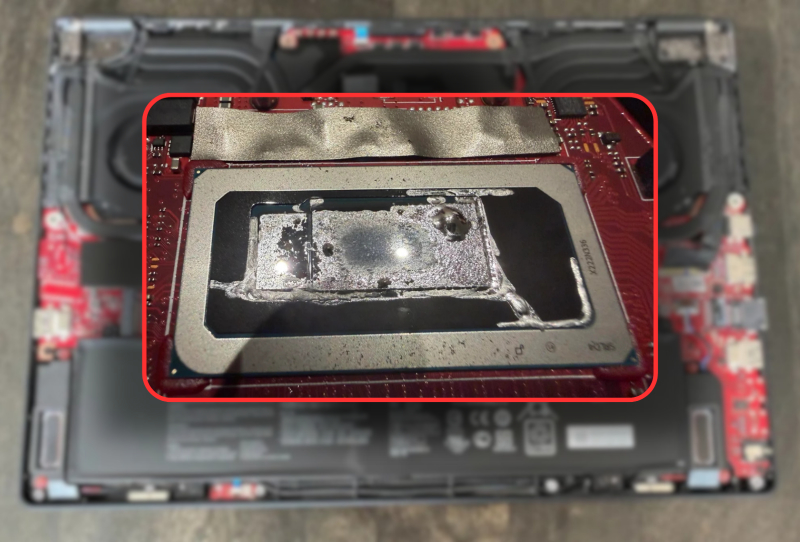
A Reddit user’s Zephyrus M16 liquid metal fiasco shows what can go wrong when a factory-applied thermal compound turns corrosive inside a gaming laptop. The owner, posting under the handle nicknickmeetnick, spent months chasing random shutdowns and thermal throttling before discovering the real culprit hiding under the heatsink: liquid metal that had slowly eaten through the CPU lid itself.
The laptop in question is a 2022 Asus Zephyrus M16 built around an Intel Core i9-12900H, bought just over three years ago. Its owner mostly used it for light tasks rather than heavy gaming, which makes the discovery even more alarming. A machine that wasn’t being pushed hard still ended up with corrosion severe enough to threaten the silicon underneath.
Table of Contents
How the Zephyrus M16 Liquid Metal Corrosion Started
Asus has used liquid metal as a thermal interface material on several of its gaming laptops for a few years now, chasing better heat transfer than standard paste can offer. Liquid metal conducts heat exceptionally well, but it is notoriously fussy to apply and maintain. In this case, something went wrong at the factory stage, and the consequences built up quietly over time.
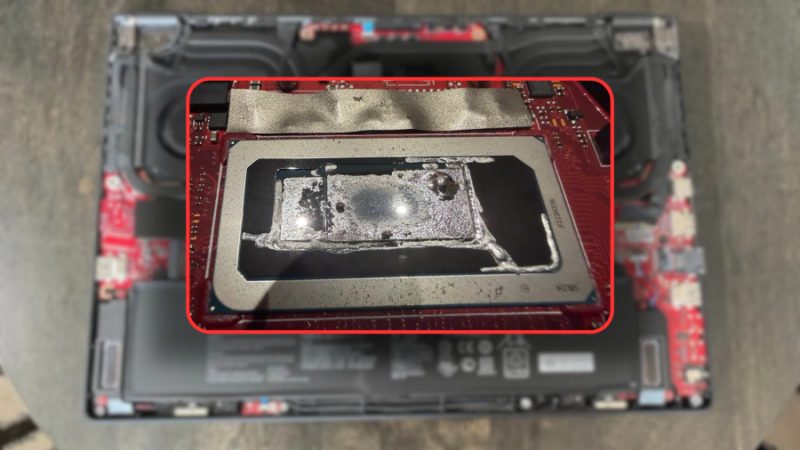
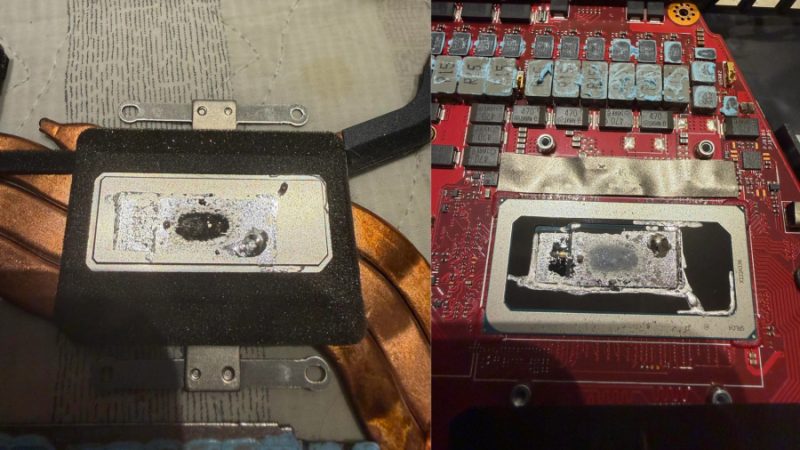
Nick began noticing his laptop running hotter than expected, with games stuttering before the whole system crashed outright. Suspecting ageing thermal compound, he ordered PTM7950 phase-change material to redo the job himself. What he found when he opened the chassis was far worse than simple wear. The liquid metal had burned onto the heatsink and spilled out of the cavity meant to contain it, creeping dangerously close to the thin lid protecting the CPU die.
Liquid metal is electrically conductive, so any contact with surrounding components risks shorting the board entirely. Asus reportedly mixes abrasive additives into its liquid metal to help it adhere to the die more effectively, but those same chemicals appear to corrode surfaces over years of thermal cycling. That corrosion is what wore through the heatsink and nearly breached the lid protecting the silicon.
The Repaste That Saved the Laptop
With the problem exposed, the fix came down to careful cleanup rather than anything exotic. Using dried cotton swabs and isopropyl alcohol, the owner worked the corroded liquid metal into a manageable blob, then lifted it away with painter’s tape rather than risk smearing it further across the board.
- Removed the existing liquid metal using isopropyl alcohol and cotton swabs
- Consolidated the residue into a blob for safe removal with tape
- Applied GD900 thermal paste as an interim fix ahead of the PTM7950 delivery
- Reassembled the laptop and retested under load
The results were immediate. Temperatures dropped sharply, the random reboots stopped, and framerates in the one game he regularly plays with his kids reportedly tripled. That improvement came from GD900 paste alone, before the PTM7950 phase-change material had even arrived, suggesting further gains were still possible once the intended upgrade landed.
Not an Isolated Case
The owner’s advice afterward was blunt: avoid liquid metal in laptops altogether. Portable machines flex, get bumped, and heat-cycle constantly, all conditions that make a sensitive, corrosive-prone material a poor long-term choice. Even desktop graphics cards that sit still for years have shown similar liquid metal degradation, so the risk isn’t limited to devices that travel.
A quick search turns up a string of similar reports from other Asus laptop owners describing comparable liquid metal problems, which points to a broader quality control issue rather than a single unlucky unit. Automated application on an assembly line leaves little room for the precision liquid metal demands, and small inconsistencies compound over years of use.
For anyone shopping among current gaming laptops like the Gigabyte Gaming A16 Pro, cooling design is worth scrutinising as closely as raw specs. It’s one of several issues that frustrate laptop buyers long after purchase, alongside software bloat and driver quirks that only surface with sustained use. Understanding how laptop hardware handles everyday stress matters just as much as chasing benchmark numbers at the point of sale.
What This Means for Gaming Laptop Owners
Owners of Asus laptops with factory liquid metal cooling, particularly units several years old, may want to keep an eye out for symptoms like rising idle temperatures, sudden throttling, or unexplained shutdowns. Left unchecked, the same corrosion process could eventually threaten the processor itself rather than just the heatsink.
Repasting a laptop is not a job for everyone, since it involves fully disassembling the chassis and handling a conductive liquid around sensitive electronics. Still, this case is a reminder that even premium hardware carrying a strong price tag can leave the factory with a flawed cooling job. For an ageing Zephyrus M16, liquid metal breaking down quietly in the background turned out to be far more damaging than any amount of everyday gaming ever was.