Images are usually the heaviest single thing loading on a modern WordPress page, and the fix for that is rarely as simple as it sounds. Optimole (2026) tackles the problem as a cloud based media optimisation service, handling compression, format conversion, resizing and delivery through Optimole’s platform without requiring site owners to touch a single file by hand.
What started life as a fairly simple image optimisation plugin has grown into a much broader media platform. Optimole now combines a WordPress plugin with a hosted cloud service that automatically compresses images, converts them to next-generation formats such as WebP and AVIF, resizes them per visitor, lazy loads anything below the fold, and pushes the finished files out through a global content delivery network. It is used on more than 200,000 websites, ranging from personal blogs to larger commercial catalogues.
This review works through how Optimole is put together, what it actually does once installed, and how it behaves in day to day use across a working WordPress site. The goal is to give a clear picture of where Optimole earns its keep, who it suits best, and what the experience feels like once the initial setup is out of the way.
Table of Contents
Design and Functionality
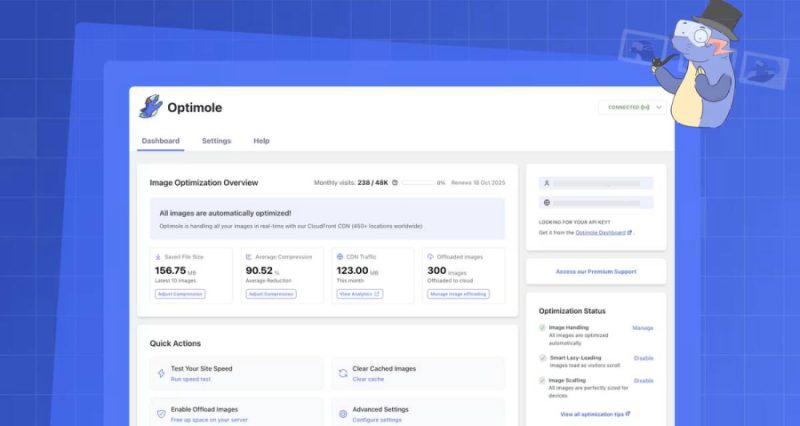
Optimole is built around two connected pieces: a lightweight plugin that lives inside the WordPress dashboard, and a cloud based service at Optimole.com that does the heavy lifting. The plugin itself is not where the optimisation happens. Instead, it acts as the bridge that links a site to the cloud service, which is where images are actually transformed and served from.
Getting the two connected is a short process. A free account is created on the Optimole website, an API key is generated, the plugin is installed on the WordPress site, and the key is pasted into the settings screen. From that point on, the plugin quietly manages the connection in the background without needing regular attention.
One of the more interesting design choices is that Optimole does not simply compress every image the moment it is uploaded and leave it at that. Instead, it prepares and caches an optimised version of an image when someone actually requests it, tailoring the format and dimensions to that specific visitor’s browser and screen. This real-time approach means the same source image can be served in different shapes and formats depending on who is viewing it, rather than a single fixed version being reused for everyone.
Storage handling is another area where the design is worth understanding before diving in. In the default configuration, the original image file stays on the WordPress server, while Optimole’s CDN handles delivery of the transformed versions. Starter, Business and higher tier plans introduce the option to move originals into Optimole Cloud instead, which can simplify hosting but does mean the images live off-site.
Anyone using that cloud-only storage mode should be aware that if a plan lapses or an account goes inactive for an extended period, offloaded files can eventually be removed as part of account cleanup. It is a sensible detail to flag early, since it affects how a site owner should plan backups and migrations if they ever decide to move away from the service.
The plugin’s settings panel inside WordPress is refreshingly uncluttered. Rather than presenting a wall of toggles, it groups controls around presets that favour either speed, visual quality, or a balanced middle ground, with the option to dig into individual settings for anyone who wants finer control.
Beyond the plugin itself, logging into the Optimole dashboard on the web reveals a cloud media library. This gives a broader view of every image connected to the account, which is particularly handy for anyone managing more than one WordPress site under a single Optimole account.

Inside that cloud library, there is scope to make quick edits directly on the platform, including resizing images or applying watermarks, without needing to reopen the original file in a separate editor. It is a small but genuinely useful convenience for site owners who regularly reuse the same photography across multiple pages.
Smart Cropping is another design element worth mentioning, since it uses automated detection to keep the most important part of an image in frame when a crop is generated. Rather than cropping from a fixed corner or centre point, it aims to retain the visual focus of the original shot.
On the technical side, Optimole requires PHP 7.4 or higher and WordPress 5.5 or higher, and the plugin has been tested against WordPress 6.0. The version reviewed here is 4.2.11, with the most recent update published in August 2026, which points to an actively maintained project rather than one left to tick along unattended.
That ongoing development is reflected in its standing within the official WordPress Plugin Directory, where it currently holds an average rating of 4.7 out of 5 stars from 638 reviews. For a plugin operating in a fairly crowded category, that is a solid vote of confidence from a large user base.
For developers who want to go beyond the standard settings, Optimole also exposes hooks, filters and API access. This opens the door to custom integrations, whether that means triggering optimisation from external workflows or adjusting how images are handled on more complex builds.
The overall feel of the product, both inside WordPress and on the web dashboard, is clean and function-first. There are no distracting extras competing for attention, which suits a tool that is largely meant to run quietly in the background rather than demand daily interaction.
Taken together, the design reflects a tool that has matured well beyond a simple compression plugin. It now behaves more like a proper media infrastructure layer sitting between a WordPress site and its visitors, and the architecture choices around real-time processing and cloud storage are clearly built with that broader role in mind.
Key Features
At the centre of Optimole’s feature set is automatic, real-time image optimisation. Every eligible image is compressed and, where the visitor’s browser supports it, converted into WebP or AVIF automatically, without any manual export or batch processing required.
Closely tied to that is responsive resizing. Optimole detects the visitor’s device and screen size and serves an image sized appropriately for that context, rather than pushing a single large file to every device regardless of whether it is a phone or a widescreen monitor.
Lazy loading rounds out the core performance trio. Optimole’s default Smart Loading mode is JavaScript driven and includes scaling and viewport aware controls, while a native browser lazy loading mode is also available for anyone who prefers to avoid the extra script, albeit with a trade-off of losing some of the smarter scaling behaviour.
Delivery is handled through a global content delivery network built on Amazon CloudFront, with more than 450 edge locations worldwide according to the official product page. This means images are served from a location physically closer to the visitor, which matters a great deal for sites with an international audience.
Network-aware quality adjustment is another feature worth highlighting. When enabled through the relevant preset or custom settings, Optimole can reduce image quality slightly for visitors on slower connections to keep pages feeling responsive, though this behaviour is optional rather than forced on every configuration.
The cloud media library gives site owners a central place to browse and organise images connected to their account, which becomes especially valuable once a site has accumulated years of uploads or spans multiple properties under one login.
Basic editing tools sit alongside that library, including resizing and watermarking directly within the platform. It saves a round trip through a separate image editor for quick, everyday adjustments.
Smart Cropping, mentioned earlier from a design perspective, is also a standalone feature in its own right. It automatically generates crops that keep the meaningful subject of an image in frame, which is handy for thumbnails, galleries and featured images that need to work across several aspect ratios.
Video optimisation is included as part of the broader platform as well, extending the same idea of format and quality matching beyond static images to video files, so visitors receive an appropriately sized version for their device and connection.
The free plan is genuinely usable rather than a token trial. It allows unlimited images to be optimised, within a limit of 2,000 monthly visits, which is enough for smaller blogs, portfolios and early-stage business sites to get real value without paying anything.
Paid tiers scale that visit allowance up considerably and add the cloud-only storage option along with the extra features that come with the higher plans, aimed at sites with more traffic or larger media libraries.
For anyone hesitant about committing, Optimole backs its paid plans with a seven day money-back guarantee, which is a straightforward way to try the premium features without much risk if they turn out not to be the right fit.
Experience Using the Product and Performance
Getting Started and First Impressions
Signing up for Optimole is a quick process that starts with creating a free account and generating an API key on the website. From there, installing the plugin from the WordPress repository takes only a minute or two, and pasting the key into the settings screen is the only real configuration step needed before optimisation begins.
What stands out early on is how little the plugin asks of the person setting it up. There is no need to run a bulk optimisation job or wait for a lengthy scan of the media library, since Optimole processes images as they are requested rather than all at once up front.
Within the first few page loads after activation, it becomes noticeable that image URLs have changed to point through Optimole’s delivery network rather than the original WordPress uploads folder. That switch happens automatically, and existing image tags across posts and pages do not need to be edited manually.
For anyone coming from a purely local compression plugin, this cloud based approach feels like a genuine shift in how the whole process works, since the heavy lifting moves off the WordPress server entirely rather than adding load to it during upload.
Speed and Everyday Performance
Once running, the difference in page weight is one of the more immediately obvious benefits. Large photographs that would previously have loaded as multi-megabyte files are instead served as considerably smaller, format-appropriate versions matched to the visitor’s device.
Mobile performance in particular benefits from this behaviour. Since Optimole tailors both the image dimensions and the compression level to the requesting device, phones on slower mobile connections receive a lighter file than a desktop visitor on the same page, rather than both parties downloading an identical large image.
Pages with a lot of visual content, such as galleries, product listings or image-heavy blog posts, show the benefit most clearly, since the cumulative weight saved across dozens of images adds up quickly compared to a page with only a handful of graphics.
The lazy loading behaviour also plays a real part in that improvement. Images below the fold are not fetched until a visitor scrolls close enough to see them, which keeps the initial page load lighter and lets the visible content appear sooner.
For sites that were previously serving unoptimised, full-resolution images straight from the media library, the jump in perceived speed after enabling Optimole is genuinely noticeable rather than a marginal tweak.
Image Quality and Format Handling
Format conversion is one of the quieter but more effective features in daily use. Visitors on browsers that support WebP or AVIF automatically receive those formats, while older browsers still get a compatible fallback, all without any manual configuration on a per-image basis.
Quality retention through this process holds up well under normal viewing conditions. Photographs and graphics remain sharp at typical screen sizes, and the compression is generally not something a casual visitor would notice unless directly comparing files side by side.
The presets that favour speed versus quality do produce a visible difference when pushed to their extremes, so it is worth spending a few minutes testing which setting suits a particular site’s visual style, especially for photography-heavy sites where fine detail matters more.
Smart Cropping performs reliably on typical subject matter such as portraits, products and landscape shots, keeping the main subject centred even when an image needs to be squeezed into an unusual thumbnail ratio.
Global Delivery and CDN Behaviour
Because delivery runs through Amazon CloudFront with a large network of edge locations, the benefit of the CDN becomes most apparent on sites with visitors spread across different regions rather than a single country audience.
Loading times for images stay consistent regardless of where a visitor is browsing from, since the request is served from a nearby edge location rather than travelling all the way back to the origin server hosting the WordPress site.
This matters particularly for businesses with an international customer base or content aimed at a global audience, where relying solely on local server hosting for image delivery would otherwise introduce noticeable lag for visitors further away.
Managing Media at Scale
For sites with large media libraries built up over years, the cloud library interface makes it far easier to locate and manage images than scrolling through the standard WordPress media screen.
Being able to apply quick edits, such as resizing or adding a watermark, directly within the Optimole dashboard removes a step that would otherwise require exporting the file, editing it elsewhere, and re-uploading it.
The choice between keeping originals on the WordPress server or moving them into Optimole Cloud becomes more relevant as a media library grows, since offloading originals can meaningfully reduce hosting storage requirements on larger sites.
That said, the earlier point about inactive account cleanup is worth keeping front of mind for anyone leaning on cloud-only storage, since it changes how backups and site migrations should be planned going forward.
Support, Documentation and Reliability
Documentation covering setup, presets and troubleshooting is thorough enough to answer most common questions without needing to raise a support ticket, which is a good sign for a tool that many site owners will want to set and largely forget.
Regular plugin updates, including the most recent release in August 2026, suggest an actively maintained product rather than one coasting on its initial feature set, which adds confidence for anyone relying on it long term.
Reliability during day to day operation has been steady, with the plugin sitting quietly in the background and not requiring repeated intervention once the initial settings have been chosen.
Who Optimole Suits Best
Sites that lean heavily on visual content, such as photography portfolios, product catalogues, and content-heavy blogs, are where Optimole delivers the clearest return, since the combination of compression, resizing and CDN delivery compounds across a large number of images.
Agencies managing several client sites also benefit from the centralised cloud library, since it offers a single place to oversee media across multiple WordPress installations rather than juggling separate plugins on each one.
Smaller blogs and personal sites are well catered for by the free plan, which offers unlimited image optimisation within a generous monthly visit allowance, making it a sensible starting point before considering a paid tier.
Sites with very high traffic relative to a modest number of images may want to weigh up the visit-based plan structure carefully, since the value proposition shifts depending on how that balance between visitors and media volume plays out for a given plan.
Conclusion
Optimole brings together automatic compression, responsive resizing, lazy loading and global CDN delivery into a single, largely hands-off package for WordPress. The setup process is quick, the day to day experience requires little ongoing attention, and the performance gains on image-heavy pages are easy to notice once it is switched on.
The design choices around real-time optimisation and flexible storage modes give it room to suit both small blogs on the free plan and larger sites that need cloud storage and higher visit allowances. Features like Smart Cropping, the cloud media library and network-aware quality adjustment add genuine convenience beyond simple file compression.
There are a few details worth keeping in mind, particularly around cloud-only storage and how it behaves if an account lapses, but these are manageable with a bit of forward planning rather than being deal breakers.
For anyone running a WordPress site that leans on strong visuals and wants faster loading without manually managing image files, checking out Optimole’s platform is a worthwhile step, and pairing this review with the site’s earlier hands-on look at the Optimole WordPress plugin gives a fuller picture of how it performs over time.