Getting Plex to correctly match your TV shows comes down to one thing: naming your files and folders the way its scanners expect. This guide walks you through how to name TV shows correctly for Plex recognition, covering folder structure, episode tags, date-based shows, specials, and multi-episode files, so your library shows up with the right artwork, episode titles, and descriptions instead of a jumble of unmatched content.
Table of Contents
What you’ll need
- A Plex Media Server already installed and running
- Your TV show video files stored somewhere you can rename and organise them
- Access to a file manager on your computer or NAS
- An internet connection to check show details on a reference site like The Movie Database
Separate your TV shows from everything else
Plex’s scanners work best when each type of content sits in its own dedicated folder. Mixing movies, music, and TV shows under one path is one of the most common reasons matching fails. Set up a top-level structure similar to this before you touch individual episode files:
- /Media/Movies
- /Media/Music
- /Media/TV Shows
When you create your TV library in Plex, you point it at the folder that contains all your individual show folders, in this case /Media/TV Shows, rather than pointing it at a single show.
Set up the correct folder structure for each show
- Create a folder for each show using its title and release year, for example ShowName (2011). Including the year is recommended for the Plex TV Series agent because it helps distinguish shows with similar or identical titles.
- Inside that show folder, create a subfolder for each season, always using the English word “Season” followed by a two-digit number, such as Season 01 or Season 02, even if the show itself is in another language.
- If you’re unsure whether a show is organised by season or by air date, check The Movie Database or TheTVDB and match the structure shown there.
- Optionally, add a show ID to the folder name inside curly braces to improve matching accuracy, for example ShowName (2011) {tmdb-123456} or ShowName (2011) {tvdb-123456}.
Name standard, season-based episode files
Most shows follow a simple season and episode structure. Use the sXXeXX notation in the file name, where the first number is the season and the second is the episode:
- /TV Shows/ShowName (2011)/Season 02/ShowName (2011) – s02e17 – Optional_Info.ext
The exact separators you use between elements (dashes, dots, or spaces) don’t matter to Plex. What matters is that the s02e17-style tag appears correctly in the file name. Anything you add after that, such as resolution or source details, is optional and can be wrapped in brackets if you want Plex to ignore it entirely during matching, for example [1080p Bluray].
Name date-based shows
Some shows, such as nightly talk shows or daily news programs, are organised by broadcast date rather than season and episode number. For these, replace the sXXeXX tag with the actual date:
- /TV Shows/ShowName/Season 02/ShowName – 2011-11-15 – Optional_Info.ext
- /TV Shows/ShowName/Season 02/ShowName – 15-11-2011 – Optional_Info.ext
You can use either YYYY-MM-DD or DD-MM-YYYY format, and separate the date with dashes, periods, or spaces, as long as it’s consistent within the show.
Handle miniseries, specials, and multi-episode files
- For a miniseries, treat it like any other season-based show and simply place all episodes under a single Season 01 folder.
- For specials or extra content that falls outside the normal season numbering, use season zero. Place these files in a folder named Season 00 or Specials, and tag episodes as s00e13, s00e14, and so on.
- If a special doesn’t appear on The Movie Database at all, such as a behind-the-scenes clip or DVD extra, consider adding it as an “extra” for the show rather than forcing it into the episode structure.
- For a single file that spans more than one episode, use a range in the episode tag, for example s02e18-e19. Plex will list both episodes individually in the library, but playing either one plays the whole file. If you want each episode to play independently, split the file first using a dedicated video tool.
Check episode ordering if a show still looks wrong
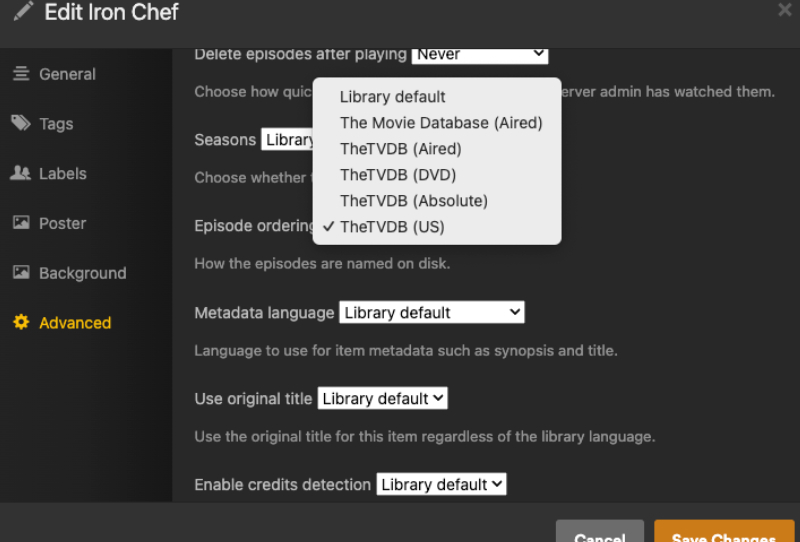
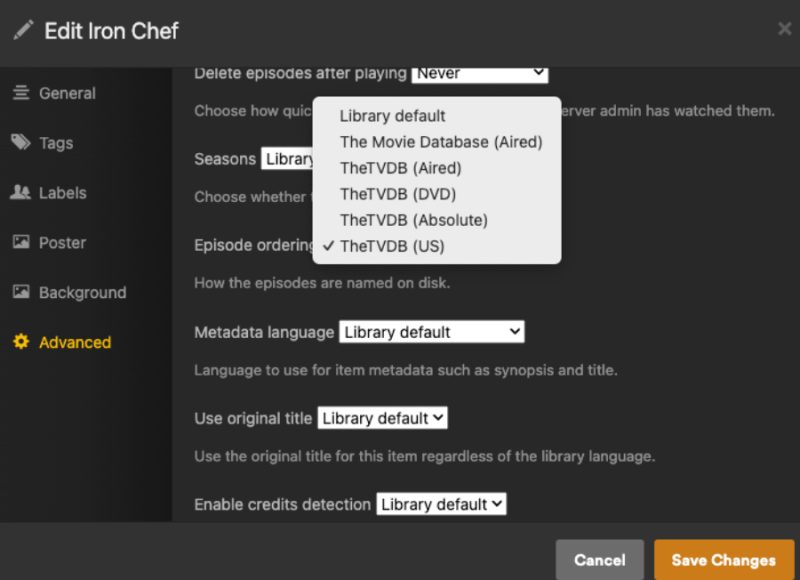
Occasionally a show’s episode order differs between reference sites, or between how it aired and how it was packaged on DVD or Blu-ray. By default, Plex’s TV Series agent uses an aired order based on The Movie Database. If your files are actually named according to TheTVDB’s numbering, you can change the Episode Ordering preference under the Advanced tab when creating or editing the TV library. For shows with genuinely alternate release orders, such as regional airings, you can also set an alternate order for that specific show from its own Advanced settings after it has matched successfully.
Tips and troubleshooting
- If a show refuses to match after renaming, refresh your Plex library so the scanner rescans the updated file names, since Plex often won’t re-check files it has already indexed.
- Double-check that season folders use “Season” in English and a two-digit number, not abbreviations or non-English terms.
- If you have hundreds of episodes to rename, consider a naming tool to automate the process rather than renaming everything by hand. This site’s guide to using FileBOT to automate naming covers this in more detail.
- Windows sometimes hides file extensions by default, which can cause you to accidentally save a file with the wrong or duplicated extension. Make file extensions visible before renaming in bulk.
- If you’re still setting up Plex for the first time, it helps to sort out your folder structure before you even create the library. See the guide on how to set up a Plex Media Server for the full process.
Frequently asked questions
Why won’t Plex recognise my TV show even after renaming it?
This is usually because Plex has already scanned the old file names and hasn’t rechecked the folder. Refresh the library or the specific show, and confirm the folder and file names match the season and episode format exactly, including the “Season” keyword and the sXXeXX tag.

Do I need to include the year in the show folder name?
It isn’t strictly required, but it’s recommended, especially for shows with common titles or remakes. Including the year, such as ShowName (2011), helps the Plex TV Series agent match the correct show rather than a similarly named one.
What’s the difference between naming a special and naming a regular episode?
Specials use season zero rather than a normal season number. Place them in a folder called Season 00 or Specials and tag the file as s00e01, s00e02, and so on, following the same pattern as regular episodes.
Can Plex handle anime or shows with unusual episode numbering?
Yes, though these shows often use alternate episode orders such as absolute numbering. Check the show on The Movie Database or TheTVDB to confirm the correct structure, then set the appropriate episode order in Plex’s Advanced settings for that show if the default order doesn’t match your files.