The quickest way to choose USB-C headphones for Android phones is to work out three things first: whether you need the microphone to work over the cable, whether you want wired-only or a hybrid Bluetooth-plus-USB-C design, and how much you care about active noise cancelling. This guide walks Android owners through that decision process step by step, so you end up with a pair that actually suits how you use your phone, not just whatever looks good on a shelf.
Key takeaways
- ✓Most modern Android phones send digital audio over USB-C without needing an extra dongle
- ✓Not every USB-C headphone connection carries a microphone signal, so check before buying for calls
- ✓Hybrid headphones that combine Bluetooth with USB-C, like the Bose QuietComfort Ultra, offer the most flexibility
- ✓Budget wired options such as the TOZO HT3 still include active noise cancelling and an EQ app
- ✓Free tools like Audacity let you test microphone and recording quality once your headphones are connected
USB-C headphones have become a sensible option as phone makers keep USB-C as the only port on the device. Instead of relying purely on Bluetooth, you get a wired option that skips pairing, works even when the battery is flat, and in many cases still lets you plug into a laptop or PS5 later. The catch is that USB-C audio implementations vary a lot between models, which is exactly what trips people up.
Table of Contents
What you’ll need
- An Android phone with a USB-C port that supports digital audio output (most phones released in the last several years do)
- A pair of USB-C headphones or earphones, or a set that supports USB-C, Bluetooth, and analog
- A USB-C to 3.5mm adapter or USB-C DAC dongle, if your preferred headphones use the older analog jack
- The headphone’s companion app, if it has one, for firmware updates and EQ settings
- A free audio editor like Audacity if you want to test microphone recording quality once connected
Choosing USB-C headphones for Android phones
- Confirm your phone actually sends digital audio over USB-C. Most current Android phones use the USB Audio Class standard, which lets compliant headphones work without extra drivers, but older or budget phones sometimes only support charging and data over that port.
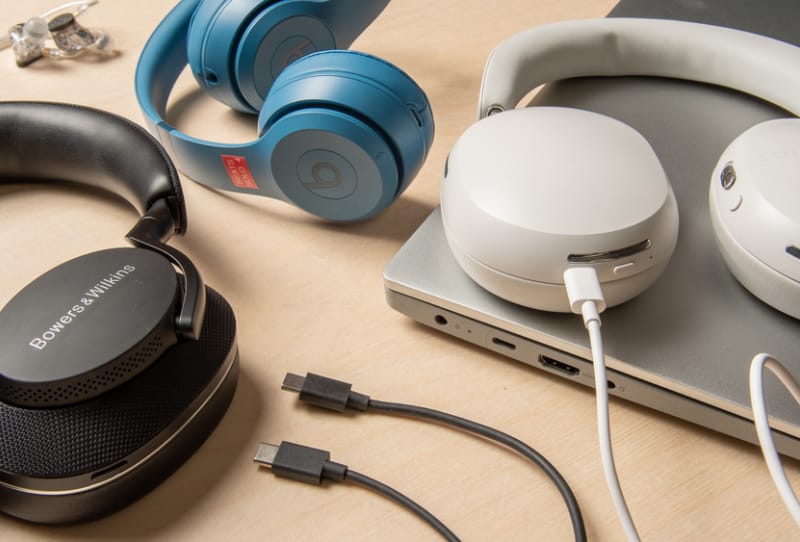
- Decide between wired-only, hybrid, or Bluetooth-first headphones. Wired-only USB-C models are simple and cheap but lose the cable-free convenience of Bluetooth. Hybrid models, such as the Bose QuietComfort Ultra Headphones (2nd Gen), let you switch between Bluetooth, USB-C, and analog depending on the situation.
- Check whether the USB-C connection actually carries a microphone signal. Some headphones only pass audio out over USB-C and rely on Bluetooth or analog for calls, which matters if you plan to take meetings or calls with the cable plugged in.
- Think about how much noise cancelling you need. If you commute or travel often, strong ANC is worth prioritising. If you mostly use headphones at a desk, lighter noise cancelling or even none at all may be enough.
- Look for a companion app with an equaliser. A basic three-band EQ can tame an overly bassy sound signature, while a ten-band EQ gives finer control if the default tuning doesn’t suit your music.
- Check battery life if the headphones also run over Bluetooth. Figures vary widely, from around 45 hours on some budget wired-plus-Bluetooth models up to nearly 80 hours on some mid-range picks, so match this to how often you’re willing to charge.
- Consider accessories like a carry case and cable length, especially if you’re swapping the headphones between a phone and a laptop throughout the day.
Matching headphones to your use case
The table below summarises how a few well-tested options handle the key USB-C differences covered above. Use it as a starting point rather than a final answer, since your priorities around ANC, mic use, and sound signature will differ.
| Pick | Connections | USB-C mic support | Noise cancelling | Best for |
|---|---|---|---|---|
| Bose QuietComfort Ultra Headphones (2nd Gen) | Bluetooth, USB-C, analog | No | Very strong | Travel and flights |
| Nothing Headphone (a) | Bluetooth, USB-C, analog | Yes | Moderate | Office calls and everyday use |
| TOZO HT3 | Wired USB-C, analog cable included | Yes (PC and PlayStation) | Light | Wired use without Bluetooth |
If you’re after serious sound quality rather than conveniences like ANC or a mic, premium in-ear monitors are worth a look too. Audiophile-grade earphones such as the 64 Audio Ocean are typically sold with interchangeable cables, including USB-C options, so they pair with Android phones through a USB-C DAC cable rather than relying on the phone’s built-in audio chip. Anyone weighing up a 64 Audio Ocean review should note that these are a different category entirely from the everyday picks above, aimed at listeners who want maximum detail over portability or ANC.
Tips and troubleshooting
If your headphones aren’t detected after plugging in, try unplugging the cable and plugging it back in, or power the headphones off and on again. Some models need to be switched on even when connected by wire, and USB-C device detection can occasionally be inconsistent between phones. If the headphones work over Bluetooth but not when wired, check whether that model’s USB-C port is audio-only; not every pair supports microphone pass-through, which is a common reason calls sound muffled or don’t connect at all.
For anyone recording voice memos or testing a headset’s mic, a free audio editor such as Audacity is a straightforward way to check clarity and background noise handling before committing to a pair for calls. If you stream a personal music library, apps like Plexamp are worth pairing with higher-resolution USB-C headphones, since they can push better quality audio than many streaming apps by default. It’s also worth remembering that Apple’s AirPods 5 noise cancelling earbuds are built around Lightning and Bluetooth for Apple devices, so they aren’t a USB-C option for Android owners, even though they’re often compared against wired Android alternatives.
Frequently asked questions
Do USB-C headphones work with all Android phones?
Most recent Android phones support digital audio over USB-C through the USB Audio Class standard, but some older or entry-level phones only use the port for charging and file transfer. Check your phone’s specifications, or test with a basic pair, before buying something more expensive.
Can wireless headphones also use a USB-C cable?
Yes, several hybrid headphones support Bluetooth and a wired USB-C connection in the same unit, giving you the choice depending on battery level or whether you want lower latency. Some of these also support Bluetooth multipoint, letting you stay connected to two devices at once when not using the cable.
Why doesn’t the microphone work when I plug my headphones in?
Not every USB-C connection is built to carry a microphone signal, even if the same headphones support calls over Bluetooth. Manufacturers list this separately in their specifications, so it’s worth confirming mic support over USB-C specifically if you plan to take calls with the cable plugged in.
Are USB-C headphones better than Bluetooth for Android?
Neither option is universally better; it depends on priorities. USB-C wired headphones avoid pairing issues and work with a flat battery, while Bluetooth offers more freedom of movement and typically better compatibility with multiple devices. Many of the better options on the market now offer both, so you don’t have to choose permanently.