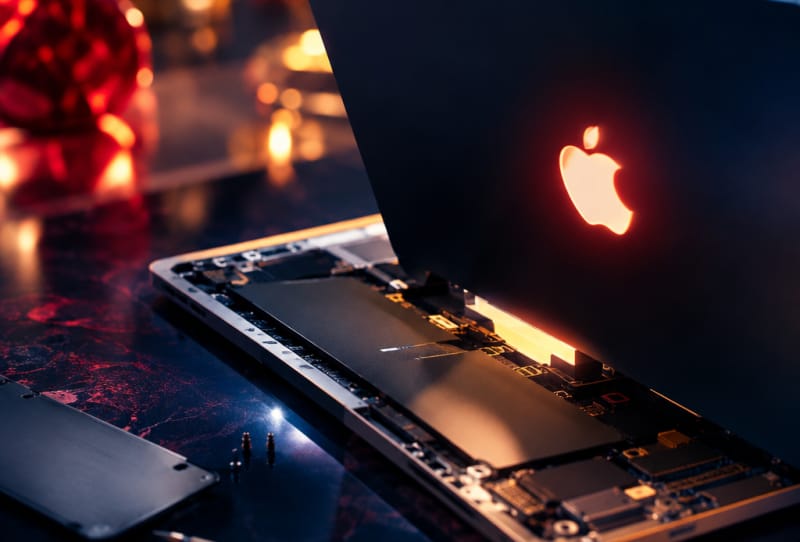
The glowing MacBook Pro logo is back, and iFixit’s teardown of Apple’s new touchscreen laptop shows exactly how the company rebuilt it for an OLED era. Rather than relying on a simple backlight cutout like older models, Apple fitted a strip of four LEDs behind the display panel, with a diffuser and a specially coated logo that reflects light when off but lets it shine through when powered on.
Key takeaways
- ✓iFixit's teardown shows the glowing MacBook Pro logo uses a four-LED strip and diffuser behind the OLED panel
- ✓The Apple logo gets a two-way mirror coating so it looks metallic when off and glows when lit
- ✓Apple dropped the backlit logo in 2016 and only brought it back now that OLED removed the need for a traditional backlight
- ✓Weight savings come from less aluminium in the lid and base, plus a slightly smaller trackpad
- ✓iFixit found USB-C port swaps require removing the logic board, and memory and the HDMI port remain soldered
The discovery comes from iFixit’s teardown of the MacBook Pro with PROLED XDR Display, the same model that introduced touchscreen support to Apple’s laptop lineup for the first time. Alongside the glowing logo, the teardown covers the laptop’s tandem OLED screen, its reduced weight, and a hinge redesign, while also flagging a fairly familiar complaint about how difficult the machine is to repair.
Table of Contents
How the glowing MacBook Pro logo actually works
Apple ditched the illuminated Apple logo back in 2016, once MacBooks moved away from the kind of backlit LCD panels that made the feature easy to produce. Older models simply had a cutout in the lid that let backlight bleed through the logo shape. OLED screens generate their own light per pixel and don’t use a traditional backlight, so that old trick no longer worked.
According to iFixit, Apple’s solution is a dedicated light strip carrying four LEDs, positioned behind the display assembly. Light from those LEDs passes through a diffuser before reaching the logo itself, spreading it evenly rather than creating hot spots. The logo is then coated in a material iFixit compares to a two-way mirror, so it appears metallic and reflective when dark but turns translucent once the LEDs switch on.
It is a more elaborate setup than the old cutout design, built specifically to recreate a cosmetic feature on a screen technology that does not naturally support it. That effort suggests Apple sees the glowing logo as more than nostalgia. On its priciest laptop, it is a visible way to separate the MacBook Pro from cheaper models in the range that still use a plain, unlit logo.
Lighter build, familiar trade-offs
Beyond the lid, iFixit’s teardown points to other changes behind the MacBook Pro’s reduced weight. Apple used less aluminium in both the base and the lid, and fitted a slightly smaller trackpad than on previous generations. The hinge was also reworked, which iFixit notes reduces screen wobble when tapping the touchscreen, a sensible fix given the new display now responds to touch input.
None of those changes are dramatic on their own, but together they explain how Apple managed to shave weight from a laptop that also gained a touchscreen, a tandem OLED panel, and the added hardware needed to make the logo glow. Trimming material from the chassis while adding components elsewhere is a balancing act, and this teardown shows where some of that balance was found.
| Feature | Older LCD MacBook Pro | New PROLED XDR MacBook Pro |
|---|---|---|
| Logo lighting method | Backlight cutout through LCD panel | Four-LED strip with diffuser, behind OLED panel |
| Logo finish | Standard opaque logo | Two-way mirror coating, metallic when off |
| Display type | LCD with backlight | Tandem OLED, no backlight |
| Touchscreen support | No | Yes |
Repairability still lags behind the design
As with previous Apple teardowns, iFixit’s biggest criticism is not the clever engineering, it is how hard the laptop remains to service. The report notes that swapping out the MacBook Pro’s USB-C ports means removing the entire logic board first, a time-consuming job for what should be a routine repair. Memory is soldered directly to the board, as is the HDMI port, so neither can be upgraded or replaced independently.
That pattern is consistent with Apple’s recent laptops generally, and it tends to matter less to buyers spending heavily on the touchscreen MacBook Pro than it does to right-to-repair advocates. Anyone paying close to five figures for a high-end configuration is unlikely to be opening the chassis themselves, but the soldered components still limit long-term upgradeability and third-party repair options.For anyone relying on external ports regularly, it is also worth planning around a logic board that houses the USB-C connectors rather than assuming a quick swap is possible if one fails. Readers weighing up accessories for the new laptop may find it useful to look at options for choosing the right USB-C hub for a MacBook Pro, since expanding connectivity externally is simpler than repairing or upgrading the built-in ports.
What the teardown means for buyers
The glowing MacBook Pro logo is a small detail, but it says something about how much engineering effort Apple is willing to spend on cosmetic touches for its flagship laptop. Rebuilding a feature it had quietly dropped, specifically to make it work with a screen technology that does not naturally support it, is not a trivial undertaking.
Combined with the tandem OLED display, touchscreen support, and a lighter chassis, the logo redesign fits a broader pattern of the new MacBook Pro leaning on premium, highly visible features to justify its position at the top of Apple’s lineup. The trade-off, as iFixit’s teardown makes clear, is a laptop that remains difficult to repair or upgrade once it leaves the factory, a familiar cost of Apple’s thin-and-light design philosophy.
Frequently asked questions
Why did Apple bring back the glowing MacBook logo?
Apple dropped the backlit logo in 2016 when it moved away from LCD panels that made the effect easy to produce. The new MacBook Pro’s OLED screen does not use a traditional backlight, so Apple engineered a dedicated LED strip and diffuser specifically to recreate the glowing logo as a distinguishing design feature.
How does the glowing MacBook Pro logo work without a backlight?
According to iFixit’s teardown, four LEDs sit in a strip behind the display, shining through a diffuser and a specially coated logo that behaves like a two-way mirror, appearing metallic when off and letting light through when the LEDs are switched on.
Is the new MacBook Pro harder to repair?
Yes. iFixit found that replacing the USB-C ports requires removing the logic board entirely, while memory and the HDMI port are soldered in place and cannot be upgraded or swapped independently.
What else changed on the new MacBook Pro’s design?
Apple used less aluminium in the base and lid to reduce weight, fitted a slightly smaller trackpad, and reworked the hinge to reduce screen wobble, a useful change given the laptop’s new touchscreen support.