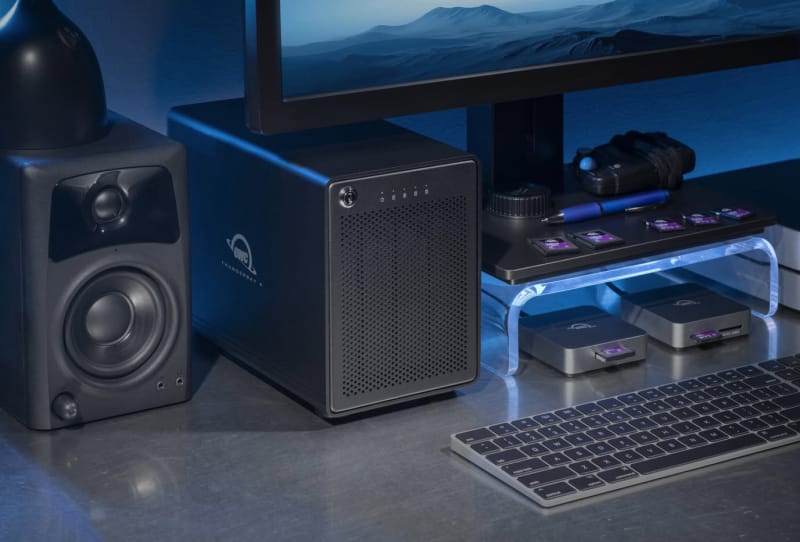
OWC has refreshed its long-running ThunderBay 4 storage array with native Thunderbolt 5 connectivity, pushing capacity as high as 128TB. The update keeps the familiar four-bay aluminium design intact while addressing the two things creative professionals ask for most: more headroom and less waiting around for files to copy.
Key takeaways
- ✓OWC's ThunderBay 4 now ships with Thunderbolt 5 connectivity across two ports.
- ✓Capacity options stretch up to 128TB across four drive bays.
- ✓Real-world speeds reach 1268 MB/s on HDDs and 1703 MB/s on SSDs.
- ✓A downstream Thunderbolt 5 port allows daisy-chaining without losing a host connection.
- ✓The aluminium four-bay design has been OWC's standard enclosure for more than a decade.
The ThunderBay 4 Thunderbolt 5 model is built for anyone juggling large video files, RAW photo libraries, or project archives that have outgrown a single external drive. Rather than scattering footage across multiple loose drives, OWC’s pitch is simple: put everything in one enclosure, connect it once, and let the RAID configuration handle redundancy and speed.
Table of Contents
What’s new in the Thunderbolt 5 upgrade
The headline change is the move to Thunderbolt 5 connectivity, which replaces the previous generation’s interface across OWC’s flagship four-bay unit. Two Thunderbolt 5 ports feature on the enclosure: one for the host connection to a Mac or PC, and a second downstream port for daisy-chaining additional Thunderbolt, USB4, or USB-C devices.
That second port matters more than it might sound. Creative professionals often run several peripherals off one machine, whether that’s a monitor, a docking station, or another storage unit. Daisy-chaining through the ThunderBay 4 means none of those extra devices need to compete for a limited number of ports on the host computer itself, which is especially useful on laptops where Thunderbolt ports are scarce.
Speed is the other practical benefit. OWC quotes real-world throughput of up to 1268 MB/s when the array is populated with hard drives, and up to 1703 MB/s when loaded with SSDs. For editors cutting 4K or 8K footage directly off external storage, that kind of sustained speed is the difference between smooth playback and constant buffering.
Capacity options and what fits in four bays
Capacity now scales up to 128TB across the array’s four drive bays, giving buyers plenty of room to configure the unit around their workflow rather than the other way around. Whether that space is split across RAID 0 for raw speed, RAID 5 for a balance of performance and redundancy, or RAID 10 for maximum protection depends on how much a user values uptime versus outright throughput.
| Feature | Specification |
|---|---|
| Connectivity | Two Thunderbolt 5 ports (host plus daisy-chain) |
| Drive bays | Four, hot-swappable |
| Maximum capacity | Up to 128TB |
| Real-world HDD speed | Up to 1268 MB/s |
| Real-world SSD speed | Up to 1703 MB/s |
| Enclosure material | Aluminium, four-bay design |
That spread of capacity options means a small studio editing short-form content might configure the ThunderBay 4 for speed with smaller, faster drives, while a post-production house archiving years of footage can lean into the full 128TB ceiling with higher-capacity spinning disks. OWC has built the enclosure to work either way, without forcing a buyer into one configuration.
How it stacks up against the connectivity it joins
Thunderbolt 5 is still a relatively new standard, and the ThunderBay 4’s adoption of it places the array alongside a growing wave of Thunderbolt 5 accessories reaching the market. Docking stations such as Thunderbolt 5 docking stations like the Kensington SD5010T5 and Lexar’s own Thunderbolt 5 hub have already demonstrated how much bandwidth the standard frees up for multi-device setups, and a storage array built around the same interface fits naturally into that ecosystem.
Compared with D-Link’s Thunderbolt 4 dock and similar previous-generation hardware, Thunderbolt 5 offers a meaningful jump in available bandwidth, which is exactly what large RAID arrays need to avoid becoming a bottleneck. OWC’s decision to equip the ThunderBay 4 with two Thunderbolt 5 ports, rather than just one, also puts it ahead of some rival enclosures that still rely on a single host connection and no daisy-chain option.
The four-bay aluminium chassis itself isn’t new. OWC has used variations of this design for more than a decade, and the company is leaning on that track record as a selling point rather than reinventing the enclosure from scratch. For buyers who already trust the ThunderBay line, the Thunderbolt 5 version reads as an evolution rather than a gamble.
Who this upgrade is really for
Video editors, photographers, and small studios handling large media libraries stand to benefit most from the faster interface and expanded capacity. Anyone currently bottlenecked by an older Thunderbolt or USB connection, or running out of room on a two-bay setup, has a clear reason to look at the new ThunderBay 4.
For home users or casual creators with smaller libraries, the upgrade is less urgent. A four-bay array with up to 128TB of capacity is aimed squarely at professional workflows, and the Thunderbolt 5 speed gains only really show up when the host machine and cabling also support the standard. Buyers should check that their computer actually has a Thunderbolt 5 port before expecting to see the full real-world throughput OWC is quoting.
Frequently asked questions
What capacity does the OWC ThunderBay 4 Thunderbolt 5 support?
The array supports configurations up to 128TB across its four drive bays, allowing buyers to choose between speed-focused and capacity-focused drive combinations.
Do I need a Thunderbolt 5 computer to use it?
The enclosure works with Thunderbolt and USB4 hosts, but reaching the quoted real-world speeds of up to 1703 MB/s requires a host port and cable that actually support Thunderbolt 5.
Can other devices be connected through the ThunderBay 4?
Yes. The second Thunderbolt 5 port on the enclosure supports daisy-chaining additional Thunderbolt, USB4, or USB-C devices without using another port on the host computer.
Is the ThunderBay 4 a new enclosure design?
No. OWC has used this four-bay aluminium design for more than a decade; the Thunderbolt 5 version updates the internal connectivity while keeping the proven chassis.