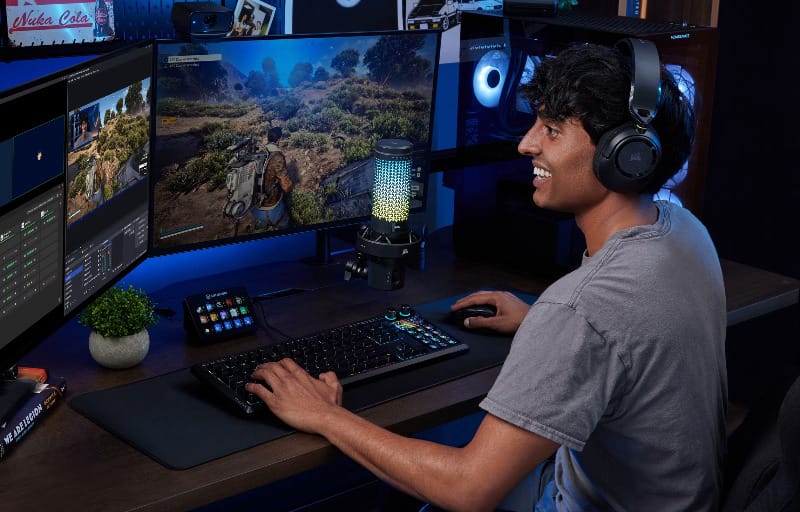
Standalone gaming microphones have a reputation problem. Most either chase RGB flair while sounding worse than a decent headset, or they ask a premium price for only a marginal quality bump. Corsair’s VOXARA USB gaming condenser microphone is the company’s first real swing at genuine studio-grade audio in this category, and the white unit reviewed here suggests Corsair has actually pulled it off.
Review summary
VOXARA
The VOXARA delivers genuine studio-grade audio quality in a gaming microphone that prioritises sound performance over aesthetic flash. Its 25mm condenser capsule, 32-bit/192kHz audio engine, and Elgato Wave Link 3.0 integration produce warm, detailed vocal recordings in real-world conditions, whilst the AI-powered Voice Focus noise suppression tool handles background noise effectively without over-processing.
Highlights
- ✓Studio-grade 25mm condenser capsule with warm, detailed sound
- ✓AI noise suppression and deep software customisation via Wave Link
- ✓Intuitive controls with responsive tap-to-mute and informative OLED display
- ✓Excellent console compatibility including PS5 and Nintendo Switch
- ✓Clean minimalist design suited to professional and gaming setups
The gaming mic market has long been crowded with devices that look the part but fall flat once the mute button is pressed and someone actually starts talking. VOXARA takes a different approach, pairing serious hardware with Elgato’s Wave Link 3.0 software, a combination that makes sense given how central streaming and content creation tools have become to everyday PC setups.
This review walks through the design, the feature set, and what it’s actually like to live with the VOXARA day to day, from casual voice chat to more demanding recording and streaming scenarios. The white colourway suits desk setups that lean light or minimalist, and it’s a detail worth knowing before deciding whether this is the right microphone for a particular battlestation.
Table of Contents
Design and Functionality
Unboxing the VOXARA is a fairly no-nonsense affair, and that’s no bad thing. In the box sits the microphone itself, its stand, a USB-C cable, a quick start guide, and two thread adapters that deserve more credit than their size suggests.
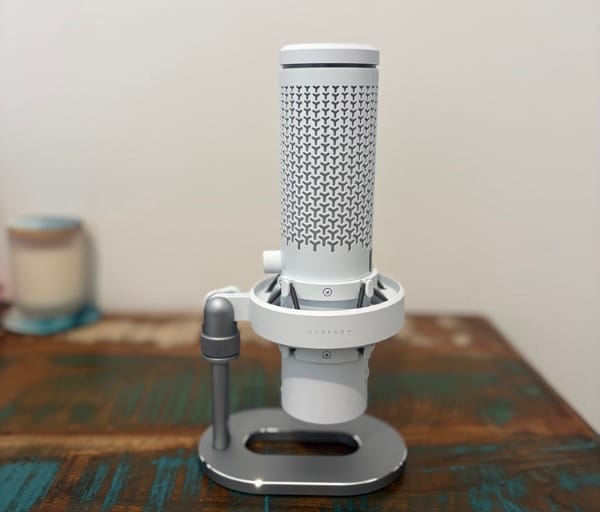
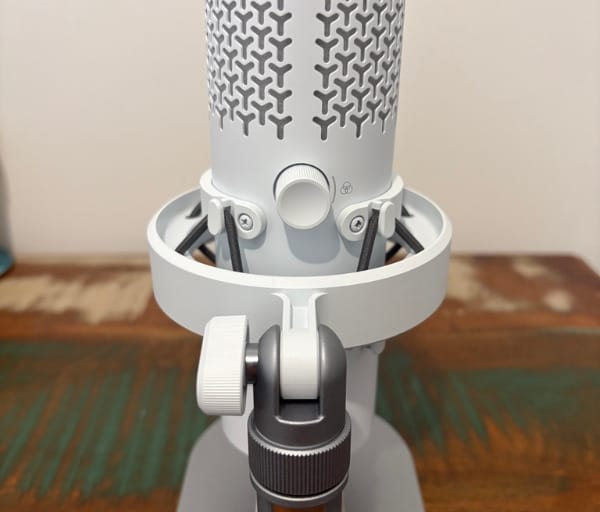
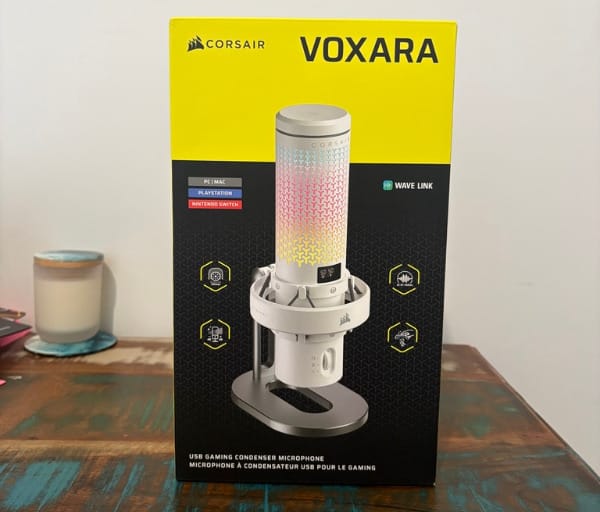
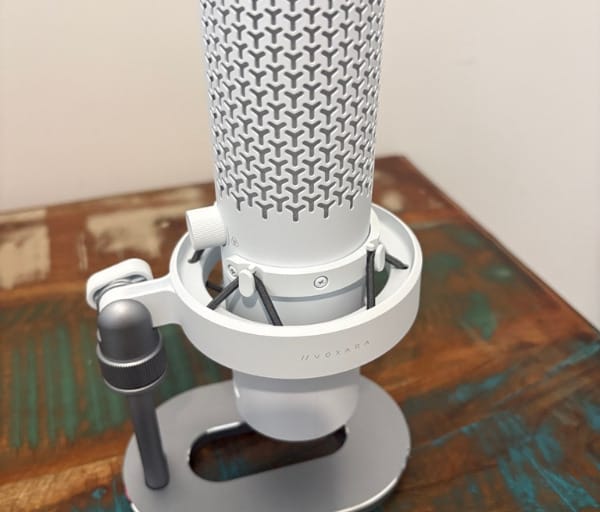
Those adapters matter because the VOXARA’s native thread is 5/8 inch, which means it will bolt onto the vast majority of boom arms already sitting on streamers’ and podcasters’ desks without a special order or adapter hunt.
The bundled cable runs to roughly ten feet, which is generous enough to reach across most desk layouts. It isn’t braided, which feels like a small miss given the asking price, though it doesn’t affect performance in any way.
In white, the VOXARA has a clean, almost minimalist presence that doesn’t scream for attention the way a lot of gaming gear does. It photographs and streams well against light desk setups, and the white body makes the customisable RGB elements pop a little more than they would on a darker finish.
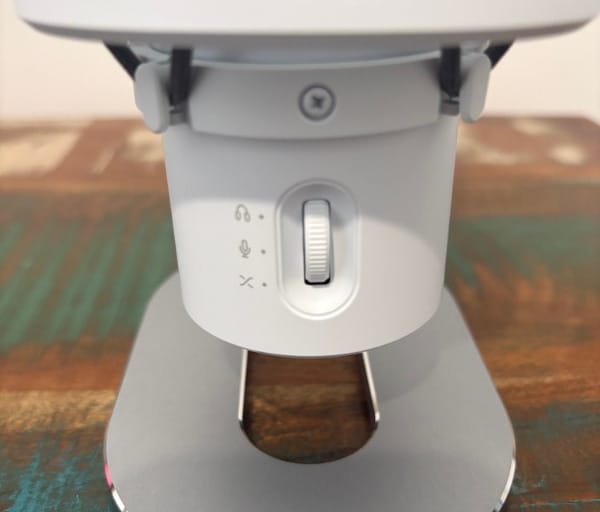
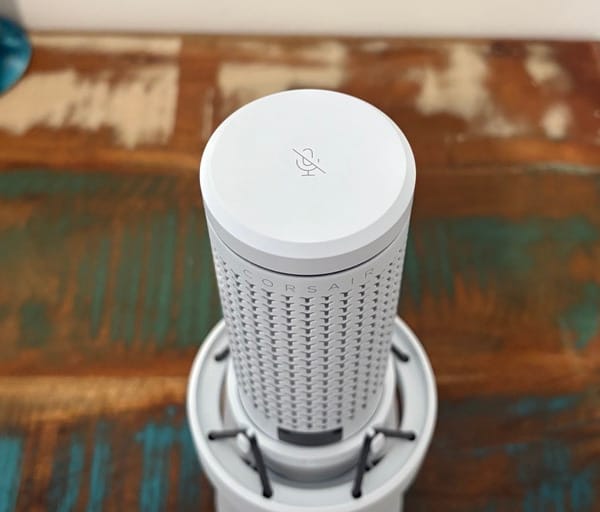
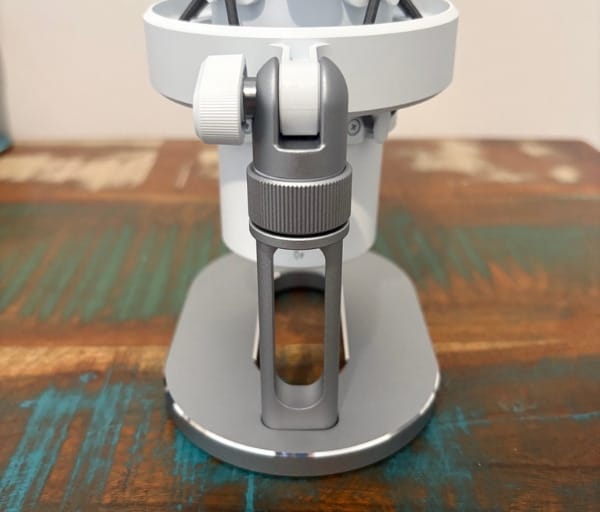
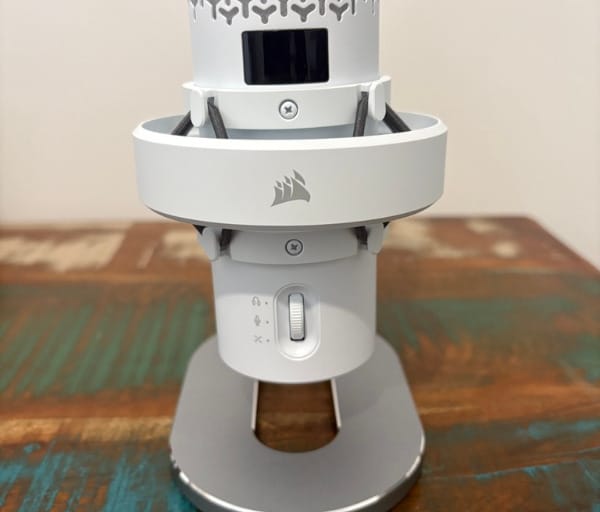
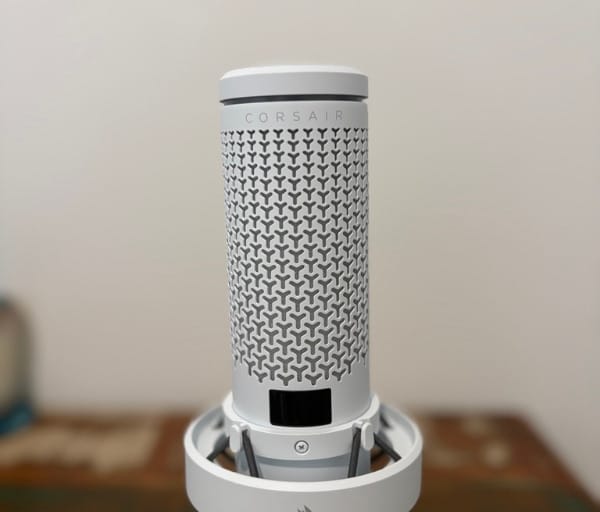
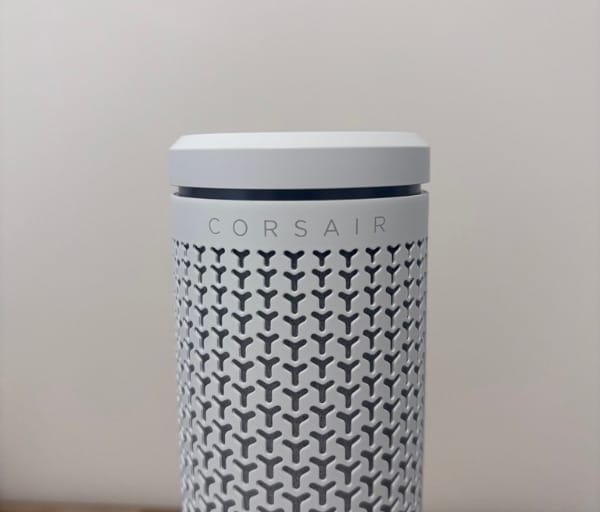
The main housing is built from PC+ABS, a sturdy plastic blend that keeps weight down without feeling cheap in hand. It sits atop a solid aluminium stand that adds the heft needed to keep the whole thing stable on a desk.
That stand offers 360-degree rotation along with roughly 30 degrees of tilt, giving plenty of flexibility to angle the capsule toward a mouth rather than forcing posture to adjust around the mic.
Despite the RGB lighting, the overall design leans subtle rather than gaudy. It’s the kind of microphone that could sit on a professional’s desk just as easily as a streamer’s rig.
The RGB lighting itself cycles between a few modes: a smooth multicolour pattern, a solid single colour, and a particularly handy level meter mode that visualises input gain in real time as a form of live feedback while speaking.
A small OLED screen sits on the front of the mic body, and it’s one of the smarter inclusions here. Rather than guessing where an infinite-scroll dial has landed, the display shows the exact value being adjusted along with current mute status at all times.
The front wheel is the primary onboard control, scrolling infinitely and clicking to step through mic gain, headphone volume, and sidetone balance. It’s tactile, precise, and never feels like it’s fighting for attention with the other controls.
Holding that same wheel down for a couple of seconds flips the OLED display upside down, a thoughtful touch for anyone mounting the VOXARA on a boom arm where the mic itself ends up inverted.
A rear knob handles the RGB lighting modes and can be pressed to cycle through sub-modes configured via software, giving a bit more lighting customisation without needing to dive into an app every time.
The standout physical control, though, is the tap-to-mute ring sitting on top of the mic. It’s satisfying to use, visually distinct when active, and responsive enough that there’s never a moment of doubt over whether a tap has registered.
Build quality has one genuine soft spot: the integrated shock mount helps absorb some vibration, but the heavy aluminium desk stand still transmits knocks and bumps from a busy desk through to the capsule.
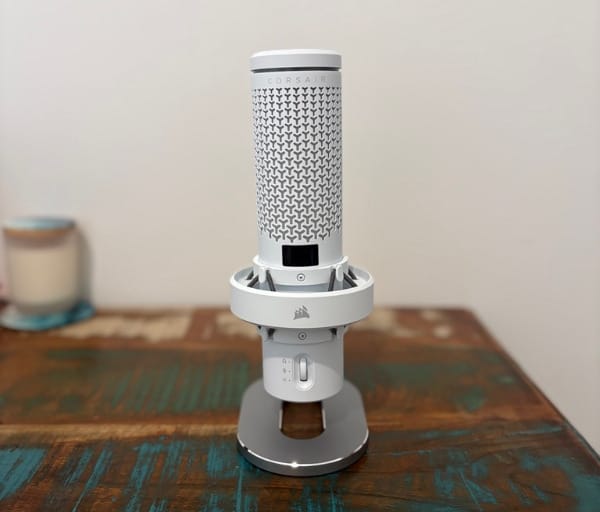
That’s a common limitation of desk stands generally rather than a VOXARA-specific flaw, and a boom arm is the sensible upgrade for anyone serious about avoiding desk thumps bleeding into recordings. Thankfully, Corsair has made that swap painless, since the shock-mounted body is the exact part that detaches to clip onto an arm.
Connectivity is handled through a single USB-C port, and a 3.5mm headphone jack on the body allows for direct monitoring of either the microphone input or system audio without routing everything through a separate interface.
Key Features
At the heart of the VOXARA sits a 25mm condenser capsule, a size more commonly associated with dedicated studio microphones than gaming peripherals, and it’s doing a lot of the heavy lifting on the audio quality front.
That capsule is paired with a 32-bit/192kHz audio engine, giving the VOXARA a wide dynamic range and plenty of headroom, which matters for anyone recording in less than ideal acoustic conditions.
A cardioid pickup pattern keeps the focus on whoever is speaking directly in front of the capsule, while reducing sensitivity to sound arriving from the sides and rear.
Unlike some rivals, the VOXARA has no onboard signal processing of its own. Every effect, from EQ to compression, runs through Elgato’s Wave Link 3.0 software on the connected computer instead.
That software-first approach puts a little more load on the host PC, but it also opens up a far deeper well of customisation than a chip baked into the microphone ever could.
Wave Link handles audio routing directly, letting users mix multiple sources, such as game audio, Discord, and the microphone itself, into separate streams for recording and monitoring.
The Elgato Marketplace extends things further with downloadable add-ons, including an Equalizer tool that unlocks additional EQ bands and ready-made presets for anyone who doesn’t want to dial settings in manually.
Beyond EQ, the Marketplace also offers voice filters and other creative effects, though some of the more elaborate options come as paid extras rather than being bundled in free.
The most genuinely impressive software feature is Voice Focus, Corsair’s AI-powered noise suppression tool, which runs on a simple Weak-to-Strong slider to dial in exactly how aggressively background noise gets cut.
Lighting fans also get iCUE Murals support through the iCUE Apps ecosystem, letting the VOXARA’s RGB sync with other Corsair gear, although this integration is still in beta.
The OLED display doubles as a feature in its own right rather than a mere add-on, constantly showing gain levels, headphone volume, sidetone balance, and mute state depending on which function is currently selected.
On the compatibility front, the VOXARA connects over USB-C to Windows and macOS machines, plus PS4, PS5, Nintendo Switch, and Switch 2, making it one of the more console-friendly options in this price bracket.
It’s worth flagging that Wave Link only runs on Windows and macOS, so console players get the raw capsule output without Voice Focus or custom EQ applied, though the unprocessed signal still sounds solid on its own.
The front wheel’s multi-function design, cycling between gain, headphone volume, and sidetone with a simple click, means Corsair has managed to pack several controls into a single, uncluttered dial rather than scattering buttons across the body.
Experience Using the Product and Performance
Setting up the VOXARA on a desktop with a capable sound card is about as close to true plug-and-play as USB microphones get. Plugging it in had it recognised almost instantly, with no driver chase required.
On a laptop with a more modest onboard sound card, a few extra settings needed attention before everything behaved as expected, though this is more a quirk of weaker laptop audio hardware than anything specific to the VOXARA itself.
Installing Wave Link to unlock the full feature set took only a few minutes on top of the initial setup, and the process was straightforward enough that no troubleshooting guides were needed.
The first impression out of the box was a strong one, with the RGB lighting immediately catching the eye and the OLED panel lighting up to confirm the mic was live and ready.
Tapping the mute ring produced an instant, confidence-inspiring response, with the LEDs dimming noticeably to confirm the microphone had gone quiet without needing to glance at any software overlay.
The front wheel proved intuitive almost immediately, with clicks between gain, headphone volume, and sidetone settings clearly reflected on the OLED display every time.
At the operating system level, Windows automatically set the VOXARA as the default output device, which was expected, but it also tried to claim the default input role, which needed a manual correction since a separate soundbar was already handling output duties.
Testing took place primarily in an untreated home office with no acoustic foam or isolation of any kind, which is exactly the sort of real-world environment most buyers will actually be using the VOXARA in.
Even without acoustic treatment, vocal recordings came through warm and detailed from roughly two feet away, avoiding the thin, slightly boxy character that plagues a lot of budget gaming microphones.
The cardioid pickup pattern did its job well, keeping the focus locked on the voice directly in front of the capsule rather than picking up every ambient sound in the room.
Some room character still crept into raw recordings, as expected in an untreated space, but this is exactly where the software side of the VOXARA earns its keep.
Plosives were the one consistent weak point, with hard consonants occasionally popping through despite the built-in pop filter. Anyone particularly sensitive to this should still budget for an external foam windscreen or pop filter, though that’s true of most hard-shell microphones at this price.
Compared with a typical gaming headset microphone or an entry-level USB mic, the difference in clarity and warmth was immediately obvious, with far less of the muffled, compressed quality those alternatives tend to produce.
Voice Focus, the AI noise suppression tool, was genuinely one of the highlights of the whole experience. Even on its lowest setting, it cut ambient room noise in the untreated office without noticeably colouring or thinning out the voice.
Pushing the Weak-to-Strong slider higher did start to introduce a slightly more processed tone, which is a reasonable trade-off for anyone working in noisier environments like a shared household or an open-plan space.
The RGB level meter mode turned out to be more than a gimmick, offering a genuinely useful visual cue of input gain while speaking, particularly handy during a livestream when watching a software meter isn’t practical.
During longer sessions, the OLED screen made it easy to confirm levels and mute status at a glance, cutting down on the need to tab over to Wave Link just to check settings.
The desk stand did pick up some vibration from typing and the occasional desk bump, exactly as expected from a stand-mounted condenser microphone with this much mass in its base.
Switching to a boom arm, as Corsair’s detachable shock mount design allows, noticeably cleaned up that issue, and the swap took only a couple of minutes thanks to how the mic body separates from its stand.
On a desk alongside other white or light-coloured peripherals, the VOXARA’s finish blended in nicely, giving the whole setup a tidier, more cohesive look compared with the darker, more industrial styling of many competing mics.
Testing on a PS5 confirmed the straightforward USB-C connection works as advertised, with the console recognising the microphone immediately for party chat and game audio capture.
Without Wave Link available on console, that raw capsule signal lacked Voice Focus and custom EQ, but it still sounded clean and usable for voice chat, which should reassure console-only buyers.
The 3.5mm headphone jack made direct monitoring simple, and being able to adjust sidetone balance straight from the front wheel meant there was never a need to shout over a muted mic unknowingly.
Wave Link itself strikes a solid balance between accessibility and depth, asking a little patience up front from first-time users but rewarding that investment with genuinely useful routing and processing options over time.
Spending time dialling in a custom EQ curve through the Elgato Equalizer add-on was a satisfying process, and the ability to save that profile meant it only had to be done once.
A few of the Marketplace’s voice filters were worth trying purely for the novelty factor, and while some carry an extra cost, the core EQ and Voice Focus features cover what most users will actually need.
After extended daily use, the VOXARA earned a permanent spot on the desk rather than being swapped out after the review period, which says a lot about how little friction it introduces to a daily workflow.
For streaming and content creation specifically, the combination of Voice Focus, customisable EQ, and that level meter mode makes the VOXARA feel purpose-built rather than adapted from a general-purpose microphone.
For everyday voice chat and gaming sessions, the VOXARA is admittedly more microphone than most players strictly need, but the quality jump is noticeable the moment teammates comment on how much clearer communication has become.
Recording short voiceover clips and podcast-style segments in Audacity produced clean, usable takes with minimal post-processing required, a clear sign the capsule and audio engine are doing real work rather than relying entirely on software polish.
Across every scenario tested, from party chat on console to long-form recording on a desktop, the VOXARA remained consistent, which is arguably the most reassuring trait a microphone at this level can offer.
Conclusion
Corsair set out to push what a gaming-focused USB microphone can realistically achieve, and the VOXARA largely delivers on that promise. The 25mm condenser capsule and 32-bit/192kHz engine provide genuine studio-adjacent sound quality, while the design, especially in this clean white finish, looks the part on any desk.
Streamers, podcasters, and content creators stand to get the most out of the VOXARA, given how much Wave Link 3.0 and Voice Focus add once software is in the mix. Console players aren’t left out entirely either, since the raw capsule still performs well without any processing layered on top.
It isn’t an XLR studio microphone, and it was never trying to be one. The occasional plosive and some desk-transmitted vibration are the only real blemishes, and both are solvable with a cheap pop filter and a boom arm respectively.
For anyone shopping around the VOXARA product page and weighing it against other premium gaming microphones, this is a genuinely strong option that backs up its design with real audio performance, and the white colourway adds a clean, modern option for anyone not keen on an all-black setup.
Frequently asked questions
Does the Corsair VOXARA work with PS5 and Nintendo Switch?
Yes, the VOXARA connects via USB-C and is compatible with PS4, PS5, Nintendo Switch, and Switch 2, in addition to Windows and macOS. Console users won’t get access to Wave Link software features like Voice Focus or custom EQ, but the raw microphone signal still performs well for party chat and voice communication.
What software does the VOXARA use for noise suppression and EQ?
The VOXARA relies on Elgato’s Wave Link 3.0 software for all of its processing, since the microphone has no onboard digital signal processing of its own. This includes the AI-powered Voice Focus noise suppression tool, EQ adjustments via the Elgato Equalizer add-on, and additional presets and filters through the Wave Link Marketplace.
What colours does the Corsair VOXARA come in?
The VOXARA is available in both black and white finishes. The white model reviewed here pairs a clean PC+ABS body with a sturdy aluminium stand, and its lighter finish suits desk setups built around lighter-coloured peripherals and gear.
What’s included in the box with the VOXARA?
Inside the box is the microphone itself, its aluminium desk stand, a USB-C cable roughly ten feet in length, a quick start guide, and two thread adapters that let the mic’s native 5/8 inch thread fit most standard boom arms without needing to buy a separate adapter.