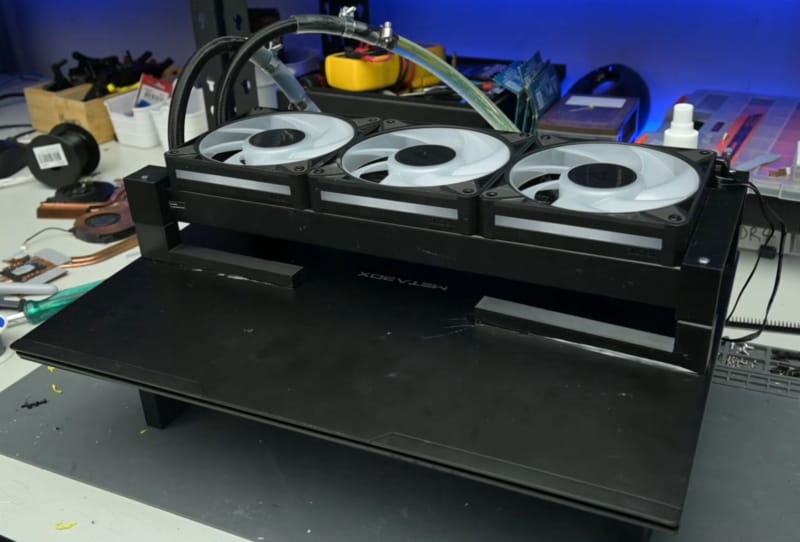
A PC modder known as TrashBench has taken laptop cooling to an extreme, bolting a full-size 360mm all-in-one radiator onto a gaming laptop and cutting internal temperatures to below 40 degrees Celsius. This laptop AIO radiator mod did more than keep things cool: it delivered an average performance uplift of around 14 percent across a mix of games and benchmarks, a figure that says a lot about how much stock cooling usually holds a laptop back.
Key takeaways
- ✓Modder TrashBench attached a 360mm AIO radiator and external fans to a gaming laptop
- ✓The mod cut internal core temperatures to below 40 degrees Celsius
- ✓Average performance gains reached around 14 percent across games and benchmarks
- ✓The build highlights how much thermal throttling limits stock gaming laptop performance
- ✓The mod sacrifices portability entirely, turning the laptop into a tethered desktop-like rig
The build strips away the usual assumption that a laptop has to cool itself within its own chassis. Instead of relying on the thin heat pipes and small fans squeezed into a few centimetres of aluminium, the mod routes heat out to a radiator the size of what most people would mount in a mid-tower desktop case. It is a niche, impractical project by design, but it exposes a real engineering tension that every gaming laptop maker deals with every single generation.
Table of Contents
How the laptop AIO radiator mod works
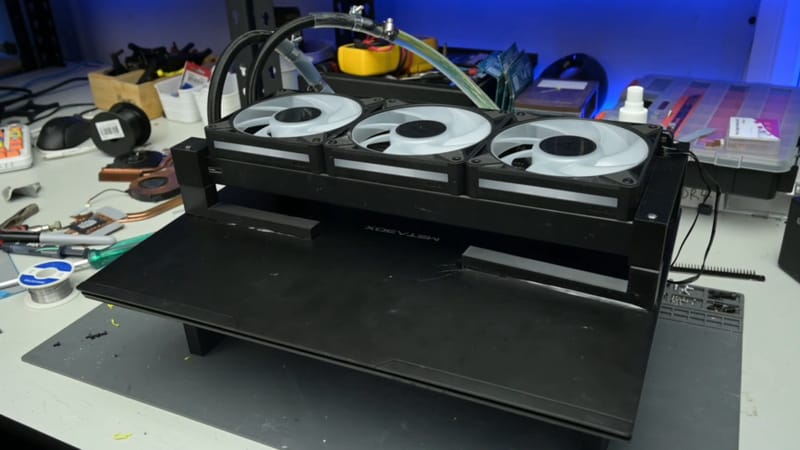
Rather than relying on the laptop’s built-in fans and heat pipes alone, TrashBench rerouted the cooling path so heat gets carried outside the chassis entirely. The setup effectively borrows from desktop liquid cooling: a pump moves coolant through tubing connected to the laptop’s internals, out to an external 360mm radiator with its own bank of fans doing the actual heat rejection. That radiator size is typically reserved for high-end desktop builds running hot CPUs and GPUs together, not something ever expected to sit next to a laptop keyboard.
Getting a sealed loop to interface with components never designed for it is the hard part of a mod like this. Laptop CPUs and GPUs use custom-mounted cold plates, tight tolerances, and delicate connectors, so adapting a desktop-style cooling loop means custom brackets, careful tubing routing, and a fair amount of trial and error to avoid leaks or mounting pressure that could crack a die. None of that is visible in the headline numbers, but it is the unglamorous engineering that makes the final temperature drop possible.
What the temperature and performance numbers actually show
The headline results are straightforward: core temperatures fell to below 40 degrees Celsius under load, a figure that would be considered excellent even for a well-cooled desktop tower, let alone a laptop. Thinner laptop chassis routinely see components run far hotter than that under sustained gaming loads, which is exactly why manufacturers build in aggressive thermal throttling as a safety mechanism in the first place.
With that overhead gone, the laptop was free to sustain higher clock speeds for longer instead of constantly backing off to stay within its thermal limits. That is what produced the roughly 14 percent average performance gain across games and benchmarks. It is not a universal number that will apply to every laptop or every workload, but it illustrates how much headroom is typically sitting unused in a chip that never gets the chance to run at full tilt.
Why gaming laptops run hot in the first place
Modern gaming laptop CPUs and GPUs use boost clocks that scale back once a chip hits its thermal limit, trading performance for safety the moment temperatures climb too high. That is a sensible compromise in a chassis that might only be a couple of centimetres thick, where there is simply no room for the kind of cooling hardware a desktop tower can fit.
Desktop builders have long used 360mm all-in-one liquid coolers typically built for desktop towers to keep high-wattage components well within their thermal limits, something that was never a realistic option for a laptop until a modder decided to force the issue. Readers who want gains without taking a laptop apart have far gentler options, and a guide on optimising a laptop for gaming performance covers the software and settings adjustments that can claw back a meaningful chunk of performance safely.
What this means for laptop cooling and the wider modding scene
Projects like this rarely translate into anything a typical buyer could replicate, and that is the point. TrashBench’s build is a proof of concept rather than a product, showing just how far laptop performance is being capped by thermal limits rather than silicon capability. It sits alongside other recent extreme hardware projects, including a modder’s dual 8-pin fix for the RTX 5090’s power connector, as evidence that enthusiasts are increasingly willing to rebuild stock hardware from the ground up rather than accept factory limitations.
For everyday buyers, the more realistic takeaway is that cooling design genuinely separates good gaming laptops from mediocre ones, even without strapping an external radiator to the chassis. Laptops that already ship with generous vapour chambers and well-tuned fan curves, such as a well-cooled gaming laptop like the Gigabyte Gaming A16 Pro, tend to hold their boost clocks for longer during real gaming sessions precisely because they were engineered with thermal headroom in mind from the start. TrashBench’s mod does not change how laptops are built, but it does make the cost of cramped cooling very easy to see in hard numbers.
Frequently asked questions
What is the laptop AIO radiator mod exactly?
It is a custom cooling project by modder TrashBench that connects a 360mm all-in-one liquid cooler, normally used in desktop PCs, to a gaming laptop’s internals via external tubing and a radiator with its own fans, bypassing the laptop’s stock cooling entirely.
How much cooler did the laptop run after the mod?
Core temperatures dropped to below 40 degrees Celsius under load, a substantial improvement over the kind of temperatures thin gaming laptops commonly reach when running demanding games or benchmarks on stock cooling.
Did the mod actually improve gaming performance?
Yes. With less thermal throttling holding back clock speeds, the laptop gained an average of around 14 percent in performance across the games and benchmarks tested, according to the modder’s own results.
Can a regular user do this mod at home?
It is not practical for most people. The build requires custom mounting work on delicate laptop components and permanently sacrifices portability, so it is best understood as a demonstration project rather than a realistic upgrade path.