Logitech has spent years refining the compact, symmetrical shape that made the original G305 such a popular budget pick, and the new G305 X Superlight takes that familiar silhouette and gives it a genuine performance overhaul. The unit tested here is finished in black, and it pairs a much lighter chassis with an updated HERO 44K sensor, positioning it as a far more serious contender for gamers who want a small mouse without sacrificing precision.
Table of Contents
Logitech G305 X Superlight review summary
The Logitech G305 X Superlight refines a familiar compact, symmetrical shape with a substantial weight cut, an updated HERO 44K sensor and genuine tri-mode connectivity, bringing flagship-level specifications to a budget-friendly form factor. Build quality remains solid despite the lightweight shell, and thoughtful touches like dongle storage and a user-replaceable battery add practical long-term value. Overall it performs confidently across gaming, work and travel use without unnecessary bulk or complexity.
Highlights
- Lightweight 61g symmetrical design
- HERO 44K sensor with 44,000 DPI
- Tri-mode connectivity (Lightspeed, Bluetooth, USB-C)
- User-replaceable battery
- Long 130+ hour battery life
Where the original G305 leaned on its compact size and affordability as its main selling points, this new version adds the kind of specification sheet usually reserved for flagship wireless mice. A 61 gram body, tri-mode connectivity, and an upgradeable polling rate all point to Logitech treating this as more than just a minor refresh of an old favourite.
This review digs into how that shape, weight reduction and sensor upgrade actually translate into everyday use, covering the design choices Logitech made, the standout features packed into such a small shell, and how the mouse holds up across gaming sessions, work tasks and travel.
Design and Functionality
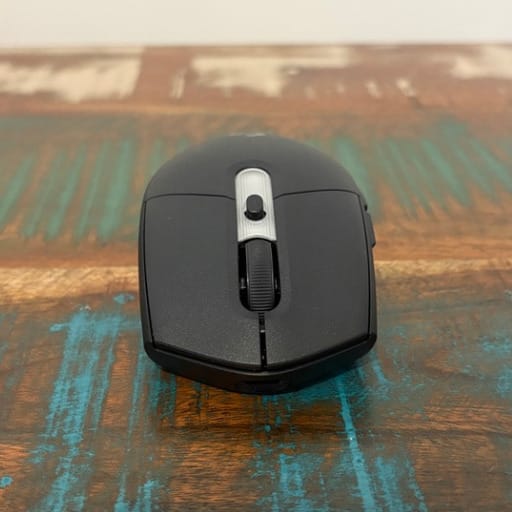
The G305 X Superlight keeps the same compact, symmetrical outline that longtime Logitech fans will recognise instantly. It is a short mouse with a noticeably low profile, and the rear end tapers in quite sharply rather than bulking out like many modern gaming mice.
That tapering shape is what makes this mouse so well suited to a fingertip grip. There is plenty of room underneath the palm to shift the mouse quickly across a pad, and the narrower rear means fingers naturally rest along the sides rather than being forced into an awkward spread.
Despite its small footprint, the sides flare out just enough that it never feels cramped in hand. Users with a claw grip, resting the ring and little finger against the mouse rather than lifting them entirely, will find just as much comfort as those who prefer a lighter fingertip touch.
A subtle overhang along the rear edge helps fingers tuck underneath the shell instead of sliding upward during fast flicks. It is a small detail, but it adds a surprising amount of security when whipping the mouse across a mat during intense moments.
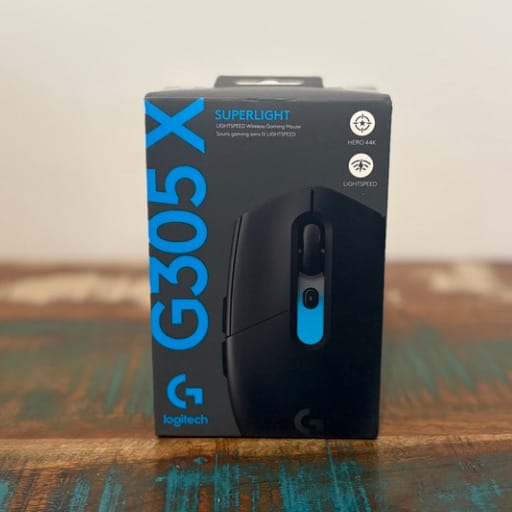
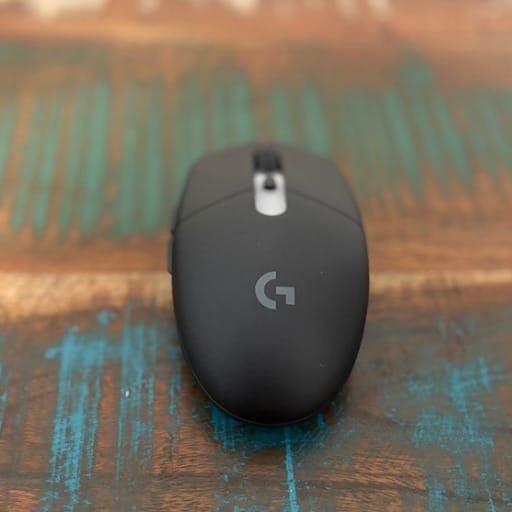
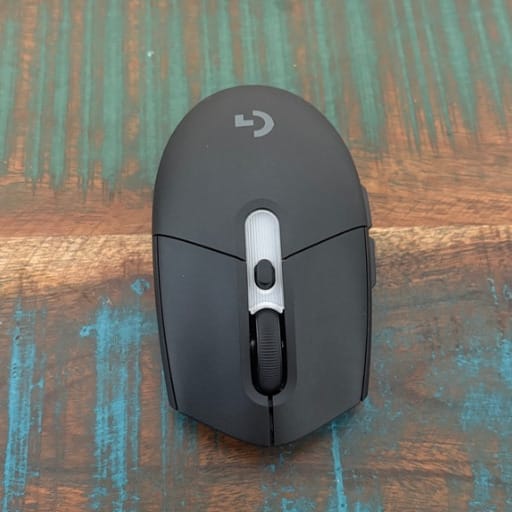
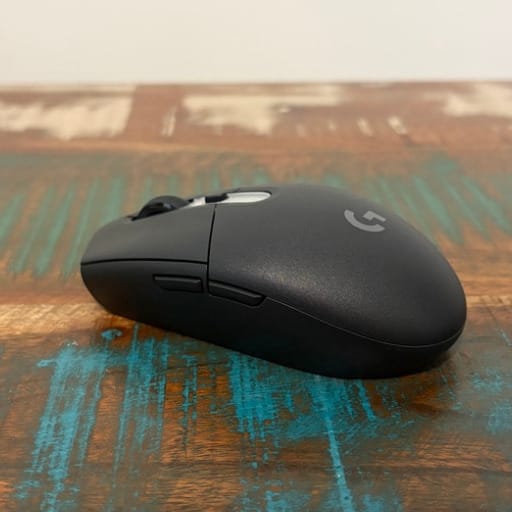
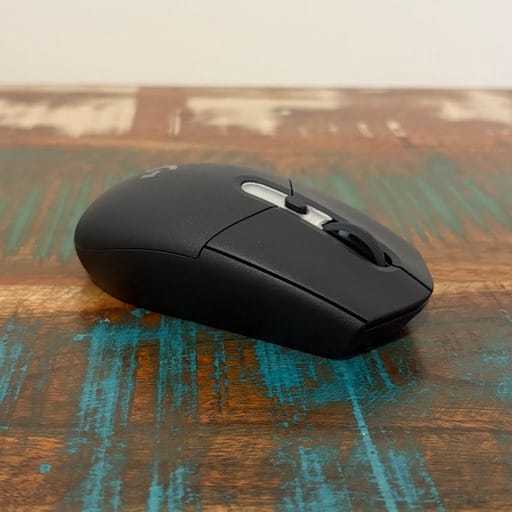
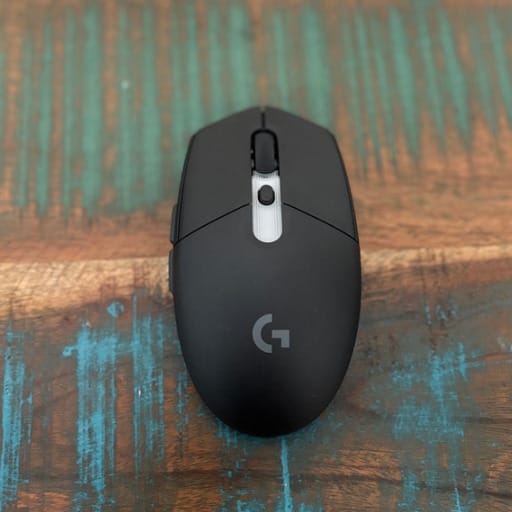
The biggest transformation compared to earlier G305 models is the weight. At 61 grams, this is a substantial cut from the older Lightspeed version, and the difference is immediately noticeable the first time the mouse is picked up.
That lighter build makes rapid direction changes feel almost effortless, and it reduces the fatigue that can build up during long sessions with heavier mice. It is a genuine change in how the mouse feels to use, not just a number on a spec sheet.
Six buttons make up the control layout, covering the standard left click, right click, middle click, forward and back thumb buttons, plus a dedicated DPI cycling button positioned just behind the scroll wheel. It is a simple, no-frills arrangement rather than the button-heavy layouts found on some rivals.
A small strip of RGB lighting sits just behind that DPI button, and while it is far from an elaborate lighting show, it adds a touch of personality to what is otherwise a fairly utilitarian design. It can be synced with other Logitech G gear through the company’s software.
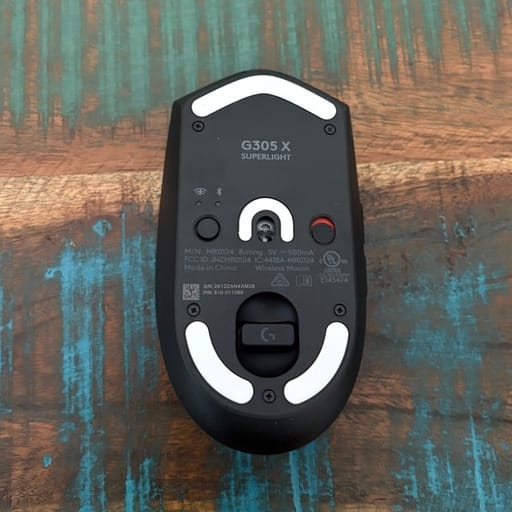
Flip the mouse over and there is a neat storage bay built into the underside specifically for the USB-A wireless dongle. It is a genuinely useful inclusion for anyone who travels with the mouse or swaps it between multiple machines, since there is no separate dongle to misplace.
A sliding switch controls power on the underside, and a separate button lets the mouse switch between its 2.4GHz wireless connection and Bluetooth. Both controls are easy to reach without being so exposed that they get bumped accidentally during play.
One of the more unusual and welcome design choices on this mouse is a set of exposed screws on the underside that give direct access to the internals. That access exists specifically so the rechargeable battery can be swapped out by the user down the track.
Most gaming mice hide their internal screws under glued-down glide pads, which usually means destroying the feet just to get inside, or they use a battery that is fixed in place and effectively unreplaceable. Logitech has avoided both of those pitfalls here.
Instead, the battery sits in place with simple clips, making it straightforward to remove and replace once the shell is opened. It is the kind of repairability feature that extends the practical lifespan of the mouse well beyond its warranty period.
At the front of the shell is a USB-C port, used both for charging and for a fully wired connection when preferred. Its placement is sensible and keeps the charging cable well out of the way of natural finger movement during play.
The glide feet on the base are reasonably smooth, though they are not the largest pads available on the market. They perform well on most cloth and hard gaming surfaces, even if dedicated glide enthusiasts might eventually look at aftermarket replacements.
Build quality across the shell feels solid for a mouse this light, with no obvious flex or creak when gripped firmly. The matte black finish on this particular colourway also does a good job of resisting fingerprints and smudges during extended use.
Key Features
At the heart of the G305 X Superlight is Logitech’s updated HERO 44K sensor, capable of tracking up to 44,000 DPI. That is an enormous jump in raw sensitivity range compared to earlier G305 models and puts it in line with sensors found in far pricier gaming mice.
Alongside that DPI ceiling, the sensor supports tracking speeds of up to 678 inches per second, meaning even the fastest, most aggressive swipes across a mousepad are read accurately without skipping or misreading position.
Connectivity is where this mouse really separates itself from budget alternatives, offering genuine tri-mode support. Gamers can plug in the Lightspeed wireless dongle for the lowest latency connection, pair over Bluetooth for general use with laptops and other devices, or connect directly with the included USB-C cable.
That flexibility means the same mouse can comfortably move between a dedicated gaming rig, a work laptop, and a tablet or secondary device, without needing separate hardware for each scenario.
Logitech’s Lightspeed wireless technology is built specifically to deliver a professional-grade, low-latency connection, and it is the same underlying technology used across the company’s higher-end esports mice. There is no perceptible lag between hand movement and on-screen response.
Polling rate is another standout figure, with the mouse supporting up to 8kHz when paired with Logitech’s optional PRO Wireless Receiver, sold separately. Even without that accessory, the standard wireless connection still delivers a smooth, responsive experience for the vast majority of games.
Battery life is genuinely impressive, with Logitech rating the mouse for more than 130 hours on a full charge. That kind of longevity means most gamers will only need to plug in for a top-up once every week or two, depending on daily usage.
Fast charging is also built in, with just two minutes on the USB-C cable delivering roughly 3.5 hours of additional play time. For anyone who forgets to charge peripherals until the last minute, that quick top-up is a genuinely handy safety net.
The dongle storage bay mentioned earlier deserves another mention here as a feature in its own right, since it directly supports the mouse’s travel-friendly design. Everything needed to use the mouse wirelessly stays contained within the mouse itself.
Software support comes through Logitech’s G Hub application, which allows DPI stages, button assignments, lighting behaviour and polling rate to all be configured and saved. Profiles can be tied to specific games so settings switch automatically.
The user-replaceable battery, accessed through those exposed screws on the base, is a feature more commonly associated with premium tools than budget-friendly gaming mice. It reflects a broader shift toward repairable hardware that lasts longer in daily use.
Six programmable buttons give enough flexibility for most games, particularly first-person shooters and general desktop tasks, where a simpler button layout is often preferred over a dense array of extra inputs.
Despite all of the added technology packed inside, Logitech has kept the shell itself refreshingly simple, avoiding the temptation to bolt on extra buttons or complicated scroll wheel functions just for the sake of a longer spec sheet.
The table below summarises the core specifications for quick reference.
| Specification | Detail |
|---|---|
| Sensor | Logitech HERO 44K |
| Maximum DPI | Up to 44,000 |
| Tracking speed | Up to 678 IPS |
| Weight | Approximately 61g |
| Buttons | Six |
| Connectivity | Lightspeed wireless, Bluetooth, USB-C wired |
| Polling rate | Up to 8kHz with optional PRO Wireless Receiver |
| Battery life | 130+ hours per charge |
| Fast charging | 3.5 hours of use from 2 minutes charging |
| Colour reviewed | Black |
Experience Using the Product and Performance
Picking up the G305 X Superlight for the first time after using a heavier mouse is a genuinely eye-opening experience. The reduced weight makes flicks and swipes feel almost weightless, and it becomes obvious very quickly why Logitech chose to carry the Superlight name into this smaller shape.
During fast-paced first-person shooters, that low weight translates directly into quicker target acquisition. Sudden direction changes require far less physical effort, which pays off over long sessions where fatigue would otherwise start to slow reaction times.
The HERO 44K sensor tracks smoothly across a wide range of movement speeds, from slow, deliberate aim adjustments in tactical shooters through to rapid, wide swings needed in faster arena-style games. There is no sign of the sensor losing track or jittering during those transitions.
Wireless performance through the Lightspeed dongle feels every bit as responsive as a wired connection during actual play. There is no perceptible input delay, and the connection remains stable even in busy environments with multiple wireless devices nearby.
Switching over to Bluetooth mode for general desktop use, such as browsing or working on a laptop away from the gaming setup, is straightforward via the dedicated connection button on the base. The mouse remembers previous pairings, so switching back and forth between devices is quick.
Bluetooth mode naturally trades a small amount of responsiveness for convenience, which is expected and entirely appropriate for non-gaming tasks like document editing, web browsing or media control, where ultra-low latency simply is not necessary.
The physical click feel on the primary buttons is crisp and consistent, with a resistance that sits on the lighter side rather than requiring a firm press. That lighter actuation suits rapid-fire clicking in competitive games without feeling mushy or imprecise.
There is no noticeable wobble or rattle in the main buttons, even after repeated aggressive clicking during intense gaming sessions. The switches feel tightly assembled, which contributes to a reassuring sense of build quality despite the mouse’s minimal weight.
Click noise is kept relatively low, in keeping with Logitech’s general house style for its gaming mice. That makes it a comfortable option for shared spaces, late-night gaming sessions, or streaming setups where background clatter can be picked up by a microphone.
The scroll wheel performs its basic job reliably, cycling through weapon selections, browser tabs and menu items without skipping steps. The individual detents are on the softer side rather than sharply defined, which some users may prefer for smoother, quieter scrolling.
The forward and back thumb buttons are positioned within easy reach for a fingertip or claw grip, without requiring the thumb to stretch awkwardly. They provide a satisfying, tactile click that makes them easy to use for secondary actions like reload or ability activation.
The dedicated DPI button behind the scroll wheel makes it simple to cycle sensitivity on the fly, which is particularly handy when switching between a fast-paced shooter and a slower, precision-focused game like a strategy title.
Testing the mouse across a range of surfaces, from cloth mousepads to harder plastic mats, showed consistent glide performance. It is not the absolute smoothest mouse available, but it never felt sticky or inconsistent during rapid movement.
Long gaming sessions highlighted just how much of a difference the reduced weight makes to overall comfort. There was noticeably less strain on the wrist and fingers compared to heavier wireless mice used previously, particularly during multi-hour play sessions.
The symmetrical shape also makes this a solid option for left-handed users, since there is no contouring that favours one hand over the other. That inclusivity is a nice touch for a mouse in this shape category, where many rivals lean heavily toward right-handed ergonomics.
Battery performance lived up to Logitech’s stated figures during extended use, with the mouse comfortably lasting well over a week of regular gaming and general use before needing a top-up. That kind of longevity removes a lot of the anxiety around remembering to charge peripherals.
The fast-charging feature proved genuinely useful on one occasion when the battery ran low unexpectedly. A brief two-minute plug-in was enough to squeeze out several more hours of play, avoiding an unwanted pause mid-session.
Testing the higher 8kHz polling rate, available with the optional PRO Wireless Receiver, showed the kind of subtle improvement that is really only noticeable in extremely high frame rate scenarios. Most day-to-day gaming feels identical between 1kHz and higher polling rates.
Running at the standard 1kHz setting proved to be the more practical choice for most situations, since it preserves battery life significantly compared to the higher polling options, without sacrificing any noticeable responsiveness during normal play.
Compared with Logitech’s own G Pro X Superlight 2 DEX, this mouse trades some of that model’s premium competitive polish for a more compact, travel-friendly shape and a friendlier price position, while still holding its own on core sensor performance.
Set alongside the Logitech G325 Lightspeed, the G305 X Superlight feels like the more specialised option for players who specifically want the smallest possible shape, while the G325 spreads its appeal a little wider with a slightly larger footprint.
For those who find six buttons limiting, the Logitech G502 X Plus remains a strong alternative within the same brand, offering a more elaborate button layout and scroll wheel for players who want extra customisation options.
Against something like the Logitech G Pro X2 Superstrike, the G305 X Superlight is clearly aimed at a different type of buyer, favouring a smaller shape and simpler feature set over the extra switch technology and competitive tuning found in that higher-tier model.
Everyday desktop tasks, from spreadsheet work to general web browsing, feel just as comfortable as gaming sessions thanks to the light weight and compact shape. It never feels like overkill to use this mouse outside of games.
The dongle storage compartment proved its worth during testing away from the main desk setup, with the wireless receiver staying safely tucked inside the mouse rather than getting lost in a bag or left behind entirely.
Opening the shell to access the battery compartment required a firm, careful approach, since the front edge of the casing fits together tightly. Patience and a steady hand made the process manageable, and the payoff of a genuinely replaceable battery makes the initial effort worthwhile.
G Hub software made setting up custom DPI stages and button assignments a quick process, with changes syncing to the mouse almost instantly. Lighting customisation, while limited to that single RGB strip, synced smoothly with other Logitech G peripherals on the same desk.
Switching between wired and wireless modes during testing showed no meaningful difference in day-to-day feel, aside from the small trade-off in polling rate when using the USB-C cable directly. Both modes felt equally reliable for everyday gaming.
The mouse handled sudden, fast tracking movements in high-speed shooters without any dropped inputs, reinforcing just how capable the HERO 44K sensor is even in a mouse built primarily around a lightweight, budget-conscious design.
For anyone coming from an older G305 model, the jump in comfort, weight and sensor accuracy makes this new version feel like a genuinely different mouse, rather than a simple cosmetic refresh of the original.
Conclusion
The Logitech G305 X Superlight takes a shape that already had plenty of fans and gives it the kind of internal overhaul that finally matches its compact, travel-friendly design. The weight reduction alone transforms how the mouse feels in hand, while the HERO 44K sensor brings genuine competitive-grade performance.
Practical touches like the built-in dongle storage, user-replaceable battery and tri-mode connectivity make this a mouse that fits naturally into a range of setups, whether that is a dedicated gaming rig, a work laptop, or a bag destined for a LAN event.
Battery life stands out as one of its strongest attributes, easily lasting well over a week of regular use, and the fast-charging feature adds a genuinely useful safety net for anyone who forgets to plug in ahead of time.
For gamers who specifically want a small, symmetrical mouse suited to a fingertip or claw grip, this refreshed G305 delivers a compelling mix of comfort, capability and thoughtful design choices that make it a strong pick within Logitech’s current lineup.