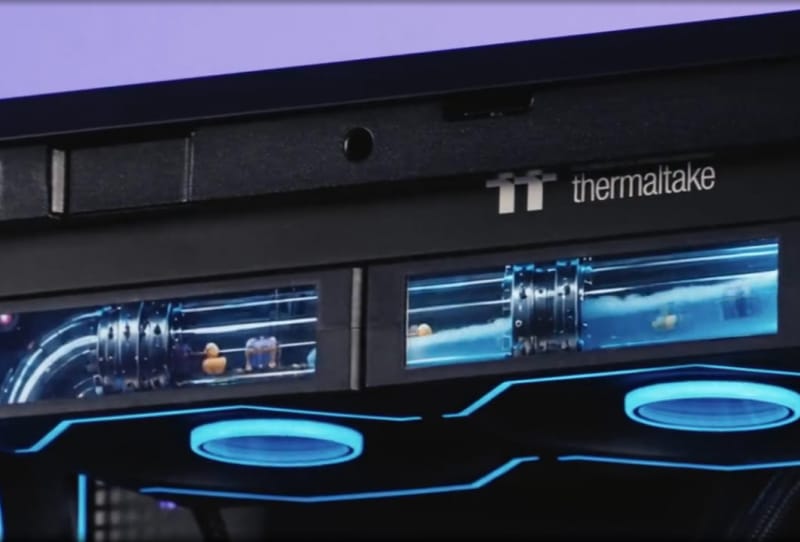
The Thermaltake Swafan Ultra 120 is a new 120 mm case fan built around a four-inch screen bolted onto the side of its frame, letting it show live system stats, the weather, or two playable retro mini-games. It is a genuinely odd idea for a cooling product, but it follows a pattern Thermaltake has leaned into for years: turning a part nobody usually looks at twice into something a builder can show off.
Key takeaways
- ✓Each Thermaltake Swafan Ultra 120 fan has its own four-inch LCD mounted on the frame.
- ✓Screens daisy-chain together and sync through the TT RGB Plus 3.0 software.
- ✓Displays can show live system stats, weather, time, or custom images and animations.
- ✓Two playable retro mini-games, RGB Runner and Crazy Climber, run on the built-in controller.
- ✓Kits ship with both standard and reverse fan blades plus magnetic, modular cabling.
Unlike simple addressable RGB fans that just cycle through colours, the Swafan Ultra 120 gives every single fan its own small display, and those displays can be chained together to behave as one continuous panel across a case. That makes it one of the more unusual additions to the PC cooling market in recent memory.
Table of Contents
A Screen Built Into Every Fan Housing
Each Thermaltake Swafan Ultra 120 fan carries a four-inch LCD panel mounted on the side of its frame, rather than hidden behind the blades or limited to the hub, which is where most screen-equipped coolers put their displays. When several fans are installed together, the panels automatically detect each other and link up in a daisy-chain arrangement, so a three-fan set can effectively act as one wide strip of screen real estate running down the front or top of a case.
Control sits inside Thermaltake’s TT RGB Plus 3.0 software, the same platform the company uses across its broader lighting and fan ecosystem. From there, a builder can upload custom images or short animations, pull up live system information such as temperatures and clock speeds, or simply display the local time and weather. It turns a cooling component into a secondary readout that sits inside the case rather than on a monitor.
Two Mini-Games Hidden Inside a Cooling Fan
The more eccentric feature is what Thermaltake has tucked into the fan’s built-in controller: two playable retro-style games. RGB Runner is a side-scrolling run-and-jump title, while Crazy Climber has players scaling upward in a vertical climbing format. Neither is going to replace a proper handheld, but the novelty of a cooling fan doubling as a tiny arcade cabinet is squarely in line with Thermaltake’s history of unusual add-ons.
It also puts the Swafan Ultra 120 in a small but growing club of PC components that do more than their core job. Liquid cooler pumps with built-in screens have become common over the past few years, and several motherboard and case makers now offer small embedded displays of their own. Thermaltake’s approach stands out mainly because the screen lives on something as disposable and interchangeable as a 120 mm fan, rather than a cooler block or case panel.
Familiar Swafan Hardware Underneath the Novelty
Strip away the screen and the games, and the Swafan Ultra 120 is still recognisably part of Thermaltake’s existing Swafan line. It keeps the magnetic, modular fan cables introduced on earlier Swafan Unify models, which make wiring a bank of case fans to a motherboard noticeably tidier than dealing with a tangle of individual cables. The blades themselves are also easy to pop off for cleaning, a feature that matters more than it sounds once dust starts building up inside a case over several months of use.
Each kit includes both standard and reverse fan blades for every frame, which lets builders set up push or pull airflow configurations without buying a second set of fans. That flexibility is worth factoring in when choosing the right case for a build, since airflow direction can change depending on where intake and exhaust fans sit relative to radiators or dust filters.
| Feature | Detail |
|---|---|
| Fan size | 120 mm |
| Screen size | 4-inch LCD per fan |
| Screen sync | Automatic daisy-chain across multiple fans |
| Software | TT RGB Plus 3.0 |
| Display content | Images, animations, system stats, weather, time |
| Built-in games | RGB Runner, Crazy Climber |
| Cabling | Magnetic, modular connectors |
| Blade options | Standard and reverse blades included |
Why Screens on Case Fans Matter for Builders
On a practical level, a screen on a case fan is not going to lower temperatures or quiet down a system. What it does offer is another layer of personalisation for builders who already treat their PC as a display piece, something tempered glass panels and RGB lighting have been doing for over a decade. Being able to glance at live clock speeds or temperatures from inside the case, without opening a monitoring app, adds a small but genuine convenience too.
There is a broader pattern worth noting here. As components keep gaining small embedded displays, from AIO coolers to motherboards, the line between a part’s function and its role as an interface keeps blurring. That shift echoes a point raised in a related piece on why real-time interfaces often matter more than raw power: people increasingly value being able to see what a system is doing right now, even on parts as unglamorous as a cooling fan.
Thermaltake has not detailed exact availability windows for the Swafan Ultra 120 outside its own Swafan Ultra 120 product listing, so builders keen on the fan should keep an eye on Thermaltake’s official site for regional stock updates.
Frequently asked questions
What does the screen on the Thermaltake Swafan Ultra 120 actually show?
Each fan’s four-inch LCD can display custom images or animations, live system stats like temperature and clock speed, or simply the local time and weather, all controlled through Thermaltake’s TT RGB Plus 3.0 software.
Can multiple Swafan Ultra 120 fans work together as one display?
Yes. The screens automatically detect neighbouring fans and link up in a daisy-chain, allowing several units installed together to behave as one continuous strip of display across a case.
Do the built-in games affect the fan’s cooling performance?
No. RGB Runner and Crazy Climber run on the fan’s separate display controller and have no bearing on airflow, noise, or cooling output, which remain governed by the fan’s standard blade and motor design.
Does the Swafan Ultra 120 include both normal and reverse fan blades?
Yes. Every kit ships with standard and reverse blades for each fan frame, letting builders configure push or pull airflow setups without purchasing additional fans.