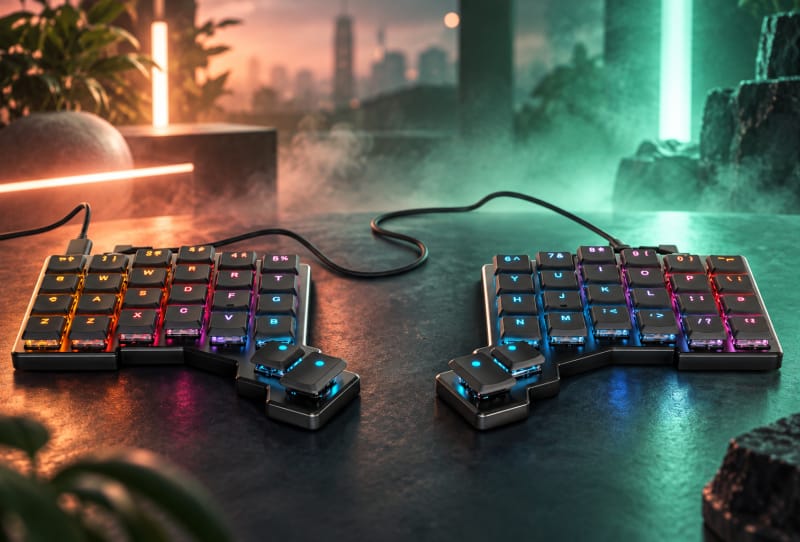
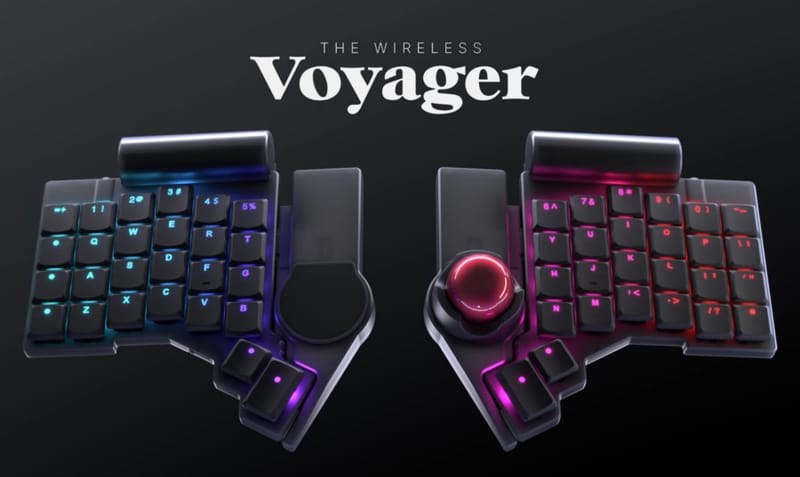
ZSA has launched the Wireless Voyager keyboard, a cordless version of its split ergonomic keyboard that swaps cables for Bluetooth while keeping user-replaceable batteries and full QMK support. It marks a notable reversal for a company that has spent years publicly arguing against building a wireless ergonomic board, citing worries about reliability, latency and battery longevity.
Key takeaways
- ✓ZSA's Wireless Voyager adds Bluetooth and a battery pack to each half of the split keyboard
- ✓Battery life reaches up to 30 days with RGB off, or 7 days with RGB and Navigator accessories on
- ✓The keyboard keeps the 52-key Choc V1 switch layout and full Oryx/QMK configurator support
- ✓A TRRS cable can still link both halves for easier charging and wired syncing
- ✓ZSA had previously resisted building a wireless ergonomic keyboard over reliability concerns
The change arrives without touching the core design that made the original Voyager popular among keyboard enthusiasts. Buyers get the same 52-key split layout, the same Choc V1 low-profile switch standard, and the option to bolt on ZSA’s modular Navigator trackpad or trackball attachments. The only visible difference is a battery pack and wireless module strapped to the top of each half, which is how ZSA has managed to add Bluetooth without redesigning the keyboard from scratch.
Table of Contents
What’s new in the ZSA Wireless Voyager keyboard
Each half of the ZSA Wireless Voyager keyboard now connects independently over Bluetooth, both to the host computer and to the other half, so the two sides of the keyboard can sit as far apart as a typist needs without a cable running between them. That is the single biggest change ZSA has made, and it directly answers years of requests from a community that generally dislikes being tethered to a desk by a coiled cable linking the two halves.
Despite the wireless upgrade, ZSA has kept a TRRS cable option for those who want it. Plugging the halves together still works, mainly as a convenient way to charge both sides at once or keep them in sync without worrying about pairing. It is a sensible compromise: wireless for daily use, wired when it is more practical.
Software support has not been scaled back either. The new board still runs through Oryx, ZSA’s browser-based configurator built on QMK, the open-source keyboard firmware project that underpins remapping, layers and macros on a huge range of mechanical keyboards. Anyone who has already learned Oryx on the original Voyager will feel instantly at home, and existing layouts should carry across without much fuss.
Battery life and what affects it
Battery life is where the trade-offs of going wireless usually show up, and ZSA has been upfront about the numbers. With RGB backlighting switched on and both the Navigator trackpad and trackball attached and active, the company rates the Wireless Voyager keyboard for up to seven days on a single charge. Strip away the lighting and the trackpad accessories, and that figure stretches to roughly 30 days of use on just the keyboard halves alone.
That spread makes sense given how power-hungry RGB lighting and additional wireless peripherals tend to be on any battery-powered device. It also gives buyers a reasonably clear picture of what to expect depending on how they configure their setup, rather than a single vague marketing figure.
| Configuration | Estimated battery life |
|---|---|
| Keyboard only, RGB off | Up to 30 days |
| Keyboard with RGB and Navigator trackpad/trackball | Up to 7 days |
Why ZSA held out on wireless for so long
ZSA’s resistance to wireless was never a secret. The company had repeatedly pointed to concerns around input latency, long-term reliability of rechargeable cells, and the general complexity of adding radios to a product built for people who often type for hours at a stretch professionally. Split ergonomic keyboards also tend to attract programmers and writers who are particularly sensitive to lag or dropped keystrokes, which raises the stakes for getting a wireless implementation right.
The eventual decision to ship a wireless model suggests Bluetooth technology, or at least ZSA’s confidence in implementing it, has matured enough to meet that bar. Choosing user-replaceable batteries rather than sealed internal cells is a telling detail too. It signals a product built to last years rather than one where a degraded battery eventually forces a replacement purchase, a criticism often levelled at wireless peripherals from other manufacturers.
How it fits the wider keyboard market
Wireless mechanical keyboards are no longer a niche category. Plenty of mainstream boards now ship with Bluetooth or low-latency dongles, and the ergonomic keyboard segment has largely been playing catch-up. Rivals such as other split ergonomic keyboards like the Keychron Orca Echo have already explored similar territory, blending split layouts with alternative input methods like trackballs.
More broadly, the shift mirrors what has happened across the wider peripheral market, where wireless keyboards such as the ASUS ROG Azoth 96 HE and the Logitech G915 X TKL Lightspeed have demonstrated that going cordless no longer has to mean compromising on switch feel or responsiveness. ZSA entering that space with its own take, backed by replaceable batteries and open QMK firmware, gives ergonomic keyboard buyers a genuine wireless option from a brand they already trust for build quality.
The inclusion of shine-through double-shot PBT keycaps, a dedicated carrying case and various accessories with the keyboard also points to ZSA treating this as a premium, travel-friendly product rather than a stripped-down variant. For anyone already using tools like QMK-based configurator tools like Wootility to manage other keyboards, the Wireless Voyager slots into a familiar workflow of deep remapping and layer customisation, just without the cable.
Frequently asked questions
Does the ZSA Wireless Voyager keyboard still support QMK and Oryx?
Yes. The wireless model runs on the same QMK-based firmware and uses ZSA’s Oryx configurator for remapping keys, building layers and setting up macros, just as the wired Voyager does.
Can both halves of the keyboard still be connected with a cable?
Yes. A TRRS cable can still link the two halves, which is useful for charging both sides together or keeping them synced without relying on Bluetooth pairing.
How long does the battery last on a single charge?
ZSA rates the keyboard for up to 30 days with RGB backlighting disabled and no Navigator accessories attached, dropping to around 7 days with RGB enabled and both the trackpad and trackball connected.
What switches does the Wireless Voyager use?
It uses the same Choc V1 low-profile switch standard as the original wired Voyager, so existing switch and keycap compatibility carries over to the new model.