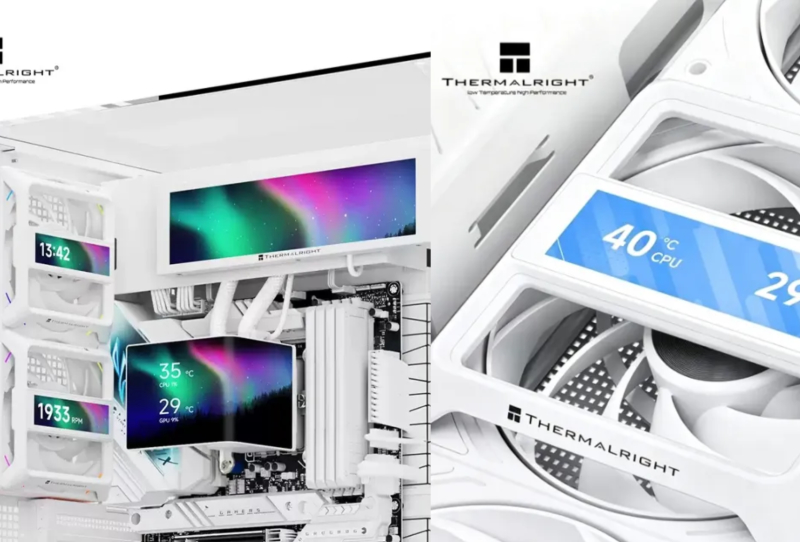
The Thermalright Fan Frame Vision-1 has just given PC builders another way to dress up the inside of a case, and this time the canvas is the fan itself. Rather than sitting on a cooler pump or a case panel, this small IPS screen clips directly onto a standard 120mm fan, turning what used to be a spinning blur of plastic into a readable display for temperatures, fan speeds, or a custom animation.
It is a simple idea executed in a way that fits neatly into the current obsession with visible PC internals. Tempered glass panels made components something to look at rather than hide, and now accessories like this one are pushing that trend a step further by making even the humble case fan part of the show.
Table of Contents
What the Fan Frame Vision-1 actually does
The unit itself is a 3.69-inch IPS panel housed in a frame that clips over the front of a fan using magnetic mounts. Those magnets grab onto the metal screws at each corner of a standard 120mm fan, so no adhesive or drilling is involved. Builders can choose a black or white frame and mount it either horizontally or vertically, depending on how the fan sits in the case.
Thermalright says the frame leaves enough clearance that it does not choke airflow, despite sitting right in front of the blades. That is an important claim given the entire point of a case fan is to move air, and a screen bolted across its face would be self-defeating if it throttled performance in the process.
Power and data come from a USB 2.0 hub inside the case, with an included adapter for anyone who wants to run it straight off a spare USB-A header instead. Content on the display is managed through Thermalright’s TRCC software, the same tool the company uses for its other LCD accessories, and that software has already been ported to Linux, so builders running SteamOS or another Linux-based gaming setup are not locked out.
Fitting the fan screen into a wider theme
The obvious pairing here is with the growing number of AIO coolers that already ship with their own displays, since those pump-top screens have become almost standard on higher-end all-in-one liquid coolers. Adding a matching screen to a case fan means a builder can carry the same theme, whether that is a live temperature readout or custom artwork, across multiple points inside the case rather than having it confined to one component.
Because the mounting system relies on standard screw positions, the Fan Frame Vision-1 should fit most conventional 120mm fans without modification. That includes many of the fans found in high-airflow cases built around big fan walls, where several fans sitting in a row would make for an eye-catching row of synchronized mini displays.
Builders leaning towards understated cases that favour clean interiors may find less appeal here, since the whole point of the accessory is to draw attention rather than blend in. That is not a criticism so much as a reminder that this product is aimed squarely at builders who already enjoy RGB lighting and visible components, not those chasing minimalism.
Where it will not fit
The standardised mounting system is also the accessory’s main limitation. Thermalright’s own larger fans, such as the TL-US24 and TL-US36, use offset screw placements rather than the corner-mounted screws found on typical 120mm fans. Since the magnetic studs on the Fan Frame Vision-1 need those corner screws to grab onto, it simply will not attach to fans built on a different screw layout.
That rules out a chunk of oversized or unconventional fan designs, though the vast majority of 120mm case fans sold today use the same four-corner screw pattern this accessory is built around. Anyone running a mix of fan sizes and brands in one build should check screw placement before assuming a snap-on fit.
Why this matters for builders
None of this changes how well a PC actually performs. A screen bolted to a fan will not lower temperatures or speed up frame rates, and Thermalright is not claiming otherwise. What it does offer is another layer of personalisation for builders who already treat the inside of a case as something worth designing, not just assembling.
For anyone already deep into modular cases designed around heavy customisation, an accessory like this slots in naturally alongside RGB fans, custom cable combs, and themed lighting profiles. It also signals where the wider peripheral market is heading, with more component makers treating displays as a standard feature rather than a premium extra reserved for flagship coolers.
Whether the Fan Frame Vision-1 becomes a common sight in gaming builds will likely depend on how easily it reaches mainstream retailers rather than niche import channels, and on how well Thermalright’s Thermalright software ecosystem keeps expanding to support it alongside the company’s existing cooling lineup.