
Microsoft has started rolling out Windows 11 Cloud Rebuild, a new recovery tool that wipes a PC and reinstalls the operating system along with fresh drivers pulled straight from Windows Update, even when the machine refuses to boot normally. The feature is landing through optional preview update KB5127936 for devices on Windows 11 25H2 and 26H2, and it marks one of the more practical additions to the operating system’s recovery toolkit in years.
Key takeaways
- ✓Windows 11 Cloud Rebuild wipes a PC and reinstalls Windows plus fresh drivers from Windows Update.
- ✓It rolls out via optional preview update KB5127936 for Windows 11 25H2 and 26H2.
- ✓Unlike Cloud download in Reset this PC, it can run even when Windows won't boot normally.
- ✓The feature needs a working WinRE partition, network access, and drivers published on Windows Update.
- ✓IT administrators can trigger it remotely on managed fleets using the Recovery CSP.
For anyone who has ever sat through a corrupted boot sequence with no working installer handy, the pitch is straightforward. Instead of hunting for a USB recovery drive or relying on an existing local image that may already be the source of the problem, Cloud Rebuild fetches a clean copy of Windows and matching drivers directly from Microsoft’s servers.
Table of Contents
How Windows 11 Cloud Rebuild actually works
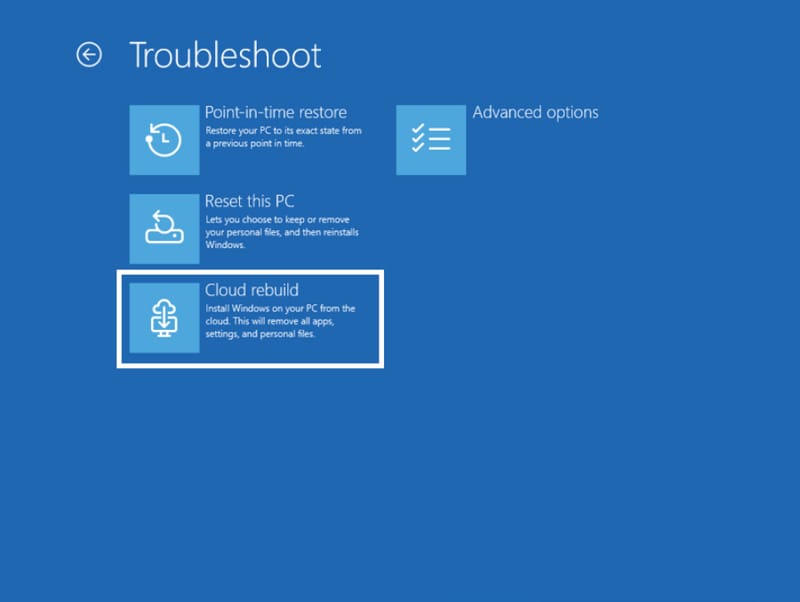
According to reporting from VideoCardz, the option can be triggered two ways. On a PC that still starts up fine, it sits under Settings > System > Recovery as a tool labelled “Rebuild PC”. On a machine that keeps failing to start, Windows drops automatically into the Windows Recovery Environment, where Cloud Rebuild appears inside the Troubleshoot menu alongside the existing repair options.
That second scenario is the real point of difference. Windows already has a Cloud download setting buried in the Reset this PC flow, but Microsoft has confirmed that option depends on an intact local installation to function. Windows 11 Cloud Rebuild does not. It is designed specifically for situations where the operating system itself is too damaged to cooperate, pulling everything it needs from the cloud instead of the local disk.
Running the process is not a gentle repair. It wipes the primary drive entirely, removing installed programs, local files, and user accounts in the process. Only data already synced to the cloud survives the rebuild. Microsoft has also added a sanitize mode for anyone preparing a machine to be resold or handed to someone else, which performs a secure erase of the disk rather than a standard wipe.
Built with IT departments in mind too
Home users are not the only audience here. System administrators managing fleets of company laptops can trigger a Cloud Rebuild remotely using the Recovery configuration service provider, or Recovery CSP, letting a help desk reset a struggling machine without physically touching it. That capability slots neatly alongside Microsoft’s broader push toward self-healing endpoints across managed Windows 11 deployments.
The requirements are fairly specific, though. A working WinRE partition has to be present on the drive, and the PC needs active network connectivity over Wi-Fi or Ethernet to even start the process. Helpfully, WinRE can now reuse saved Wi-Fi profiles from the main Windows installation, so users should not need to re-enter network passwords just to begin a rebuild.
There is one important catch. Microsoft has confirmed that the rebuild will fail outright if a system’s drivers are not published on Windows Update. That puts some of the responsibility back on PC manufacturers, since any hardware relying on manufacturer-specific drivers that have never been submitted to Microsoft’s servers simply will not get what it needs during the process.
Why this matters for everyday troubleshooting
Windows reliability has had a rough run lately. Microsoft has been dealing with everything from a recent Windows 11 bug that was crashing PCs with RGB software to an earlier update that reset custom mouse cursors, and ongoing frustrations over Windows 11 bloatware on new laptops have not helped the platform’s reputation for a clean out-of-the-box experience. A built-in rebuild tool that can recover a dead system and fetch current drivers in one pass addresses a genuine pain point that has existed since Windows began shipping on an enormous range of hardware.
It also fits a pattern Microsoft has been following with other support initiatives, including a new refund portal for Windows 11 licensing issues, of trying to reduce how often users need third-party tools or manual workarounds to fix basic problems. Whether Cloud Rebuild becomes a genuine alternative to keeping a USB installer in a drawer will depend on how reliably it performs once it reaches general availability, but the concept closes a real gap in the existing recovery options.

Frequently asked questions
What is Windows 11 Cloud Rebuild?
It is a recovery feature that wipes a PC’s primary drive and reinstalls Windows 11 along with current drivers downloaded from Windows Update, designed to work even when the existing installation cannot boot.
How is Cloud Rebuild different from the existing Cloud download reset option?
The Cloud download setting inside Reset this PC still needs a working local Windows installation to run. Windows 11 Cloud Rebuild operates from the Windows Recovery Environment and does not depend on the local installation functioning at all.
Will Cloud Rebuild delete personal files?
Yes. The process wipes the primary drive completely, removing installed software, local files, and user accounts. Only files already synced to the cloud will survive.
Is Windows 11 Cloud Rebuild available now?
It is currently rolling out through the optional preview update KB5127936 on Windows 11 25H2 and 26H2, which typically means a wider release follows in a future cumulative update once testing wraps up.