The Tuxedo Nano Pro Gen15 is a new Linux-first mini PC that pairs Intel’s freshly launched Core Ultra X7 358H processor with TuxedoOS, aimed squarely at developers and home lab users who want to run AI models locally rather than in the cloud. Tuxedo Computers, the German manufacturer behind the machine, has built it around Intel’s Panther Lake architecture and its Arc B390 integrated graphics, fitting both into a chassis barely bigger than a deck of playing cards.
Key takeaways
- ✓The Tuxedo Nano Pro Gen15 runs Intel's Core Ultra X7 358H chip with an Arc B390 integrated GPU
- ✓It measures just 110 x 117.5 x 49 mm but opens with only four screws for easy upgrades
- ✓Networking includes Wi-Fi 7, dual 2.5 GbE ports and Bluetooth 6
- ✓A 120 W external power supply runs the system, though Tuxedo has not disclosed the CPU's maximum TDP
- ✓The mini PC can drive up to four displays at once via its USB4, USB-C and HDMI outputs
That focus on local, private computing shows up in how Tuxedo talks about the machine. The company describes it as a tool for running “local, secure, sovereign” large language models, a pitch aimed at anyone wary of sending sensitive data to a third-party AI service. At the same time, Tuxedo doesn’t pretend the Nano Pro Gen15 is strictly for work. Because Intel’s graphics drivers are baked directly into the Linux kernel that TuxedoOS ships with, the company openly markets it as a capable, low-fuss mini gaming PC as well.
Table of Contents
What’s inside the Tuxedo Nano Pro Gen15
Despite measuring just 110 by 117.5 by 49 millimetres, the Nano Pro Gen15 is built to be opened up rather than sealed shut. Tuxedo says only four screws stand between the user and the internals, where the RAM, storage and wireless card are all upgradeable. That’s a notable design choice for a mini PC this small, since many compact systems solder components in place to save space.
The plastic chassis won’t win points for premium materials, but it keeps the unit light and likely helps with cost and thermal management in such a tight footprint. Power comes from a 120 W external supply connected via a barrel adaptor, a fairly standard approach for mini PCs in this class. Tuxedo hasn’t published the actual maximum TDP the Core Ultra X7 358H is configured to draw inside the chassis, which makes it hard to know exactly how hard the chip is being pushed versus its rated ceiling elsewhere.
| Spec | Detail |
|---|---|
| Processor | Intel Core Ultra X7 358H (Panther Lake) |
| Graphics | Intel Arc B390 integrated GPU |
| Dimensions | 110 x 117.5 x 49 mm |
| Operating system | TuxedoOS (Linux) |
| Power supply | 120 W external, barrel connector |
| Networking | Wi-Fi 7, dual 2.5 GbE, Bluetooth 6 |
| Max displays | Up to four simultaneous outputs |
Ports and connectivity on the Nano Pro Gen15
Networking is one area where Tuxedo hasn’t cut corners. The Nano Pro Gen15 includes Wi-Fi 7 for fast wireless connections, two 2.5 GbE ports for wired networking, and Bluetooth 6 for peripherals. It’s a sensible spread for a machine pitched at home labs and small server duties, where reliable, fast networking often matters more than raw CPU grunt.
Around the back sits the DC-in power port, the pair of 2.5 GbE ethernet jacks, two USB 3.2 Gen 2 Type-A ports, and two HDMI outputs. Those HDMI ports support the full HDMI 2.1 feature set under Windows, but only HDMI 2.0b under Linux for now, a limitation tied to how HDMI 2.1 support has been rolled out in the Linux kernel rather than any hardware shortfall. The front of the unit carries a USB4 port, a USB 3.2 Gen 2×2 Type-C port with DisplayPort 1.4a Alt Mode, another USB 3.2 Gen 2 Type-A port, and a 3.5 mm combo audio jack.
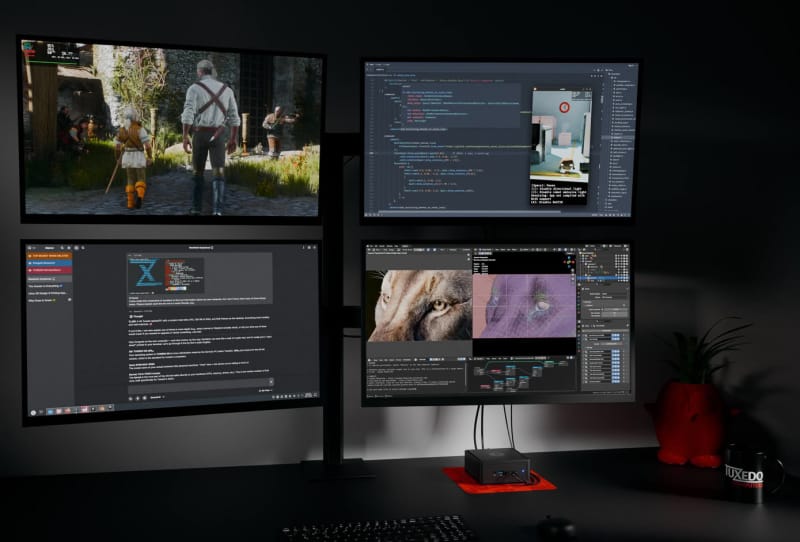
Between the front USB-C ports and the rear HDMI outputs, Tuxedo says the Nano Pro Gen15 can drive up to four displays at once, which is a genuinely useful figure for anyone setting it up as a multi-monitor workstation or a compact home server dashboard rig.
How the Nano Pro Gen15 stacks up against other mini PCs
Mini PCs built for Linux and local AI work are still a relatively small niche compared with the flood of Windows-focused compact systems on the market. Many rivals chase raw gaming performance with discrete-class graphics crammed into small cases, such as the far more powerful FEVM FA80G mini PC, which pairs a Ryzen 9 9950X3D with an RTX 5090. The Nano Pro Gen15 takes a different path, prioritising repairability, Linux compatibility and local AI inference over brute-force graphics horsepower.
Against workstation-leaning competitors like GIGABYTE’s BRIX mini PC, Tuxedo’s machine stands out for shipping Linux out of the box rather than treating it as an afterthought, since TuxedoOS drivers are integrated into the kernel from day one. That matters for developers who’d otherwise spend time wrestling with graphics drivers on a fresh Linux install. It’s a narrower proposition than playful compact builds like Acemagic’s NES-styled Retro X3, but the trade-off buys a tidier, more professional package.
For anyone weighing up options for a home server or always-on local AI box, it’s worth working through the broader considerations in a guide to choosing a mini PC for a home server, since factors like networking, upgradeability and power draw often matter more day to day than headline CPU specs.
What it means for buyers
The Nano Pro Gen15 won’t suit anyone chasing the highest frame rates or the most powerful integrated graphics on the market. What it offers instead is a tidy, upgradeable Linux machine that handles local AI workloads, home server duties and light gaming without demanding much desk space or technical fuss during setup.
Tuxedo hasn’t detailed regional availability or specific configuration options beyond the base chip and GPU pairing, so anyone interested should keep an eye on the company’s own listings for firmer details as the launch rolls out further.
Frequently asked questions
What processor does the Tuxedo Nano Pro Gen15 use?
It runs Intel’s Core Ultra X7 358H, a Panther Lake chip paired with Intel’s Arc B390 integrated graphics.
Can the Tuxedo Nano Pro Gen15 be upgraded?
Yes. Tuxedo designed it so only four screws need removing to access the RAM, storage and wireless card for upgrades or repairs.
Does the Nano Pro Gen15 run Windows?
It ships with TuxedoOS, a Linux distribution, though the HDMI ports do support the fuller HDMI 2.1 feature set under Windows if a user installs it separately.
How many monitors can it support?
Tuxedo says the Nano Pro Gen15 can drive up to four displays simultaneously using its USB4, USB-C and HDMI outputs together.