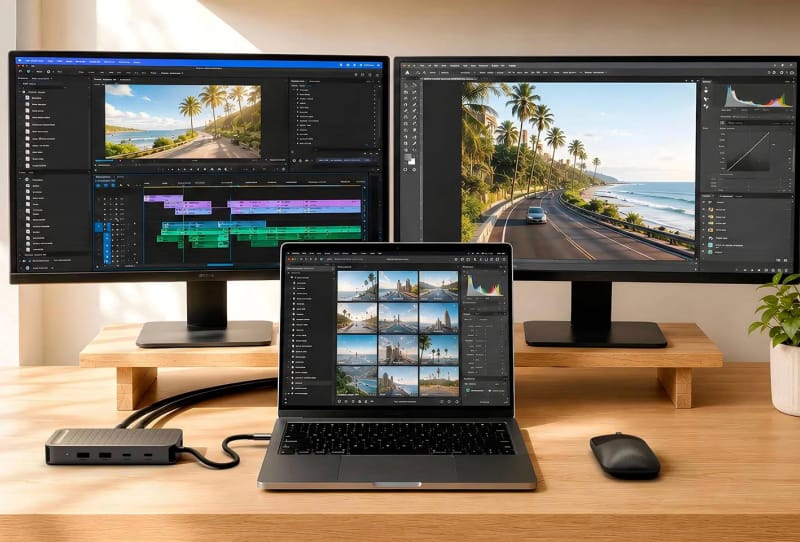
Satechi has launched the ExtendView USB4 adapter, a compact seven-port hub that drives two 4K monitors at 60Hz from a single USB4 cable, without needing extra drivers or DisplayLink software on either Mac or Windows laptops.
Key takeaways
- ✓The ExtendView USB4 adapter drives two 4K displays at 60Hz from a single USB4 cable.
- ✓It works with Mac and Windows laptops without DisplayLink software or extra drivers.
- ✓Seven ports include dual HDMI 2.0, two USB-A 3.2 Gen 2 and two USB-C 3.2 Gen 2 ports.
- ✓A dedicated power delivery port accepts up to 140W and passes through up to 125W to a laptop.
- ✓The aluminium hub weighs 168.5 grams and has a built-in 20.1cm braided USB4 cable.
The adapter targets a familiar problem for anyone working from a slim laptop: too few ports and no clean way to run multiple external displays. Satechi’s answer folds dual HDMI 2.0 outputs, four additional data ports and a dedicated power delivery line into a single aluminium housing small enough to toss in a bag.
Table of Contents
Seven ports built around the ExtendView USB4 adapter
The headline feature is the pair of HDMI 2.0 outputs, each capable of pushing a 4K display at 60Hz simultaneously. That matters for creative professionals and anyone running a multi-monitor desk setup, since many USB-C hubs on the market still top out at a single external display or force a trade-off between resolution and refresh rate once two screens are attached.
Beyond the video outputs, the hub includes two USB-A 3.2 Gen 2 ports and two USB-C 3.2 Gen 2 ports, all rated for data transfer speeds of up to 10Gbps. Those USB-C data ports are strictly for peripherals and storage though; they do not carry a video signal, so anyone wanting a third display will need a different solution. The seventh port handles charging only.
| Port | Count | Specification |
|---|---|---|
| HDMI 2.0 | 2 | 4K at 60Hz each |
| USB-A 3.2 Gen 2 | 2 | Up to 10Gbps data |
| USB-C 3.2 Gen 2 (data) | 2 | Up to 10Gbps data, no video |
| USB-C Power Delivery | 1 | Up to 140W in, 125W out |
Power delivery that keeps the laptop charged, not just connected
Docking a laptop usually means hunting for a separate charger once the ports fill up. Satechi has built around that with a dedicated USB-C power delivery port that accepts as much as 140W from an external charger and passes through up to 125W to the connected laptop. That is enough headroom for most high-performance ultrabooks and even some compact gaming laptops, so the ExtendView USB4 adapter can double as the only cable running to a desk.
The trade-off is that the charging port is dedicated to power only; it cannot be used for data or an external display. Given how often USB-C ports try to multitask, that clear division of labour should make the hub easier to live with day to day, since there is no guesswork about which port does what.
A short cable, a tidy build and no software to install
Rather than relying on a separate cable that can get lost in a bag, Satechi has built a 20.1cm braided USB4 lead directly into the adapter, rated for the full 40Gbps bandwidth of the USB4 standard. A slot on the body stores the cable when not in use, and a small LED confirms the unit is powered.
The enclosure itself is aluminium with an anodised Space Black finish, measuring 140 x 59 x 20mm and weighing 168.5 grams. Satechi has leaned on native USB4 and DisplayPort Alt Mode support to avoid the DisplayLink drivers that some multi-display docks still require, which should make setup closer to plug-and-play on both macOS and Windows machines.
Why the ExtendView USB4 adapter matters for laptop users
Dual-display docking has traditionally forced a choice between proprietary docking stations, bulkier hubs with fans, or DisplayLink-based adapters that need drivers and occasionally struggle with operating system updates. A driverless USB4 hub that handles two independent 4K60 outputs natively sidesteps both problems, and it slots neatly alongside the kind of fast external storage and networking gear buyers are increasingly pairing with thin laptops, such as USB4 storage accessories like Club3D’s NVMe enclosure, or home office setups built around fast network-attached storage like Minisforum’s fanless all-flash S5 NAS.
It also reflects where the wider accessory market is heading. As more laptops ship with USB4 or Thunderbolt-compatible ports instead of a mix of proprietary docking connectors, hub makers including Satechi have an incentive to standardise around the open USB4 specification, which guarantees the 40Gbps bandwidth needed to carry two independent 4K video streams alongside fast data and high-wattage charging over one cable. For anyone juggling a crowded desk, that consolidation is the real appeal, not just the port count on the spec sheet.
Frequently asked questions
Does the ExtendView USB4 adapter work with Windows laptops as well as Mac?
Yes. Satechi says the adapter works natively with both Mac and Windows laptops using USB4 or Thunderbolt ports, without needing DisplayLink software or additional drivers installed.
Can it really run two 4K monitors at once?
Yes, both HDMI 2.0 outputs support 4K resolution at 60Hz simultaneously, provided the host laptop’s USB4 or Thunderbolt port and graphics hardware can support dual external displays.
Can the USB-C ports on the hub output video too?
No. The two USB-C 3.2 Gen 2 ports are for data only, and the USB-C power delivery port is dedicated to charging. Only the two HDMI 2.0 ports carry video.
How much charging power does it supply to a connected laptop?
The adapter accepts up to 140W from an external USB-C charger and can pass through up to 125W to the connected laptop, enough for most mainstream and performance laptops.