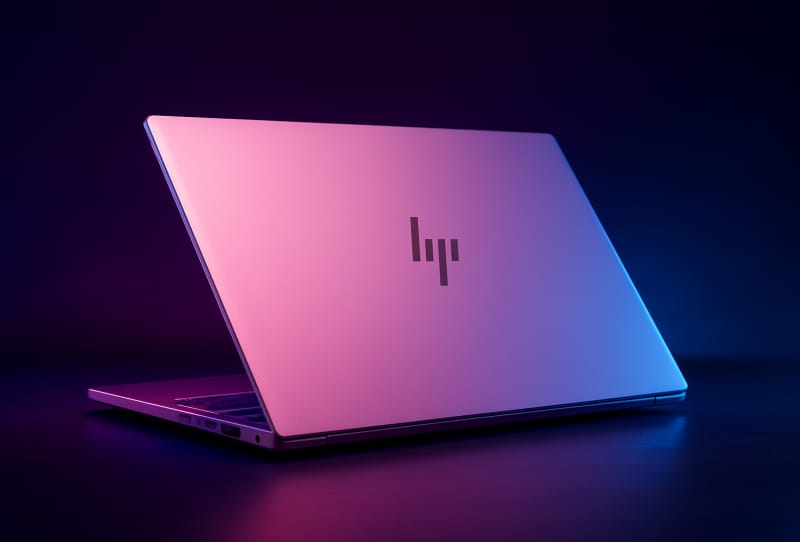
The HP OmniBook 5 is a new 14-inch laptop that pairs three OLED screen options with Intel’s latest Wildcat Lake processors, aiming squarely at shoppers who want a slim, long-lasting machine without the usual compromises on display quality. It arrives alongside a business-focused sibling, the ProBook 4 G2iS, and both lean heavily on Intel’s newest silicon and on-device AI features baked into Windows. For anyone researching the HP OmniBook 5 ahead of a purchase, the line-up is designed to sit between budget Chromebook-style ultraportables and pricier flagship laptops, offering OLED visuals and all-day battery life at a more accessible price point.
Key takeaways
- The HP OmniBook 5 is a 14-inch laptop built around Intel’s new Wildcat Lake processors.
- Buyers can choose from three OLED panels, including a QHD+ HDR option hitting 620 nits peak brightness.
- HP rates the entry configuration’s battery life at up to 42 hours on a single charge.
- A built-in HDMI port and dual USB-C ports give it more connectivity than Apple’s rival MacBook Neo.
- HP also unveiled the business-focused ProBook 4 G2iS alongside the OmniBook 5, with a sharper 2880×1800 OLED screen.
Fourteen-inch laptops have changed shape dramatically over the past decade and a half, and the OmniBook 5 is a tidy illustration of how far the category has come. HP has packed an aluminium chassis, a hinge that folds flat to 180 degrees, and genuinely capable hardware into a body thin enough to slip into a bag without a second thought. The flat-folding hinge is a small but practical touch, making the OmniBook 5 easier to share across a table during meetings or presentations, and it reinforces HP’s pitch that this machine is meant for everyday carry rather than sitting on a desk. HP has also positioned the OmniBook 5 as a volume seller rather than a niche flagship, which means pricing and availability are likely to be broader than some of its pricier ZBook and Omen siblings, spanning general retail, HP’s own online store and a range of enterprise resellers.
Table of Contents
Wildcat Lake power and genuinely long battery life
At the entry level, the HP OmniBook 5 runs a six-core Wildcat Lake chip that boosts up to 4.4GHz, paired with 8GB of shared LPDDR5 memory and a 256GB SSD. That is not a huge amount of memory by 2026 standards, but the CPU itself is no slouch, and HP says the base configuration can run for up to 42 hours on a single charge, an unusually long figure for a laptop in this class. In practical terms, that kind of rating should comfortably cover a full working week of light use between charges, even allowing for the inevitable gap between lab-tested figures and real-world performance.
Stepping up the range brings a Core 7 350 processor that boosts to 4.8GHz, along with a choice of 12GB or 16GB of memory, a 1TB SSD, and the option of Windows 11 Pro for buyers who need it. The larger configuration also carries a bigger 60Whr battery. Every version includes enough dedicated NPU horsepower to run Windows Studio Effects locally, which covers things like AI-driven background blur and voice clean-up during video calls without leaning on the cloud. Running these effects on-device rather than through a remote server also means they keep working even on a patchy internet connection, and it avoids sending webcam or microphone data off the laptop for processing, which is a meaningful privacy consideration for anyone using the OmniBook 5 for work calls.
Wildcat Lake’s efficiency gains also show up in day-to-day thermal behaviour. Because the platform is built on a smaller process node than the chips it replaces, HP has been able to fit the OmniBook 5 with a quieter, smaller cooling solution than earlier 14-inch models in its range, which should translate into a cooler chassis and less fan noise during typical tasks like web browsing, video streaming and document editing. Heavier workloads such as video exporting or extended gaming sessions will still spin the fans up, but for the mainstream buyer this chip is clearly tuned for quiet, all-day use rather than sustained peak performance.
Three OLED panels to choose from
Where the HP OmniBook 5 really separates itself from cheaper rivals is the screen. Buyers can pick between a FHD+ (1920×1200) OLED panel with or without multitouch support, or step up to a QHD+ (2560×1600) HDR OLED display rated for up to 620 nits of peak brightness. HP claims all three options can reproduce the full DCI-P3 colour gamut and are protected by Gorilla Glass 3 for everyday durability. For buyers who spend long hours reading or editing photos and video, the jump from a standard IPS panel to OLED typically means deeper blacks, richer contrast, and faster pixel response, which matters when the OmniBook 5 is pitched squarely at people who care about screen quality.
HP also points to a 90 percent screen-to-body ratio, a figure that sounds unremarkable on a phone but is a genuine achievement on a laptop this size. It is part of a broader shift across the PC market, where OLED panels are showing up across the entire PC market, from desktop monitors down to budget-friendly notebooks like this one. Narrower bezels on the OmniBook 5 also mean the 14-inch panel fits into a chassis footprint closer to older 13-inch designs, which should make the laptop a little easier to use on a cramped tray table or in a backpack built for smaller machines.
Connectivity keeps pace with the screen upgrade. The OmniBook 5 includes two full-function USB-C ports supporting 10Gbps data, 100W-class power delivery, and DisplayPort 2.1, plus a built-in HDMI port and a 3.5mm combo audio jack. Wireless duties are handled by Wi-Fi 6E, with Bluetooth arriving as either version 5.3 or 5.4 depending on whether the laptop ships with an Intel or Realtek adapter. The inclusion of a dedicated HDMI port is worth highlighting, since many ultra-thin laptops in this price bracket now drop it entirely in favour of USB-C-only designs, forcing buyers to carry a dongle just to plug into an external monitor or projector.
HP has also carried over a few quality-of-life features common across its OmniBook range, including a physical webcam privacy shutter, a backlit keyboard, and a fingerprint reader integrated into the power button for Windows Hello sign-in. None of these are groundbreaking on their own, but together they round out a laptop that feels considered rather than stripped back to hit a price point.
How the HP OmniBook 5 stacks up against rivals
HP is clearly positioning the OmniBook 5 against Apple’s phone-chip-powered MacBook Neo, and the spec sheet backs that framing up. The MacBook Neo uses a standard IPS LCD rather than OLED, skips a built-in HDMI port entirely, and carries a smaller 36.5Whr battery compared with the OmniBook 5’s 60Whr pack in its higher configuration. For buyers who value screen quality and physical connectivity over the Apple ecosystem, that is a meaningful gap.
The business-oriented ProBook 4 G2iS, launched at the same time, shares the same Wildcat Lake foundation and aluminium build but pushes further in some areas. It supports up to 32GB of memory, a sharper 2880×1800 OLED panel running at 120Hz with variable refresh rate, and a larger 70Whr battery. It trades the HDMI port for a pair of USB-A connectors, a sensible swap for an office machine that still needs to plug into older peripherals. Taken together, the OmniBook 5 and ProBook 4 G2iS show HP targeting two slightly different buyers from the same engineering base: one chasing portability and screen quality for everyday and creative use, the other prioritising higher refresh rates and legacy connectivity for corporate IT fleets.
| Configuration | Processor | Memory | Storage | Display | Battery |
|---|---|---|---|---|---|
| OmniBook 5 (entry) | Wildcat Lake hexa-core, up to 4.4GHz | 8GB LPDDR5 (shared) | 256GB SSD | FHD+ (1920×1200) OLED | Up to 42 hours rated |
| OmniBook 5 (higher tier) | Core 7 350, up to 4.8GHz | 12GB or 16GB LPDDR5 | 1TB SSD | QHD+ (2560×1600) HDR OLED, 620 nits | 60Whr |
| ProBook 4 G2iS | Wildcat Lake | Up to 32GB | Not disclosed | 2880×1800 OLED, 120Hz, VRR | 70Whr |
What the HP OmniBook 5 means for shoppers
HP has quietly built one of its more compelling thin-and-light laptops in years with the OmniBook 5. The combination of OLED screen choices, long battery life claims, and on-device AI features that work without an internet connection puts real pressure on rivals that still rely on standard LCD panels at similar positioning. It also follows a pattern seen elsewhere in HP’s lineup, including the HP’s own OmniBook 3 16, where HP has leaned on memory and display upgrades rather than flashy redesigns to differentiate its machines. For shoppers comparing specific configurations, it is worth weighing up whether the base 8GB memory option is sufficient for mostly browser and document-based work, or whether the step up to the Core 7 350 model with 12GB or 16GB of RAM makes more sense for heavier multitasking, photo editing, or running several AI-assisted apps at once.
It is also worth thinking about storage headroom when choosing between configurations. The entry-level 256GB SSD can fill up quickly once Windows updates, apps and a handful of larger files are installed, so buyers who plan to keep a lot of photos, video, or offline media on the laptop itself may prefer the 1TB option on the higher-tier model rather than relying solely on cloud storage. Similarly, anyone who regularly works away from a power outlet should weigh the real-world difference between the entry model’s smaller battery and the larger 60Whr pack reserved for the upgraded configuration, since HP’s headline battery figures are typically measured under lighter, idealised usage conditions.
For buyers comparing options across HP’s wider range, from the gaming-focused HP’s Omen Transcend 14 gaming laptop to the workstation-grade HP’s workstation-class ZBook Ultra G3a, the OmniBook 5 fills a clear gap as the everyday option built for portability and screen quality rather than raw horsepower. Full specifications and configuration details are listed in HP’s official announcement, with the laptop built around Intel’s Wildcat Lake platform that underpins both new models.
Frequently asked questions
What processor does the HP OmniBook 5 use?
It runs on Intel’s Wildcat Lake platform, starting with a six-core chip that boosts to 4.4GHz and scaling up to a Core 7 350 processor that boosts to 4.8GHz in higher configurations.
How long does the HP OmniBook 5’s battery last?
HP rates the entry configuration at up to 42 hours of battery life, while the higher-tier model carries a larger 60Whr battery pack.
Does the HP OmniBook 5 come with an OLED screen?
Yes. Buyers can choose between a FHD+ OLED panel, a touch-enabled FHD+ OLED variant, or a QHD+ HDR OLED display reaching up to 620 nits of peak brightness.
What is the difference between the OmniBook 5 and the ProBook 4 G2iS?
The ProBook 4 G2iS is HP’s business-oriented sibling, offering up to 32GB of memory, a sharper 2880×1800 120Hz OLED screen with variable refresh rate, and a bigger 70Whr battery, though it drops the HDMI port in favour of USB-A connectors.